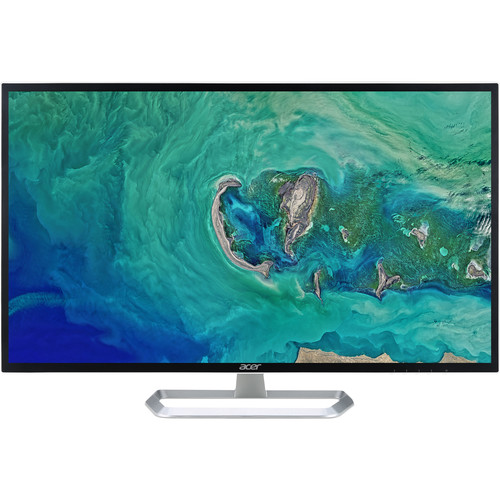
Acer EB321HQ Abi overview
The Acer EB321HQ Abi is a 31.5-inch widescreen monitor built around an IPS panel and Full HD resolution. Its large 16:9 screen is intended for desktop work, home entertainment, study and general office use where a broad viewing area matters. Acer’s EB1 family combines a straightforward display design with HDMI and VGA connectivity, while this Abi version is visually identified by a black display cabinet and silver loop-style stand. The model name is EB321HQ Abi; regional part numbers can differ, so the catalog does not claim a specific regional SKU without matching packaging or invoice evidence. This page describes the published monitor capabilities and calls out variations where regional source tables disagree.
Screen size and Full HD resolution
The diagonal screen measures 31.5 inches, approximately 80 centimetres, with a native resolution of 1920 × 1080 pixels. Full HD on this size gives a large image for spreadsheets, browser windows, video and everyday applications, but the pixel density is lower than on a smaller Full HD display or a same-size QHD monitor. Fine text may look less crisp when viewed from close range. Use the native resolution and adjust the viewing distance, scaling and text size to your comfort. For gaming, Full HD can be easier for a computer to render than a higher resolution, although this monitor’s standard refresh rate is 60Hz and it is not aimed at high-refresh competitive play.
IPS panel, brightness and viewing angles
Acer identifies an IPS LCD panel with LED backlighting, 300 cd/m² typical brightness and 178-degree horizontal and vertical viewing angles. IPS technology is useful when the screen is viewed from different seating positions because the image is designed to remain viewable across a wide angle. The published colour gamut is 72% NTSC; this is a coverage specification and does not certify factory calibration or colour accuracy for print production. The anti-flicker and blue-light features are intended to support comfortable viewing, but room lighting, brightness settings, viewing distance and breaks remain important for long sessions. The screen is a practical general-use panel rather than a specialist HDR or colour-grading display.
Refresh rate, response and contrast figures
The standard refresh rate is 60Hz. Acer regional pages and retailer specification tables are not fully consistent on response time: some list 4ms grey-to-grey while others show 5ms. This page therefore records the response claim as 4ms GTG, with a note that regional seller tables may state 5ms; the two figures should not be treated as an independently measured guarantee for every transition. Acer lists a dynamic contrast feature called Adaptive Contrast Management, with a maximum figure of 100 million to one. Dynamic contrast is not the same as native static contrast and can vary brightness according to the image. Buyers comparing displays should give greater weight to the panel, resolution, brightness and use case than to a dynamic contrast headline.
Ports and device compatibility
The monitor provides one HDMI input and one VGA input, allowing connection to a modern computer through HDMI or to compatible older equipment through VGA. HDMI carries a digital video signal; VGA is an analog connection and may need display adjustment for the clearest image. The box contents and exact cable inclusion can vary by regional package, so verify accessories with the seller. This model does not list DisplayPort, USB-C docking, a USB hub or built-in speakers. Plan separate speakers or headphones if audio is needed, since the monitor is a display and the listed connections do not constitute an integrated sound system. Check the graphics source output and cable before purchase, particularly for older office computers.
Stand, mounting and physical fit
The Abi images show a silver loop-shaped stand. Acer’s specifications describe tilt adjustment, while adjustment ranges vary among regional listings; the commonly published range is approximately −5° to +15°, with some regional tables stating a different upper angle. Verify the manual for the exact purchased SKU if a precise tilt limit matters. A VESA 100 × 100mm mounting pattern is listed for compatible arms or wall mounts. Confirm the mount’s supported weight and screw requirements before installation. The display is approximately 729.8mm wide. Acer lists around 486mm height and 180mm depth with the stand, and about 430mm height and 52mm depth without it; allow extra desk space for cables and comfortable viewing.
Power use and eye-care functions
Acer documentation lists a universal AC power input in the 100–240V range. Published maximum power is about 52W, with typical use lower depending on brightness and selected settings; standby and off-state figures are also lower. Actual consumption varies with the unit, content and configuration. The monitor includes Acer Flicker-less and blue-light reduction functions in the EB1 family documentation. These settings can change the image appearance, so select a level that is comfortable and suitable for the task. Keep the vents clear, disconnect power before cleaning and use a soft, dry cloth on the panel. Do not press on the LCD surface or apply household solvents.
Who this large monitor may suit
The EB321HQ Abi can suit users who want a large screen for office documents, web browsing, video playback, remote study and general home computing. The IPS viewing angle and full-size image can help when the display is shared. Its Full HD resolution is familiar and broadly compatible, while HDMI and VGA cover common current and legacy computer outputs. Users who work with dense text at close range may prefer a higher pixel density. Users seeking high-refresh gaming, USB-C laptop charging, a built-in speaker system, height-adjustable stand or certified HDR should compare alternatives that explicitly include those features. Measure the desk and seating distance before choosing a 31.5-inch display.
Bangladesh price and warranty context
Bangladesh retailer pages observed during this review show listings from about ৳26,500 to ৳32,800, with differences in stock, payment method and seller pricing. This is a dated market observation, not a live offer from every merchant and not a replacement for the BiponiBD variant price. The catalog’s existing ৳28,500 variant price is retained. Retailer listings commonly advertise a three-year warranty, but the responsible service provider, panel policy, proof-of-purchase requirements and box-retention conditions can vary. Confirm the warranty card, invoice and exact EB321HQ Abi model with the seller before purchase. Do not assume that a market-range value guarantees current stock or a specific merchant’s final checkout price.
Model identity and choosing carefully
The exact product family is Acer EB321HQ Abi. Acer’s regional EB321HQ A pages use manufacturer part numbers such as UM.JE1AA.A01 or UM.JE1SJ.A02, but those suffixes refer to regional configurations and are not visibly confirmed for this catalog unit. The product-level and variant MPN fields are therefore left empty rather than inferring one from a related region. The Abi designation matches the black cabinet and silver stand shown in the supplied images. Compare the model label on the monitor and carton, check the included stand and cables, and ask the seller about return and dead-pixel policies. This helps ensure that a similarly named EB321HQ regional variant is not mistaken for the exact Abi configuration.
Setup and everyday use
Place the display so the top of the screen is near a comfortable eye line and the panel is not facing a bright window. Connect HDMI where available for a digital signal; use VGA only when needed for compatible legacy equipment. Select 1920 × 1080 in the computer’s display settings and choose 60Hz if the operating system exposes a refresh-rate menu. Adjust brightness to the room rather than leaving a high setting in a dim space. Use the monitor menu to configure image and eye-care options, and check that the computer is sending the intended resolution. If using a VESA arm, secure it according to the mount manufacturer’s instructions and keep the power and signal cables free from strain.
What the specifications do and do not promise
Published specifications describe intended product capabilities under stated conditions. A 300-nit brightness rating is not a guarantee of uniform brightness at every point, and 72% NTSC gamut is not a calibration report. The 100-million-to-one Adaptive Contrast Management figure is a dynamic maximum and should not be compared directly with a native contrast measurement. Response-time figures depend on measurement method and source region; this review preserves the 4ms GTG claim with a regional 5ms caveat. The refresh rate is listed as 60Hz. Retail price, stock and warranty offers can change. If a particular dimension, cable or regional part number is essential, request confirmation for the exact unit before ordering.