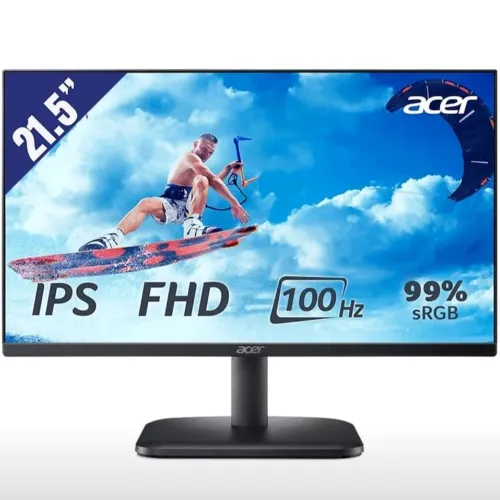
Exact model and regional manufacturer part number
The Acer EK220Q E3bi is the IPS member of Acer’s EK220Q family. The suffix is important: another product with a similar EK220Q name can use a different panel, contrast ratio, color gamut, refresh rate or speaker configuration. Acer documentation identifies UM.WE0SS.303 for APAC markets, including the regional Bangladesh channel, and UM.WE0AA.302 in global documentation. Because part numbers vary by market, use the code printed on the physical carton to identify the specific unit. A retailer’s catalog number is not the manufacturer part number and must not be copied into MPN or BiponiBD SKU fields. The existing product URL remains unchanged so prior links and indexing are not disrupted.
A 21.5-inch IPS screen for Full HD work
This monitor has a 21.5-inch (54.6cm) viewable diagonal and is often described by retailers as belonging to the 22-inch class. Its IPS LCD panel has a native Full HD resolution of 1920 × 1080 pixels in a 16:9 widescreen layout. Acer lists a pixel pitch of 0.241 × 0.241mm and wide 178-degree horizontal and vertical viewing angles. These properties support legible text, spreadsheets, browser windows, video calls and 1080p entertainment from a compact desktop display. IPS viewing angles help preserve color and brightness when more than one person is looking at the screen, although the image still looks best when viewed near the center.
Matte ComfyView finish and color characteristics
Acer’s ComfyView anti-glare surface diffuses reflections from typical indoor lighting. The panel is rated at 250cd/m² (250 nits) typical brightness and 1,000:1 native static contrast. Acer also advertises 100,000,000:1 ACM dynamic contrast; dynamic and native static contrast are different measurements, so the static figure is the more useful one for direct comparisons. The published gamut is 99% sRGB, with support for 16.7 million colors using 6-bit plus FRC processing. That makes the E3bi suitable for everyday web graphics, study material, office documents and casual photo adjustments. These manufacturer ratings do not amount to a per-unit color calibration certificate, so professional print or color-critical work may need a calibrated display.
100Hz refresh over HDMI and the VGA limit
The EK220Q E3bi reaches up to 100Hz at 1920 × 1080 through its HDMI 1.4 input. That refresh rate can make cursor movement, scrolling, desktop animation and supported games look smoother than on a 60Hz monitor. The VGA input is an analog connection and is rated for up to 75Hz at Full HD; it should not be advertised as a second 100Hz input. To use the maximum digital refresh rate, connect a compatible computer with HDMI and select 100Hz in the operating system’s display settings. Actual frame rates depend on the graphics hardware, software and workload: a 100Hz display does not make a computer render every game at 100 frames per second.
Understanding 1ms VRB versus pixel response
Acer advertises 1ms VRB, or Visual Response Boost, as a motion-blur reduction option. VRB pulses the backlight between refreshes to make moving objects appear clearer. It is not the same measurement as the LCD pixels’ gray-to-gray transition; the typical GtG response is approximately 5ms. Backlight strobing may reduce perceived brightness and can be less comfortable for some viewers. Acer’s VRB mode cannot be used at the same time as AMD FreeSync. Choose the mode that fits the content: VRB for a fixed high-refresh motion setting, or FreeSync when variable refresh is more useful. The product copy should keep both terms qualified and should not turn “1ms VRB” into a generic 1ms GtG claim.
AMD FreeSync and variable refresh
Acer lists AMD FreeSync support through HDMI variable refresh. The reported operating range for this configuration is 48–100Hz. When the monitor and compatible graphics output coordinate refresh timing, variable refresh can reduce tearing and stutter when frame rates change. Functionality can depend on the graphics card, driver, operating system and selected settings, so compatibility should be checked for the buyer’s setup. FreeSync and VRB are alternative modes on this display; they cannot operate simultaneously. If a buyer prioritizes adaptive refresh, keep VRB disabled. If a buyer prioritizes backlight-strobing clarity, understand that variable refresh will not be active.
Acer VisionCare viewing options
The EK220Q E3bi includes Acer VisionCare features listed as Flicker-Less, BlueLightShield, ComfyView and Low Dimming. Flicker-Less is designed to reduce backlight flicker, while BlueLightShield offers adjustable blue-light filtering. The matte ComfyView panel reduces common reflections, and Low Dimming allows lower brightness settings for darker rooms. These are display comfort features rather than medical treatment or a guarantee against eye fatigue. Lighting in the room, monitor distance, text scaling and regular breaks also affect comfort. A blue-light setting may change the screen’s color appearance, so users who edit color-sensitive content should choose a neutral picture mode when evaluating colors.
HDMI and VGA connections; no audio hardware
The monitor provides one HDMI 1.4 input and one VGA (D-Sub) input. HDMI is the connection for Full HD at up to 100Hz and FreeSync. VGA supports older computers or equipment at a lower refresh ceiling. There is no built-in speaker system and no 3.5mm audio output jack on the E3bi. Sound should come from the computer, laptop, dock, USB headset, Bluetooth audio device or separate speakers. This is a useful detail to check before purchase because some similarly named Acer multimedia (“m”) configurations may include audio hardware. The exact E3bi should be described as a display without monitor speakers or audio out.
ZeroFrame design, tilt and VESA mounting
Acer’s three-side ZeroFrame design keeps the top and side borders visually narrow, which can help when placing two displays beside each other. The black chassis and stand should be visible in accurate product imagery. The included stand supports tilt from −5° to +20°; Acer does not list height adjustment, swivel or pivot on the standard stand. A 100 × 100mm VESA pattern is available for compatible wall brackets and monitor arms. Without its stand, the monitor head is approximately 492.8 × 281.9 × 50.8mm and weighs 2.1kg. Check the mount’s supported load and screws before installation, and keep the cable bend radius clear behind the display.
Dimensions, external power and energy use
With its stand, the EK220Q E3bi measures approximately 493 × 376.9 × 192mm and weighs 2.5kg. The panel head without the stand measures about 492.8 × 281.9 × 50.8mm. It uses an external power adapter that accepts 100–240V AC at 50/60Hz. Acer’s power figures are approximately 21W operating, 24W maximum, 0.5W standby and 0.3W off. These specifications help plan a desk or VESA arm but are not carton measurements. The box is expected to include the monitor components, HDMI cable, power lead, adapter and documentation; the exact delivered package should be checked on receipt because market bundles can vary.
Warranty and Bangladesh market references
Bangladesh retailers list a three-year brand warranty for this monitor and explicitly exclude the external power adapter from warranty coverage. Confirm the warranty provider, claim procedure and adapter terms on the BiponiBD offer, invoice and included paperwork for the exact unit. Retailer references observed during the audit place the model in a broad range of about ৳8,500–৳10,200 depending on seller and promotion. Those are competitor market references only: they do not establish BiponiBD’s current price, stock, delivery availability or offer. The listing should show only the live BiponiBD selling information and verified service conditions.
Keep E3bi separate from other EK220Q models
Acer’s EK220Q family contains configurations that look similar in search results but have materially different panels. EK220Q E3bi is the IPS, 100Hz configuration with 1,000:1 static contrast and 99% sRGB. EK220Q H3bi is a VA configuration with different contrast and gamut values. Older Abi/Hbi models may be VA and 75Hz. The E3bi also lacks built-in speakers and audio output; a multimedia variant with an “m” suffix can differ. Therefore, do not copy VA panel claims, 3,000:1 native contrast, 72% NTSC, older refresh limits or speaker details from another suffix. Use the exact model code on both the panel listing and the physical carton to verify identity.
Category, search intent and the complete product record
The existing Monitors category is correct. Useful collection filters include Acer, 21.5-inch, IPS, Full HD, 100Hz, FreeSync and home/office monitors. The title and first paragraph should identify Acer EK220Q E3bi, 21.5-inch, IPS and Full HD; those terms match the exact product and help distinguish it from H3bi and older Abi options. The existing slug remains intact. Detailed attributes, long description, features, balanced pros and limitations, and focused FAQs cover the practical buying questions: port refresh limits, VRB, FreeSync, missing audio, mounting, power, warranty and current offer. BiponiBD’s price and availability must come from its own live product record, and competitor prices should not be represented as this store’s offer.