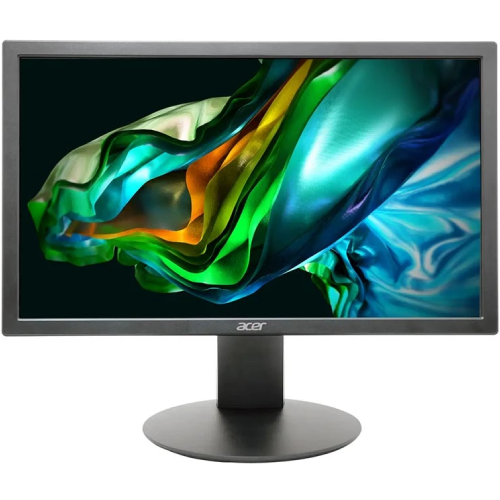
Acer K202Q bi 19.5-inch HD+ Monitor
Model identity and Bangladesh configuration
The Acer K202Q bi is a compact 19.5-inch (49.5cm viewable) LED-backlit monitor for desktop work, study and everyday home computing. The exact suffix matters: the Bangladesh K202Q bi configuration is listed with both HDMI and VGA, while a related K202Q b configuration may have a different input set. This page describes the bi model and its one HDMI 1.4 plus one VGA port. Check the suffix and the physical rear ports on the delivered unit if a particular connection is essential. Acer publishes several regional UM.IX and UM.IE part codes for related configurations; the exact regional code on BiponiBD's physical carton has not been verified, so no one part code is assigned here.
HD+ 1600 × 900 display
The monitor's native resolution is HD+ (1600 × 900) in a 16:9 widescreen format. That resolution gives a little more workspace and detail than standard 1366 × 768 HD panels, while remaining below Full HD 1920 × 1080. It can be suitable for documents, spreadsheets, web browsing, online classes and general desktop use. Set the computer to 1600 × 900 for the native mode. Text size and usable desktop area also depend on operating-system scaling, application settings and viewing distance. Buyers who regularly work with large spreadsheets, multiple windows or detailed creative projects may prefer a Full HD display with more pixels.
TN panel, brightness and contrast explained
Acer specifies a Twisted Nematic (TN) panel with LED backlighting, 200 cd/m² brightness, 16.7 million colors and 72% NTSC color gamut. The documented viewing angles are 90° horizontally and 65° vertically. Compared with many IPS panels, TN color and brightness can shift more when the screen is viewed from an angle; position the monitor directly in front of the user and adjust its tilt for a more consistent view. The matte Acer ComfyView surface helps reduce reflections, although room lighting and screen placement still affect comfort.
The frequently repeated 100,000,000:1 contrast value is Acer Adaptive Contrast Management (ACM), a dynamic contrast specification. Acer separately lists native static contrast as 600:1. Those figures describe different modes and should not be blended into a claim that the panel has 100 million to one native contrast. For clear product comparison, use 600:1 native and identify 100,000,000:1 as ACM dynamic contrast. Screen settings, content and ambient light influence the perceived image.
75Hz refresh and response time
Acer lists a maximum 75Hz refresh rate at the monitor's 1600 × 900 resolution and a 6ms grey-to-grey (GTG) response time. A 75Hz signal can refresh the image more often than a standard 60Hz signal when the computer and selected mode support it. Some Bangladesh retailer sheets and other regional Acer material show a 5ms response figure. Because exact sub-revision documentation differs, this page uses Acer's 6ms GTG specification as the primary value and records the 5ms figure as a regional discrepancy rather than presenting it as certain for this unit. Refresh rate and response time do not by themselves describe input lag or guarantee a particular gaming result.
HDMI, VGA and audio
The K202Q bi configuration provides one HDMI 1.4 input and one VGA input, allowing connection to compatible modern and legacy computers. The bi suffix is an important way to distinguish this HDMI-plus-VGA configuration from related model names. Acer does not list built-in speakers or an audio output jack. Audio should therefore be connected to the computer, a separate speaker system or another source. USB-C or DisplayPort-only computers may require an adapter; supported resolution and refresh rate depend on the adapter, graphics hardware and cable. Confirm your computer's output before ordering.
Eye comfort, stand and mounting
Acer's ComfyView anti-glare treatment, BlueLightShield and Flicker-less technology are intended to support more comfortable viewing during ordinary computer sessions. They do not replace sensible breaks, suitable room lighting or an appropriate viewing distance. The included stand offers tilt adjustment from -5° to +15°; no height, swivel or pivot adjustment is specified. For a different working height, the monitor supports a 100 × 100mm VESA mounting pattern. VESA compatibility describes the spacing of the rear mounting holes and does not confirm that a wall bracket or monitor arm is included. Check the bracket's load rating, screw fit and the monitor manual before installation.
Dimensions, weight and power
Acer's published physical measurements distinguish the panel from the assembled monitor. Without the stand, dimensions are 468.63 × 276.86 × 50.8mm and weight is approximately 1.65kg. With the stand, the listed dimensions are 468.7 × 372.6 × 210.8mm and weight is approximately 2.00kg. Leave enough desk depth for the assembled footprint and cable routing. The monitor uses an internal AC power supply rated for 100–240V, 50/60Hz, so a separate external DC adapter brick is not specified. Acer lists under 24W operating consumption; energy data gives about 0.5W standby and approximately 0.3W off-mode. Actual draw changes with signal, settings and operating mode.
Bangladesh pricing and warranty context
At the time of this review, Bangladesh retailer listings for Acer K202Q bi were generally around ৳8,300–৳9,000 and commonly displayed three-year warranty wording. These are third-party market references, not a statement of BiponiBD's current selling price or stock. The BiponiBD catalog's listed price remains the catalog's own value; confirm availability at checkout. The specific distributor, warranty provider, serial eligibility, box requirements and service process for a BiponiBD purchase have not been established from public sources. Confirm those terms with the seller before purchase, especially if warranty coverage is a deciding factor.
Who should consider this monitor?
The Acer K202Q bi is designed around a modest footprint, HD+ resolution, 75Hz refresh, HDMI and VGA connectivity, tilt positioning and standard VESA mounting. It may fit routine office work, study and general computing where 1600 × 900 resolution is sufficient. Its limitations are equally relevant: TN viewing angles are narrower than many IPS displays, native contrast is 600:1, resolution is below Full HD, the stand only tilts, and there is no monitor audio. Compare those characteristics with the computer's ports, the amount of screen workspace needed and the intended desk setup before choosing.
Frequently asked questions
What resolution does the Acer K202Q bi support?
Its native resolution is HD+ 1600 × 900 at a 16:9 aspect ratio. It is not a Full HD 1920 × 1080 panel.
Is this the Acer K202Q b or K202Q bi model?
This listing is for K202Q bi. Acer’s official configuration has one HDMI 1.4 input and one VGA input. Check the bi suffix and ports on the carton because the K202Q b configuration may differ.
What does the 100,000,000:1 contrast figure mean?
That is Acer Adaptive Contrast Management (ACM) dynamic contrast. The native static contrast is 600:1. These are different measurements; the dynamic figure should not be read as the panel’s native contrast.
What are the refresh rate and response time?
Acer lists up to 75Hz at the native resolution and 6ms GTG response time. Some regional retailer sheets show 5ms; 6ms GTG is the primary value used here.
Is the panel IPS or TN?
The Bangladesh K202Q bi configuration documented by Acer and local distributor/retailer listings is a TN LED-backlit panel. Some overseas part-number revisions may differ, so check the regional part label.
What ports are available?
It has one HDMI 1.4 input and one VGA input. Acer does not list a built-in speaker or audio output jack for this model.
Does the monitor have built-in speakers?
No. Connect speakers or headphones to the computer or another audio source; the monitor itself does not provide built-in speakers or an audio output.
What is the screen brightness and viewing angle?
The listed brightness is 200 cd/m². The TN panel viewing angles are 90° horizontal and 65° vertical, so the image can shift more when viewed from the side or above/below than on many IPS panels.
Can I mount it on a monitor arm or wall bracket?
Yes. The monitor supports a 100 × 100mm VESA mounting pattern. Confirm that the bracket supports the display weight and that the required screws are suitable; bracket inclusion is not established by the public specification.
What are its dimensions and weight?
Without the stand it measures 468.63 × 276.86 × 50.8mm and weighs about 1.65kg. With the stand Acer lists 468.7 × 372.6 × 210.8mm and about 2.00kg.
Does it use an external power adapter?
No external DC brick is specified. Acer lists an internal AC 100–240V, 50/60Hz power supply. Operating consumption is under 24W, with around 0.5W standby and approximately 0.3W off-mode figures in the energy data.
What warranty applies to this BiponiBD unit?
Bangladesh retailers commonly advertise three years for this model. The specific warranty provider, serial eligibility, box requirements and claim process for a BiponiBD order must be confirmed with BiponiBD before purchase.