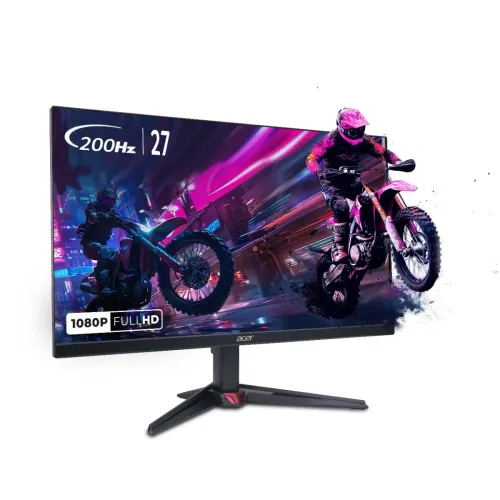
Acer Nitro VG270 X1 27-inch FHD 200Hz IPS Gaming Monitor — Complete Buyer Guide
Exact model and regional part number
This listing is for the Acer Nitro VG270 X1, the 27-inch VG0-series gaming monitor, and should be kept distinct from similarly named VG270 M3, VG270 S, VG270 X and VG270 X1 sibling or regional revisions. Acer India's official store identifies the South Asian product as VG270 X1 with reference UM.HV0SS.101. The full technical model string reported for this family is VG270 X1bmiipx. Acer regional suffixes can differ, so buyers should compare the part number on the carton and invoice with the local seller's warranty record. The catalog product name, slug and active status remain as supplied; the normalized model and regional manufacturer part number make exact product searches more useful.
27-inch Full HD IPS display
The monitor has a 27-inch (68.6cm) flat IPS screen with a 16:9 aspect ratio and Full HD resolution of 1920 × 1080. The matte anti-glare surface and 178-degree horizontal and vertical viewing angles are listed for this model. Full HD is comparatively straightforward to drive at high frame rates, which matches the monitor's high-refresh gaming purpose. At 27 inches, text and fine desktop details appear less dense than on a 1440p display of the same size; buyers choosing between resolution and frame rate should weigh that trade-off against their graphics hardware, viewing distance and game settings.
200Hz refresh and response behavior
Acer India advertises refresh up to 200Hz, and exact-model regional listings specify that ceiling through both HDMI 2.0 and DisplayPort 1.2. To use 200Hz, the graphics card, cable, operating system and selected display mode must all support the required signal; check the refresh selector after connecting. Acer advertises 0.5ms response time. Treat that as the manufacturer's fastest/minimum stated response figure rather than a promise that every pixel transition is always 0.5ms: retailer tables and regional Acer specifications describe response metrics differently, and aggressive overdrive can affect image quality. Fast refresh can make compatible gameplay and pointer movement look more fluid, but it does not create extra frames in the game itself.
Brightness, contrast, color and HDR
Acer lists typical brightness of 250cd/m², 99% sRGB coverage, 16.7 million colors and a native static contrast ratio of 1,000:1 for the product family. The 100,000,000:1 figure seen in seller tables is a dynamic ACM contrast figure, not the panel's ordinary native contrast; both values must not be conflated. Acer India advertises HDR10 signal support. HDR10 compatibility does not mean the monitor has a high-brightness HDR certification: the official EMEA specification for this model does not identify a VESA DisplayHDR tier, and 250 nits is a modest peak-brightness class. The product image and Acer India page support HDR10 format compatibility, so it is stated with that qualification.
Adaptive sync and Acer VisionCare
AMD FreeSync Premium is listed for the VG270 X1. Variable refresh can help reduce tearing when a compatible graphics source produces frame rates within the display's supported VRR range. Acer's India product page describes VisionCare 2.0 features including BlueLightShield Pro, Flickerless, Low Dimming and ComfyView; these are display comfort functions, not medical guarantees. Acer Display Widget and Game View presets are also advertised. Regional feature names and software availability can vary; use Acer's support page for the matching regional part number when downloading utilities or checking drivers.
Inputs, sound and cable setup
The exact India/South Asia listing identifies two HDMI 2.0 inputs and one DisplayPort 1.2 input, plus an audio output. The rear catalog image also depicts the dual-HDMI and DisplayPort connections. Acer lists two stereo speakers with 2W output each (2 × 2W total). The India store package includes a monitor, stand, power cord, manual and HDMI cable; local Bangladesh bundles can vary, so check the box before purchase. This model is not listed with USB-C video input or a USB hub. If a computer has only USB-C, a compatible video adapter may be required, and the selected adapter must support the intended resolution and refresh rate.
Stand, mounting and desk fit
The monitor is black and weighs approximately 3.8kg in Acer's store specification. Acer's regional specification describes a simple tilt stand, with tilt listed at approximately −5° to +25°; the stand is not height-adjustable and does not support pivot/rotation. A 100 × 100mm VESA mounting pattern is specified, so a compatible arm or wall mount can be used after removing the stand. Allow room for the stand footprint and cable routing. Keep the display level on a stable surface, and confirm that any third-party arm is rated for the monitor's size and weight.
Power, dimensions and package
Acer's store lists approximate dimensions of 612.5mm wide, 459.9mm high and 239.7mm deep with its stand, and a weight around 3.8kg. The official regional page lists the package contents as monitor, stand, power cord, manual and HDMI cable. Power draw and detailed regional energy data were not independently established from the India store page reviewed for this listing, so no unsupported consumption figure is added. The monitor is sold as a black configuration and the Acer India listing states China as country of origin for that regional SKU; origin on a Bangladesh-imported unit should be checked from its own carton label.
Gaming, work and everyday use
This 27-inch screen is aimed at competitive and fast-action gaming, with a Full HD panel, 200Hz ceiling, FreeSync Premium and dual digital input options. It can also handle streaming, general browsing, schoolwork and everyday desktop use. Its integrated stereo speakers are convenient for basic sound, while a headset or external speakers may suit users who want stronger audio. The 99% sRGB claim can support everyday color-rich media, but the reviewed sources do not provide a per-unit calibration report. Buyers seeking sharper text at 27 inches, height adjustment, USB-C docking, stronger HDR output or a color-calibrated production display should compare a QHD or feature-richer model.
Bangladesh pricing and warranty
Two current Bangladesh seller pages observed during this review listed the Acer Nitro VG270 X1 around ৳21,900; another exact-model local listing showed ৳21,700, while other offers vary by stock, promotion and seller. The existing BiponiBD variant price of ৳21,900 is therefore retained. The Acer India store lists a three-year warranty for its India-market UM.HV0SS.101 SKU, and Bangladesh retailers also advertise three years, with at least one stating that the box is required for warranty claims. That does not by itself prove the Bangladesh-imported unit's authorized service route. Ask the seller to identify the local warranty provider, retain the original box and invoice if required, and confirm dead-pixel and claim conditions in writing.
Limits and alternatives to consider
A 27-inch Full HD panel offers a large picture but fewer pixels per inch than QHD; users who read small text or work with detailed layouts may prefer higher resolution. The stand has tilt adjustment only, so users who need height, swivel or portrait rotation will need a suitable monitor arm or a different monitor. HDR10 format support should not be mistaken for a certified high-brightness HDR experience. The 0.5ms response claim is a minimum marketing/specification figure and is not directly comparable across sellers unless the response metric and overdrive mode are specified. These limitations are useful decision factors and do not mean the monitor is unsuitable for its intended high-refresh Full HD gaming use.
Buyer checklist before checkout
Before ordering, match the product label to Acer Nitro VG270 X1 and regional part UM.HV0SS.101 where applicable; compare the seller invoice and warranty terms with the unit's actual regional code. Confirm current stock, the final Bangladesh price, delivery cost and the local service provider. Check that the computer has HDMI 2.0 or DisplayPort 1.2 and a suitable cable for the desired 200Hz mode. Ask whether the HDMI cable, stand, manual and power cord are present. If you need desk-height adjustment, portrait rotation, USB-C, a USB hub or more pixel detail, verify those specific functions before purchase rather than assuming them from another VG270 model.