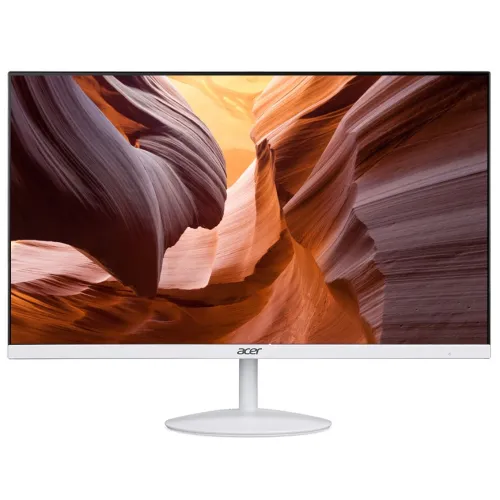
Acer SA222Q Ultra Slim 21.5-Inch 100Hz IPS Full HD Monitor
A compact 21.5-inch Full HD monitor
The Acer SA222Q is a 21.5-inch display in Acer’s ultra-slim SA2 monitor family. The 100Hz IPS revision is commonly identified as SA222Q E. It has a native 1920 × 1080 pixel resolution in a 16:9 widescreen format, making it suitable for ordinary desktop applications, online classes, documents, spreadsheets and Full HD video. Acer lists a 54.6 cm diagonal and an active viewing area of approximately 476.06 × 267.79 mm. The panel’s pixel pitch is about 0.248 mm, which corresponds to roughly 102 pixels per inch. These figures describe the panel; perceived sharpness also depends on the computer’s output resolution, scaling and viewing distance.
The model suffix is important when buying or comparing this product. Bangladesh shops often use the short name SA222Q for multiple regional variants. The SA222Q E line refers to the 100Hz IPS generation, while older SA222Q versions may have a lower refresh rate and some SA222Q H products use a VA panel. This record therefore uses SA222Q as the umbrella model and does not claim an exact Ebi or Ewmix carton suffix for the pictured white unit.
IPS picture characteristics and contrast terminology
The SA222Q E is listed with an IPS panel and LED backlight. Acer regional sources specify 250 cd/m² typical brightness, a 178-degree horizontal and vertical viewing angle, and 16.7 million colors using a 6-bit plus FRC panel description. Acer lists a 72% NTSC color gamut. That figure gives a general indication of color-space coverage; it is not a factory calibration report and does not certify the monitor for color-critical print or grading work. The screen has a matte ComfyView anti-glare treatment. It can reduce reflections from diffuse room lighting, but a bright window or lamp directed at the display can still cause glare.
Contrast specifications need clear labels. The headline 100,000,000:1 figure is Acer Adaptive Contrast Management, or ACM, a dynamic contrast rating. It is not the monitor’s typical static contrast. The IPS E-series is commonly listed at 1000:1 typical static contrast. Some Acer regional family pages and seller material show 3000:1, but that figure is associated with the VA-panel SA222Q H sibling or merged family data. This listing keeps the ACM and static values separate so that a dynamic number is not mistaken for the IPS panel’s native contrast.
100Hz refresh, VRB and FreeSync
Acer lists a maximum 100Hz refresh rate for the SA222Q E-series when connected through HDMI 1.4. A higher refresh rate means the display can update the image more often each second. With a compatible computer and a 100Hz setting enabled, scrolling and pointer movement can appear smoother than on a 60Hz mode. The monitor cannot create additional frames that the source does not render, and the graphics output, cable, driver and operating-system settings must support the chosen Full HD timing.
Acer’s 1ms response claim uses Visual Response Boost (VRB). Acer’s regional specification material also lists 4ms Grey-to-Grey (GtG). These values describe different measurement approaches: VRB is a motion-clarity mode, while GtG describes pixel transition. VRB can use backlight strobing and may lower brightness, so it should not be treated as a native 1ms GtG panel response. AMD FreeSync support is listed for compatible HDMI sources; the source graphics hardware and software must also support adaptive refresh. No claim is made that every game will run at 100 frames per second.
Color, surface and Acer VisionCare
Acer’s product material identifies BlueLightShield, Flicker-less, ComfyView and Low Dimming under VisionCare. BlueLightShield provides a selectable blue-light adjustment. Flicker-less refers to Acer’s backlight flicker-reduction feature. ComfyView describes the matte surface, while Low Dimming is a brightness setting intended for lower-light conditions. These features can give users more display choices for reading or working in different rooms. They are not medical treatments and do not guarantee that a user will avoid discomfort or eye fatigue.
The monitor also provides standard on-screen display controls for brightness, contrast, color and input selection. Exact menu wording can differ by firmware and market. For long sessions, users can set a comfortable brightness, reduce reflections, position the monitor at a suitable distance and take regular breaks. The 72% NTSC gamut is aimed at general computing and entertainment. No factory calibration certification, hardware light sensor or color-critical production capability is claimed for this model based only on the reviewed material.
HDMI and VGA connectivity
The published connection set for the SA222Q E includes one HDMI 1.4 input and one VGA (D-Sub) input. HDMI is the digital connection for a contemporary PC, laptop, mini computer or compatible media source. Acer identifies the 100Hz Full HD mode through the digital input. VGA is an analog connection that can be useful with older desktop equipment. The exact VGA refresh ceiling varies between regional manuals and source devices; local documentation commonly lists 60Hz or 75Hz at Full HD. Use HDMI when the 100Hz mode is required.
DisplayPort and USB-C are not listed in the reviewed port specification. A computer with only USB-C may need a compatible video adapter or dock, which must support the desired resolution and refresh rate. The monitor itself does not convert an unsupported output into 100Hz. The supplied gallery primarily shows the product’s exterior; it does not establish the cable or adapter included in the Bangladesh retail box.
Ultra-slim housing, stand and mounting
The product is marketed with a 7.2 mm upper-panel profile and Acer ZeroFrame styling. The 7.2 mm measurement applies to the thin upper part of the panel; the lower housing is deeper because it contains electronics and connection points. This distinction matters when planning a wall clearance or comparing the monitor’s thickness with a uniform-thickness screen. The gallery shows the white housing and a silver-accented circular stand base, which confirms the pictured color and appearance but not the exact model suffix.
Acer’s regional SA222Q E data lists dimensions of 492 × 361 × 189 mm with the stand and 492 × 281 × 42 mm without the stand. Acer lists a net weight of 2.02 kg with the stand and 1.75 kg without it. The stand supports tilt from −5 degrees to +15 degrees. Height adjustment, swivel and pivot are not listed for the included base. The 100Hz E revision is listed with a 75 × 75 mm VESA mounting pattern. Since earlier SA222Q revisions can differ, confirm the rear mounting holes on the exact unit before ordering a monitor arm.
Power, speaker variants and package details
The SA222Q E uses an external DC power adapter according to Acer regional information. Retail specifications list a typical draw around 15–18W and standby below 0.5W, while maximum consumption varies by published regional revision. These figures are manufacturer or retailer ratings rather than a measurement of a specific unit. Confirm the adapter output and power figures from the carton or exact suffix when this detail affects a deployment. A compatible surge protector or UPS may be used if its outlet and power rating meet the monitor’s requirements.
Built-in audio depends on the regional suffix. Acer and Bangladesh retailer records distinguish speakerless SA222Q Ebi/Ewi versions from Ewmix/Ebmi variants with two 1W speakers. The white product images do not show an identifying suffix, so the listing does not promise speakers on this particular unit. Some variants include an HDMI cable, while packaging contents can vary by market. Confirm the carton label and accessories supplied with the seller. The visible rear grille or housing pattern in a product image is not sufficient proof of speaker hardware.
Bangladesh warranty and model selection
Smart Technologies BD and Bangladesh retailer listings advertise a three-year warranty for the SA222Q family. The exact coverage provider and conditions can depend on the imported revision and proof of purchase. Keep the invoice and confirm which warranty applies to the delivered model suffix. Product pages for different suffixes may share a family title while differing in color, speakers or included cable. The seller’s stock label or box barcode is the best way to confirm a specific unit configuration.
When comparing an SA222Q with another 21.5-inch display, check panel type, refresh rate, ports and stand features rather than relying only on the family name. A VA SA222Q H is not the same panel revision as this IPS listing. The older 75Hz SA222Q generation is also not equivalent to the 100Hz E-series. Retailer numbers such as Star Tech’s item code or a Ryans product ID are identifiers within that shop; they are not Acer manufacturer part numbers, serial numbers or universal barcodes.
Everyday compatibility and setup
For a straightforward setup, connect a compatible computer using HDMI, select 1920 × 1080 in the operating system and enable 100Hz if the source and cable offer that mode. If the monitor is connected by VGA, select a timing supported by both the monitor revision and graphics adapter. Adjust brightness and contrast for the room and use the on-screen menu to select the desired input and picture settings. The monitor’s color and motion performance will depend on the chosen settings and the source content.
The screen size and resolution suit common office and learning tasks, but users should plan the available desk space using the full stand dimensions, not the panel width alone. The supplied stand’s adjustment is limited to tilt, so a different height may require a riser or a compatible VESA arm. For a dual-screen layout, measure the bases and viewing distance before placing two displays together. Secure the stand and monitor on a stable surface, and follow the manufacturer’s handling and cleaning guidance.
What this listing confirms and what remains suffix-specific
This product record confirms the Acer SA222Q family, white appearance shown in the gallery, 21.5-inch Full HD IPS format, 100Hz E-series positioning, HDMI and VGA inputs, published eye-care features and Bangladesh family warranty advertised by local sellers. It also distinguishes Acer’s ACM dynamic contrast from typical static contrast and VRB from GtG response timing. The product title and description use a manufacturer model family rather than a retailer stock number.
The exact regional carton suffix, speaker presence, included cable set, adapter details and warranty terms for this individual stock unit are not proven by the product images or the original catalog record. Those points are described as revision-dependent rather than guessed. No BiponiBD live stock level, reviews or selling price is inferred from third-party retailers. Buyers who require a particular sound, mounting or accessory configuration should verify the precise box label and contents before purchase.