Product overview
The Acer SA272 P1 is a 27-inch Full HD IPS monitor in the white UM.HS2SI.101 configuration shown on Acer India’s official product page. Acer describes the display with a 144Hz refresh-rate listing, 1ms VRB response, AMD FreeSync, built-in stereo speakers and eye-comfort features. The published connection set includes one HDMI port, one VGA port and audio-in/audio-out connections. The exact Acer page does not list DisplayPort, even though a Bangladesh retailer page currently includes it in its specification text. For this guide, the manufacturer’s exact reference page controls hardware details, while the Bangladesh seller page supplies local price context and is flagged where its data conflicts.
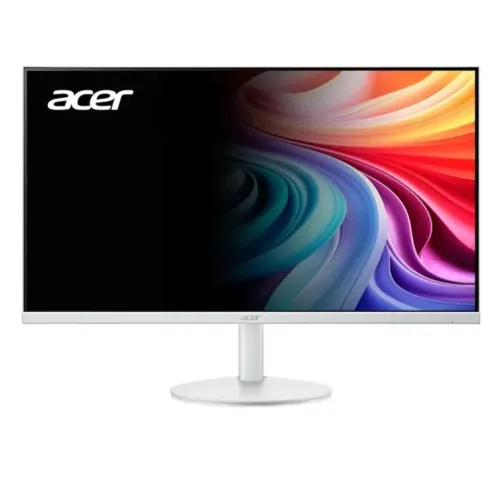
The gallery depicts a white screen enclosure and stand, a clean front view, rear housing and port/feature imagery. Pictures help identify the visible color and design, but may show illustrative graphics rather than the exact package. The product reference, dimensions, included cables and warranty can differ across regions. Check the carton or seller confirmation if the regional part number, included HDMI cable or service coverage matters. The model is designed for general desktop use, media and gaming where Full HD resolution and the source computer’s supported refresh rate fit the intended setup. The following sections explain performance limits, connections, ergonomic movement and purchase checks without treating a retailer’s conflicting data as manufacturer confirmation.
Screen size and resolution
Acer identifies a 27-inch (68.6 cm) display with a native 1920 × 1080 pixel resolution and a 16:9 aspect ratio. Full HD is a familiar format for documents, browsing, video and many PC games. At 27 inches the panel provides a large physical viewing area, while retaining the same pixel count as smaller Full HD monitors. Users who work with very fine text, detailed design canvases or many dense windows may prefer to compare QHD models at this size. The monitor displays the source image it receives; it does not create extra detail beyond that image.
The panel technology is IPS with LED backlighting and a zero-frame appearance. Acer lists horizontal and vertical viewing angles of 178°. This can help when sitting slightly off-center or sharing the screen, though picture brightness and color can still vary with angle and room conditions. Acer specifies Full HD IPS, 16.7 million colors and 72% NTSC gamut. Those are product specifications, not a guarantee that each unit is calibrated for print, photography or color-critical production. If accurate color matching is essential, plan for an appropriate calibration workflow and review the target application’s color-management requirements.
Refresh rate and connection timing
Acer’s official India product title and technical description list a maximum 144Hz refresh rate. The same page contains a promotional bullet that says “120Hz,” so buyers should consult the exact regional timing table and verify the mode with their own graphics source. The monitor’s maximum does not force the computer to render 144 frames per second. The graphics processor, cable, game settings, driver, selected input and operating-system refresh configuration all affect whether a high refresh mode is available. If the operating system does not offer the expected setting, check the cable and source output, confirm the monitor input and review the graphics driver configuration.
Acer’s exact SKU page lists one HDMI input and one VGA input. It does not list DisplayPort for UM.HS2SI.101. A Star Tech Bangladesh page includes DisplayPort, but that specification conflicts with Acer’s exact reference listing and should not be copied into this product record as confirmed hardware. A local unit could still vary by regional part number, so inspect the carton reference before ordering if a specific input is required. Use HDMI for the digital connection and VGA for compatible legacy equipment; the maximum refresh available depends on the mode and interface timings supported by the exact unit.
Response time and motion
Acer lists a 1ms Visual Response Boost (VRB) figure. VRB is a manufacturer-defined motion response measure and should keep its full label when compared with other display figures. It is not automatically equivalent to gray-to-gray pixel response or input lag. Refresh rate, frame delivery, picture settings and motion processing all contribute to how moving content looks. A fast response label cannot make a computer render more frames than its hardware and software allow. Buyers comparing gaming displays should check measurement methods and supported timings rather than relying on an unlabeled “1ms” claim.
The monitor also lists AMD FreeSync and synchronization features. Acer’s official product copy identifies AMD FreeSync, while a separate NVIDIA G-SYNC certification is not stated on the exact product page. Compatibility depends on the graphics card, driver, connection and supported refresh range. Confirm the desired adaptive-sync combination with the source hardware and the regional monitor documentation. Use available on-screen modes according to preference, since motion-processing settings can affect brightness or image appearance. The product’s capabilities should be evaluated against the applications and games actually used rather than treated as a guarantee of tear-free results in every setup.
Brightness, contrast and color
Acer lists 250 cd/m² brightness and a 1500:1 native contrast ratio. Brightness describes the panel’s stated light output, while contrast describes the ratio between white and black in the manufacturer’s measurement. Actual viewing depends on room lighting, display settings and the image content. A 250-nit rating may be adequate in a typical indoor room, but users with strong daylight or direct sunlight should consider their desk placement and compare brighter options.
Acer lists 16.7 million colors and 72% NTSC gamut. This gamut figure is not a factory calibration record and does not establish the color accuracy of an individual unit. For ordinary web, office, streaming and game use, the listed color support describes the expected display capability. For photo editing, print proofing or professional video grading, check whether the required gamut, bit depth and calibration workflow are supported. Avoid inferring a professional certification or panel uniformity result from a marketing image or a gamut percentage alone.
Built-in audio and ports
Acer India’s product page lists one HDMI input, one VGA input, audio-in and audio-out connections, and integrated stereo speakers rated 1W × 2. Built-in speakers can cover basic alerts, video or meeting audio in a small room, though they are not a substitute for a separate speaker system when stronger volume or bass is needed. Headphones or external audio equipment can be used with the appropriate audio output. Check the physical jack labels on the exact regional unit because the product page describes several audio connections but does not specify every connector’s placement in the concise overview.
No DisplayPort is listed by Acer for reference UM.HS2SI.101. This matters for desktop systems that rely on DisplayPort to reach a preferred refresh mode. A Star Tech listing does include DisplayPort, so there is a regional information conflict. Confirm the item’s part number and rear port layout with the seller before purchase when that connector is required. A computer with only USB-C may need a compatible active adapter or dock; confirm the adapter supports the resolution and refresh rate you plan to use. The monitor itself does not add USB-C docking, charging or a USB hub.
Eye-care and image features
Acer lists Flicker-less, BlueLightShield, ComfyView, Low Dimming and VisionCare features. These are display technologies and settings intended to adjust the viewing experience. They are not medical treatment and cannot guarantee reduced fatigue for every user. Room lighting, brightness, screen distance, posture and breaks remain relevant to comfortable use. If a setting makes the picture look too warm or dim, select another mode using the monitor’s on-screen controls and consult the manual for feature behavior.
The official listing also describes a Zero Frame design and ultra-slim profile. These visual traits can help a monitor fit a multi-screen arrangement, but the bezel and stand should be measured against the workspace. Gallery images can show promotional feature labels; they do not independently validate a certification or color measurement. Use Acer’s exact SKU data for hardware values and confirm certifications through official documentation if a particular standard is needed for procurement.
Stand movement and mounting
Acer specifies tilt adjustment from −5° to +15° and does not list height adjustment for the stand. The display therefore allows a limited angle change but is not described as having a height, swivel or pivot mechanism. Set the monitor at an appropriate desk height or consider a compatible arm if more adjustment is important. Acer’s official India page says wall-mount support but does not state the VESA pattern in the page content reviewed. Star Tech lists 75 × 75 mm for the product, so treat that mounting measurement as a local seller claim and verify the exact regional unit before buying a mount.
Check the arm’s pattern, screw requirements and supported load against the monitor and manual. The stand footprint, tilt range and cable direction affect desk fit. Acer India lists an approximate physical size of 61.4 × 45.2 × 22.4 cm and weight of 3.92 kg. The page does not clearly label these dimensions as with or without stand. Another regional listing reports 3.55 kg without stand; these values are not necessarily contradictory, but the exact configuration should be confirmed for shipping or arm selection.
Power use and electrical fit
Acer India lists operating power consumption of 24W for the UM.HS2SI.101 configuration. A Bangladesh listing reports 48W maximum power supply, 500mW standby and 300mW off-mode, but those figures are retailer data and should not replace a model-specific Acer energy sheet. The operating figure is not a precise monthly electricity estimate; actual use depends on brightness, content, hours and power state.
Check the power cable and input requirements for the local shipment. Acer India describes a power cord among the included items, but regional plugs can differ. Use the manufacturer-supplied cable or a properly rated local equivalent and follow the manual’s safety directions. Keep the power connection accessible and route cables so they are not pinched by the stand or desk. Do not infer the adapter’s rated capacity from the 24W operating-consumption number.
Dimensions, weight and package contents
Acer India lists dimensions of approximately 61.4 cm wide, 45.2 cm high and 22.4 cm deep, with approximate weight of 3.92 kg. Those values are the exact reference page’s physical characteristics, although the page does not clearly label the measurement by stand configuration. A European listing for a closely named SA272 P1 variant reports 3.55 kg without stand and 3.92 kg with stand; regional versions can differ, so use the UM.HS2SI.101 carton or confirmed seller specifications for shipping and mounting decisions.
Acer India describes a monitor, stand, power cord, user manual and cable in the package and specifically mentions an HDMI cable. Accessories can vary by country or promotion. Confirm the exact contents with the Bangladesh seller if a particular cable or adapter is needed. Product images may include promotional overlays and do not establish what is inside the carton. The locally offered warranty may also exclude an adapter or apply only under a specific regional service policy.
Who may find it suitable
The SA272 P1 may suit a home office, study desk or entertainment setup where a large Full HD IPS screen, built-in stereo sound and a high refresh mode are useful. HDMI and VGA give a digital and legacy analog connection, while the speakers can cover basic audio without extra hardware. The white UM.HS2SI.101 configuration can coordinate with a light-colored workspace. Users who mainly browse, stream, write documents or play games at Full HD may find the feature mix relevant.
It may be less suitable for buyers who need QHD detail at 27 inches, a height-adjustable stand, a confirmed DisplayPort input, stronger integrated speakers or documented professional color calibration. Competitive gamers should verify the refresh timing table for the exact unit because Acer’s product page includes both 144Hz and 120Hz language. Users who need a confirmed VESA measurement should check the carton or official regional manual, rather than assuming the local listing’s 75 × 75 mm applies to every variant.
PC setup checklist
Connect the computer using HDMI or VGA according to the ports on the actual product. Select the matching input on the display, then set 1920 × 1080 resolution and an available refresh rate through the computer’s display controls. If 144Hz is desired, check Acer’s regional timing data, the source graphics output, cable, driver and selected mode. A missing refresh option may be a source or cable limitation. The 144Hz product title and one 120Hz promotional bullet should be understood as an unresolved wording inconsistency until the exact timing table is checked.
Set the stand tilt between −5° and +15° and confirm that the screen height works for the user. Choose an audio output for headphones or external equipment if the built-in 1W × 2 speakers do not meet listening needs. Review the on-screen controls for BlueLightShield, ComfyView, low dimming and picture modes. If mounting the monitor, confirm the VESA pattern and screw details for the exact regional part number before installation.
Care, comfort and troubleshooting
Place the monitor on a stable surface and follow Acer’s manual for cleaning and handling. Avoid spraying fluid directly onto the panel and keep liquids away from power and signal connections. If the picture looks soft, verify that the computer is using the native 1920 × 1080 mode. If there is no image, check the power indicator, selected input and source output. If audio is absent, confirm whether sound is routed to the monitor speakers, audio output or a different device.
Flicker-less and BlueLightShield controls can be adjusted to preference, but individual comfort varies. Set brightness for the room and take regular viewing breaks. When an expected refresh rate is unavailable, check the monitor model/ref, input, cable and graphics settings. A local page’s DisplayPort claim conflicts with Acer’s exact reference listing, so inspect the physical input panel before relying on that connection. Use the exact user guide and seller support for region-specific controls and warranty service.
Warranty and local offer
Acer India’s official store advertises a three-year warranty for reference UM.HS2SI.101. Star Tech Bangladesh also lists three years but states that the adapter is not covered. These are regional seller/manufacturer-store terms and do not prove the warranty provider or exclusions for the specific BiponiBD sale. Confirm the written warranty period, service provider, serial-number eligibility, adapter coverage and claim process for the exact unit before checkout.
The stored variant MSRP is BDT 17,500, while the current Star Tech page shows a BDT 16,000 cash-discount price and BDT 17,140 regular price. These values describe different commercial fields and dates. The retailer snapshot is useful market context, not a live BiponiBD price, stock status or discount. Check the actual BiponiBD offer for current availability, selling price, shipping, payment terms and return policy.
Model and source notes
Acer identifies the white product configuration as SA272 P1, reference UM.HS2SI.101. The manufacturer page specifies the 27-inch Full HD IPS display, 144Hz listing, VRB, 250-nit brightness, 1500:1 contrast, built-in speakers, HDMI/VGA connectivity, FreeSync and eye-care features. One promotional bullet on that same page says 120Hz, so the exact timing table is the authority for a mode-specific claim. Acer lists HDMI and VGA but not DisplayPort for this reference.
The Bangladesh Star Tech page supplies local pricing and warranty context, but its color field says black despite the product title and Acer store indicating white, and it lists DisplayPort despite the manufacturer’s port list. Those conflicts are not propagated as confirmed facts. Check reference UM.HS2SI.101 on the delivered product and confirm the local warranty with the seller. The recorded price range is the retailer’s cash and regular amount, observed on 2026-11-04.
Purchase checklist
Before ordering, confirm that the unit is the Acer SA272 P1 white configuration and that its reference is UM.HS2SI.101 or the specifically offered regional equivalent. Decide whether 27-inch Full HD is detailed enough for the normal viewing distance. Confirm HDMI or VGA compatibility, whether DisplayPort is truly needed, and whether the actual unit supports the requested refresh timing.
Check that built-in speakers, a tilt-only stand and the listed color gamut suit the intended use. Ask the seller to confirm wall-mount pattern, included HDMI cable, current stock, price and written warranty terms, including adapter coverage. These checks separate the product’s manufacturer specifications from retailer-specific pricing and service promises.