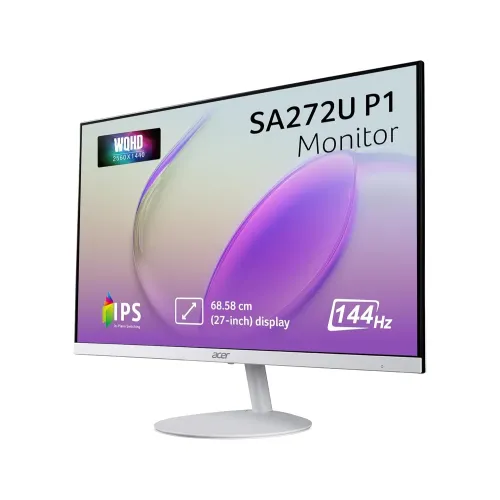
Acer SA272U P1 overview
The Acer SA272U P1 is a 27-inch QHD monitor that combines a 2560 × 1440 IPS panel with a 144Hz refresh rate. The Bangladesh white version is commonly listed as SA272U P1wmipx, with Acer regional part number UM.HS2SI.102. Its high refresh rate can make compatible games, cursor movement and scrolling appear smoother, while QHD resolution provides more desktop room and finer detail than Full HD at the same screen size. The white ultra-slim cabinet, integrated stereo speakers and tilt stand make it a straightforward all-purpose display for a home or office desk. The listing’s catalog price is ৳27,900. Retail prices and exact included accessories should be checked with the seller because stock, offers and regional revisions can change.
What 27-inch QHD means for work and play
The 2560 × 1440 native resolution contains about 3.69 million pixels, compared with about 2.07 million in 1920 × 1080 Full HD. That is roughly 78 percent more pixels and gives more room for side-by-side windows, long spreadsheets, timelines and code editors. At 27 inches the panel has around 109 pixels per inch, which produces finer text and interface edges than a 27-inch Full HD screen. The 16:9 format works with common games, video services and office applications. Many people can use QHD at 100 percent operating-system scaling, although eyesight and preferred text size differ. If you use a laptop, check that its graphics output can drive 2560 × 1440 at the refresh rate you want. A suitable cable and output mode are also required; the screen cannot add resolution or frames that the computer does not send.
IPS image characteristics and color
The IPS panel is listed with 178-degree horizontal and vertical viewing angles. This helps maintain a consistent picture when you sit off-centre or show content to another person. Acer’s regional specification and local distributor describe 16.7 million colors, 6-bit plus frame-rate control, and 72 percent NTSC gamut. Those figures are useful for everyday web graphics, documents, streaming and casual photo work, but they do not establish professional color calibration or a factory color-accuracy guarantee. For print production or color-critical design, calibrate the display and check the application color workflow. Acer lists a 1500:1 typical native contrast ratio and a much larger maximum ACM dynamic ratio. Native contrast describes ordinary panel behavior; a dynamic ratio is processed and should not be compared directly with a static measurement. The matte ComfyView surface helps diffuse reflections from windows and room lights, though it cannot eliminate glare from every position.
Brightness and HDR10 expectations
The Bangladesh specifications list 250 cd/m² brightness. This is generally intended for indoor use with moderate ambient light. It may appear less vivid near a bright window or under strong daylight, so adjust the desk position and room lighting if necessary. HDR10 signal support means the display can accept compatible HDR content; it does not by itself indicate high-end HDR performance. The available specification does not list local-dimming zones or a DisplayHDR certification. With a 250-nit brightness rating and ordinary IPS contrast, HDR should be treated as entry-level signal compatibility rather than the high highlight intensity and deep blacks of an advanced HDR television or monitor. For standard desktop use, SDR mode may provide the most predictable brightness and color.
144Hz refresh rate and 1ms VRB
At 144Hz the display can refresh up to 144 times per second, provided the connected device supplies the appropriate signal. Compared with 60Hz, motion can look smoother and input-to-display timing can feel more immediate, especially in games with fast camera movement. Acer and retailers list 1ms VRB, or Visual Response Boost. VRB is a motion-blur reduction mode and is not equivalent to a 1ms native gray-to-gray response time. Strobing modes can change brightness and may limit which variable-refresh options can be used at the same time. Try the normal refresh and adaptive-sync settings first, then compare VRB in the games you play. Use the on-screen display and your graphics settings to choose a balanced mode without distracting trails, flicker or dimming. Always use the display mode that remains comfortable during long sessions.
Adaptive sync and frame delivery
Local listings identify AMD FreeSync or Adaptive-Sync support. When enabled with a compatible GPU and software configuration, variable refresh can align the monitor’s refresh timing with changing frame output and reduce tearing over supported ranges. The actual behavior depends on the graphics card, driver, connection, game and monitor settings. If the option does not appear, check the cable, update the GPU driver, enable the appropriate monitor setting and confirm the operating system is using the intended refresh rate. A 144Hz panel does not guarantee that every game will run at 144 frames per second. Demanding games may need reduced graphics settings to reach high frame rates, while strategy, creative and office workloads benefit more from the sharper QHD workspace than from maximum refresh alone.
White ultra-slim design and desk fit
The SA272U P1wmipx is described and pictured as a white monitor with a narrow upper profile and three-sided slim bezel. Its light finish can suit white computer cases, bright workspaces and minimalist desks. Retail specifications give assembled dimensions of approximately 61.4cm wide, 45.2cm high and 22.4cm deep, including the stand. Measure the desk area and account for the base and cable bend space before placing it. The supplied base keeps the screen upright and supports tilt, but the product data does not list built-in height, swivel or pivot movement. If you need to align the display with eye level, a monitor arm or riser can help. Keep ventilation paths clear and route the external power adapter so it cannot be pulled from the desk.
Ports, audio and an important specification conflict
For the white wmipx version, Star Tech and Ryans list one HDMI input and one DisplayPort. Smart Technologies’ distributor listing instead lists two HDMI ports plus a DisplayPort. These sources therefore disagree on the HDMI count. The current catalog follows the repeated local retailer listing of one HDMI and one DisplayPort, but buyers who need simultaneous device connections should inspect the actual rear panel or box before purchase. The product is also listed with an audio output and integrated 1W × 2 stereo speakers. Built-in speakers can handle alerts, calls and casual video playback, while a headset or external speakers will provide fuller sound. Check that your device output and cable match the input before ordering; the product data does not list USB-C, a USB hub or VGA for this model.
Stand movement, VESA and ergonomics
Local retail specifications list tilt adjustment from -5 to +15 degrees and no height adjustment. The Smart Technologies page gives a different tilt maximum, so the range may vary by revision or listing error. Treat tilt-only movement as the safe expectation and confirm the supplied stand in the box. The listed VESA pattern is 75 × 75mm. Before buying a wall bracket or arm, verify that its plate supports 75 × 75mm, check its minimum supported load and follow the mounting instructions. With the stand removed, the monitor is listed as 3.55kg; the complete monitor with stand is listed as 3.92kg. These are product weights, not packed shipping weights. Do not infer carton size or courier weight from the assembled dimensions.
Acer VisionCare and longer viewing sessions
Acer VisionCare features listed for this model include Flicker-less, BlueLightShield, Low-Dimming and ComfyView. These settings can help tailor the display to room lighting and personal comfort. Blue-light reduction may change the appearance of whites and colors, so switch it off when evaluating color-sensitive work. Use an appropriate brightness for the room and take regular breaks during long sessions. Eye-comfort features do not replace good posture, correct viewing distance or medical advice where needed. The monitor’s matte surface can soften reflections, but changing the screen angle or moving a light source may be more effective when glare is strong.
Bangladesh price, seller and warranty checks
At the time this catalog review was prepared, Star Tech and Ryans showed a ৳27,900 selling price for the SA272U P1, while Smart Technologies showed ৳30,000. The product’s catalog selling price remains ৳27,900. Seller offers can change with stock, payment method, location and campaign dates, so check the final checkout amount before ordering. Bangladesh listings advertise a three-year warranty. Star Tech notes that the adapter is not covered, and Ryans requires the original box for warranty claims. Ask the chosen seller to confirm the local distributor, warranty start date, panel and adapter coverage, dead-pixel policy, service location and documentation required. Keep the invoice, serial number and packaging paperwork. Warranty language shown by one seller may not automatically apply to another seller’s unit.
Choosing between nearby Acer models
Confirm the entire model code before comparing this screen with Acer alternatives. The SA272U P1 is QHD and 144Hz; Acer SA272U E listings describe a related 27-inch QHD model with a lower 100Hz refresh rate. Acer SA272 P1 is a different Full HD product despite the similar name. Nitro VG271U M3 and XV272U V3 listings are separate gaming models, and may use different panel, stand and port specifications. A monitor with a higher refresh rate may suit competitive gaming, while a more adjustable stand can matter for ergonomics. Compare resolution, refresh, actual response mode, stand movement, port count, color gamut, warranty and current price as separate factors. Do not transfer an Acer family specification from one suffix to another.
Who may find this monitor useful
The Acer SA272U P1 is a practical match for buyers who want a 27-inch QHD desktop display, smoother-than-standard refresh and a clean white design at a midrange Bangladesh price. It can serve office work, study, web browsing, streaming and casual or competitive gaming, depending on the computer’s graphics capability. The 1500:1 listed contrast and IPS viewing angles are useful everyday characteristics, while the 250-nit brightness and basic speakers set realistic limits. Buyers who need height adjustment, multiple HDMI devices, high-end HDR, USB-C docking or verified color calibration should compare alternatives or confirm those requirements directly with the seller. Before purchasing, verify the exact SA272U P1wmipx unit, rear connections, included cables, final price, local warranty details and stand movement.
Setup checklist
After unboxing, inspect the panel and stand before discarding packaging. Confirm the model label, power adapter and included cable contents with the seller’s invoice. Connect through HDMI or DisplayPort and select the panel’s native 2560 × 1440 resolution. Set a refresh rate up to 144Hz where the source device and cable support it. Enable Adaptive-Sync only with a compatible graphics configuration, then test your usual applications and games. Adjust tilt and brightness for your desk, and use the OSD to explore comfort options. If attaching a VESA arm, verify its 75 × 75mm pattern and follow the manufacturer’s mounting instructions. Save the box and warranty documents in case the seller requires them for a claim.