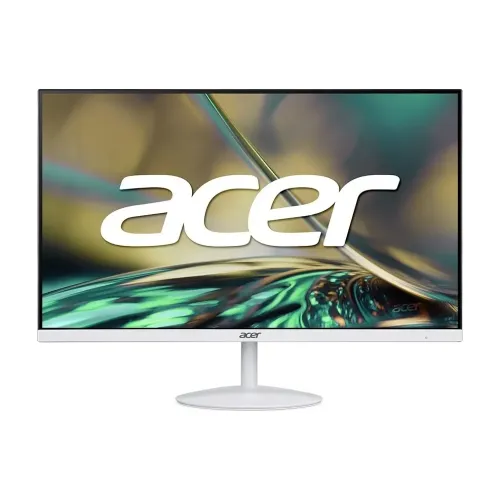
Acer SA322Q 31.5" 75Hz FHD IPS Ultra Slim Monitor: white Acer SA322Q 31.5-inch 75Hz FHD IPS ultra-slim monitor. See the full buyer guide and source-qualified specification notes below.
Acer SA322Q at a glance
The Acer SA322Q is a large Full HD monitor for shoppers who want a roomy display, a bright white finish and basic built-in audio at a moderate local price. The product photographed for this catalog is the white South Asian configuration: it has a white lower bezel, white rear housing and a matching circular stand, with a dark three-sided ZeroFrame border around the screen. Its core specification is a 31.5-inch IPS display with 1920 × 1080 resolution, 16:9 aspect ratio and a 75Hz refresh ceiling. Acer’s naming family has multiple regional configurations, so this page focuses on the white unit shown in the gallery and avoids importing details from similarly named black or higher-resolution models. The regional SKU suffix has not been independently verified from the actual retail carton.
Screen size, resolution and viewing distance
The 31.5-inch diagonal screen gives a large workspace for browser windows, spreadsheets, monitoring dashboards, online learning and video. It uses a 1920 × 1080 Full HD matrix. On a screen this large, Full HD prioritizes readable, large interface elements over fine pixel density: the pixel pitch is about 0.363mm and pixel density is approximately 70 pixels per inch. Users who prefer larger text or sit farther back may find that comfortable, while those who work close to the screen with small type, detailed design canvases or fine photo retouching may see individual pixels and prefer a 27-inch Full HD or 31.5-inch QHD monitor. A viewing distance around 75 to 100 centimetres can make the large area easier to take in without frequent head movement. Operating-system scaling can enlarge or shrink interface elements, but it does not add pixels to the panel.
IPS image and colour performance
Acer identifies an In-Plane Switching panel with 178-degree horizontal and vertical viewing angles. This helps the picture remain more consistent when viewed away from the centre, which is useful when a large display is shared at a desk or used for a presentation. The SA322Q family specification lists 300cd/m² typical brightness, 1,000:1 native contrast, 16.7 million colours and 72% NTSC gamut. These figures describe a mainstream everyday display rather than a wide-gamut professional monitor. The 100,000,000:1 dynamic contrast figure is a processing-related specification and should not be confused with native static contrast. Acer also identifies an anti-glare surface. Room lighting, viewing angle, picture mode and individual panel variation all affect what a user sees, so colour-critical work should use an appropriate calibrated display and workflow.
Refresh rate, response mode and casual play
The monitor supports up to 75Hz, a small but noticeable step above a 60Hz office screen for scrolling and compatible games. Acer lists 1ms VRB (Visual Response Boost), while SA322Q family material also gives a 4ms GtG response time. They refer to different response measurements or modes, so the product should not be described simply as having 1ms GtG. VRB is intended to reduce perceived motion blur and may change brightness or interact with other display features; consult the on-screen menu and regional manual for the delivered unit. AMD FreeSync is listed for compatible graphics sources and can reduce tearing when frame output varies within the supported range. This remains a 75Hz display, not a high-refresh esports monitor. Competitive players wanting 144Hz or higher, DisplayPort and faster motion modes should compare a gaming-focused model.
Connectors, speakers and audio use
The South Asian white model infographic shows one HDMI 1.4 input, one VGA input, one 3.5mm audio-in and one 3.5mm audio-out. HDMI is the simple choice for modern computers and consoles; VGA can help keep older desktops or compatible security recorders in service. Audio-in can carry analog sound from a VGA-connected computer to the monitor speakers. The rear illustration and local retailer specifications show two 1W built-in stereo speakers, which are convenient for spoken content, notifications, remote calls and casual video. They are small speakers and are not intended to provide deep bass or loud room-filling sound. The audio-out jack can connect headphones or external speakers where supported by the selected input. The pictured regional setup does not show USB-C, a USB hub, DisplayPort, a second HDMI input or KVM, so do not assume those features based on another Acer SA322Q-family variant.
Acer VisionCare and daily comfort
Acer’s SA2 product information groups several viewing-comfort functions under VisionCare. Flicker-less technology is intended to reduce visible or perceived backlight flicker; BlueLightShield offers a warmer viewing mode; ComfyView describes the anti-glare surface. These options can be useful during long reading or office sessions, but they do not replace sensible brightness, room lighting, breaks or an ergonomic viewing position. A 300-nit typical rating gives the screen useful brightness in an ordinarily lit room, while strong direct sunlight can still make any glossy reflections or reduced contrast difficult. Users can adjust brightness and picture settings to match the room and task. If the warmer blue-light mode shifts colours, turn it off for colour-sensitive work and choose a neutral picture preset.
Slim white design and image details
The six catalog images provide a useful view of this exact white finish: a straight-on front image, angled front view, thin side profile, rear housing, tilt/VESA feature graphic and a connectivity graphic. The profile graphic identifies a 7.2mm upper section and the ZeroFrame style. The white shell, bezel and circular base suit a light-coloured workspace; the black inner border makes the active panel distinct from the housing. The screen itself is flat. The official graphic and image captions give product-level visual evidence for colour, design, tilt and ports, but should not be used to infer hidden chassis measurements or the exact VESA hole spacing. A large 31.5-inch display also needs a desk with enough width, depth and viewing distance; check the area behind the monitor for cables and the stand footprint before placing it.
Stand adjustments and mounting caveats
The included stand provides tilt adjustment only. It does not lift the screen, swivel at the base or rotate into portrait orientation. Acer’s South Asian infographic shows tilt from -5° to +25°, which is consistent with Bangladesh retailer listings; some Acer global documentation for a related SA322Q variant gives -5° to +15°. Because the product family has regional sub-models, the exact movement range should be confirmed from the manual or the delivered unit if the extra angle is important. Acer lists wall-mount compatibility, but the pattern is also inconsistent across sources: the US black SA322Q Abi page lists 75 × 75mm, while Bangladesh retail pages report 100 × 100mm for the white listing. Verify the back label or manual and the included adapter before buying a monitor arm; a universal dual-pattern plate can accommodate both common patterns only if the monitor’s mounting interface and adapter support it.
Power, physical size and setup
Acer’s SA322Q family mechanical data gives approximate dimensions of 715 × 512 × 224mm with the stand and 715 × 422 × 49mm without it, and weight around 5.56kg with the stand or 5.19kg for the panel. These figures come from a related official SA322Q variant page; the precise white regional carton specification has not been confirmed, so treat them as family reference measurements rather than a guaranteed shipping size. The family material lists an external AC adapter, with 100–240V input. Set the monitor on a level surface, route cables so they do not pull on the stand, and use the supplied adapter and power cord. Let the screen warm up, then select 1920 × 1080 and 75Hz in the operating system if the source supports it. If 75Hz is missing, check the cable, graphics driver, connection and display settings.
Price and warranty in Bangladesh
Bangladeshi retailer pages currently reviewed list prices around ৳28,499 to ৳29,000 and advertise a three-year warranty. Star Tech shows ৳29,000 and an in-stock listing; Tech Land BD shows ৳28,499 and also marks it in stock. These are observations from seller pages, not a promise that every shop has the product at the same price. The catalog variant price remains ৳29,000 and is kept separately from this market comparison. Before ordering, confirm the final cash or online price, the exact white model and its regional code, box contents, delivery condition and who provides the warranty. Ask whether the warranty is handled by Acer’s local channel or the retailer and whether the original carton, serial label or invoice is required for a claim. Keep purchase documents and packaging until you have confirmed the local service terms.
Who should consider it
The SA322Q is a practical match for users who value a large, white Full HD screen for office work, study, calls, CCTV viewing, streaming and casual 75Hz gaming. Its IPS viewing angles, 300-nit typical brightness, simple HDMI/VGA choices, small integrated speakers and eye-care modes cover many everyday needs without adding separate speakers. It may also work well for a room where a clean white design matters. Consider another display if your desk is shallow and you sit close, if you need crisp small text or fine image detail, if you require height adjustment or portrait pivot, or if you want multiple digital inputs, USB-C, a USB hub, a DisplayPort connection or high-refresh competitive gaming. Comparing the screen size, resolution, desk distance and stand features before choosing is more useful than judging the product by its 1ms marketing number alone.
What to verify before buying
This catalog page is for the white 31.5-inch FHD 75Hz SA322Q shown in its six images. Acer’s global catalog contains black and other SA322Q-family variants, and those can differ in colour, speaker configuration, regional part number, VESA pattern or stand range. Use the photo and exact delivered model code to prevent a cross-variant mix-up. Confirm that your computer can output 1920 × 1080 at 75Hz over the selected HDMI or VGA connection, and choose the audio path you need. If wall-mounting, verify the hole pattern and adapter before purchase. The selected product listing should state its retailer-advertised three-year warranty and current price, but the seller must confirm stock, final price and claim requirements at checkout. This guide records source conflicts openly so a buyer can ask the retailer a clear question instead of relying on a generic SA322Q page.