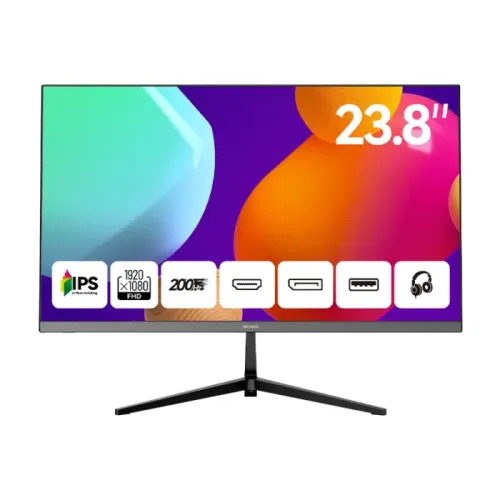
A high-refresh 23.8-inch Full HD display
The AIWA MD2419-V is a flat desktop monitor whose manufacturer-hosted AW-MD2419-V product page lists a 23.8-inch screen, IPS panel and Full HD 1920 × 1080 resolution with a maximum refresh rate of 200Hz. Those identifiers describe the exact model reviewed here and distinguish it from the similarly named MF2419-V, which is a 100Hz product. A 23.8-inch screen is commonly sold in the 24-inch size class; the diagonal measurement is the useful figure when comparing monitor dimensions. Full HD means 1,920 pixels across by 1,080 pixels vertically, arranged in a 16:9 shape. It is a practical desktop resolution for everyday text, web pages, video and games. The listed 200Hz ceiling is a manufacturer specification, but the highest refresh rate a computer can use depends on its graphics output, cable, selected port, driver and the monitor's supported timing. The available manufacturer page does not publish a port-by-port timing chart, so check the delivered manual when a specific 200Hz connection is essential.
What the IPS panel means in everyday use
AIWA identifies the MD2419-V panel as IPS. IPS displays are widely used for general computing because they are designed to maintain a more consistent image across wider viewing positions than many basic twisted-nematic panels. That can be useful when shifting posture at a desk or when another person glances at the screen from the side. The source confirms the panel family, but it does not provide an independent color calibration report, measured uniformity result or a guarantee that every unit will look identical. The monitor should therefore be described as an IPS display, not as a professional color-reference monitor. The manufacturer page does not state its contrast ratio, color gamut, color depth, factory Delta E, HDR capability or a specific viewing-angle number. Some Bangladesh sellers publish additional figures, but these remain retailer claims and have not been elevated to manufacturer-verified specifications in this catalog description. Screen appearance also changes with picture mode, brightness, room lighting, viewing distance and the source device. Buyers choosing a display for color-critical production should seek a full color specification and consider independent calibration rather than relying on the IPS label alone.
Understanding the 200Hz refresh rate
A 200Hz refresh rate means the panel can refresh up to 200 times each second when operated in a supported mode. Compared with a 60Hz monitor, a high refresh rate can make cursor movement, scrolling and compatible games look smoother, especially when a computer can render a high number of frames. The monitor cannot create additional game frames that the graphics system does not produce. To use the maximum rate, a user may need to select 1920 × 1080 at 200Hz in the operating system or graphics driver after connecting the display. The manufacturer lists HDMI and DisplayPort but does not publish the exact HDMI or DisplayPort revision, bandwidth, or maximum refresh rate on each input in the material checked. Retailer listings for this model are inconsistent: some repeat 200Hz while another exact-model page has a 100Hz value in its detailed table despite showing 200Hz in its headline. AIWA's exact-model page specifies 200Hz, so this product is cataloged as 200Hz; the supported input mode should still be confirmed from the unit manual if it determines a purchase.
Resolution, screen size and viewing distance
At 1920 × 1080, the MD2419-V provides a familiar Full HD desktop workspace. A 23.8-inch diagonal at that resolution is suitable for common office applications, browser tabs, online learning, streaming and gaming when viewed at a normal desk distance. Text and interface scaling can be adjusted in the operating system to match the user's preference. A larger resolution would show more pixels and potentially more workspace, but it is not listed for this model. Do not assume that a 24-inch marketing label means exactly 24.0 inches of viewable panel area: the exact manufacturer specification is 23.8 inches. The manufacturer page does not state the screen's aspect ratio, pixel density, surface coating or border dimensions, so those details have been omitted as confirmed facts. Most Full HD monitor content is produced in a widescreen format, but exact input behavior and scaling should be checked with the connected source. If several windows must remain visible at once, consider how 1920 × 1080 will fit the user's applications before choosing a monitor. For a single primary desktop display, this resolution avoids the higher graphics workload associated with driving a larger number of pixels.
Ports and connecting a computer
AIWA lists HDMI, DisplayPort, USB and an earphone connection for the AW-MD2419-V. This gives buyers several types of connection to plan around, but the public manufacturer page does not identify the HDMI or DisplayPort revision, the USB connector type, the number of USB sockets, whether USB is an upstream hub connection, or the audio jack's exact format. The front product artwork also depicts port symbols without enough detail to establish their count or version. Match the computer's available output to a monitor input and use a cable rated for the desired resolution and refresh mode. A physical USB socket should not be assumed to carry video or provide a complete docking feature: its purpose needs to be confirmed from the manual. The earphone port is listed, but the page does not document integrated speakers or a built-in microphone. Buyers who depend on a particular USB function, analog audio path, adapter or console mode should ask the seller to confirm the port layout of the actual unit before ordering. Cable inclusion is also not specified by the sources reviewed, so check the box contents rather than assuming that HDMI or DisplayPort cables are supplied.
Brightness and room lighting
The manufacturer page publishes a brightness notation of 220+20 cd/m². Bangladesh listings render it as 220 ± 20 cd/m², while the manufacturer page uses an informal plus notation. The catalog preserves the value with a note that its measurement basis is not defined in the material available. The source does not clearly label a typical, minimum or peak measurement, and the number should not be interpreted as a verified 240 cd/m² sustained brightness. Brightness controls let a user adapt the image to a dim bedroom, office or brighter room, but sunlight falling directly on a screen can still make viewing uncomfortable. The product page does not provide a glare-coating specification, contrast value or brightness uniformity measurement. When comparing displays, consider the room's lighting and viewing position as well as the published brightness figure. A higher refresh rate describes motion capability and does not make a screen brighter. The screen should be positioned away from direct reflections where practical, and users can adjust the operating-system theme and monitor picture settings to suit their environment.
Response-time claims and motion
Some Bangladesh sellers advertise a 1ms response time for the MD2419-V. AIWA's exact-model page does not list a response-time value or explain a measurement method. Response time may be measured using different transitions and settings, so a bare 1ms number should not be treated as a universal result for every transition or as proof that all ghosting is eliminated. The listing's 200Hz refresh specification and a seller's 1ms claim describe different aspects of motion: refresh rate is how often the display can update, while response time concerns how quickly pixels change from one state to another. Actual motion clarity depends on panel behavior, overdrive, frame rate, content and viewing conditions. Because the source does not state whether 1ms is GTG, MPRT or another method, this catalog names it as a seller-listed value and explicitly notes that the method is unspecified. Buyers who need a particular motion-performance benchmark should request the manufacturer timing sheet or test method for the exact revision. The display remains a high-refresh Full HD monitor without an unsupported promise about measured response across all gray-to-gray transitions.
Stand, placement and mounting
The five catalog images show the monitor with a central stand and wide angular feet. They are product images, not a mechanical specification sheet. AIWA's product page does not document stand adjustment range, height adjustment, swivel, pivot, VESA hole spacing, detached stand dimensions, panel-only dimensions or the monitor's weight. A visible stand shape does not establish a VESA mount pattern. Before buying a desk arm or wall bracket, inspect the rear of the delivered unit or obtain the exact VESA specification and weight from the seller. Check that the desk has enough depth for the screen and stand footprint, and allow space behind the monitor for cables. The images show the stand attached, but they do not establish whether tools are required for assembly or which fasteners are included in the retail box. Tilt adjustment also should not be promised from the photographs alone. The manufacturer page lists a wall power supply, but it does not give adapter dimensions or cable length. If ergonomics or mounting compatibility is important, verify the exact values with the local warranty provider before placing an order.
Power and operating setup
The manufacturer identifies a wall power supply for this monitor. It does not publish input-voltage range, adapter output voltage or current, cord length, maximum power consumption, standby consumption or energy certification on the exact-model page reviewed. Do not infer a wattage from a different Aiwa monitor or from an adapter that looks similar. Use the power adapter supplied with the unit and follow its label and manual. On first setup, place the monitor on a stable surface, connect the power supply, attach one compatible video cable, switch on the source and select the matching input if automatic detection does not work. After the desktop appears, open the operating-system display settings and choose the desired resolution and refresh rate. If 200Hz is not shown, verify the graphics driver, connection and cable before assuming that the monitor is faulty. The correct mode is limited by the weakest part of the signal chain. Keep vents unobstructed and disconnect power according to the supplied instructions before cleaning. The sources do not establish whether a video cable, USB cable, cleaning cloth or other accessory is included, so confirm package contents with the seller.
Use for games, video and office tasks
The combination of IPS, 23.8-inch Full HD and a manufacturer-listed 200Hz ceiling makes the MD2419-V relevant to mixed desktop use. Office users can work with documents, email and web pages at 1920 × 1080, while the high-refresh mode can make supported games and pointer movement feel more fluid. Streaming video can be watched at the source content's frame rate; a 200Hz panel does not change a film's original frame cadence. For competitive gaming, the computer must render enough frames and the selected connection must support the desired output mode. Console compatibility should be checked against the console's supported resolutions and refresh rates because the exact HDMI revision and input timing table are not published on the manufacturer page. The manufacturer page also does not state Adaptive-Sync, FreeSync, G-Sync compatibility, HDR or built-in speakers. Those capabilities are not included as confirmed product features. A buyer can connect external audio equipment through the listed earphone port if the source routes sound through HDMI or DisplayPort, subject to the device setup. For work, calibrate brightness and color to the room and task, and use the computer's own settings for scaling and accessibility.
Market listings and warranty in Bangladesh
Bangladesh retailers list the MD2419-V under AIWA and generally advertise a three-year local warranty. The official manufacturer page identifies the model but does not define a Bangladesh warranty provider, coverage, dead-pixel threshold, claim process or regional service terms. Warranty eligibility is tied to the seller, invoice, serial label and official warranty documents; confirm all of these for the specific offer. Prices can change with stock, payment method, campaign and seller, and a public retailer price is not an active BiponiBD offer. The catalog retains its existing BDT 17,199 reference MSRP and does not claim that a merchant currently has the product in stock. Listings checked for market context include prices near BDT 17,000–17,199, but those may be promotional and can change. Ask the seller for a dated quotation and ensure the named model on the invoice is MD2419-V rather than the similar MF2419-V. The image of the product box in manufacturer materials is described as a color box; it does not provide a complete retail package list. Obtain the warranty card, included cables and stand details from the seller before purchase.
Model naming and revision checks
The manufacturer page uses the full code AW-MD2419-V, while Bangladesh retailers commonly shorten it to MD2419-V. The catalog uses MD2419-V as its model name and AW-MD2419-V as the manufacturer part number so both forms can be matched in product searches. This distinction is useful because AIWA has nearby model codes with different refresh rates and ports. In particular, MF2419-V appears in local listings as a 100Hz monitor with VGA and HDMI, while the exact MD2419-V manufacturer page states 200Hz and HDMI, DisplayPort, USB and earphone. Another exact MD2419-V retailer page has a 100Hz entry in a detailed table, conflicting with its own 200Hz headline and the manufacturer page. That inconsistent retailer value is not copied as the official maximum. At delivery, compare the model code printed on the carton, rear label, invoice and warranty papers. If the label does not say MD2419-V or AW-MD2419-V, specifications for this listing may not apply. A model suffix is not a cosmetic detail: it can identify a different panel, refresh limit or input selection.
Image gallery and what it can confirm
The BiponiBD gallery contains five images of the AIWA monitor. The first is a front view with promotional graphics stating 23.8 inches, IPS, 1920 × 1080 and 200Hz; it also shows icons for video and audio connections. This image visually supports how the product is presented, but the manufacturer page is the stronger source for its headline specifications. The second image presents front and rear three-quarter views, helping shoppers see the thin bezel and central stand shape. The third is a portrait-oriented angled front view with a colorful abstract sample image on the panel. The fourth is a straight rear view showing the AIWA logo, central stand connection and rear control/connection area. The fifth shows another rear-side perspective of the casing and stand. These promotional renders do not establish physical measurements, VESA spacing, port revisions, exact port counts, included cables or what is inside the package. The recommended alternative text describes only the visible product and viewpoint. Alt text is intended to help identify an image to someone who cannot see it; it should not be stuffed with repeated search phrases or claims not visible in that particular image.
Care, positioning and daily comfort
Place the monitor on a stable desk and choose a viewing distance that keeps text comfortable to read without leaning toward the screen. Adjust the operating-system scaling and application zoom before increasing brightness unnecessarily. The exact product page does not list flicker-free certification, a low-blue-light mode, eye-care certification or a hardware reading mode, so these are not represented as verified functions. Users who are sensitive to screen brightness can try a lower setting and take regular visual breaks, but those habits are not a substitute for medical advice. Avoid pressing on the panel when cleaning and use a soft cloth according to the manufacturer's instructions. Do not spray cleaner directly onto the screen or use solvents unless the manual explicitly allows them. Keep the power adapter and cables arranged so they do not pull the display toward the edge of a desk. The source does not specify a Kensington lock, cable-management channel or adjustable stand mechanism. These details should be checked in the manual if they affect a workspace. A clean, stable setup and the correct display mode help the monitor perform as intended without assuming features not documented for this exact model.
Limitations and details to verify before buying
The most useful confirmed facts are the exact model, IPS panel, 23.8-inch diagonal, Full HD resolution, 200Hz maximum, listed input types and the manufacturer's brightness notation. Several commercially useful details are absent from the manufacturer page: port versions and per-port timing, USB type and count, response-time method, contrast ratio, color gamut, viewing angles, speaker status, VESA pattern, physical dimensions, unit weight, power draw and full in-box contents. Some local retailers publish selected extra figures, but they are not used as manufacturer-confirmed catalog attributes here. Local pages also disagree on warranty details and one retailer page displays a 100Hz refresh value for this model. Confirm any requirement that depends on those details with the exact retail unit and its documentation. The listing does not guarantee a live price, stock level, delivery time or particular seller warranty. This description separates the official model specifications from reseller information so a buyer can see which values are authoritative and which still need confirmation. For a question that affects compatibility, ask for a photo of the rear label and a copy of the exact manual or warranty card before purchase.