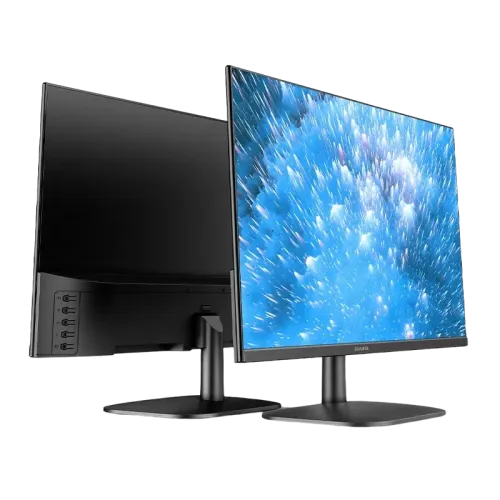
Aiwa MF2219-B is a 21.45-inch class / 22-inch marketed Full HD IPS monitor with 1920 × 1080 resolution, 100Hz, 5ms, one HDMI and one VGA. Retailers list 99% sRGB, 8-bit colour, Low Blue Light, Flicker Free, 75 × 75mm VESA and a three-year warranty. Star Tech says it has no speakers; check each seller’s current stock, price and stand revision.
Overview and best-fit use
The Aiwa MF2219-B is a flat LED monitor with an IPS panel, Full HD 1920 × 1080 resolution and 100Hz refresh rate. Star Tech and several Bangladesh sellers list 5ms response time, HDMI and VGA inputs, anti-glare treatment, Low Blue Light and a three-year warranty. The advertised size is usually 22 inches, while some sellers describe the viewable diagonal as 21.45 inches; both refer to the MF2219-B. The model is intended for everyday desk work, online classes, office documents, browsing, video and casual gaming. It has no built-in speaker according to Star Tech’s product Q&A, so audio should be connected to the computer or another source device. Star Tech currently shows the model Out Of Stock and To be announced. Vibe Gaming and EERNA showed in-stock listings when checked, at different prices. Confirm the unit, delivery terms, included adapter, stand and written warranty with the selected shop before placing an order.
Full HD image and desktop workspace
The native resolution is listed as Full HD 1920 × 1080 pixels with a 16:9 aspect ratio. This gives enough horizontal and vertical workspace for common documents, browser tabs, video calls and mainstream entertainment. Exact visible workspace depends on operating-system scaling, application layout and the source device. For sharp text, set the computer to 1920 × 1080 rather than an arbitrary scaled mode when the graphics output supports it. A single Full HD screen can handle routine office tasks; users editing large timelines or keeping many spreadsheets visible at once may prefer a larger or higher-resolution display. The 21.45-inch versus 22-inch wording is a seller convention and should not be interpreted as two different model variants unless the seller confirms another model number. Check the MF2219-B label on the carton and invoice. For laptops using only USB-C or DisplayPort, an adapter may be needed because this monitor is listed with HDMI and VGA.
IPS panel and viewing angles
Star Tech lists an IPS panel with 178° horizontal and 178° vertical viewing angles. IPS panels are commonly chosen where consistent viewing from an off-centre seat is useful, but the published angle does not promise identical brightness or colour at every position. Image quality also depends on room lighting, screen settings, content and the exact unit. Star Tech lists 99% sRGB colour gamut and 16.78 million colours / 8-bit; EERNA repeats those values. No independent measurement, factory calibration certificate or manufacturer data sheet was located during this check. The figures are retailer-derived and should not be treated as a professional calibration guarantee. For office documents, media and general creative work, the listing indicates broad sRGB coverage. For print proofing, colour grading or regulated colour workflows, compare monitors with measured gamut and calibration evidence and calibrate the actual unit.
Refresh rate, response and game use
The MF2219-B is listed at 100Hz refresh and 5ms response time. At a supported 100Hz mode, compatible content and cursor movement can appear smoother than on a typical 60Hz monitor. The computer, cable, port and graphics driver must all support the selected mode. A 5ms figure does not ensure that every pixel transition is equally fast or that there will be no motion blur. The 100Hz refresh rate is useful for casual gaming and general motion but remains below high-refresh competitive displays. The retailer page does not provide a verified adaptive-sync range or overdrive measurement for this exact model. If a game shows only 60Hz, check the operating-system display menu and graphics output before assuming a panel issue. For users who play fast competitive titles, compare refresh rate, response method, input lag and adaptive-sync support rather than relying on one headline specification.
Brightness, contrast and screen surface
Star Tech and EERNA list maximum brightness at 200 cd/m² ±20 and a 1000:1 contrast ratio. This is a modest brightness level intended for ordinary indoor conditions; it may be difficult to see clearly in direct sunlight or a very bright room. Adjust the screen to match ambient lighting instead of running maximum brightness continuously. The listing describes an anti-glare surface, which can reduce reflections from some indoor lights but cannot remove strong window glare. Reposition the screen or close blinds if reflections interfere with reading. The product page does not provide HDR certification, local dimming, measured black levels or a wide-gamut HDR profile, so it should be understood as an SDR Full HD monitor. The published contrast and brightness values are retailer claims, not results from an independent lab test.
Ports, source compatibility and audio
The exact-model seller pages show one HDMI input and one VGA input. HDMI is the straightforward digital connection for a modern PC or console with a compatible output. VGA is useful for legacy computers but transmits analog video and does not carry sound. Star Tech’s product Q&A explicitly says the monitor has no built-in speaker and no audio jack/input. Connect speakers or headphones to the computer, console or another source instead of expecting the display to output audio. A device with only USB-C or DisplayPort may require a separate compatible adapter; check that it supports 1920 × 1080 at 100Hz before purchase. The listing does not show DisplayPort, USB-C, a USB hub or multiple HDMI sockets. The single HDMI plus VGA pair may allow two different cables to remain connected, but automatic switching is not documented.
Eye-comfort options and positioning
Star Tech lists Flicker Free, Low Blue Light and Eye Protection functions. They may provide useful image-setting options for a desk monitor, but their effect varies by implementation, selected mode, brightness and individual sensitivity. They are not a medical guarantee and do not replace breaks, suitable viewing distance or sensible room lighting. Set brightness to a comfortable level, avoid placing a bright window directly behind the screen, and position the display so that the user can look toward the centre without sustained neck tilt. The anti-glare surface may reduce some reflections. Users with specific sensitivity should try the actual display settings when possible and consult qualified advice for medical concerns.
Stand tilt, VESA and desk placement
Star Tech lists a -5° to 20° tilt range and a 75 × 75mm VESA mounting pattern. Vibe Gaming’s specification also lists pivot capability, while Star Tech does not mention pivot. This may reflect different stand descriptions or an omission; confirm the stand supplied with the exact MF2219-B unit if pivot is important. The listings show a plastic stand base and screws among Vibe Gaming’s stated package contents. Before using an arm, check its VESA pattern, the monitor’s supported screw depth and the arm’s weight rating. Star Tech gives dimensions of 550 × 102 × 350mm; that page does not clearly state whether every measurement is the display, stand or packaging envelope, so check physical fit with the retailer. Vibe Gaming lists 2.2kg net and 3.2kg gross. Leave room for cable bends and ventilation, and use a stable surface.
Power adapter and energy specifications
Star Tech lists power consumption up to 30W, standby consumption of 0.5W and an external 12V/2.5A power supply. Its same specification table also labels the power Type as Internal, which conflicts with the external-adapter description. Use the adapter supplied with the exact monitor and inspect its label for output voltage, current, polarity and connector. Do not substitute a visually similar adapter without confirming those values. The listing is evidence of what the retailer publishes, not a replacement for the label or the official manual. The 30W figure is a stated maximum, and actual draw can change with brightness and operating mode. Keep the power adapter ventilated and protected from liquids, heat and cable strain.
Warranty, price and stock in Bangladesh
Star Tech lists a three-year warranty, but its direct product page showed Out Of Stock and the main price field To be announced. At the time of this Chrome check, Vibe Gaming marked the product In Stock and stated a ৳8,200 best price; EERNA marked it In Stock at ৳10,700 cash price, with ৳11,500 as its regular/EMI price. Those two observed cash/sale prices give a currently verified reference range of ৳8,200–৳10,700 across the checked retailers, not an offer from BiponiBD. Stock and promotions can change. Check the actual payment method, delivery charge, return policy, warranty provider, dead-pixel policy and included accessories with the seller. Keep the invoice. Star Tech’s direct listing remains useful for technical details and warranty terms even while that shop shows no stock.
Who should consider it and limitations
The MF2219-B can suit a compact home office, student desk or general-use PC where Full HD resolution, IPS viewing, a 100Hz refresh rate and simple HDMI/VGA connectivity matter. The 99% sRGB claim may be attractive for general image work, although it is not independently measured here. The monitor is less suitable for bright spaces because listed brightness is modest, and it cannot provide audio on its own. Users who need USB-C docking, DisplayPort, multiple HDMI inputs, HDR, built-in speakers or a documented pivot stand should compare alternatives. Competitive gamers should look beyond the 100Hz/5ms headline and check measured response, input lag, adaptive sync and supported refresh modes. Confirm the correct model suffix, exact stand, current stock and payment-specific price before ordering.
Specification source and field notes
The exact Star Tech listing was opened in Chrome and showed product code 37878, AIWA brand, MF2219-B model, 22-inch, IPS, Full HD 1920 × 1080, 100Hz, 5ms, 200 cd/m² ±20, 1000:1, 99% sRGB, 16.78M 8-bit, 178°/178°, one HDMI, one VGA, flicker-free, Low Blue Light, Eye Protection, -5° to 20° tilt, 75 × 75mm VESA, 2.2kg net, three-year warranty, Out Of Stock and To be announced. Its product Q&A says no built-in speaker or audio jack. Vibe Gaming and EERNA exact-model pages corroborate the core display/port values and show their own current stock and prices. Vibe lists pivot; Star Tech does not. Star Tech’s power type conflicts with its external adapter detail. These seller-specific disagreements are retained as notes rather than silently turned into universal claims.
Before ordering and initial setup
Confirm MF2219-B on the seller page, carton and invoice. Ask whether the stock shown is physically available, whether the quoted price requires a particular payment method, and which warranty provider will handle service. Verify that the package contains the stand, base, screws, HDMI cable, adapter and manual if those are important; Vibe Gaming lists these items, but packages may vary. Check the adapter label before connection. Use HDMI where possible, select 1920 × 1080 and 100Hz in the computer display settings, and connect any audio equipment to the source device because the monitor has no built-in sound. Test pixels, both ports, tilt and mounting points promptly within the seller’s return window. If pivot is required, get written confirmation that the supplied stand supports it. Recheck the price and availability immediately before ordering.
Frequently asked questions
What is the exact monitor model and size?
This is the Aiwa MF2219-B. Sellers market it as a 22-inch monitor and also describe the active display area as about 21.45 inches.
What is the display resolution?
Star Tech and EERNA list Full HD 1920 × 1080 with a 16:9 aspect ratio.
What panel and refresh rate does it use?
The MF2219-B is listed as an IPS LED monitor with a 100Hz refresh rate and 5ms response time.
What colour specifications are listed?
Star Tech and EERNA list 16.78 million colours / 8-bit and 99% sRGB. These are retailer specifications; no calibration report was found.
Which video inputs are available?
The exact-model listings show one HDMI input and one VGA input. DisplayPort and USB-C are not listed.
Does it have built-in speakers or an audio jack?
Star Tech’s product Q&A says it has no built-in speaker and no audio jack/input. Connect speakers or headphones to the computer or other source device.
Does it support eye-comfort features?
Star Tech lists Flicker Free, Low Blue Light and Eye Protection. Adjust brightness and room lighting to suit personal comfort.
Can I mount it on a VESA arm?
Star Tech lists a 75 × 75mm VESA pattern. Check arm compatibility and screw requirements before mounting.
What stand adjustments are available?
Star Tech lists -5° to 20° tilt. Vibe Gaming lists pivot support; Star Tech does not, so confirm the exact stand revision with the seller.
What are the power and physical specifications?
Star Tech lists up to 30W consumption, 12V/2.5A external power supply and 0.5W standby. It lists 550 × 102 × 350mm and 2.2kg net; verify the supplied adapter label and exact measurement convention.
What warranty is offered?
Star Tech lists a three-year warranty. Confirm the provider, coverage, exclusions and claim process in writing with the seller for the purchased unit.
What is the current Bangladesh price and stock?
During this check, Vibe Gaming showed In Stock at ৳8,200 and EERNA showed In Stock at ৳10,700 cash price; Star Tech showed Out Of Stock / To be announced. Offers can change, so recheck before ordering.