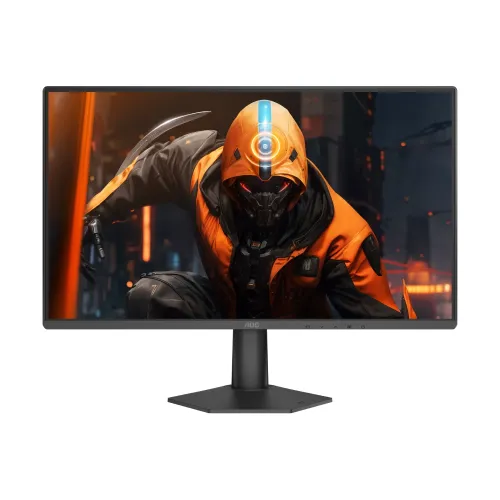
AOC 24G50Z2 মডেল ও পণ্যের পরিচয়
AOC 24G50Z2 একটি 23.8-inch Full HD Fast IPS gaming monitor। এর native refresh rate 200Hz, আর overclocking চালু করলে সর্বোচ্চ 260Hz পর্যন্ত যেতে পারে—এ দুটি আলাদা operating mode। AOC official product page এবং manual-এ এই model-এর 1920 × 1080 resolution, 260Hz overclocked maximum ও 200Hz native mode নথিভুক্ত আছে। Product title এবং technical copy-তে “260Hz OC / 200Hz native” দুইটিই স্পষ্টভাবে লেখা উচিত, যাতে ক্রেতা 260Hz-কে factory native refresh মনে না করেন।
23.8-inch FHD screen-এ 16:9 aspect ratio ও 0.2745mm pixel pitch রয়েছে। Fast IPS panel দ্রুত motion-এর সঙ্গে IPS viewing angle সুবিধা দেয়। এটি esports বা fast-action game, সাধারণ PC কাজ, streaming এবং পড়াশোনায় ব্যবহার করা যায়; ফলাফল GPU, game frame rate, display connection এবং monitor settings-এর ওপর নির্ভরশীল। 260Hz পেতে monitor-এর overclock mode enable করতে হবে এবং graphics output-কে 1920 × 1080 at 260Hz পাঠাতে হবে। Overclocking-এ অস্বাভাবিক display error হলে AOC manual 200Hz-এ ফিরে যেতে বলে।
ModelName এবং manufacturer part number এখানে শুধু “24G50Z2” রাখা হয়েছে। 24G50Z2-কে একই নামের 24G50Z বা অন্য 24-inch AOC monitor-এর সঙ্গে গুলিয়ে ফেলবেন না। AOC official material বলে 260Hz হলো overclocked mode; local retailer listing-এও native 200Hz এবং OC 260Hz আলাদা করে উল্লেখ রয়েছে। Product identity, slug, category, active status ও variant relation সংরক্ষণ করে copy পরিষ্কার করা হয়েছে।
ছবির গুণমান, pixel density ও HDR
Fast IPS panel-এর native image 1920 × 1080 pixels। 23.8-inch আকারে প্রায় 93 PPI density হয়—27-inch FHD-এর তুলনায় text ও interface কিছুটা ঘন দেখায়। Pixel pitch 0.2745mm এবং viewing angle প্রায় 178° horizontal/vertical (CR>10)। Matte anti-glare coating room light reflection কমাতে সাহায্য করে; তবে জানালার সরাসরি glare, খুব উজ্জ্বল lamp বা screen-এর ভুল angle থাকলে reflection থাকবে।
AOC/local listing-এ typical brightness 300 cd/m², static contrast 1000:1 এবং 16.7 million colors উল্লেখ আছে। Static contrast black/white luminance-এর একটি panel metric; “MEGA DCR” dynamic processing-এর দাবি, native contrast-এর বদলি নয়। এই product-এর নির্ভরযোগ্য exact-model color-space coverage বা factory calibration figure পাওয়া যায়নি, তাই কোনো invented sRGB percentage বা color accuracy দাবি যোগ করা হয়নি। Casual content ও game-এর জন্য default color mode যথেষ্ট হতে পারে; print/photo proofing-এ colorimeter দিয়ে panel calibrate ও workflow যাচাই করুন।
HDR Ready support HDR signal গ্রহণ বা সংশ্লিষ্ট processing feature বোঝায়; এটি VESA DisplayHDR certification কিংবা high peak brightness/local dimming guarantee নয়। HDR content চালু করলে game, operating system, connection ও settings-এর সামঞ্জস্য দরকার। SDR desktop-এ HDR enable করলে brightness এবং tone mapping বদলে যেতে পারে; পছন্দ না হলে HDR বন্ধ করুন। Flicker-Free ও Low Blue Light feature AOC/local specification-এ তালিকাভুক্ত—এগুলো display setting, চিকিৎসা-সংক্রান্ত চোখের সুরক্ষার নিশ্চয়তা নয়।
Refresh rate, overclock ও response time
AOC manual-এ 1920 × 1080 resolution-এ সর্বোচ্চ 260Hz লেখা, সঙ্গে footnote-এ overclocking প্রয়োগের শর্ত দেয়া। AOC-এর product page native refresh 200Hz এবং OC refresh 260Hz আলাদা করে। তাই monitor OSD-তে OC setting enable করার পর Windows বা graphics driver-এ 260Hz বেছে নিন। যদি black screen, flicker বা signal error দেখা দেয়, OSD-তে OC বন্ধ করে 200Hz ব্যবহার করুন। Cable ও GPU port-ও এই bandwidth সমর্থন করতে হবে।
AOC 1ms GTG এবং 0.3ms MPRT response figures প্রকাশ করে। GTG হলো pixel shade transition-এর সময়ের metric; MPRT moving-picture persistence/blur reduction-এর ভিন্ন metric। 0.3ms-কে universal transition, input lag বা সব refresh mode-এ একই performance ধরে নেওয়া ভুল। MPRT/MBR feature চালু করলে brightness কমতে পারে বা VRR একসঙ্গে ব্যবহার করা নাও যেতে পারে। Overdrive বেশি দিলে bright/dark inverse trails হতে পারে—game-এ চলমান object দেখে OSD preset বেছে নিন।
Adaptive-Sync/VRR compatible graphics card-এর frame delivery এবং monitor refresh মিলিয়ে tearing কমাতে পারে। Manual-এ vertical frequency 48–260Hz range এবং AOC product copy-তে Adaptive-Sync আছে; practical VRR behavior source device, firmware, input, driver setting ও OC state-এর ওপর নির্ভর করে। Game-এ FPS limit বা V-Sync/VRR options একে অপরের সঙ্গে মিলিয়ে নিন। Monitor 260Hz চালাতে পারলেও game engine বা GPU 260FPS তৈরি না করলে প্রতি refresh-এ নতুন frame আসবে না।
Ports, sound, stand ও physical setup
এতে একটি HDMI 2.0 এবং একটি DisplayPort 1.4 input রয়েছে। Audio connector-এ headphone output আছে; built-in speaker specification পাওয়া যায়নি। Local listing শুধু “Audio Jack: Yes” বলেছে, তাই সেটিকে headphone output হিসেবে ব্যাখ্যা করেছি, microphone input বা speaker output হিসেবে নয়। Console, laptop বা desktop যুক্ত করার আগে device-এর output mode মিলিয়ে নিন। 260Hz mode কোন input ও cable combination-এ সমর্থিত তা official manual timing table এবং graphics device অনুসারে যাচাই করুন।
Stand tilt প্রায় −5° থেকে +20° এবং VESA mount 100 × 100mm। Height adjustment, swivel বা pivot function listing-এ পাওয়া যায়নি; desk setup-এ প্রয়োজনীয় উচ্চতা না মিললে compatible arm ব্যবহার করতে পারেন। Arm-এর load range, VESA screw length, desk clamp clearance এবং monitor clearance একসঙ্গে যাচাই করুন। Product listing-এ standসহ dimension 544 × 418.1 × 175mm, stand ছাড়া 544 × 318.5 × 36.1mm; weight standসহ প্রায় 2.42kg, stand ছাড়া প্রায় 2.25kg এবং gross packaged 4.23kg বলা হয়েছে। এগুলো retailer-published dimension/weight, delivered unit/region label-এ মিলিয়ে নিন।
Power specification-এ source conflict আছে: Star Tech listing adapter 12V DC, 2.5A দেখায়; AOC English manual-এ 19V, 1.9A এবং typical 18W, maximum ≤38W, standby ≤0.3W দেখা যায়। Catalog-এ manufacturer manual voltage-কে primary reference করেছি এবং listing mismatch-কে evidence note-এ রেখেছি। Shipment-এ আসা original adapter label ও monitor input rating পরীক্ষা না করে generic adapter ব্যবহার করবেন না; voltage, polarity, current capacity ও connector ঠিক না হলে ক্ষতি হতে পারে।
সুবিধা, সীমাবদ্ধতা ও বাংলাদেশে কেনার তথ্য
এই monitor-এর প্রধান সুবিধা 23.8-inch FHD Fast IPS panel-এ native 200Hz, selectable 260Hz OC, Adaptive-Sync এবং HDMI/DisplayPort input একসঙ্গে পাওয়া। 300-nit brightness, anti-glare surface, 100 × 100mm VESA mount ও tilt stand daily use সহজ করে। Competitive game-এ high refresh উপকার দিতে পারে, কিন্তু প্রতিযোগিতার ফল নির্ভর করে GPU, FPS, game latency, internet এবং player skill-এর ওপর।
সীমাবদ্ধতা হলো 260Hz overclock mode, তাই native 260Hz panel নয়; native maximum 200Hz। FHD resolution 23.8-inch-এ সাধারণত পরিষ্কার হলেও high-detail creation-এ QHD প্রয়োজন হতে পারে। Stand height-adjustable নয়, built-in speakers নেই, USB-C/USB hub নেই এবং HDR Ready certification-level HDR নয়। Response-time figures MPRT ও GTG দুই ধরনের marketing metric—দুটিকে এক metric হিসেবে তুলনা করবেন না।
বাংলাদেশের exact-model Star Tech listing-এ পর্যবেক্ষণের সময় ৳16,999 cash price, ৳18,450 regular price এবং in-stock status ছিল; একই page-এ ৳19,900 crossed price-ও দেখা গেছে। Star Tech-এর category page-এ ৳16,300 price দেখা যাওয়ায় exact product page ও category listing-এর মধ্যে price conflict রয়েছে। Variant price ৳16,999-এ রাখা হয়েছে exact product listing অনুসারে এবং conflict evidence-এ নথিভুক্ত। এগুলো retailer observation, BiponiBD offer নয়। Listing-এ তিন বছরের warranty বলা হয়েছে; warranty provider, dead-pixel policy, service location, overclock failure coverage, panel replacement এবং return period লিখিতভাবে নিশ্চিত করুন।
সঠিকভাবে চালু ও পরীক্ষা করার ধাপ
Monitor স্থিতিশীল desk-এ বসিয়ে supplied power adapter লাগান এবং HDMI/DisplayPort cable ব্যবহার করে PC-তে যুক্ত করুন। OSD-তে input source নির্বাচন করুন। প্রথমে 1920 × 1080 resolution এবং native 200Hz নির্বাচন করে image stability পরীক্ষা করুন। এরপর monitor OSD-তে OC enable করুন; driver-এ 260Hz option এলে নির্বাচন করুন। Overclock mode-এ screen blank, flicker বা artifact হলে 200Hz-এ ফিরুন এবং cable, port, GPU driver ও device output যাচাই করুন।
Adaptive-Sync ব্যবহার করতে GPU driver-এ supported VRR চালু করুন, game-এ refresh/FPS behavior পরীক্ষা করুন এবং tearing বা flicker থাকলে OSD ও driver setting সামঞ্জস্য করুন। MPRT/MBR blur reduction mode বেছে নিলে brightness, VRR compatibility এবং motion clarity নতুন করে পরীক্ষা করুন। Overdrive-এ ghosting বা overshoot দেখলে কম aggressive level নিন। Monitor-এর factory picture mode ও unit variation বিবেচনায় brightness এবং color preference অনুযায়ী সেট করুন।
Color-sensitive কাজের জন্য review unit মাপা ছাড়া published exact-model sRGB coverage ধরে নেবেন না। Ambient light কমিয়ে glare নিয়ন্ত্রণ করুন, screen পরিষ্কারে microfiber cloth ব্যবহার করুন এবং liquid সরাসরি panel-এ দেবেন না। VESA arm-এ বসালে screw fit/weight rating যাচাই করুন। Power supply নিয়ে listing/manual mismatch থাকায় supplied original adapter-এর label photograph করে warranty claim-এর জন্য রেখে দিন। কেনার পর box contents, serial, warranty card এবং panel condition সঙ্গে সঙ্গে যাচাই করুন।