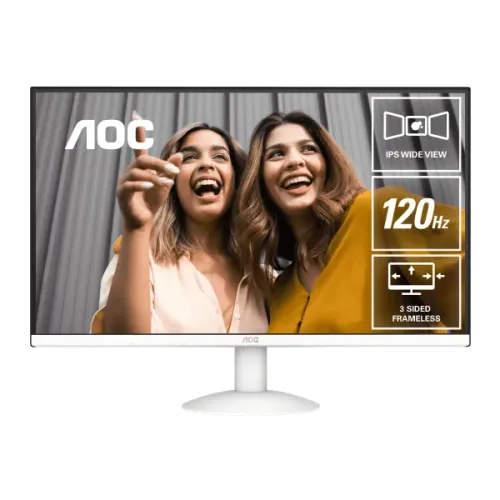
AOC 27B30H 27-inch Full HD IPS monitor: detailed guide
Product overview
AOC 27B30H is a 27-inch flat IPS monitor with native Full HD resolution of 1920 × 1080 and a 16:9 aspect ratio. AOC lists a 120Hz refresh mode over HDMI when overclocked, alongside a 75Hz VGA timing. The official specifications list 4ms typical GtG and 1ms MPRT as separate response measurements, 300 cd/m² typical brightness and 1000:1 typical static contrast. Connectivity comprises one D-Sub (VGA) and one HDMI 1.4 input. AOC's Malaysia product page and linked user manual were checked for this exact model. Local Bangladesh price, stock and warranty conditions still need confirmation from the seller.
Screen size, resolution and workspace
The 27-inch diagonal gives a familiar desktop monitor footprint while Full HD (1920 × 1080) keeps interface text and common video content at a widely supported resolution. The 16:9 aspect ratio matches standard widescreen media and most desktop layouts. At this size, Full HD gives practical room for a browser, office document, class materials or communication window without requiring a high-end graphics card. Users who regularly keep many large spreadsheets or creative timelines open may prefer a higher-resolution display, while this pixel count can be easier for older computers to drive and for games to render at higher frame rates.
IPS panel and viewing position
The exact-model official AOC specification identifies an IPS panel and lists horizontal and vertical viewing angles of 178 degrees, measured at a contrast-ratio threshold greater than 10. IPS technology is often selected when a desktop is viewed from different positions because image appearance can remain more consistent off-axis than on many basic TN panels. The listed angle is a panel measurement, not a promise that brightness and color look identical from every position. Place the screen directly ahead, avoid strong reflections and adjust the tilt to find a comfortable view. The panel is flat rather than curved, which suits standard office layouts and multi-window use.
120Hz refresh over HDMI
AOC identifies a 120Hz refresh capability, and its official product details identify the HDMI timing as overclocked. AOC lists 1920 × 1080 at 120Hz over HDMI and 1920 × 1080 at 75Hz over VGA. Enable the supported overclock setting in the display menu if required, then select the matching refresh rate in the computer's display settings. Actual motion smoothness depends on the source, cable, graphics driver, application and frame rate. A monitor can display only the frames delivered to it; the 120Hz specification does not guarantee that a computer or game will render 120 frames each second. If the mode is unavailable, check the HDMI connection and monitor menu before troubleshooting the graphics card.
Response time: GtG and MPRT
AOC lists a 4ms typical gray-to-gray transition and a separate 1ms moving-picture response time. GtG and MPRT use different measurement approaches and are not interchangeable descriptions of every pixel transition. The MPRT figure is associated with motion-picture clarity conditions, while GtG describes a gray-level transition. The manufacturer's page does not publish a full test protocol alongside these headline values, so compare monitors using like-for-like measurement types. Real motion appearance also depends on refresh rate, response settings, frame delivery and content. Users who prioritize competitive play should assess the actual supported HDMI 120Hz overclocked mode, their PC's frame rate and the monitor's on-screen controls rather than relying on one response-time number.
Brightness, contrast and color
The listed typical brightness is 300 cd/m² and typical contrast is 1000:1, with Mega DCR also mentioned. Dynamic contrast is a processing feature and should not be treated as the same measurement as the typical native contrast ratio. AOC lists NTSC 90% under CIE1976 and sRGB 103% under CIE1931, and the display supports 16.7 million colors. Because the gamut percentages use different standards, they should not be compared directly as though both use the same calculation. The provided source does not state factory calibration tolerances, a color-accuracy delta-E value or a calibration report; color-critical work should be evaluated with a suitable calibration process.
Adaptive sync and eye-care options
AOC highlights Adaptive Sync, Flicker Free and Low Blue Light for the 27B30H. Adaptive Sync coordinates display refresh with compatible frame delivery to reduce tearing and judder in supported configurations. The AOC page does not give a variable-refresh operating range or state NVIDIA G-SYNC certification, so do not assume a specific GPU pairing or range. Confirm available options in the computer's graphics driver and the display menu. Flicker Free and Low Blue Light are display features intended to support viewing comfort, but comfort varies by user and environment. Use suitable room lighting, take breaks and set brightness for the room; these features do not remove the need for sensible viewing habits.
Inputs and device compatibility
AOC specifies one D-Sub (VGA) input and one HDMI 1.4 input. The HDMI connection is required for the listed 120Hz overclocked Full HD timing; the VGA timing is listed at 75Hz. Check the graphics output and cable before ordering. A computer with only USB-C video may need a compatible adapter, but this monitor does not list native USB-C or DisplayPort input. The official specification also lists HDMI HDCP 1.4. HDMI may carry audio from a source, but a connection alone does not provide sound if the display has no speakers. Confirm the source device's output mode and cable when troubleshooting a blank screen or an unavailable high-refresh setting.
Sound and speakers
AOC's specification states that speakers are not included. Plan to use the computer's audio output or separate speakers or headphones. The product page does not list an audio-out connector, so do not rely on the monitor to forward audio to a headset. This matters for a compact desk, classroom or shared workstation where one display might otherwise be assumed to provide complete audiovisual output. Check the exact package and connections with the seller if audio pass-through is important.
Stand adjustment and wall mounting
AOC lists a tilt range from -5° to +23°. Its product overview promotes VESA mounting, and the Bangladesh retailer technical specification lists a 100 × 100mm pattern; confirm the mounting pattern on the exact unit/manual before ordering an arm. Height, swivel and pivot adjustment are not established by the cited specification, so plan around tilt only when using the supplied stand. For a third-party arm, check VESA fit, load rating, screw requirements and safe installation. Keep cable clearance behind the panel and position the screen so your neck can remain relaxed during longer work sessions.
Power input and consumption
AOC specifies an external power supply rated at 19V DC and 1.31A, with typical on-mode consumption of 20W. Use the supplied or manufacturer-approved adapter with the correct output and connector; the monitor's DC input is not a mains-voltage connection. The published typical figure is a reference condition, not a promise that the display draws exactly the same power at every brightness setting. Keep ventilation clear and route the power lead so it cannot be pulled or pinched. AOC does not list a standby consumption figure in the visible product table, so this guide does not infer one.
Dimensions, weight and desk planning
AOC lists dimensions of 614.5 × 451.8 × 195.9mm with the base, 614.5 × 363.1 × 35mm without the base and carton dimensions of 690 × 432 × 103mm. Listed net weight excluding packaging is 2.94kg; the display without its stand is 2.64kg and package gross weight is 4.75kg. Measure the desk, shelf or mounting space before ordering, and account for the stand depth, power adapter and connector bend radius. If wall mounting, check the VESA pattern and support capacity for the complete monitor. Packaging dimensions describe the shipping carton, not the space needed to use the display.
Warranty and local purchase checks
AOC Malaysia provides official product specifications and a support manual, but those materials do not establish warranty coverage for a unit sold in Bangladesh. Confirm current stock, exact model suffix, final checkout price, return conditions, invoice, local service center and warranty-card terms with the seller before purchase. The current Bangladesh price was not independently verified in this review, so the product variant MSRP remains unset. Ask whether the warranty covers the full monitor and how service is handled locally. A regional product page verifies technical identity, not a seller's stock status or local after-sales promise.
Who this monitor may suit
The 27-inch Full HD panel may suit home-office work, study, browsing, video and casual gaming where broad compatibility and a larger screen are priorities. IPS viewing angles and AOC's named Adaptive Sync, Flicker Free and Low Blue Light features add flexibility for mixed everyday use. The HDMI 120Hz mode may make motion smoother when the overclock setting and computer both support it. Full HD on a 27-inch display is less pixel-dense than QHD at the same size, so users who need finer text or more workspace may prefer a higher resolution. Built-in speakers, USB-C docking and DisplayPort are not listed; choose another model if those are essential.
Model identity and evidence notes
This record concerns AOC 27B30H, confirmed by the manufacturer's official Malaysia product page and its linked user manual. The page specifies a 27-inch Full HD IPS display, 120Hz HDMI overclocked mode, 4ms GtG and 1ms MPRT, 300 cd/m² brightness, 1000:1 static contrast, 16.7 million colors, NTSC 90% CIE1976, sRGB 103% CIE1931, one VGA and one HDMI 1.4 input, Adaptive Sync, Flicker Free and Low Blue Light. It lists a 20W typical on-mode power figure and an external 19VDC, 1.31A supply. HDMI 120Hz is an overclocked timing; VGA supports 75Hz. Local selling price and Bangladesh warranty are separate seller-specific facts.
Buying checklist
Before ordering, check the label on the carton for the exact 27B30H model, confirm the seller's current availability and final price, and ensure your computer offers HDMI or VGA. For 120Hz, connect by HDMI and verify the operating system exposes 1920 × 1080 at 120Hz. If using VGA, plan around the listing's stated 75Hz timing. Confirm the adapter is included and matches 19V DC, 1.31A, clarify the written three-year local warranty, and decide whether external audio is required. If using a VESA arm, confirm 100 × 100mm compatibility. Those checks resolve the practical questions that model name and headline refresh rate alone cannot answer.
Frequently asked questions
1. What is the native resolution and size?
AOC 27B30H is a 27-inch IPS monitor with a native Full HD resolution of 1920 × 1080 and a 16:9 aspect ratio.
2. Does it support 120Hz?
AOC lists a 120Hz overclocked mode via HDMI. The documented VGA timing is 75Hz.
3. What response time does AOC list?
The official specification gives 4ms typical GtG and 1ms MPRT; these are separate measurement methods.
4. Which video ports are included?
AOC lists one D-Sub (VGA) input and one HDMI 1.4 input.
5. Does the monitor include speakers?
No. AOC lists speakers as false, so plan external speakers or headphones.
6. What brightness and contrast are listed?
AOC specifies 300 cd/m² typical brightness and 1000:1 typical static contrast.
7. Which eye-care features are included?
The AOC product page highlights Flicker Free and Low Blue Light features.
8. Does it support Adaptive Sync?
Yes. AOC lists Adaptive Sync, but the product page does not specify the variable-refresh range or GPU certification.
9. Can I mount it on a VESA arm?
AOC promotes VESA mounting and the Bangladesh retailer lists 100 × 100mm; verify the exact unit pattern and arm load rating.
10. How does the stand adjust?
The AOC specification lists tilt from -5° to +23°.
11. What power adapter does it use?
AOC specifies an external 19VDC, 1.31A supply and 20W typical on-mode consumption.
12. What are the Bangladesh price and warranty?
Confirm current price, availability and written warranty terms with the local seller. MSRP remains unset because a current checkout price was not verified.