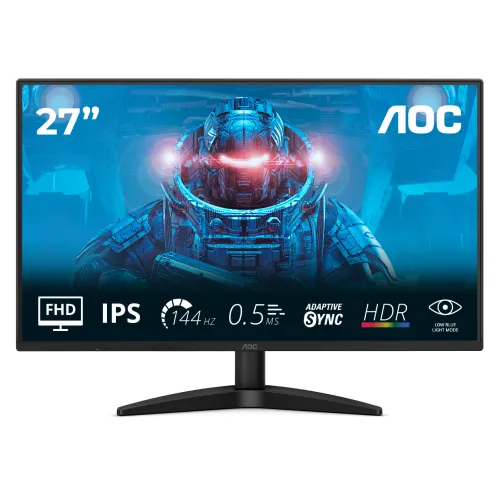
AOC 27B36X মডেল পরিচিতি ও ব্যবহার
AOC 27B36X হলো 27-inch Full HD IPS মনিটর, যার native resolution 1920 × 1080, aspect ratio 16:9 এবং সর্বোচ্চ refresh rate 144Hz। এটি 27B36X নামের নির্দিষ্ট B3 series মডেল; 27B36H, Q27B36X বা অন্য 27-inch AOC মডেলের তথ্য এর সঙ্গে মেশানো যাবে না। AOC-এর model leaflet এবং product page-এ 144Hz, IPS, HDR10, Adaptive-Sync, HDMI 1.4, DisplayPort 1.4 ও headphone output উল্লেখ আছে। এই listing-এ modelName/MPN শুধু 27B36X রাখা হয়েছে।
এটি বাসা বা অফিসে সাধারণ কাজ, একাধিক window, online class, video দেখা এবং casual gaming-এ ব্যবহার করা যায়। IPS panel ও 178° viewing angle একাধিক অবস্থান থেকে দেখার সুবিধা দেয়। 144Hz refresh দ্রুত scrolling এবং compatible game-এ motion-কে 60Hz-এর তুলনায় মসৃণ দেখাতে পারে; তবে কম্পিউটারকে সেই frame rate তৈরি করতে হবে। এটি gaming feature-সহ সাধারণ monitor—built-in speaker, USB hub, USB-C docking বা height-adjustable stand আছে ধরে নেওয়া উচিত নয়।
AOC leaflet-এ সর্বোচ্চ refresh rate 144Hz এবং Adaptive-Sync frequency range 48–144Hz দেয়া। HDMI input-এ HDMI 1.4 এবং DisplayPort input-এ DP 1.4 আছে। 144Hz পেতে উপযুক্ত graphics output, cable, resolution ও driver setting দরকার; port থাকলেই প্রত্যেক laptop বা console-এ একই mode নিশ্চিত হয় না। Monitor কেনার আগে নিজের device-এর supported resolution/refresh rate এবং প্রয়োজনীয় cable মিলিয়ে নিন।
ছবি, text ও panel-এর ব্যবহারিক দিক
27-inch screen-এ Full HD resolution মানে 1920 × 1080 pixels পুরো display জুড়ে ছড়িয়ে থাকে। AOC-এর specification অনুযায়ী pixel pitch 0.3114mm এবং density প্রায় 81.59 PPI। সাধারণ browsing, spreadsheet, video এবং game-এ এটি গ্রহণযোগ্য; তবে একই আকারের QHD panel-এর তুলনায় ছোট text ও fine UI কম ধারালো হতে পারে। আপনার কাজ যদি বড় spreadsheet, CAD, detailed photo edit বা খুব ছোট text নিয়ে হয়, তাহলে একই budget-এ 1440p monitor তুলনা করুন।
IPS panel-এ horizontal ও vertical viewing angle 178° (CR>10) হিসেবে দেয়া হয়েছে। এটি side angle থেকে ছবি দেখার সুবিধা দেয়, তবে viewing angle মানে সব অবস্থানে color accuracy এক থাকবে এমন নিশ্চয়তা নয়। Screen surface anti-glare, brightness 300 cd/m², static contrast 1500:1 এবং display 16.7 million color সমর্থন করে। AOC leaflet CIE1976 convention-এ sRGB color-space area 128.4%, DCI-P3 95.5% এবং Adobe RGB 91.5% উল্লেখ করে; area percentage-কে sRGB coverage বা calibrated color accuracy হিসেবে ব্যাখ্যা করবেন না।
মডেলটি HDR10 signal support করে, কিন্তু এই পণ্যের জন্য VESA DisplayHDR certification তালিকাভুক্ত নয়। HDR10 input গ্রহণ করতে পারা আর উজ্জ্বলতা, local dimming বা certified HDR performance এক জিনিস নয়। তাই HDR label-কে উন্নত HDR contrast-এর প্রতিশ্রুতি ধরে মূল্যায়ন করবেন না। Flicker-Free এবং Low Blue Light বৈশিষ্ট্য AOC উল্লেখ করেছে; এগুলো দীর্ঘক্ষণ ব্যবহারে পছন্দসই setting বেছে নিতে সাহায্য করতে পারে, কিন্তু break নেওয়া ও room lighting ঠিক রাখার বিকল্প নয়।
144Hz, Adaptive-Sync ও response time
144Hz display প্রতি সেকেন্ডে 144 refresh পর্যন্ত করতে পারে। Desktop settings-এ 1920 × 1080 resolution-এর সঙ্গে 144Hz নির্বাচন করুন এবং game-এর frame rate মিলিয়ে দেখুন। GPU যদি 144 frames per second দিতে না পারে, monitor তবুও refresh করতে পারে কিন্তু একই frame পুনরাবৃত্তি হবে বা variable refresh ব্যবহার হবে। HDMI 1.4 ও DisplayPort 1.4 input listing-এ আছে; supported refresh mode graphics card, cable, firmware এবং timing-এর ওপর নির্ভর করে। AOC-এর stated vertical sync range 48–144Hz।
AOC response time 4ms GTG এবং 0.5ms MPRT উল্লেখ করে। GTG হলো pixel shade transition-এর measurement; MPRT হলো moving-picture persistence সম্পর্কিত আলাদা metric। 0.5ms-কে সব transition-এ বাস্তব response বা system input lag মনে করা ঠিক নয়। MPRT/blur-reduction mode চালু করলে brightness বা variable refresh-এর ব্যবহার বদলাতে পারে। Overdrive setting অতিরিক্ত করলে inverse ghosting হতে পারে; নিজের game ও refresh rate-এ OSD preset পরীক্ষা করে ভারসাম্য রাখুন।
Adaptive-Sync compatible GPU-র frame delivery এবং monitor refresh-এর mismatch কমাতে পারে। AOC leaflet-এ 48–144Hz VRR range আছে; compatible GPU, driver, connection এবং setting প্রয়োজন। AOC page-এ NVIDIA G-SYNC support উল্লেখিত হলেও এটি আলাদা NVIDIA certification label কি না সেই নির্দিষ্ট model claim listing-এ অস্পষ্ট। তাই এখানে variable refresh compatibility-কে Adaptive-Sync হিসেবে বর্ণনা করা হয়েছে এবং “G-Sync certified” দাবি করা হয়নি।
সংযোগ, audio ও দৈনন্দিন setup
পেছনের input-এ একটি HDMI 1.4, একটি DisplayPort 1.4 এবং 3.5mm headphone output আছে। HDMI দিয়ে PC, laptop, console বা streaming device যুক্ত করা যায়; DisplayPort-ও PC graphics card-এর জন্য উপযোগী। DisplayPort cable প্যাকেজে থাকবে কি না retailer-এর box contents থেকে নিশ্চিত করুন। Headphone out-এ wired headphone বা powered speakers লাগানো যায়। AOC specification-এ built-in speaker নেই (N/A), তাই internal audio আশা করলে আলাদা speaker/headphone লাগবে।
AOC 27B36X-এর stand tilt adjustment দেয়; official leaflet অনুযায়ী angle প্রায় −5° থেকে +23°। Height adjustment, swivel বা pivot feature নিশ্চিত নয়। Desk ergonomics-এর জন্য screen-এর উপরিভাগ চোখের সমান রাখুন; বেশি উঁচু দরকার হলে VESA 100 × 100mm compatible monitor arm ব্যবহার করা যায়। Arm বা wall mount-এর load rating এবং screw length monitor-এর সাথে মানানসই কি না যাচাই করুন। Kensington lock slot-ও আছে; সেটি চুরি-প্রতিরোধী cable lock-এর anchor point।
Monitor external 19V DC power adapter-এ চলে; label-এ 19V, 1.31A, typical consumption 22W এবং off/standby-তে কম power উল্লেখ আছে। Supplied adapter ও region-compatible power cable ব্যবহার করুন। Power socket, cable bend এবং airflow ঠিক রাখুন; adapter ঢেকে রাখবেন না। VESA mount লাগানোর সময় stand খুলতে manufacturer নির্দেশনা অনুসরণ করুন। Screen পরিষ্কারে শুকনো microfiber cloth ব্যবহার করুন এবং liquid সরাসরি panel-এ spray করবেন না।
সুবিধা, সীমাবদ্ধতা ও কেনার আগে মিলিয়ে দেখা
মূল সুবিধা হলো একই monitor-এ 27-inch workspace, IPS panel, 144Hz refresh, Adaptive-Sync, anti-glare surface এবং HDMI/DisplayPort দুই ধরনের digital input পাওয়া। 300-nit brightness উজ্জ্বল indoor room-এ কাজে লাগে; 100 × 100mm VESA support বিকল্প mounting দেয়। AOC-এর listed response figures motion-focused game-এ আকর্ষণীয় হলেও সেটি আপনার GPU performance, panel setting এবং game latency নিশ্চিত করে না।
প্রধান সীমাবদ্ধতা: 27-inch আকারে 1080p pixel density QHD-এর চেয়ে কম, stand height/pivot adjustable নয়, built-in speaker নেই এবং USB-C/USB hub নেই। HDR10 label-কে certified HDR display হিসেবে ধরা যাবে না। Monitor-এর listed weight stand ছাড়া 2.83kg এবং standসহ 3.11kg; desk, arm বা wall mount নির্বাচনকালে standসহ/ছাড়া ওজনের পার্থক্য বিবেচনা করুন।
বাংলাদেশে Star Tech-এর exact model listing-এ ৳17,300 cash price, ৳19,250 regular price, in-stock status এবং তিন বছরের warranty দেখানো হয়েছিল; listing-এ দাম বা stock বদলাতে পারে। এই দাম BiponiBD-এর offer নয়। অর্ডারের আগে বর্তমান price, dead-pixel policy, warranty provider, panel replacement terms, seal condition এবং box contents বিক্রেতার কাছ থেকে লিখিতভাবে মিলিয়ে নিন। Warranty listing তিন বছর বললেও এটি manufacturer warranty নাকি local seller/service warranty তা নিশ্চিত করা জরুরি।
Display mode ও care checklist
প্রথম setup-এ monitor-কে supplied stand-এ স্থির desk-এর ওপর বসান, power adapter যুক্ত করুন, এরপর HDMI বা DisplayPort দিয়ে computer সংযোগ দিন। OSD menu-তে input source নির্বাচন করুন। Windows বা graphics driver-এ display resolution 1920 × 1080 এবং refresh rate 144Hz সেট করুন; macOS/Linux বা console-এ available mode আলাদা হতে পারে। Refresh rate option অনুপস্থিত হলে cable, connector, graphics output, driver ও display mode একে একে যাচাই করুন।
Color কাজের আগে brightness-কে room lighting-এর সঙ্গে মানানসই করুন; factory setting এবং panel unit ভেদে appearance বদলাতে পারে। AOC leaflet-এ color space percentage দেয়া থাকলেও factory calibration report বা Delta-E tolerance পাওয়া যায়নি, তাই professional proofing-এর জন্য colorimeter দিয়ে calibration এবং প্রয়োজনীয় gamut validation করুন। HDR10 signal ব্যবহার করলে operating system ও content source-এ HDR mode চালু করা যায়, কিন্তু SDR desktop-এ brightness/color বদলাতে পারে; প্রয়োজন না হলে বন্ধ রাখুন।
Adaptive-Sync কাজে লাগাতে GPU control panel-এ supported VRR option চালু করুন, game-এ frame cap প্রয়োজন হলে সেট করুন এবং tearing/stutter লক্ষ্য করুন। Flicker-Free/Low Blue Light mode পছন্দমতো বেছে নিন; warm color profile রাতের কাজের জন্য আরামদায়ক হতে পারে, তবে color-critical কাজের আগে standard profile-এ ফিরুন। Firmware update বা driver পরিবর্তন কেবল AOC/graphics vendor-এর official channel থেকে নিন। Long session-এ বিরতি, glare নিয়ন্ত্রণ এবং ঠিক viewing distance বজায় রাখুন।