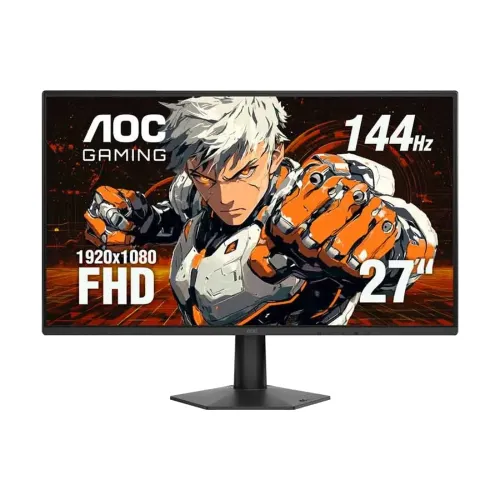
AOC 27G50F 27-inch FHD IPS Gaming Monitor
The AOC 27G50F is a 27-inch flat Full HD IPS gaming monitor with a native resolution of 1920 × 1080 and a 16:9 aspect ratio. Its WLED backlight, anti-glare surface and 178-degree horizontal and vertical viewing angles are listed by AOC. The large 27-inch panel provides a familiar desktop and gaming layout, while Full HD is less pixel-dense than QHD at the same size. The manufacturer lists a 0.3114 mm pixel pitch and 93 pixels per inch; users who sit very close or need fine text detail may prefer a higher-resolution panel.
AOC's current US 27G50F product page lists a standard 144Hz refresh rate with an overclock option up to 180Hz. An AOC user manual hosted on AOC's asset domain lists 1920 × 1080 at up to 144Hz and does not show the newer 180Hz overclock mode. Bangladesh seller listings also generally describe the monitor as 144Hz. This may reflect a document revision, firmware or regional SKU difference. The safe buying expectation is 144Hz; treat 180Hz as an optional manufacturer-listed overclock on the current page and confirm it is available on the exact unit, cable and graphics source before purchase.
The 144Hz refresh rate can make motion clearer than a standard 60Hz screen when a game and graphics card produce higher frame rates. A compatible PC can select the highest supported mode in its display settings. AOC lists HDMI 2.0 and DisplayPort 1.4, one of each. The current official page provides the port standards but does not specify a distinct refresh ceiling per input in the table reviewed here. The older manual explicitly documents 1920 × 1080 at 144Hz. Do not guarantee 180Hz over a specific input without confirmation from the product revision's manual or OSD.
Response-time figures need their method identified. AOC's current product page states 4ms GtG and 0.5ms MPRT. GtG describes a pixel transition measurement, while MPRT is a motion-picture response metric that can use backlight strobing or blur-reduction behavior. These values are not interchangeable. Some Bangladesh listings copy 1ms GtG or call 0.5ms an unspecified response time; use the exact official 4ms GtG and 0.5ms MPRT labels rather than presenting a generic 0.5ms pixel transition claim.
AOC lists typical brightness of 300 cd/m², static contrast of 1500:1, 16.7 million colors using 6-bit plus FRC, and 98% sRGB under CIE1931 on its current product page. The 6-bit + FRC description means frame-rate control is used for the marketed 16.7-million-color output; it is not native 8-bit panel depth. Some Bangladesh comparison and retailer pages state 100% sRGB, 94% DCI-P3, 90% NTSC, or a 1000:1 contrast ratio. Those differ from AOC's current exact-model page and may be copied from a variant or generic template. This listing uses the manufacturer values and does not imply factory calibration or measured color accuracy.
Adaptive Sync and MBR Sync are listed by AOC for compatible sources. The product is identified as NVIDIA G-SYNC Compatible on AOC's page, which is a compatibility claim, not a dedicated hardware G-SYNC module. AOC also lists HDR Ready and describes HDR10 support. HDR Ready is not the same as a VESA DisplayHDR tier certification; no DisplayHDR certification level is listed for this model. Flicker-Free and Anti-Blue Light features are also included in the official product feature list. Actual variable refresh and blur-reduction options depend on the GPU, driver, display mode and selected OSD settings.
The rear connections consist of one HDMI 2.0 input, one DisplayPort 1.4 input, and one audio output for headphones or external speakers. The monitor does not have built-in speakers according to local product listings; AOC lists an audio output but no internal speakers. There is no USB hub or USB-C video input listed. Connect the PC or console over HDMI or DisplayPort and attach headphones or powered speakers to the audio-out jack if sound is needed. The standard box contents and cable type can vary by regional bundle, so check the exact retailer package before ordering.
The supplied stand's ergonomic range should be described carefully. AOC's current product page lists tilt from -5° to +23°. The same page does not list built-in height, swivel or pivot adjustment, despite some Bangladesh seller specification tables claiming 130 mm height, pivot and swivel. Those more extensive movements may belong to another AOC model or stand revision. A 100 × 100 mm VESA mount is listed by AOC, with M4 × 10 screws. A compatible monitor arm can provide more ergonomic movement if the supplied stand is tilt-only.
AOC lists dimensions of 616 × 458.7 × 190 mm with the base and 616 × 358.8 × 36.2 mm without it. Product weight is 3.14 kg with the stand and 2.84 kg without it; packaged gross weight is 5.26 kg. The monitor uses an external 19V DC, 1.9A power supply. AOC gives typical on-mode power consumption of 21W and standby/off consumption of 0.3W. The product listing's shipping weight remains unset because freight packaging weight is not the same as net product weight.
For initial setup, connect the video cable, connect the external power adapter, select the matching input, and choose 1920 × 1080 with the desired refresh rate in the computer's display settings. If the 144Hz mode is missing, verify that the cable is properly seated, the GPU supports the output mode, and the correct display input and driver are selected. To try the current-page 180Hz overclock, check the OSD and exact product manual for that feature and confirm the computer can supply the mode. Do not expect every console to use 144Hz or 180Hz simply because the monitor supports high refresh on PC.
Bangladesh retailer offers observed for this review are about ৳18,900 to ৳19,500, with individual pages showing higher regular prices. These cash offers, stock notices and discounts can change. The existing BiponiBD variant price is retained. Local sellers commonly list a three-year warranty, but the issuing distributor, service center and claim conditions should be checked with the seller. Keep the box, invoice, serial label and warranty card, and confirm whether the carton is required for a claim.
Check the full model name 27G50F when comparing AOC products. This model is a 27-inch Full HD IPS gaming monitor with a 144Hz standard mode and a current AOC-listed 180Hz overclock option. Do not copy resolution, refresh rate, stand, response-time or connector specifications from the AOC 27G50Z, 27G4, 27G4H, 27G50X or other G-series models. A retailer's 130 mm height-adjustable stand or 1ms GtG claim should be used only if the exact model's local revision documentation supports it.
The AOC 27G50F suits buyers who prioritize a large 27-inch IPS view, fast refresh, variable-refresh support and a budget-friendly Full HD gaming display. Its main trade-offs are Full HD pixel density at 27 inches, a tilt-focused stand according to AOC's spec page, no built-in speakers, an external power brick and a published gamut/bit-depth specification below some competing marketing claims. A clear description of the default and overclock refresh modes, GtG versus MPRT terminology, and local warranty scope helps buyers compare it accurately with higher-resolution or more adjustable displays.