AOC 27G50Z 27-inch 260Hz FHD Fast IPS Gaming Monitor: Complete Buyer Guide
Who this monitor is for
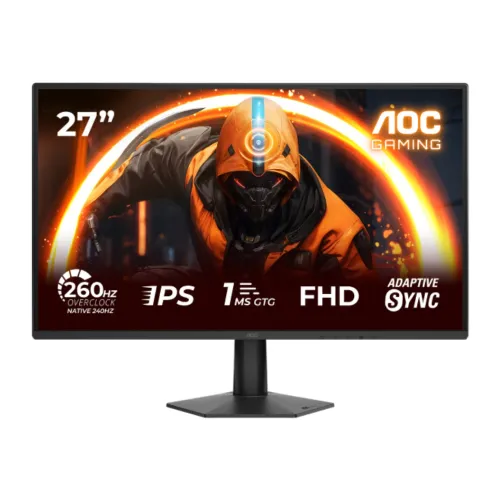
The AOC 27G50Z is a 27-inch desktop gaming monitor for PC players who prioritize high refresh rates and responsive motion at Full HD resolution. Its Fast IPS panel combines a 240Hz native refresh rate with a manufacturer-supported 260Hz overclock mode, so the higher mode depends on enabling overclocking and on a compatible graphics card, cable and input timing. The exact AOC model page identifies it as a 1920 × 1080 display with Adaptive Sync and 1ms GtG response. It can also serve for everyday browsing, study, office applications and video, but buyers should compare pixel density and desk viewing distance with their own needs. This guide distinguishes native operation from overclocked operation and reports panel facts separately from retailer marketing language.
Screen size, resolution and pixel density
The 27-inch diagonal screen uses a 16:9 aspect ratio and a native resolution of 1920 × 1080 pixels, commonly called Full HD or FHD. At this size the image has approximately 81.6 pixels per inch, calculated from the manufacturer-listed resolution and diagonal; an existing retailer specification incorrectly stated 92.3 PPI, so that value is corrected. Full HD is less demanding for a graphics card than QHD at a similarly high frame rate, which can help competitive games reach more frames per second. Text and fine interface details are not as dense as on a 27-inch 1440p monitor, however. Buyers should select scaling and viewing distance comfortably and should not mistake a 260Hz refresh figure for a higher resolution or greater image detail.
Fast IPS panel and backlight
AOC specifies a Fast IPS panel with a WLED backlight. IPS is the liquid-crystal panel technology, while WLED describes the backlight used to illuminate it; these terms are compatible rather than competing panel types. The specified 178-degree horizontal and vertical viewing angles are measured at a contrast ratio above 10 and describe how far off-center the picture can be viewed before contrast changes substantially. The display surface is antiglare with 3H hardness in the official specification. Antiglare treatment helps diffuse reflections from room lighting, although it cannot remove glare in every environment. The monitor is flat rather than curved. The retailer field “Display Type: WLED” is therefore retained with an explanatory panel/backlight distinction, instead of incorrectly replacing the Fast IPS panel type with WLED.
Refresh rate and overclock mode
The listed 240Hz native refresh rate is the standard highest refresh mode, while 260Hz is available as an overclocked mode. Enabling the overclock setting may require choosing the appropriate option in the monitor menu and then selecting a supported resolution and refresh rate in the computer operating system or graphics driver. The host GPU, operating system, cable, port and game must all support the chosen signal timing. DisplayPort 1.4 is the recommended connection to explore the highest refresh modes; verify the graphics card output and the manual before purchase if the 260Hz mode is essential. If the computer cannot render enough frames, the panel can still refresh at a high rate but the game will not produce that many unique frames. The monitor does not increase a game's own frame rate.
Response time, Adaptive Sync and motion
AOC rates the 27G50Z at 1ms grey-to-grey response and 0.3ms MPRT. These figures use different measurement methods and should not be compared as if they were identical; MPRT commonly describes a motion-blur reduction mode and its behavior can differ from ordinary pixel transitions. The monitor also supports Adaptive Sync, which coordinates refresh timing with a compatible graphics card within supported limits to reduce tearing. AOC's official feature list identifies Adaptive Sync; a retailer database has placed that same feature under “G-Sync Support”, which does not establish NVIDIA G-SYNC certification. Use the general Adaptive Sync name in the listing. Actual motion clarity depends on the selected overdrive or motion mode, game frame rate, connection and individual visual sensitivity; no setting guarantees zero blur or zero input delay.
Brightness, contrast and HDR10
The official AOC specification lists 300 cd/m² typical brightness, a 1000:1 static contrast ratio and an 80 million to one dynamic contrast ratio. The catalog's “MEGA DCR” label is a marketing description of dynamic contrast, not a replacement for the static 1000:1 measurement. AOC lists HDR10 input support. HDR support indicates that compatible HDR10 signals can be accepted; it does not by itself certify high peak brightness, local dimming, a particular HDR certification tier or reference-grade HDR reproduction. The manufacturer lists global dimming, so there are no individually controlled local dimming zones. Keep brightness appropriate to the room, and compare the panel's 300-nit rating with ambient light if the monitor will be used near bright windows. HDR appearance varies with source content, operating-system configuration and game settings.
Color reproduction and eye-comfort modes
AOC lists 16.7 million display colors, 121.5% sRGB, 92.3% DCI-P3 and 87.8% Adobe RGB color-space area or coverage values using CIE 1976. These percentages describe the cited color-space measurement method and should not be rewritten as calibrated accuracy or as a guarantee that every unit reproduces every color identically. No model-level factory calibration certificate or verified Delta E tolerance was found, so professional color-critical workflows should use a calibrated screen and suitable measurement tools. The specification also lists Flicker-Free and Low Blue Mode technologies. These modes can change the screen's light output and appearance; they do not guarantee that a user will avoid eye fatigue. Regular breaks, sensible brightness and comfortable room lighting remain useful alongside display settings.
Inputs, audio and compatibility
The rear I/O includes one HDMI 2.0 input, one DisplayPort 1.4 input and one 3.5mm audio output jack. The model supports HDCP 2.2. HDMI can connect compatible PCs and other devices, while DisplayPort is a useful connection when configuring the highest PC refresh modes; check the manual and source device output capability for exact timing support. The audio connector is an output for headphones or external speakers, not evidence of built-in speakers. The exact-model manual lists an earphone output and no integrated speaker specification, so plan on headphones or powered speakers for sound. If the connected computer routes sound through HDMI or DisplayPort, choose the relevant monitor audio device in the operating system and connect headphones or external speakers to the audio output. Cables supplied in the box are region and bundle dependent; AOC's listed box contents include a 1.5-metre DisplayPort cable and a power cable.
Stand, mounting and dimensions
The supplied stand supports tilt adjustment from approximately −5 to +20 degrees. AOC does not list height adjustment, swivel or pivot as included stand functions, so do not assume the display can be raised or rotated using the stock base. The monitor supports a 100 × 100 mm VESA wall or arm mount pattern, subject to use of a compatible mount and safe installation. The official dimensions with the stand are 616 × 459.9 × 190 mm (width × height × depth); without the stand they are 616 × 360 × 36.2 mm. Product weight is 3.16 kg with the stand and 2.82 kg without it. For delivery planning, the separate retail package measures 690 × 480 × 124 mm and gross package weight is 5.5 kg in the official AOC specification; retailer packaging or regional bundle may differ.
Power and included contents
AOC describes an external power supply and lists 23W typical on-mode consumption on its product page. The exact-model manual for a regional documentation set specifies 19V DC, 1.9A, 21W typical at default settings, maximum consumption up to 43W, and standby no more than 0.3W; Bangladesh retailer tables instead list 12V DC, 2.5A and 23W. Because these official and regional adapter ratings differ, the safe normalized value is external power, and the supplied adapter label should determine replacement compatibility. AOC lists a 1.5-metre DisplayPort cable and a power cable in the box. Further paperwork or regional bundle items should be confirmed with the seller. The manufacturer information sheet gives a three-year warranty period; Bangladesh seller service may be routed through a local importer or distributor. Keep the invoice and serial details required by the seller.
Bangladesh price and local warranty context
The saved BiponiBD variant price is ৳25,900 and remains unchanged. On 4 November 2026, Skyland's product page showed ৳21,899 as its instant cash discount price (regular ৳24,800) and marked the model in stock, while Sell Tech showed ৳25,900 (regular ৳28,500) and marked it in stock. Star Tech's indexed category listing showed ৳25,900, but its live product availability was not independently confirmed in this check. The comparison range is therefore based on the two direct product pages that displayed current price and stock; it is a dated market reference, not an offer attached to this catalog product. AOC's official spec page lists a three-year warranty, and both checked Bangladeshi sellers also advertise three years. Confirm the seller's service route, stock and final checkout price before buying because promotions can change.
Gaming setup and practical expectations
To use a high refresh mode, connect the monitor to a graphics output that supports the desired resolution and refresh rate, select 1920 × 1080 and the refresh rate in the system display settings, and enable the monitor's 260Hz overclock only if required. Start with DisplayPort 1.4 when exploring 240Hz or 260Hz PC output; the exact available modes depend on the graphics card, cable and monitor configuration. Adaptive Sync requires compatible graphics hardware and supported settings. A 260Hz panel can make cursor movement and fast action appear smoother when a game supplies high frame rates, but it will not make a slower PC render more frames. FHD is easier to drive than QHD at high frame rates, though it provides less screen detail at 27 inches. For console play, check the console's supported resolution and refresh modes; the product's maximum overclock is not automatically available to every source.
Who should consider another screen
The 27G50Z is best matched to competitive PC gaming where a high refresh rate is more valuable than a sharper 1440p image. People who prioritize detailed text, fine creative work, broad ergonomic movement or integrated audio may prefer another model with higher pixel density, a height-adjustable stand or verified built-in speakers. The stand's tilt range can still be adjusted and the VESA pattern provides an alternative mounting route. HDR10 input support should be understood as a format capability rather than an assurance of dramatic HDR brightness, since the rated brightness is 300 cd/m² and dimming is global. No independent calibration result was identified. The monitor can handle general computer use and entertainment, but buyers comparing it for design work should evaluate color accuracy and resolution needs separately from refresh rate.
Purchase checklist
Before ordering, confirm the exact model code 27G50Z, the seller's current cash/card price, local stock, invoice and three-year warranty coverage. Check whether the PC has DisplayPort 1.4 and a GPU capable of the intended frame rate. If 260Hz is needed, verify the monitor overclock setting and compatible signal timing in the manual; otherwise the standard native mode is 240Hz. Plan desk width and depth around the 616 × 459.9 × 190 mm stand footprint and the monitor's 27-inch diagonal. The listed monitor weighs 3.16 kg with its stand; shipping uses a larger carton listed at 690 × 480 × 124 mm and 5.5 kg gross. Confirm cable contents and connect the bundled power supply. For headphones or external speakers, use the audio output jack and select the monitor's audio device in the computer settings.