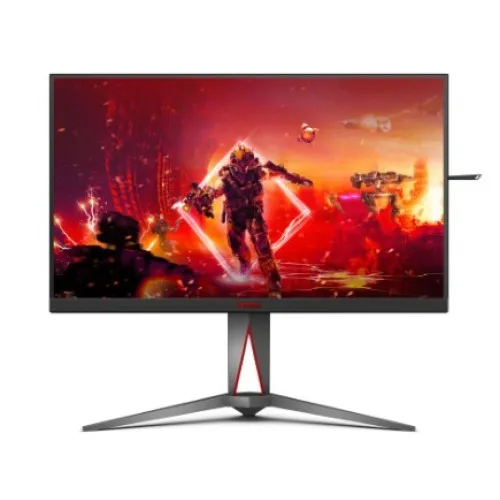
AOC AGON AG275QZE overview
The AOC AGON AG275QZE is a 27-inch QHD gaming monitor built around a Fast IPS panel. Its 2560 × 1440 resolution provides a clear 16:9 image, while the DisplayPort input supports up to 260Hz in an overclocked mode. AOC specifies QHD up to 144Hz through HDMI and marks the 260Hz mode as DisplayPort-only. The panel is rated for 1ms grey-to-grey response and a minimum 0.5ms MPRT under specific Motion Blur Reduction conditions. Other manufacturer-listed features include Adaptive-Sync with FreeSync support, VESA DisplayHDR 400, two HDMI 2.0 inputs, two DisplayPort 1.4 inputs, USB ports, Picture-in-Picture and Picture-by-Picture. This listing keeps the high refresh rate’s input and overclock conditions explicit so buyers can match the monitor to their graphics card, cable and preferred settings.
QHD image and 27-inch workspace
The 27-inch panel has a native 2560 × 1440 resolution and a 16:9 aspect ratio. This QHD format offers more detail than Full HD at the same screen size and remains a common target for gaming PCs. AOC lists a pixel pitch of approximately 0.2331mm, 178-degree horizontal and vertical viewing angles, and a three-sided slim-bezel design. The actual sharpness and interface scale depend on viewing distance, operating-system scaling and game settings. QHD places a higher rendering load on the graphics card than 1080p, especially when targeting the monitor’s very high refresh modes. Before purchasing, compare the games and graphics card with the desired resolution and frame rate; the monitor can display up to 260Hz only when the complete system can deliver a compatible signal.
260Hz overclocked DisplayPort mode
AOC describes the product as QHD 260Hz overclocked. Its exact-model specification distinguishes the inputs: HDMI supports 2560 × 1440 up to 144Hz, while DisplayPort supports 2560 × 1440 up to 260Hz with overclock enabled. A suitable DisplayPort 1.4 connection and a compatible GPU are therefore required for the maximum mode. Once connected, select the 2560 × 1440 resolution and available refresh rate in the computer’s display settings, and enable the monitor’s overclock function if the on-screen menu requires it. AOC notes that users should reduce the refresh rate if the overclocked mode causes an error. The 260Hz figure is a maximum mode, not a guarantee that every source, cable, game or adapter will provide that signal.
Response time and motion features
The official specification lists 1ms typical GTG response and 0.5ms minimum MPRT. These figures describe different measurements. AOC notes that the 0.5ms MPRT minimum is measured with Motion Blur Reduction enabled under a specified overdrive condition, while GTG is measured with another overdrive setting. It is more useful to understand the conditions than to treat either number as a universal description of every transition. The monitor also provides Motion Blur Reduction and low input lag options. Settings may affect brightness, image appearance or compatibility with variable refresh behavior, so compare them in the games and configuration you actually use. A high refresh rate can make movement appear smoother when the game produces enough frames, while response behavior still varies by transition and selected overdrive mode.
Adaptive-Sync, FreeSync and gaming controls
AOC lists Adaptive-Sync support including AMD FreeSync. Variable refresh can help coordinate a compatible graphics card’s frame output with the monitor within the supported range, reducing tearing when enabled and configured correctly. The result depends on the GPU, driver, input connection, game frame rate and monitor settings. Other gaming options include FPS and RTS presets, crosshair, Shadow Control, Game Color, low input lag and a live frame counter. These are optional display tools; they do not improve the game’s underlying frame rate or replace in-game settings. Choose the options that suit the title and leave them disabled if they introduce unwanted artifacts or alter the image more than desired. Firmware, driver and graphics settings can influence how these functions appear on a particular PC.
HDR400 and color specifications
AOC lists VESA DisplayHDR 400 certification, 350 cd/m² typical brightness in SDR and 450 cd/m² typical brightness in HDR. The static contrast ratio is specified at 1200:1 typical and 1100:1 minimum, with a separate 80-million-to-one dynamic contrast figure. Dynamic contrast is not equivalent to static contrast or local dimming. AOC also lists 10.7 hundred million colors, 99% sRGB coverage, 92% DCI-P3 coverage and average Delta E below 2 measured in sRGB mode. The coverage percentages describe how much of a color space is covered, while gamut-area figures use a different basis and should not be substituted for coverage. HDR appearance depends on the source, operating system and game. This specification is useful for gaming and general media, but buyers needing high-end local-dimming HDR should compare a display designed for that requirement.
Ports and multi-device setup
The AG275QZE provides two HDMI 2.0 and two DisplayPort 1.4 video inputs. AOC lists a USB Type-B upstream connection and two USB 3.2 Gen 1 Type-A downstream ports, with the yellow downstream port supporting fast charging. The USB-B upstream cable must connect the monitor’s hub to the computer before downstream peripherals can communicate with that host. An audio output is available for headphones or powered speakers; no built-in speakers are listed in the exact-model specification. Four video inputs can keep multiple sources connected, but the active source must still be selected and each device remains subject to the input’s resolution and refresh limits. Check the included cable list with the seller, especially when planning to use the DisplayPort 260Hz mode or the USB hub.
DSC and 10-bit color at high refresh
AOC specifies that DisplayPort 1.4 HBR3 with a graphics card supporting Display Stream Compression is required to achieve QHD at 240Hz or 260Hz with 10-bit RGB or YCbCr 4:4:4 output. Without that capability, the computer may offer a different refresh rate, color depth or chroma format. This depends on the graphics card, port, driver, cable and selected display mode. If 260Hz is missing from the list, check the DisplayPort path, enable the monitor’s overclock setting, update the graphics driver and review the GPU’s DSC support. For routine use, a lower refresh rate may be a practical trade-off if a particular source cannot produce the maximum mode. HDMI uses its separately specified QHD 144Hz maximum; a connector adapter does not necessarily preserve DisplayPort’s 260Hz capabilities.
PIP, PBP and Light FX
Picture-in-Picture and Picture-by-Picture allow two input sources to be shown together in a movable inset or split layout. The available input combinations and image size depend on the monitor’s on-screen menu, and each view may use a reduced layout compared with a single full-screen source. AOC’s Light FX provides rear ambient lighting with multiple effects and colors, while G-Menu software can adjust supported monitor settings from a computer. The monitor also lists a retractable headphone hook, quick-release stand and carrying handle. These convenience features support a more organized gaming desk, although lighting and software preferences are optional. Install utilities only from AOC’s official support page for the exact AG275QZE model and confirm operating-system compatibility.
Stand, pivot and mounting
The adjustable stand supports 150mm of height travel, swivel from −20 to +20 degrees, tilt from −5 to +23 degrees and pivot through 90 degrees in either direction. It also supports a standard 100 × 100mm VESA mount. The stand lets the display move between landscape and portrait positions, though many games and desktop layouts are designed for landscape. Leave clearance for the wide base and attached cables when rotating or swiveling the panel, and verify that a third-party arm can support the display. A local retailer lists a 6.33kg weight with stand and dimensions of 613.4mm wide, 411.1–561.1mm high and 231.8mm deep with the stand. Those physical figures are retailer-provided and can vary by listing; confirm the manual or product packaging before selecting an arm or fitting the monitor into a tight space.
Brightness, eye-care and power
AOC lists flicker-free technology and low blue light modes. These settings may suit different preferences, but comfort also depends on room lighting, screen position, font size and breaks. The stated 350 cd/m² SDR and 450 cd/m² HDR brightness are typical manufacturer ratings. A retailer specification lists 27W typical consumption, up to 115W and no more than 0.5W standby; actual consumption depends on brightness, selected mode and connected USB devices, and these figures should be checked against the local regional label. The display accepts 100–240V, 50/60Hz input according to the exact-model listing. Use a properly rated outlet and the supplied power cable, keep ventilation unobstructed and avoid interpreting a typical power number as the exact draw in every operating condition.
Bangladesh price and warranty
Four Bangladesh retailer pages checked on 6 November 2026 showed the AOC AG275QZE at ৳53,500. Price and stock can change, and seller warranty terms may differ by distributor, invoice and serial number. This is a dated market reference, not a BiponiBD store offer. The current catalog MSRP of ৳53,500 and its three-year warranty statement remain unchanged. Before ordering, ask the seller to confirm current stock, the exact AG275QZE model, included DisplayPort and USB upstream cables, written warranty coverage and the return or dead-pixel policy. AOC’s regional service terms can differ; keep the invoice and product serial number. Do not assume that an overseas warranty statement applies to a Bangladesh purchase unless the seller confirms it in writing.
Who should consider the AG275QZE
The AG275QZE may suit competitive PC gamers who want QHD resolution, a Fast IPS panel and a very high refresh mode, plus users who connect several sources or use variable refresh features. Its four video inputs, stand adjustments, USB hub and PIP/PBP expand a gaming and streaming desk. It is less suitable for someone who expects 260Hz from HDMI, needs a USB-C laptop dock or relies on built-in speakers; those functions are not listed. The 260Hz mode also depends on DisplayPort, overclock configuration and a compatible system, with DSC required for specific 10-bit high-refresh output. HDR400 is an entry certification rather than a promise of advanced local-dimming performance. Match these constraints to your computer, game library, desk and audio setup before deciding.
Setup checklist for QHD high refresh
Connect the graphics card directly to DisplayPort 1.4 with a suitable cable, then select 2560 × 1440 and the highest stable refresh mode supported by the full system. Enable overclock in the on-screen menu if needed, and reduce the mode if AOC’s stated stability condition is not met. For 10-bit color at QHD 240Hz or 260Hz with RGB or YCbCr 4:4:4, confirm DSC support in the graphics card. Use HDMI when connecting sources that support up to QHD 144Hz. Connect USB-B upstream to the PC before plugging peripherals into the monitor’s USB-A ports. Enable Adaptive-Sync in the graphics driver and monitor settings when the game and GPU support it. Finally, position the stand for comfortable viewing, select a suitable picture mode, and confirm warranty and cable details with the local seller.