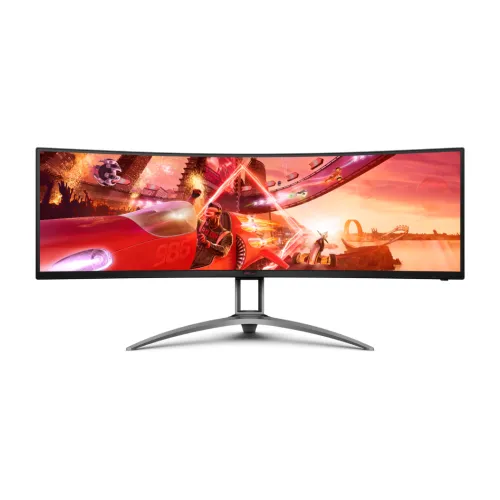
The AOC AGON AG493QCX is a 49-inch-class super-ultrawide curved monitor built around a 32:9 aspect ratio and native Dual Full HD resolution of 3840×1080. Its broad horizontal canvas is intended for users who want one seamless display across a game, editing timeline, wide spreadsheet or several windows. It combines a VA panel with WLED backlighting, 1800R curvature, a 144Hz maximum refresh rate over DisplayPort, AMD FreeSync Premium and VESA Certified DisplayHDR 400. The specification set also includes two HDMI 2.0 and two DisplayPort 1.4 inputs, a four-port USB hub, Picture-by-Picture and Picture-in-Picture modes, two 5W speakers and an adjustable stand. This page keeps model-specific AG493QCX facts separate from the higher-resolution AG493UCX, whose similar name can lead to incorrect search listings.
32:9 screen, Dual FHD resolution and model distinction
The AG493QCX is marketed as 49 inches. AOC’s official material gives 48.8 inches in one product listing and 48.9 inches or 124cm in a regional leaflet, so the safe description is a 49-inch class monitor. The 32:9 panel has 3840×1080 pixels, also called Dual FHD or DFHD. That resolution provides the same total pixel grid as two 1920×1080 Full HD screens placed side by side, with no physical middle bezel. Its 0.3114mm pixel pitch is approximately 81.7 pixels per inch, which is less dense than a 49-inch 5120×1440 panel. The distinction matters: AOC AG493UCX is a separate DQHD model at 5120×1440 and has different connectivity. A seller title that says DQHD for AG493QCX does not override the manufacturer model specification. Buyers should compare the exact model code and resolution row before ordering.
VA panel, 1800R curve and surface
AOC specifies a vertical alignment VA panel with WLED backlighting and an 1800R curvature radius. The curve follows the broad horizontal screen and can help keep the far left and right areas within a comfortable viewing arc when seated near the center. The panel has an antiglare surface treatment with 3H hardness, and AOC lists 178-degree horizontal and vertical viewing angles under its stated contrast-ratio condition. VA technology is known for higher native contrast than many standard IPS panels, and this model is rated at 3,000:1 static contrast. Viewing experience still depends on seating position, room lighting and the content on screen. A 49-inch display is physically much wider than a conventional desktop monitor, so users should center the chair and screen rather than sit close to one edge. The curve does not turn the display into two separate panels; it remains one continuous LCD image area.
Brightness, contrast, HDR and color
AOC’s AG493QCX specification lists 400 cd/m² typical brightness, 3,000:1 static contrast and an 80-million-to-one dynamic contrast figure. It is certified as VESA Certified DisplayHDR 400. The HDR certification, brightness rating and dynamic contrast number describe different things; they should not be treated as interchangeable measurements. AOC’s leaflet lists 16.7 million colors and gamut-area figures of 121% sRGB, 90% DCI-P3, 91% Adobe RGB and 98% NTSC using the stated color-space conventions. A gamut percentage is not by itself proof that each color mode is calibrated for professional work. For editing, choose the intended color mode and calibrate the full computer-to-display workflow where accuracy matters. For games and video, HDR behavior depends on source mastering, operating system settings, the selected monitor picture mode and the amount of bright content. Keep the panel in a lighting environment where its antiglare surface and brightness suit the room.
Refresh rate, motion response and input limits
The product is rated for a maximum 144Hz refresh rate, but the input used determines which native timing is available. AOC’s manual timing table supports 3840×1080 up to 144Hz through DisplayPort 1.4 and up to 120Hz through HDMI 2.0. The 4ms GtG figure measures a gray-to-gray pixel transition, while 1ms MPRT is a separate moving-picture response rating that uses a motion-blur reduction mode. These numbers should not be read as end-to-end game input latency. Actual refresh options depend on the graphics card or console, port, cable, driver and operating-system display settings. PC players seeking the full 144Hz should connect by DisplayPort and confirm the chosen mode in the display settings. HDMI remains useful for consoles and secondary sources, with the limitation that native resolution is specified up to 120Hz. The lower DFHD pixel count also requires fewer pixels per frame than 5120×1440, though game performance still depends on the GPU and settings.
Adaptive-Sync and gaming controls
AOC lists AMD FreeSync Premium support and Adaptive-Sync across a 48–144Hz variable-refresh range. Variable refresh can align the monitor refresh with compatible GPU frame output, reducing tearing within supported operating conditions. Some Bangladesh retailer tables label the product as G-Sync supported. AOC’s official listing does not identify a dedicated NVIDIA G-SYNC certification for this model, so the retailer wording should be understood as a compatibility claim rather than proof of a separate certified feature. The display also includes gaming controls through its on-screen menu and AOC G-Menu software. The AGON series feature set includes Low Input Lag, Shadow Control, game color adjustments, a crosshair option and frame counter, along with gaming presets. Available functions can differ with the input, software, firmware and regional model. These display controls can adjust the picture but do not increase the graphics card’s frame rate or change the signal limits of HDMI and DisplayPort.
Ports, four-port USB hub and audio
The rear connections include two DisplayPort 1.4 inputs and two HDMI 2.0 inputs. The USB hub has one USB Type-B upstream connector to connect the monitor to a computer and four USB 3.2 Gen 1 Type-A downstream ports for peripherals. One downstream port supports fast charging as described in AOC documentation. There is also a 3.5mm headphone output. The legacy catalog incorrectly placed the USB 3.2 hub description under a USB Type-C attribute. AG493QCX does not list a USB-C connector and should not be described as a USB-C display, USB-C dock or laptop charging monitor. To use the downstream hub, connect the USB-B upstream cable to the host system. The monitor supports Picture-by-Picture and Picture-in-Picture so that more than one video source can be shown at the same time, subject to menu modes and selected input combinations. AOC also lists two integrated 5W speakers; the headphone jack is available for private listening or an external audio setup.
Stand, dimensions, VESA and desk planning
The supplied stand provides 100mm of height adjustment, tilt from approximately −3.5 to +13.5 degrees and swivel of about −15.5 to +15.5 degrees. Pivot rotation is not supported on this 49-inch widescreen design. AOC lists a 100×100mm VESA mounting pattern for compatible hardware. With the base attached, the display measures 1194.4mm wide, 467.6–567.6mm high and 308.0mm deep. Without the base, the published dimensions are 1194.4×369.4×153.24mm. The listed net weight with stand is 14.4kg, while packaged gross weight is 20.8kg. The standard published sheet does not separately establish the stand-removed weight, so this page does not guess that figure. Before buying, measure the usable desk width and depth, wall clearance, viewing distance and route for cables. Any arm or wall mount must support the display’s actual weight and lever load; check the monitor manual and mount rating rather than relying on screen size alone.
Power specification and regional discrepancy
AOC lists 100–240V AC, 50/60Hz input and typical on-mode power consumption of 80W. The same specification family reports less than 0.5W in standby and 0.3W when switched off. The power-supply type is inconsistent across regional product material: AOC’s current product page lists external while an AOC EU leaflet identifies internal, and a Bangladesh retailer table also uses external. This record preserves the discrepancy in its specification notes instead of promising a particular adapter arrangement for every shipment. Check the rear label, power cord and box contents for the unit being supplied. Typical consumption is a reference rather than a fixed draw; settings and displayed content can affect measured use. Use a correctly grounded outlet and the power components supplied for the regional product. Do not assume an adapter brick is included or absent based on a different market leaflet.
Bangladesh price, warranty and box checks
The BiponiBD catalog variant remains at ৳122,000. On 6 November 2026, the checked Bangladesh retailer pages showed a market snapshot of approximately ৳121,500–৳122,000: Star Tech showed ৳121,500, while TechLand BD and PC House showed ৳122,000 in the research snapshot. These prices are seller references and may change with promotions, stock, payment method or delivery terms. The AG493QCX product identity remains AOC model AG493QCX; barcode, GTIN and origin were not confirmed for the local shipment and are intentionally left blank. Checked Bangladesh listings state a three-year warranty, but buyers should inspect the invoice and written warranty terms to identify the responsible seller or distributor. Confirm stock, model code on the carton, input cables, USB upstream cable and any wireless remote before purchase. AOC’s official box contents and local shipment contents can differ by market. Price comparisons are more useful when seller availability and exact model are checked on the same day.
Who should consider the AG493QCX
This model can suit users who want a very broad 32:9 image for racing or flight simulation, wide video timelines, multiple browser panes or side-by-side applications. The single panel avoids a bezel between separate displays, while PbP and PiP can show multiple sources when the selected mode supports them. It is also a practical fit for a PC whose graphics card can drive 3840×1080 at the desired frame rate through DisplayPort. Buyers seeking sharper text, more vertical workspace, USB-C connectivity, laptop charging or 144Hz over HDMI should compare another model before purchase. The similar AG493UCX offers a different 5120×1440 specification and should not be mistaken for this one. The AG493QCX requires a large desk footprint and careful seating distance; a close viewing position makes it harder to scan the full width. Consider speakers as convenient built-in audio rather than a substitute for a dedicated sound system. Match your source ports, desk, warranty expectations and target games to the published specifications before deciding.
Key features
- 49-inch-class 48.8/48.9-inch viewable super-ultrawide screen with a 32:9 aspect ratio, curved 1800R VA panel and Dual Full HD native resolution of 3840×1080.
- A 3840×1080 workspace equivalent to two 1920×1080 Full HD screens side by side, without a center bezel interrupting a timeline, spreadsheet or game view.
- WLED backlight, antiglare surface with 3H hard coating, 178° horizontal/vertical viewing angles, 400 cd/m² typical brightness and 3,000:1 static contrast.
- Up to 144Hz at native resolution through DisplayPort 1.4; HDMI 2.0 supports up to 120Hz at native 3840×1080. Response ratings are 4ms GtG and 1ms MPRT.
- VESA Certified DisplayHDR 400, 16.7 million colors and AOC leaflet gamut figures of 121% sRGB, 90% DCI-P3, 91% Adobe RGB and 98% NTSC.
- AMD FreeSync Premium / Adaptive-Sync with a 48–144Hz variable refresh range and Low Framerate Compensation, as specified by AOC.
- Two DisplayPort 1.4 and two HDMI 2.0 inputs, four USB 3.2 Gen 1 Type-A downstream hub ports with one fast-charge port, one USB-B upstream and 3.5mm headphone output; no USB-C.
- Picture-by-Picture and Picture-in-Picture, wireless remote control, two 5W speakers, 100mm height adjustment, tilt and swivel, and 100×100mm VESA mounting.
Pros
- The 32:9 3840×1080 screen combines two Full HD desktop areas without a center bezel, useful for racing views and wide work timelines.
- Dual DisplayPort 1.4 inputs support 144Hz at native resolution while the lower DFHD pixel count is less demanding than 5120×1440.
- The VA panel is rated at 3,000:1 static contrast, with 400 cd/m² brightness and official VESA DisplayHDR 400 certification.
- AOC specifies AMD FreeSync Premium; PbP/PiP, four USB-A downstream ports, a USB-B hub connection and four video inputs add flexibility.
- Built-in 2×5W speakers, wireless remote, headphone output and an adjustable stand are included according to AOC documentation.
Considerations
- 3840×1080 provides less vertical workspace and lower pixel density than the 5120×1440 AG493UCX; those two similarly named models should not be confused.
- HDMI 2.0 is limited to 120Hz at native resolution; use DisplayPort 1.4 to reach the advertised 144Hz maximum.
- There is no USB-C input, USB-C video or USB-C laptop charging; the USB hub needs a USB-B upstream connection.
- At roughly 1.2m wide and 14.4kg with its stand, the display needs substantial desk space and a suitably rated mount if the stand is removed.
- AOC lists 4ms GtG and 1ms MPRT; the MPRT strobing mode is not the same measure as GtG and can change brightness or viewing experience.
Frequently asked questions
What is the native resolution of the AOC AGON AG493QCX?
It is Dual Full HD (DFHD), 3840×1080 pixels, with a 32:9 aspect ratio. This is different from the 5120×1440 Dual QHD resolution of the separate AG493UCX.
Is the AG493QCX a 49-inch monitor?
It is sold as a 49-inch-class display. AOC materials list approximately 48.8 or 48.9 inches viewable depending on the regional document, and 124cm.
What is the refresh rate on DisplayPort and HDMI?
At 3840×1080, AOC’s manual specifies up to 144Hz through DisplayPort 1.4 and up to 120Hz through HDMI 2.0. Source device and cable capability also matter.
What are the 1ms MPRT and 4ms GtG ratings?
AOC lists 4ms gray-to-gray pixel response and 1ms Moving Picture Response Time. MPRT is a motion-blur mode rating and is not the same measurement as GtG.
Does the AG493QCX have HDR?
Yes. AOC specifies VESA Certified DisplayHDR 400 and 400 cd/m² typical brightness. HDR results depend on the source content, settings and screen conditions.
Does it support AMD FreeSync or NVIDIA G-Sync?
AOC officially identifies AMD FreeSync Premium and Adaptive-Sync. Some sellers mark G-Sync support; treat that as possible Adaptive-Sync compatibility over DisplayPort, not a separate NVIDIA certification.
Does it have USB Type-C?
No. The official connectivity specification describes a USB-B upstream connection and four USB Type-A downstream hub ports. It does not list a USB-C connector.
What ports are included?
AOC lists two HDMI 2.0 inputs, two DisplayPort 1.4 inputs, one USB-B upstream, four USB 3.2 Gen 1 Type-A downstream ports and a 3.5mm headphone output.
Can I use two computers on the screen at once?
AOC lists Picture-by-Picture and Picture-in-Picture. These modes can show more than one connected source; the final layout and available input combinations depend on the monitor settings.
Does the monitor include speakers and a remote?
AOC product documentation lists two built-in 5W speakers and a wireless remote control. It also has a 3.5mm headphone output. Check the regional box contents with the seller.
What are the dimensions and stand adjustments?
With the stand it measures 1194.4×(467.6–567.6)×308.0mm and weighs 14.4kg. The stand has 100mm height adjustment, −3.5° to +13.5° tilt and approximately ±15.5° swivel; VESA is 100×100mm.
What is the AOC AG493QCX price and warranty in Bangladesh?
The checked seller snapshot dated 6 November 2026 showed roughly ৳121,500–৳122,000 and seller-stated three-year warranties. Prices, stock and written warranty terms can change, so confirm them with the seller.