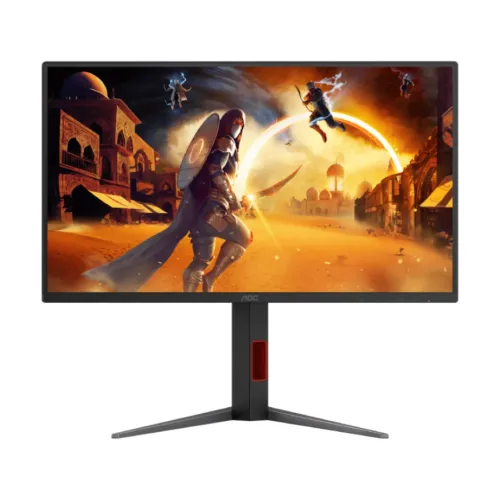
AOC Q25G4S 24.5-Inch 2K QHD (2560 × 1440) 320Hz Fast IPS Esports Gaming Monitor — Complete Technical Buyer Guide
The AOC Q25G4S is a high-density 24.5-inch competitive esports and multimedia gaming monitor that pairs a native 2K QHD (2560 × 1440) resolution with an ultra-fast 320Hz refresh rate on a flat Fast IPS (In-Plane Switching) panel. Traditionally, competitive FPS players had to choose between 24.5-inch Full HD (1920 × 1080) monitors for compact tournament sightlines or larger 27-inch QHD (2560 × 1440) displays for sharper image resolution. By packing 3.68 million QHD pixels into a tournament-standard 24.5-inch diagonal footprint (~120 PPI pixel density with a fine 0.2115 mm pixel pitch), the AOC Q25G4S delivers razor-sharp 1440p clarity alongside 1ms GtG pixel overdrive, 0.3ms MPRT with MBR Sync, Adaptive-Sync / G-SYNC Compatible variable refresh rate support, VESA Certified DisplayHDR 400 (up to 450 cd/m² peak HDR brightness), 2 × HDMI 2.1 plus 1 × DisplayPort 1.4 inputs, and a full height-adjustable stand with tilt, swivel, and pivot.
Model Disambiguation: This product is the AOC Q25G4S, a 24.5-inch QHD monitor rated at 320Hz. Check the complete model code when comparing it with the different Q25G4SR and 25G4K products, whose specifications are not interchangeable. This is a wired desktop display and has no cellular connection.
1. 24.5-Inch 2K QHD (2560 × 1440) High-PPI Architecture & Fast IPS Panel
The defining optical advantage of the AOC Q25G4S is its combination of a compact 24.5-inch 16:9 screen and native 2560 × 1440 (QHD) resolution:
- Ultra-Crisp ~120 PPI Pixel Density (0.2115 mm Pixel Pitch): Whereas a 24.5-inch 1080p monitor has a 0.2832 mm pixel pitch (~90 PPI) and a 27-inch 1440p monitor has a 0.2331 mm pixel pitch (~108.8 PPI), the 24.5-inch QHD panel on the Q25G4S compresses 3,686,400 pixels into a 0.2115 mm pixel pitch (~119.9 PPI). This produces noticeably cleaner distant character silhouettes, sharper sniper-scope reticles, and crisp desktop typography.
- Tournament-Standard 24.5-Inch Sightlines: Competitive players in Counter-Strike 2, Valorant, Apex Legends, Rainbow Six Siege, and Overwatch 2 favor the 24.5-inch form factor because the screen can present a full game image in a compact desktop footprint; whether this size suits you depends on desk distance and preference.
- Fast IPS Viewing Angles & Anti-Glare Surface: The Fast IPS liquid-crystal layer maintains consistent color saturation and gamma across 178° (H) / 178° (V) viewing angles (CR > 10). An Anti-Glare matte polarizer diffuses ambient room light and desk reflections.
2. 320Hz Refresh Rate, 1ms GtG, 0.3ms MPRT & AOC MBR Sync Technology
Per the official AOC Q25G4S product page and specification leaflet, the monitor combines high refresh frequency with advanced motion-blur reduction:
- 320Hz Maximum Refresh Rate (3.125ms Frame Interval): Updating 320 times per second cuts the time between frames to just 3.125 milliseconds (compared with 16.67 ms at 60Hz, 6.94 ms at 144Hz, and 4.17 ms at 240Hz), delivering fluid motion tracking and low scanout latency during high-speed camera flicks.
- 1ms GtG & 0.3ms MPRT Response Times: The Fast IPS panel is rated at 1ms GtG (Gray-to-Gray) for rapid pixel transitions and 0.3ms MPRT (Moving Picture Response Time) for minimal perceived eye-tracking persistence.
- Adaptive-Sync, G-SYNC Compatible & MBR Sync: The Q25G4S supports VESA Adaptive-Sync and is confirmed in the official AOC Q25G4S leaflet and product page as G-SYNC Compatible to synchronize the monitor's refresh rate with GPU frame output and eliminate screen tearing. Crucially, the official AOC Q25G4S page highlights MBR Sync (Motion Blur Reduction Sync)—an advanced AOC feature that enables MPRT backlight strobing to work concurrently with Adaptive-Sync variable refresh rate, reducing motion blur across fluctuating frame rates without introducing tearing.
3. VESA DisplayHDR 400 (350 cd/m² SDR / 450 cd/m² HDR) & Wide Color Gamut
Beyond competitive esports speed, the AOC Q25G4S offers strong brightness and wide-gamut color reproduction for AAA single-player titles, streaming media, and creative workflows:
- VESA Certified DisplayHDR 400 (350 cd/m² SDR / 450 cd/m² HDR): Official AOC specifications and the Q25G4S leaflet confirm VESA Certified DisplayHDR 400 support. The backlight delivers a bright 350 cd/m² typical luminance in SDR and reaches up to 450 cd/m² peak luminance in HDR, paired with a native 1000:1 static contrast ratio (correcting the concatenated 1000:11000:1 typo and misplaced Refresh Rate/Brightness strings present in unverified retail scrapes).
- Wide Color Gamut Coverage: The panel reproduces 16.7 million colors across 124% sRGB (CIE 1931), 102% NTSC (CIE 1976), and 93% DCI-P3 (CIE 1976), delivering rich primary saturation while preserving natural sRGB color balance.
4. Inputs, Audio, Console Use & HDCP
AOC lists three digital video inputs: two HDMI 2.1 and one DisplayPort 1.4. Its Q25G4S leaflet lists the optimum QHD mode as 2560 × 1440 at up to 320Hz alongside these interfaces. The manufacturer's public material does not provide a separate complete timing table for every graphics card, console, cable, and input combination, so check the source device's supported modes and use a certified cable when targeting the highest refresh settings. The panel itself is QHD; it is not a 4K display.
- PC connection: A compatible graphics card and DisplayPort 1.4 cable can be used for high-refresh QHD gaming. Select 2560 × 1440 and a supported refresh rate in the operating system or graphics control panel. If 320Hz is not offered, check the cable, GPU output, driver, monitor OSD, and selected color-depth settings.
- HDMI connections: The two HDMI 2.1 sockets are suitable for compatible PCs, laptops, and consoles. Console resolution and frame-rate options depend on the console, game, and output configuration; the monitor's QHD panel does not turn a lower-resolution game into native 4K.
- Audio output: The rear 3.5mm earphone jack carries audio supplied through a connected source. AOC lists no built-in speakers, so connect headphones or powered speakers, or use the audio output on the PC or console.
- Signal protection: AOC specifies HDCP 2.2 support for HDMI and DisplayPort. The display has no USB hub listed in the official leaflet.
Before purchase, confirm that the source has the required output, the desk has room for the stand, and the seller's package includes any cable needed for the intended setup. The box contents should be confirmed with the selling retailer because bundles can vary by market.
5. On-Screen Controls, Game Modes & Eye-Care Features
The Q25G4S has several display controls that help users adjust the picture for different sources and tasks. AOC's model page identifies six game modes and a Settings KeyPad for changing profiles. The available on-screen menu labels and combinations can depend on firmware and the active input.
- Six game modes and Settings KeyPad: AOC describes presets for FPS, racing, RTS, and user-customized profiles. The keypad is intended to make switching profiles and adjusting monitor features easier.
- Low Input Lag mode: AOC lists this mode for prioritizing responsive display behavior. Its effect depends on the monitor's selected image settings and the connected source.
- Picture-by-Picture (PbP): This feature displays two connected sources simultaneously in separate areas of the screen. Each input may be scaled to fit its assigned part of the display.
- Game Color: AOC describes controls for color saturation and grey levels, allowing the user to adjust the look of supported content.
- Flicker-Free and Low Blue Light: Both are listed for this model. These are comfort-oriented display features; comfort varies by person, room lighting, brightness, viewing distance, and session length.
These monitor options are separate from game-specific graphics settings. They cannot guarantee a particular frame rate or competitive result; those depend on the game, graphics hardware, software configuration, and the player's preferences.
6. Stand Adjustments, Dimensions, Weight & Power
The supplied stand is adjustable in four directions, allowing users to set the display height and angle before long gaming or work sessions. The rear housing and stand include a red accent and cable-routing detail visible in the six product images. These visual details do not imply extra electronic functions.
- Height: up to 130mm of adjustment.
- Tilt: -5° to 23°.
- Swivel: -30° to 30°.
- Pivot: -90° to 90°, for portrait or landscape placement.
- VESA and security: 100 × 100mm wall/arm mounting pattern and a Kensington lock slot are listed. Check the arm's load rating and included screws before mounting.
- Dimensions with stand: 560.1mm wide × 381.1–499.4mm high × 240.0mm deep.
- Dimensions without stand: 560.1mm wide × 325.3mm high × 52.2mm deep.
- Package size: 780mm wide × 481mm high × 162mm deep.
- Weight: 4.3kg net with stand, 2.9kg without stand, and 7.58kg gross with packaging, per the AOC product page and leaflet.
- Power: internal 100–240V, 50/60Hz supply; typical consumption is 23W. AOC also lists 0.3W standby/off in the leaflet. Actual consumption can vary with settings and use.
Measure desk depth and monitor-arm clearance before installation. The stand's full height range requires space above the desk, and the panel should be lifted by its frame rather than the screen surface. If wall mounting, disconnect power and follow the mount manufacturer's instructions.
7. Bangladesh Price, Warranty & What to Confirm
On 2026-11-05, the AOC Q25G4S product pages at Skyland and Star Tech showed ৳32,700 and ৳32,900 respectively. These are time-sensitive retailer observations, not guaranteed current offers. The saved BiponiBD variant MSRP remains ৳32,900. The same retail pages list a three-year warranty, but a retailer listing does not establish identical coverage for every seller or distributor. Confirm the warranty provider, service location, dead-pixel policy, parts coverage, stock, and delivery terms with the seller before ordering.
Ask the seller to confirm the contents of the box, including the power cable, any display cable, and mounting hardware. Accessories can vary across markets and inventory lots, so do not assume a cable is included unless the current local listing or seller confirms it.