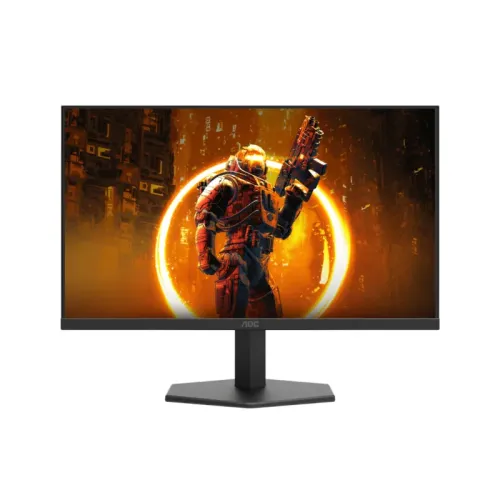
The AOC Q27G11E is a 27-inch QHD Fast IPS gaming monitor with a documented maximum of 180Hz over DisplayPort 1.4. AOC lists QHD at up to 144Hz over HDMI 2.0, 1ms GtG, 0.5ms MPRT, Adaptive-Sync, 300 cd/m² typical brightness, 99% sRGB and 90% DCI-P3. Its stand tilts but does not list height adjustment, swivel or pivot. The official leaflet also says there are no integrated speakers or USB hub. A few Bangladesh listings claim 210Hz; AOC’s exact-model leaflet supports 180Hz, so the product name and slug have been corrected.
QHD resolution and screen size
The 27-inch screen displays 2560 × 1440 pixels in a 16:9 layout. QHD provides more workspace and fine detail than Full HD at the same diagonal, which can help with gaming interfaces, browser tabs and side-by-side windows. The actual desktop area depends on operating-system scaling and app layout. QHD also increases graphics workload compared with Full HD. Consider the graphics card and game settings you use before expecting the display to reach its maximum refresh while rendering demanding scenes.
Fast IPS panel and image presentation
AOC specifies a Fast IPS panel with a 178-degree horizontal and vertical viewing angle and anti-glare treatment. IPS is commonly selected for broad viewing angles and color performance, but these specifications do not guarantee uniform brightness or identical color across the entire panel. Desk lighting and viewing position affect the image. The display is flat and measures 27 inches; it is not a curved model. For consistent viewing, position the monitor centrally and minimize bright reflections from windows or overhead lamps.
180Hz and input-specific refresh limits
The official leaflet gives separate timings for the two digital inputs: DisplayPort 1.4 supports QHD at 180Hz, while HDMI 2.0 supports QHD at 144Hz. Those figures are the manufacturer reference for the exact Q27G11E, rather than a general assumption that both ports have the same bandwidth. Some retailers list this product as 210Hz, but the cited leaflet does not support 210Hz. Use DisplayPort for the documented QHD 180Hz mode and verify the selected mode in the computer settings.
Source performance and frame rate
A 180Hz display refresh does not make a PC render 180 frames per second. The CPU, GPU, game engine, resolution and graphics settings determine the frame rate. When a game produces fewer frames, the monitor continues to show the signal but does not receive a new unique frame on every refresh. Competitive titles may reach higher frame rates with tuned settings, while graphically demanding games may require compromises. Adaptive-Sync can help within its supported range, but it does not increase rendering performance.
Response times and motion clarity
AOC lists 1ms GtG and 0.5ms MPRT. Gray-to-gray and MPRT describe different aspects of display response, and neither number is a promise that every transition takes exactly that time. MPRT modes may affect brightness or viewing comfort depending on implementation. Motion clarity also depends on refresh, frame rate, overdrive and content. Compare available settings in the games you play and avoid equating minimum response time with total input latency from controller to screen.
Brightness, contrast and HDR10
AOC lists 300 cd/m² typical brightness, 1000:1 typical contrast and 80,000,000:1 dynamic contrast. Static and dynamic contrast are different measures; the dynamic number should not be interpreted as ordinary fixed-scene contrast. The leaflet includes HDR10 but does not state VESA DisplayHDR certification or a peak HDR luminance. Treat HDR10 as signal support rather than proof of a high-brightness HDR experience. Use SDR for ordinary desktop work unless your system and content are set up for HDR.
Color gamut and color depth
AOC lists 99% sRGB and 90% DCI-P3 coverage with 16.7 million colors. These are manufacturer gamut and color-count specifications, not independent measurements of accuracy, calibration or panel uniformity. For web content, sRGB is a common target; wide-gamut video can use a broader color space when managed correctly. For photo and design work, use a colorimeter if matching color is important, and keep the application profile and export target consistent.
Adaptive-Sync
The Q27G11E includes Adaptive-Sync according to AOC. This feature can coordinate refresh with a compatible graphics source within supported operating limits and may reduce tearing. The cited leaflet does not provide a full VRR range or identify certification for a particular graphics brand. Compatibility depends on GPU, driver, DisplayPort/HDMI mode and settings. Confirm the monitor appears as a variable-refresh display and test the exact connection instead of assuming every console or GPU exposes the same feature.
Ports and audio output
The monitor has one HDMI 2.0 input and one DisplayPort 1.4 input. AOC lists HDCP 2.2 for both. It also includes a headphone output, but the leaflet explicitly says there are no built-in speakers and no USB hub. External speakers or headphones are needed for audio playback. Select the monitor’s audio output in the source settings if supported; a video connection alone does not mean every device routes audio automatically.
Stand, tilt and VESA mounting
The included stand tilts from -5° to +20°. The AOC leaflet does not list height adjustment, swivel or portrait pivot, so do not rely on retailer pages that describe an ergonomic stand without checking the exact Q27G11E document. A 100 × 100mm VESA pattern allows a compatible arm or wall mount. Confirm the mount’s load capacity, fasteners and clearance, then leave enough slack for power and video cables.
Dimensions and weight
AOC lists the monitor at 614.6 × 460.6 × 197.6mm with stand and 614.6 × 362.3 × 49.3mm without stand. Weight is approximately 4.01kg with the stand, 3.60kg without and 5.34kg packaged. Measure the desk depth and available height before installation, including the space needed for cable bends and the tilt range. A separate VESA arm can change the footprint, but the arm’s capacity and plate must match the monitor.
Power and operating setup
The Q27G11E uses an external 19V DC, 2.2A power supply and has typical power consumption of 42W according to the leaflet. Keep the adapter accessible and avoid bending the DC cable sharply. For QHD 180Hz, use DisplayPort 1.4 and a source capable of the listed timing. Install the graphics driver, choose 2560 × 1440, and then select 180Hz from the display settings. If the mode is missing, check the cable, port and monitor OSD before changing unrelated settings.
Bangladesh listings and the 180/210Hz conflict
Bangladesh retailers disagree on the refresh rate in their product titles: some say 180Hz and others 210Hz. AOC’s exact Q27G11E leaflet states 180Hz at QHD via DisplayPort and 144Hz at QHD via HDMI. Star Tech snapshots showed a 210Hz listing at ৳28,500 out of stock and a separate 180Hz listing at the same price; Ultra Technology showed a 180Hz variant. Treat the manufacturer leaflet as authoritative for refresh, verify the printed model label, current stock and warranty with the seller, and do not assume a 210Hz firmware mode.
Who should consider this display
The Q27G11E may suit gamers who want QHD resolution, a Fast IPS panel, a high refresh over DisplayPort and Adaptive-Sync. It may be less suitable if you need QHD 180Hz through HDMI, an adjustable-height stand, integrated speakers, a USB hub or independently certified HDR. Compare those requirements with your PC, desk and audio setup. The exact input timing and stand movement can matter more in daily use than a headline response-time number.
Care and model identification
Check the rear label for Q27G11E and use the exact AOC manual or leaflet for setup. Keep the purchase invoice, serial and warranty documents. Power off before cleaning and use a soft lint-free cloth; do not spray liquids directly onto the display. For long sessions, position the monitor to limit glare and take regular visual breaks. If a retailer advertises 210Hz, ask for official model-specific documentation before relying on the claim; the reviewed AOC leaflet specifies 180Hz maximum.
Key features
- 27-inch Fast IPS panel with native 2560 × 1440 QHD and 16:9 aspect ratio.
- AOC leaflet specifies 180Hz at QHD through DisplayPort 1.4.
- AOC leaflet specifies QHD up to 144Hz over HDMI 2.0; it does not specify 210Hz.
- Fast motion specifications: 1ms gray-to-gray and 0.5ms MPRT, which are distinct measurement methods.
- 300 cd/m² typical brightness and 1000:1 typical contrast.
- Color coverage listed at 99% sRGB and 90% DCI-P3 with 16.7 million colors.
- Adaptive-Sync and HDR10 are listed by AOC; HDR certification is not shown in the leaflet.
- One HDMI 2.0 and one DisplayPort 1.4 input, both with HDCP 2.2.
- 3.5mm headphone output; manufacturer leaflet says no built-in speakers and no USB hub.
- 100 × 100mm VESA mounting and tilt adjustment from -5° to +20°.
- The included stand does not list height adjustment, swivel or pivot.
- External 19V/2.2A power adapter and typical 42W power consumption.
Pros
- QHD resolution on a 27-inch IPS display gives more workspace and detail than Full HD.
- 180Hz over DisplayPort can deliver fluid motion when the graphics system can render high frame rates.
- Fast IPS, 99% sRGB and 90% DCI-P3 specifications support vivid general viewing.
- Adaptive-Sync is included for supported variable-refresh configurations.
- The simple tilt stand and 100 × 100mm VESA pattern allow basic desk placement or arm mounting.
Cons and limitations
- QHD refresh is limited to 144Hz over HDMI 2.0; use DisplayPort for the documented 180Hz mode.
- The official leaflet specifies 180Hz, while some local listings claim 210Hz; treat 210Hz as unverified and correct the title.
- The included stand has tilt only, with no listed height, swivel or pivot adjustment.
- The display has no built-in speakers and no USB hub.
- HDR10 support does not establish VESA HDR certification or high peak luminance.
Frequently asked questions
What is the correct refresh rate for the Q27G11E?
AOC’s official leaflet specifies 2560 × 1440 at 180Hz over DisplayPort 1.4 and 2560 × 1440 at 144Hz over HDMI 2.0. Some retailer titles say 210Hz, but the cited manufacturer documentation does not support that claim.
What are the screen size and resolution?
The Q27G11E is a 27-inch Fast IPS monitor with 2560 × 1440 QHD resolution and a 16:9 aspect ratio.
What cable should I use for QHD 180Hz?
Use DisplayPort 1.4 with a compatible graphics output. AOC lists QHD up to 144Hz over HDMI 2.0. The source, cable and selected monitor mode must support the timing.
What do 1ms GtG and 0.5ms MPRT mean?
AOC lists 1ms gray-to-gray and 0.5ms MPRT. These use different measurement approaches and do not guarantee every pixel transition or total system input latency.
Does the Q27G11E support Adaptive-Sync?
Yes. AOC lists Adaptive-Sync. Actual behavior depends on compatible graphics hardware, driver, port and supported operating range.
Does it support HDR?
AOC lists HDR10. The leaflet does not identify VESA DisplayHDR certification or specify a peak HDR brightness, so HDR10 support alone does not guarantee a high-impact HDR result.
What are the brightness and contrast specifications?
AOC lists 300 cd/m² typical brightness, 1000:1 typical contrast and an 80,000,000:1 dynamic contrast ratio. Static and dynamic ratios are different specifications.
What color coverage does it offer?
AOC lists 99% sRGB and 90% DCI-P3, with 16.7 million colors. Gamut coverage does not prove calibration accuracy or uniformity.
Which input ports are available?
The leaflet lists one HDMI 2.0 and one DisplayPort 1.4 input, both with HDCP 2.2, plus a headphone output. There is no USB hub.
Does it have built-in speakers?
No. AOC’s leaflet says speakers are not included. The 3.5mm output can connect headphones or external speakers.
Can the stand be adjusted?
The included stand supports tilt from -5° to +20°. AOC does not list height adjustment, swivel or pivot; VESA 100 × 100mm can be used with a separate compatible mount.
Why was the product URL and title changed from 210Hz?
The earlier catalog title and slug said 210Hz, but AOC’s exact Q27G11E leaflet specifies 180Hz. The corrected listing uses 180Hz. Confirm stock and local warranty directly with the Bangladesh seller.
Source note: AOC exact-model leaflet and product information were checked 2026-11-08T22:04:21.773Z. Local retailer refresh titles conflict with the manufacturer’s 180Hz specification; local price and stock are retailer observations, not a BiponiBD offer. No independent hands-on test is claimed.