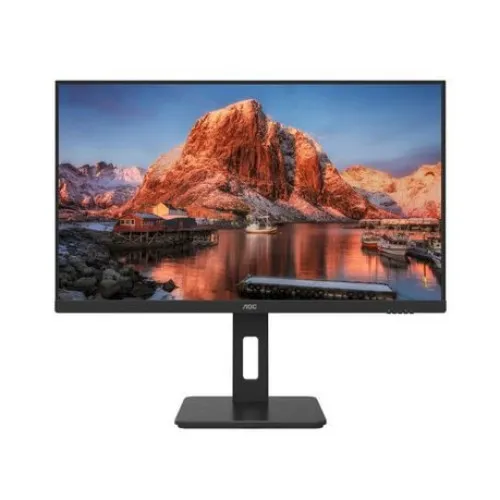
AOC Q27P10 27" 2K QHD 100Hz IPS Gaming Monitor: AOC Q27P10 27-inch QHD 100Hz IPS monitor. Read the full model-specific guide below.
AOC Q27P10 at a glance
The AOC Q27P10 is a 27-inch, flat IPS monitor with a native 2560 × 1440 QHD resolution and a native 100Hz refresh rate. AOC’s published product information describes this model as an IPS QHD display and states that the maximum resolution was updated from QHD 75Hz to native QHD 100Hz. In Bangladesh, retailers market it for gaming as well as office and home use. That makes it useful as a general-purpose screen for a modern desktop, a laptop with a suitable video output, or a console that supports its available input modes. The important product identity is Q27P10: it should not be confused with AOC models whose similar names have different panel technologies, refresh rates, stand features or resolutions. This guide uses AOC’s model-specific product specifications as the reference and calls out retailer details that conflict with that reference.
QHD resolution, screen size and clarity
The 27-inch diagonal screen uses a 16:9 aspect ratio and shows 2560 × 1440 pixels. This is commonly called QHD or 2K in local monitor listings. At this size, pixel pitch is approximately 0.2331mm and pixel density is about 109 pixels per inch. Fine text, browser interfaces and spreadsheets therefore appear more detailed than on a 27-inch Full HD panel, while icons and text may be smaller at the same operating-system scaling. Users can adjust Windows, macOS or Linux display scaling to balance workspace and readability. The panel’s active viewing area is approximately 596.736mm wide by 335.664mm high. A flat 16:9 screen suits side-by-side windows, timelines, general productivity and video playback. Buyers should select QHD in their computer’s display settings and use a cable and graphics output capable of carrying 2560 × 1440 at the intended refresh rate.
Native 100Hz and refresh-rate expectations
AOC’s product page records that this monitor was updated to native QHD 100Hz from an earlier QHD 75Hz specification. The correct listing for the currently specified revision is therefore 2560 × 1440 at up to 100Hz, rather than 75Hz or an assumed overclock. A higher refresh rate can make pointer movement, scrolling and supported games look smoother than a 60Hz display, but the computer still needs to render the content at a matching frame rate to show every refresh distinctly. Set 100Hz in the operating system or graphics driver after connecting the monitor; if the option does not appear, check the cable, port, driver and selected resolution. Retailer pages sometimes retain old or contradictory specification text, so buyers should check the actual product and on-screen information. No evidence reviewed for this update establishes an above-100Hz overclock mode for Q27P10.
IPS panel, viewing angles and color
AOC specifies an IPS-technology panel and 178-degree horizontal and vertical viewing angles. IPS is useful when several people view the screen or when the display is placed off-center, because the image generally maintains its appearance over a wider viewing angle than many basic TN panels. The official Q27P10 page lists 16.7 million display colors, 99% sRGB coverage based on CIE 1931 and average color accuracy of ΔE below 2 measured in sRGB mode. AOC says this color-accuracy result comes from its laboratory and sRGB setting. Those are manufacturer measurements, not a promise that every individual retail unit has a separately supplied calibration report. Listings that call the panel 1.07 billion colors conflict with AOC’s model-specific published 16.7-million figure and should not be repeated without verification of a different revision. For professional color work, confirm the actual unit, mode and calibration requirements before relying on its color output.
Brightness, contrast and HDR10
AOC lists a typical brightness of 300cd/m². The product specification gives typical and minimum contrast values of 1300:1 and 910:1, and a dynamic contrast figure of 50,000,000:1. The typical and minimum figures describe different conditions; the dynamic contrast number is a processing-related specification and should not be presented as the monitor’s normal static black-to-white ratio. AOC’s updated model notes also list HDR10 support and an HDR engine. This means compatible HDR10 input can be processed; it does not by itself prove VESA DisplayHDR certification, local-dimming zones or the high sustained brightness of a specialist HDR monitor. The official material reviewed here does not establish a local-dimming backlight or a DisplayHDR certification level. Buyers should treat HDR10 as input-format support and expect conventional IPS contrast and 300-nit typical brightness.
Response time and motion
AOC publishes a typical 4ms gray-to-gray response time measured in its laboratory with Overdrive set to Strong. This is a specific measurement condition, not a guarantee that every pixel transition always takes exactly four milliseconds. The overdrive setting affects how quickly a pixel changes and can also affect overshoot, so users should compare the available monitor-menu modes with the games or desktop motion they use. A 100Hz refresh rate updates the image more often than 60Hz, while response time describes pixel transitions; the two measurements are related to motion clarity but are not interchangeable. Retailer copy claiming that the specification eliminates ghosting or input lag overstates what a 4ms response-time figure proves. For typical gaming, smoothness also depends on the PC or console frame rate, input mode, game settings and the connection used.
Stand ergonomics and mounting
The included ergonomic stand is a major practical feature of this model. AOC describes four directions of adjustment: approximately 130mm of height travel, left-right swivel up to about 175 degrees in each direction, portrait pivot from -90 to +90 degrees and tilt from -5 to +20 degrees. A quick-release design is also listed. The official tilt range is the value used here; some Bangladesh retailer tables instead say +35 degrees, which conflicts with AOC’s model page and should not be copied as verified. Height adjustment can help align the top of the screen with the user’s eye line, while pivot is useful for portrait documents and long code files. The cabinet also supports a 100 × 100mm VESA mounting pattern. Check the monitor-arm load rating and screw fit before mounting, and allow room for the stand’s footprint and the cables behind the screen.
Ports, devices and audio
AOC’s Q27P10 specification lists two HDMI 2.0 inputs with HDR support, one DisplayPort input with HDR support, and an audio output. Bangladesh listings commonly identify the DisplayPort as version 1.2, while AOC’s model page labels it simply as DisplayPort with HDR; confirm the port label on the delivered unit if the exact DP revision is essential to a workstation or graphics-card setup. The HDMI inputs are identified as HDMI 2.0 on AOC’s product specification. The 3.5mm audio connection is an output for headphones or powered external speakers; AOC lists no built-in speakers. The reviewed specifications do not list USB-C video, USB charging, a USB hub or KVM switching. Two HDMI sockets are convenient when a PC and a console or streaming device stay connected at the same time. Select the correct source from the monitor’s input menu when changing devices.
Flicker reduction and low-blue-light modes
AOC lists flicker-reduction technology and low-blue-light settings among the Q27P10’s features. These options can let users tailor brightness and color tone for their environment, but they do not remove the need for comfortable room lighting, sensible brightness and regular breaks. AOC’s product information describes several preset picture or scene modes, color enhancement controls and Clear Vision processing for lower-resolution scanned images and documents. Such processing options are useful to know about, but image enhancement may change the source appearance and should be adjusted to taste. The China-market certification list includes TÜV Rheinland Low Blue Light; a local package may carry regional marks or materials that differ. Do not interpret an eye-care feature as a medical guarantee. Start with a comfortable brightness level, use the low-blue-light mode if its warmer image suits the task, and compare the result with the normal sRGB or color mode for color-critical work.
Dimensions, weight and desk fit
AOC’s published dimensions for the model with stand are approximately 613.4mm wide, 417.3 to 547.3mm high as the stand moves, and 200.1mm deep. The height span corresponds to the stand’s adjustment. AOC lists a net weight of about 5.52kg with the stand and about 3.61kg without it; a Bangladesh retailer also lists 5.52kg. Allow additional desk width for cables and room to swivel the panel. The stand can rotate the display, so check that nearby shelves, speakers or a second monitor will not block movement. Net product dimensions are distinct from shipping-carton dimensions. The product record leaves the variant’s shipping length, width and height blank because a verified local carton measurement was not available in the catalog snapshot. Buyers who need courier or desk-fit certainty should ask the seller for the actual package size and confirm that the delivered unit is Q27P10.
Power use and package details
The AOC Q27P10 is powered by an external 12V, 3A DC supply. AOC lists typical power consumption at about 34W and standby consumption at no more than 0.3W; retailers list figures around 32W and 0.5W, so published regional and measurement values are not fully consistent. The monitor’s product information names the power adapter, HDMI cable and basic documentation among the package contents, but exact accessories may differ by regional bundle. Check the carton and warranty papers at delivery, and use the supplied power adapter with the specified voltage and current. Keep the packaging if the seller or local warranty provider requires it for a claim. Bangladesh retailer pages advertise a three-year warranty, with at least one listing explicitly saying the box is required for a claim. Confirm whether coverage is brand or importer service, which service location handles the product, and which documents are required before purchase.
Gaming, productivity and device suitability
For PC gaming, the combination of QHD resolution, IPS viewing angles and a 100Hz maximum can offer a useful balance between image detail and motion smoothness. The graphics card must be powerful enough to render the chosen game at 2560 × 1440 and a frame rate near the monitor’s refresh rate to make full use of 100Hz. The Q27P10 can also serve for office software, coding, study, web browsing and video because QHD provides more desktop workspace than Full HD at a similar physical size. The adjustable stand is helpful when alternating between long reading sessions and portrait documents. Console users should check the console’s supported resolution and refresh modes rather than assume every title uses 100Hz. HDR10 signal handling is available according to AOC, but buyers wanting a strong HDR cinema effect should look for verified DisplayHDR certification and local dimming instead of relying on an “HDR” label alone.
Bangladesh price and warranty checks
The catalog variant price of ৳28,799 is preserved. Current retailer pages reviewed for this audit show Star Tech at ৳28,799 and Ryans at a special price of ৳28,800, although retailer stock and checkout prices can change; the observed comparison range is therefore about ৳28,799–৳28,800 at the time checked. Tech Land also advertises the model around ৳28,000–৳28,799, but its page has conflicting in-stock and out-of-stock text and conflicting product details, so it is not used to set the verified comparison floor. The retailer pages reviewed advertise a three-year warranty, while AOC’s mainland China service terms do not establish Bangladesh coverage. Confirm local importer or brand-backed warranty, box requirements, dead-pixel policy, stock, delivery and final payable amount with the seller. This distinction keeps the catalog offer price separate from an approximate market comparison.
Who should consider the Q27P10
Consider this monitor if you want a 27-inch QHD desktop display, an IPS panel, native 100Hz and a stand that supports height adjustment, swivel, pivot and tilt. It is a flexible fit for a desk shared between productivity, casual gaming and media playback, especially when several devices can remain connected over its two HDMI inputs and DisplayPort. Check alternatives if you need USB-C laptop docking, a built-in speaker, KVM switching, refresh rates above 100Hz or a certified high-brightness HDR experience. Buyers who are unusually sensitive to text scaling should try a 27-inch QHD screen or review operating-system scaling options before purchase. When comparing listings, prioritize the exact Q27P10 model, QHD 100Hz native mode, 4ms GtG test condition, the AOC stand range, verified ports and the warranty provider. The product-specific details above help distinguish useful specifications from conflicting retailer fields.