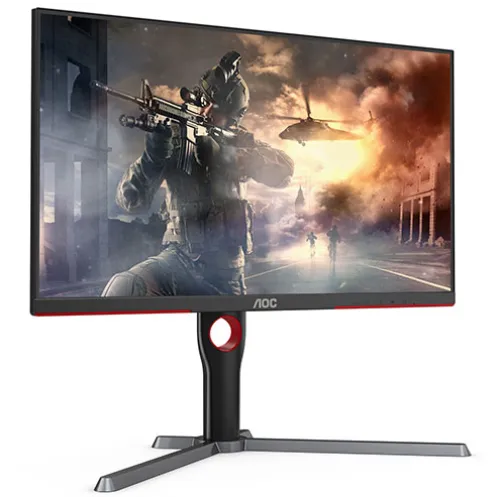
AOC U27G10: 27-inch 4K gaming display
AOC U27G10 is a 27-inch IPS gaming monitor built around a 3840 × 2160 4K UHD panel. The exact-model AOC page identifies it as a 160Hz UHD monitor, while the manufacturer’s timing table distinguishes the maximum by connector: 4K UHD up to 144Hz over HDMI and up to 160Hz over DisplayPort. That difference matters when choosing a graphics card, console, cable and input. The product has a black cabinet and red accents, as shown in the catalog images.
This combination targets people who want high pixel density and fast screen updates on one display. A 4K frame contains four times as many pixels as Full HD, so games and creative applications can show fine detail, sharp text and broad desktop workspace. Rendering games at high frame rates in 4K is demanding, however. The monitor can accept a high refresh signal, but the computer still needs to render each frame and the connection needs to carry the selected timing.
Resolution and refresh by input
AOC specifies the optimum resolution as 3840 × 2160 at 144Hz over HDMI and 3840 × 2160 at 160Hz over DisplayPort. Its vertical scan range is listed as 48–144Hz for HDMI and 48–160Hz for DisplayPort. Choose the input and a certified cable suited to the requested bandwidth, then select the refresh rate in the graphics driver or operating system. A different source, older cable or adapter may limit the available mode.
The distinction resolves inconsistent seller summaries that describe “160Hz” without explaining the connector. Skyland’s page also contains a 165Hz value in one field, but the AOC exact-model specification sets the upper limit at 160Hz DisplayPort. This description follows AOC’s limit and identifies the HDMI ceiling separately. If a laptop or console is involved, check its own output limits before expecting the monitor’s maximum PC timing.
IPS picture and viewing angles
The IPS panel measures 27 inches diagonally, uses a 16:9 aspect ratio and has a 0.15525mm pixel pitch. AOC lists 178-degree horizontal and vertical viewing angles at a contrast ratio above 10:1. IPS technology can help maintain a more consistent image across common desktop viewing positions. The monitor is suited to a direct desk view; viewing angle specifications do not mean that contrast and colour remain identical at every extreme angle.
AOC lists 400 cd/m² typical brightness, a 1,000:1 typical contrast ratio and 600:1 minimum contrast. Its dynamic contrast figure is 80 million to one, which is a separate dynamic measure and should not be compared directly with the typical static value. Set brightness for the room and content rather than assuming that a high numeric rating should always be used at maximum.
HDR and colour information
The U27G10 manufacturer page lists VESA DisplayHDR 400 certification. This tells buyers that the model has an HDR certification and accepts supported HDR content, but it does not promise OLED-level blacks, full-array local dimming or the highlight performance of a premium HDR display. AOC’s exact-model documentation reviewed here does not claim a local-dimming system. For HDR grading or mastering, compare measured peak brightness, black level, local dimming and tone mapping for the actual device.
AOC lists 1.07 billion display colours, 100% sRGB coverage and 95% DCI-P3 coverage. It also gives gamut-area figures of 137% sRGB and 100% DCI-P3; area and coverage are different ways of describing a colour gamut. The manufacturer lists average Delta E below 2 in sRGB mode and includes a factory calibration report in the package. Keep that report as a reference for the specific unit.
Response time and Adaptive-Sync
The manufacturer lists a typical 1ms grey-to-grey response time. GTG describes pixel transitions under a stated measurement condition; it does not mean that every transition finishes in one millisecond or that all motion blur disappears. Pixel response, overdrive setting, refresh timing and source frame rate affect how motion looks. AOC also lists MBR low motion-blur technology and game settings that can change perceived motion or visibility. Try settings with the content you actually use.
AOC confirms Adaptive-Sync and FreeSync support. Bangladesh sellers additionally claim G-Sync support, but the official exact-model page reviewed here does not confirm NVIDIA G-SYNC Compatible certification. Treat those as separate claims and check your graphics-card compatibility list and driver options. Adaptive-Sync can reduce tearing when the source frame rate falls within the display’s supported range; it cannot make a graphics card render more frames.
Inputs, audio and multiple sources
The exact-model AOC specification lists HDMI 2.1 and DisplayPort 1.4, while Bangladesh sellers consistently list two HDMI ports, one DisplayPort and one audio output. Those port counts and generations give room to connect a PC and additional devices. AOC also describes audio output for connecting external sound equipment; no built-in speaker claim is made in the official source. Check the connector and sound routing for the headphones or speaker system you intend to use.
AOC lists Picture-by-Picture and Picture-in-Picture functions for showing two input sources together. Supported combinations and layouts depend on selected signals and the monitor’s on-screen settings. The gaming feature set also includes FPS/RTS presets, game crosshair, shadow control, colour adjustment, a frame counter and G-Menu software. These options change how the display presents an image; they do not change the native resolution or guarantee a competitive advantage.
Stand, mounting and desk setup
AOC describes an ergonomic stand with height adjustment, left-right swivel, front-back tilt and portrait pivot. The exact numeric travel was not present in the manufacturer source reviewed, so this description avoids inventing a height or rotation range. Retailer specifications list a 100 × 100mm VESA mounting pattern. If you use a monitor arm, check its supported weight, VESA screw length and assembly instructions before removing the supplied stand.
The 27-inch 16:9 screen can occupy a substantial part of a shallow desk, especially when viewed close up. Allow room for the stand feet and cable bends, and position the panel to reduce reflections from windows or lamps. AOC’s quick-release stand is designed for convenient assembly. Keep the included stand and packaging until the display has been tested and the return or exchange period has ended.
Eye comfort and everyday use
AOC lists flicker-free technology and selectable low-blue-light settings. Those features may help some users configure a comfortable workstation, but comfort depends on room lighting, viewing distance, brightness and session length. Take regular breaks and use text scaling that you can read easily. Do not assume that a “low blue light” setting makes long sessions harmless or replaces an appropriate workspace and viewing posture.
The screen can be used for games, office work, browsing, photo viewing and video. Its 4K resolution gives fine detail, while 160Hz DisplayPort input can make supported motion feel smoother than a conventional 60Hz display. Everyday use still depends on the source device, application and chosen settings. For console gaming, check the console’s supported HDMI output modes rather than applying the PC DisplayPort maximum.
Gaming performance and system requirements
Driving modern games at 4K and 160 frames per second requires a graphics system capable of rendering that workload. Many games will run below the maximum depending on visual quality, ray tracing, game engine and GPU. Adaptive-Sync can help align refresh updates with variable frame delivery when supported. Lowering graphics quality or using an in-game upscaling mode may increase frame rate, but that changes rendered image quality and remains a choice for the user.
For the full DisplayPort mode, check the PC’s DisplayPort version, graphics output, cable and driver. AOC lists DisplayPort 1.4 and 4K 160Hz. For HDMI, the manufacturer lists 4K 144Hz. The actual result depends on the source and connection configuration. If using an adapter or dock, verify that it passes the required bandwidth; a USB-C connector or HDMI label alone does not guarantee the target timing.
Factory calibration and creative work
AOC lists average Delta E below 2 in sRGB mode and includes a factory calibration report in its package contents. This can provide a useful starting point for web imagery, design previews and other colour-aware tasks. Save the report with the unit’s serial details. Panel settings, selected picture mode, room light and display ageing influence the result, so a report should not be treated as a permanent guarantee of accuracy.
The listed 100% sRGB coverage is relevant to common web content and sRGB workflows. AOC also lists 95% DCI-P3 coverage. Colour-managed applications, correct profiles and a controlled work environment matter alongside the panel gamut. If a project requires a specific print or cinema gamut, compare the required coverage and measurement conditions against the manufacturer data before choosing this display.
Price, warranty and local purchase
Four Bangladesh retailer pages checked on 6 November 2026 showed observed asking prices between ৳48,500 and ৳49,000: Ultra Technology listed ৳48,500, Skyland ৳48,800, and Star Tech and Tech Land BD listed ৳49,000. Store prices and stock can change. These third-party references are provided for comparison only; they are not a BiponiBD offer and do not change this catalog product’s MSRP.
The catalog MSRP of ৳49,000 and three-year warranty value are retained. Bangladesh retailer listings also state three years, while AOC’s exact-model page describes its warranty terms for its own region. Confirm the written local warranty, service location, panel/dead-pixel policy, invoice requirements and return conditions with the seller for the unit you intend to buy.
What is included and practical trade-offs
AOC lists a monitor, user manual, warranty certificate, display base/stand, power cord, power adapter, DisplayPort signal cable and factory colour calibration report in the package contents. Box contents can vary by region or batch, so check the actual sealed unit and invoice. The monitor’s connections, stand and display modes make it adaptable to a desk with several sources, but users who need USB hub connectivity should note that an integrated USB hub is not listed in the exact-model specification reviewed here.
The main advantages are the 4K IPS panel, fast DisplayPort refresh, Adaptive-Sync, HDR400 certification and useful colour-coverage figures. Trade-offs include the graphics performance needed for high-refresh 4K, a lower HDMI maximum than DisplayPort, and HDR performance that should be assessed against the specific work. The 1ms label is a typical GTG figure, not a promise of identical transitions in every mode.
Summary
AOC U27G10 is a black 27-inch 4K UHD IPS monitor with a 160Hz maximum over DisplayPort and 144Hz maximum over HDMI. AOC lists 400 cd/m² typical brightness, 1ms typical GTG response, VESA DisplayHDR 400, Adaptive-Sync/FreeSync, 100% sRGB and 95% DCI-P3 coverage, plus an individual factory calibration report. It has HDMI 2.1 and DisplayPort 1.4 inputs, an audio output and a four-way adjustable stand.
The product and variant model/MPN have been normalized to U27G10, and the exact-model sources are recorded with the product. The existing slug, active status, Monitors category, SKU, ৳49,000 MSRP, three-year catalog warranty, variant and image URLs remain preserved. The Bangladesh price range is explicitly informational and separate from BiponiBD store offers. Check input timing, graphics capability and local warranty terms before purchase.