Portable display for a second workspace
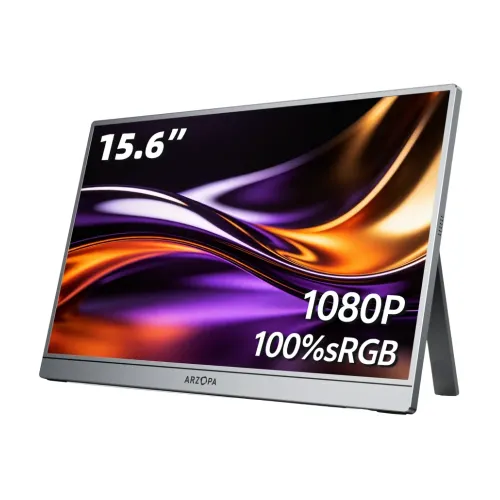
The Arzopa A1 Pro is presented in Bangladesh retail listings as a portable 15.6-inch monitor for adding screen space to a compatible laptop or other video source. A separate display can keep a document, reference page, chat window or presentation visible while the main screen remains available for the task in progress. It can also be useful in a temporary work area where carrying a full-size monitor would be inconvenient. The product image supplied with this catalog shows a landscape screen with a rear support and a thin frame. Retailer pages identify the model as A1 Pro, so this description keeps that model name distinct from Arzopa A1 and other similarly sized portable displays.
Screen size, Full HD resolution and aspect ratio
The local A1 Pro product listings specify a 15.6-inch screen, Full HD 1920 × 1080 resolution and a 16:9 aspect ratio. This is a common layout for laptop work, web browsing, video and presentations. At Full HD, the monitor provides a useful companion canvas for a single document or a pair of side-by-side windows, depending on the software and text scaling chosen on the host device. The size and resolution are retailer-published exact-model claims; the A1 Pro manufacturer manual was not located in the public support resources checked during this audit. If the precise pixel format matters for a specialized workflow, confirm it against the product label or seller documentation for the delivered unit.
IPS panel and viewing angle
Bangladesh retailer specifications identify an IPS panel and list horizontal and vertical viewing angles of 178 degrees. These figures describe the panel technology and published viewing range; they do not guarantee identical color or contrast at every angle. IPS displays are commonly selected for shared viewing and general work because the picture remains usable when the viewer is not directly centered. The listing also describes the display as LED, which refers to the backlight category rather than a separate panel technology. We retain IPS and LED as separate catalog concepts to avoid conflating the panel with its backlight. Exact panel measurements and calibration information were not available from an A1 Pro-specific manufacturer document, so color-critical users should request a measured specification.
Published brightness, contrast and color claims
The local A1 Pro specification pages list 300 cd/m² brightness, 1200:1 contrast, 262K (8-bit) color support and 45% NTSC gamut. Ryans additionally lists 6800K color temperature. These figures describe the written retailer specification, not an independently measured unit. The supplied image creates an important conflict: it advertises 100% sRGB and visually pairs that claim with 1080P, whereas the written A1 Pro listings give 45% NTSC and 262K. Because these statements are not directly interchangeable and cannot both be treated as verified panel guarantees, this description flags the conflict instead of promising 100% sRGB. For photo editing, print matching or other color-sensitive work, ask the seller for the exact panel revision and a reliable gamut or calibration report.
Refresh rate and expected motion
The exact-model local listings identify a 60Hz refresh rate. This is suitable for ordinary productivity, study, web use, presentations, video playback and casual games when the connected source can supply the chosen mode. It is not a high-refresh gaming display and should not be presented as 120Hz, 144Hz or 165Hz. Motion clarity also depends on response behavior, source frame rate, cable and settings; the available exact A1 Pro material does not establish a response-time figure. Set the host to a supported 1920 × 1080 mode and verify 60Hz in its display settings. Users who prioritize competitive play or very smooth scrolling should compare a monitor explicitly rated for a higher refresh rate.
Ports and choosing a connection
Bangladesh A1 Pro listings identify one Mini HDMI input and two USB-C ports. The exact allocation of video, data and power functions should be confirmed from the supplied manual or seller because port count alone does not establish a port’s full capability. A USB-C cable can carry display video only when the source device’s port supports video output and the cable supports the required signal. A USB-C charging or data port may not send a display signal. Mini HDMI can be useful with laptops, desktop graphics outputs, consoles or adapters that provide a compatible HDMI signal, but the monitor may require separate power. Before ordering for a particular phone, laptop or console, confirm both the source output and the monitor’s power setup.
Power, cable and setup expectations
The reviewed exact-model pages do not establish whether the A1 Pro includes a particular power adapter or the wattage needed for every brightness and volume setting. Portable displays generally require an external power source, and the source device may not be able to supply enough power for stable operation. Check the box contents and operating instructions for the exact unit. For a laptop setup, first determine whether USB-C can provide both video and power. If the source uses Mini HDMI, ask whether a second power cable is required and which adapter rating is recommended. Use the supplied or seller-approved cables and avoid assuming that any USB-C cable is suitable for video. These checks help distinguish a compatibility issue from a defective monitor.
Built-in speakers and audio routing
The A1 Pro Bangladesh listing specifies built-in speakers rated at 1W × 2. This gives the monitor a basic audio option when the source routes sound to the display. Actual playback level and quality depend on the video source, operating system, cable and room. The available exact-model retailer pages do not establish a headphone jack specification, so confirm whether a 3.5mm output is present on the particular revision before relying on it. For calls, music or a larger room, headphones or external speakers connected to the source device may be more suitable. The built-in speakers can reduce the number of separate accessories for simple viewing, but they should not be described as a dedicated high-power audio system.
Stand, placement and portability
The catalog image shows the display supported in landscape orientation by a rear support. Star Tech also includes a built-in stand among its listed features. The public material reviewed does not specify a stand adjustment range, portrait support, VESA mounting points or protective cover contents for every Bangladesh shipment. Place the display on a stable surface and confirm the stand locks or opens as intended before use. A 15.6-inch monitor is more portable than a conventional desktop panel, but the supplied power source and cables add to the travel kit. Check the unit’s actual dimensions and weight with the seller if packing space is important. The image should be treated as a visual aid, not proof of every included accessory or mechanical capability.
Compatibility with laptops and other devices
Compatibility depends on the video output and power available from the source device. A full-function USB-C connection requires a host port that supports video output, often described by the device maker as DisplayPort Alt Mode or equivalent. If the laptop has HDMI output, a compatible HDMI-to-Mini-HDMI cable or adapter may provide the picture, while separate monitor power may still be necessary. Phone and tablet support varies by exact model; the presence of USB-C does not by itself mean the device can output video. Game consoles and desktop PCs also need a suitable output and power arrangement. Check the device maker’s documentation and ask the seller to confirm any adapters before purchase.
What the listed specifications do and do not establish
The reviewed local A1 Pro pages consistently describe a 15.6-inch Full HD IPS panel at 60Hz, a Mini HDMI input, two USB-C ports, speakers and a two-year local warranty. They also list brightness, contrast, gamut and viewing-angle values. However, no exact-model Arzopa manual or current manufacturer product page was found in the public resources checked. The manufacturer’s A1 page provides related product information but is not automatically interchangeable with A1 Pro. Likewise, the single catalog image’s 100% sRGB statement conflicts with the written gamut listing. Therefore this product copy identifies which points come from Bangladesh retailers and keeps unresolved revision-specific details visible. This approach helps shoppers compare the listing without mistaking a general Arzopa support page for proof about every A1 Pro batch.
Warranty and local purchase checks
The catalog and Bangladesh retailer listings state two years of warranty for the A1 Pro. Warranty administration depends on the seller or local distributor, so confirm the responsible provider, claim process, required invoice and whether the original box is needed. Ask what panel defects are covered, how dead pixels are assessed and whether cables or adapters have separate coverage. Retail prices and stock change over time and are not included here as guaranteed offer data. Before checkout, confirm the exact A1 Pro model code on the invoice, the included accessories, display revision and local warranty terms. Keep the purchase invoice and serial-number information in case support is needed.
Who may find this monitor useful
The A1 Pro may suit students, office users, presenters and travelers who want a second Full HD screen and whose device can provide compatible video and power. Its 15.6-inch size, listed IPS panel, 60Hz refresh rate and built-in speakers cover common secondary-display tasks. It may not suit someone who needs a verified wide-gamut panel for color-critical work, a high-refresh gaming screen, a built-in battery, or a fully documented connection bundle without first confirming those requirements. The catalog image and written gamut conflict deserves particular attention for buyers considering photo or video work. Compare exact model specifications and ask the Bangladesh seller about revision, accessories and warranty before deciding.
Quick connection checklist
Before setup, identify the source device’s available display output. For USB-C, confirm video support on the exact port and use a cable designed for display transfer. For Mini HDMI, confirm the right cable or adapter and whether a separate power connection is required. Place the monitor on a stable surface, connect power according to the supplied guide, then choose extend or mirror mode from the operating system. Select a supported Full HD resolution and 60Hz refresh rate if available. Route audio to the display only if the source and connection support it. If the screen reports no signal, test the cable and source output, check monitor power, and try a known compatible device before concluding that the panel has failed.
Technical specification summary
Key features
- Arzopa A1 Pro is listed by Bangladesh retailers as a 15.6-inch portable monitor with a Full HD 1920 × 1080 resolution.
- The local A1 Pro listing identifies an IPS panel and a 16:9 widescreen aspect ratio for common laptop and media layouts.
- Retailer specifications list a 60Hz refresh rate; this is a standard refresh rate rather than a high-refresh gaming specification.
- The listed inputs include one Mini HDMI port and two USB-C ports; confirm video and power functions for the exact unit.
- The local specifications list 300 cd/m² brightness, 1200:1 contrast, 178-degree viewing angles and 45% NTSC gamut.
- A local product page lists 262K (8-bit) color support; another listing gives 6800K color temperature.
- Built-in stereo speakers are specified at 1W × 2 in the Bangladesh listing.
- The product image shows an integrated rear support stand; check the delivered revision and included accessories.
- Retailer information describes a portable, slim secondary display for compatible laptops and other video sources.
- Bangladesh retailers list a two-year warranty; seller or distributor terms should be confirmed before purchase.
Advantages
- A 15.6-inch Full HD screen offers a familiar second-screen workspace for compatible laptops and devices.
- Mini HDMI plus two USB-C ports provide several connection paths, subject to host video support and unit revision.
- IPS technology and a wide listed viewing angle can help when the screen is viewed from off-center positions.
- Built-in speakers allow basic audio playback without requiring a separate speaker for every setup.
- Local retailers list two-year warranty coverage, subject to the seller’s written terms.
Points to consider
- The 60Hz refresh rate is not intended to match 120Hz or faster gaming displays.
- The box image advertises 100% sRGB, while written Bangladesh specifications list 45% NTSC; color coverage is unverified for the delivered panel.
- An exact-model Arzopa manufacturer specification page or manual was not found, so several details rely on retailer listings.
- USB-C video requires a compatible host port; a USB-C connector alone does not guarantee display output.
- The product listing does not establish battery operation, adapter wattage, exact cable bundle or stand adjustment range.
Frequently asked questions
What is the Arzopa A1 Pro?
It is listed in Bangladesh as a 15.6-inch Full HD portable monitor. Star Tech and Ryans both identify the model as A1 Pro and give IPS and 60Hz specifications. Check the model label on the delivered unit because the manufacturer’s current resource page does not provide an A1 Pro manual.
What resolution does it have?
Bangladesh A1 Pro retailer listings specify 1920 × 1080 Full HD. The connected computer must also support that output mode. This is a Full HD display, not a 2K or 4K panel.
Is the panel IPS?
Yes, IPS is listed by the Bangladesh retailers for this exact A1 Pro listing. The manufacturer page found during this review was for the related A1 model, so it was not used to claim an A1 Pro-specific manufacturer specification.
What refresh rate is listed?
The local A1 Pro listings specify 60Hz. That supports ordinary desktop work, video and casual play, but it is not a 120Hz or 144Hz high-refresh monitor.
What are the published brightness and contrast figures?
Star Tech and Ryans list 300 cd/m² brightness and 1200:1 contrast for the A1 Pro. These are retailer-published values; ask the seller for the specification sheet matching the actual unit if measured panel performance is critical.
Does it really cover 100% sRGB?
The supplied catalog image has a 100% sRGB graphic, but the written exact-model Bangladesh specifications found here list 45% NTSC and 262K (8-bit). Those claims do not reconcile cleanly. This catalog copy flags the mismatch and does not promise 100% sRGB. Request a matching panel specification before relying on color-critical work.
How many ports does it have?
The local A1 Pro listing describes one Mini HDMI and two USB-C ports. Confirm their video, data and power roles on the unit or in the included guide. For HDMI-based video, portable displays commonly require a separate power input, so verify the model’s connection instructions.
Can I connect it to a laptop with USB-C?
Only when the laptop’s USB-C port supports video output and the correct cable is used. Some USB-C ports support charging or data but not display video. Check the laptop documentation; otherwise use a supported video adapter and the monitor’s Mini HDMI input as appropriate.
Does it have speakers?
The Bangladesh specification lists built-in speakers rated at 1W × 2. The actual loudness and sound quality depend on the source and settings. Use headphones or external speakers if you need fuller sound.
Does the monitor have a battery?
The exact A1 Pro materials checked for this review did not confirm an internal battery. Do not assume it can run untethered; confirm the power requirement and adapter with the seller before use.
What is included in the box?
The exact-model retailer materials available during this review did not consistently establish every cable or charger in the Bangladesh box. Ask the seller to confirm the included power adapter, USB-C cable, Mini HDMI cable, stand or cover and printed guide for the unit being shipped.
What warranty applies in Bangladesh?
Star Tech and Ryans list two years for this model. Warranty coverage is handled under the local seller or distributor’s terms; confirm who accepts claims, required invoice or box, and covered defects before buying.
Specifications here are attributed to Bangladesh exact-model retailer listings. The 100% sRGB image claim conflicts with the written 45% NTSC listing; confirm the panel revision and warranty with the seller.