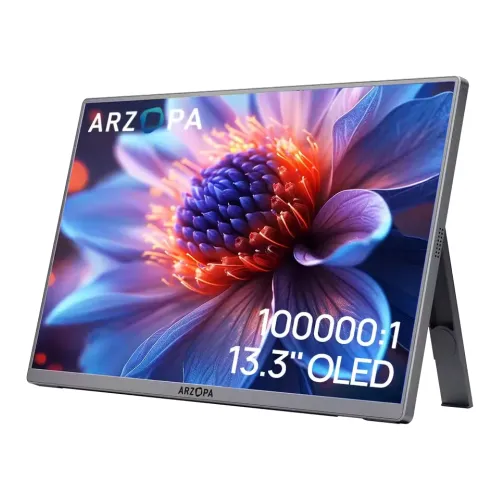
ARZOPA A3C Pro 13.3-inch FHD OLED Portable Monitor: Complete Buyer Guide
Product identity and intended role
The ARZOPA A3C Pro is a compact 13.3-inch portable display intended to add a second screen to a compatible laptop, desktop, phone, tablet or game device. The exact model shown in the manufacturer specification sheet is A3C Pro; the product code is not “A3C PRO 13.3-inch”, so the catalog model and MPN should read A3C PRO. The existing catalog name, slug, category, status, product number, brand mapping, variant SKU and selling price remain as they are. Local catalog brand mapping currently says Others, so this guide identifies the product brand in its copy without silently changing the underlying brand relationship. This is a single default variant, and its ৳24,000 catalog price remains the recorded price; the current retailer market reference is a separate piece of information.
OLED screen, size and resolution
The panel is a 13.3-inch, 16:9 AMOLED/OLED display with native Full HD resolution of 1920 × 1080 pixels. The manufacturer specification lists a 293.76 × 165.24 mm active screen area and approximately 166 pixels per inch. OLED pixels emit their own light, so black pixels can switch off rather than relying on an LCD backlight. This enables the quoted high static contrast and deep dark scenes, while the 1080p resolution keeps the monitor compatible with common laptop and console output modes. The panel is glossy/reflective in the supplied product imagery; buyers should plan for reflections in bright rooms. It is a fixed 60Hz panel, so its compact high-contrast image is useful for documents, video and general second-screen work, but it is not a high-refresh esports display.
Brightness, contrast and HDR
The manufacturer sheet specifies 400 cd/m² standard brightness, a measured 410 cd/m² peak result and 100,000:1 static contrast. Retailer listings repeat 400 nits and HDR10. These figures describe a compact OLED panel and should not be translated into a promise of direct-sunlight visibility: ambient reflections still matter, and the monitor needs adequate external power at higher brightness. HDR10 is the supported format reported by the specification and sellers. One catalog image layers an HDR10+ graphic above HDR10 text, but the available model specification and retailer listings do not substantiate HDR10+ dynamic metadata. The product copy therefore says HDR10 only. A monitor can accept an HDR signal without guaranteeing a particular HDR certification or mastering performance, so buyers should treat the format support as an input feature rather than a professional HDR reference-monitor claim.
Color gamut and bit depth
The manufacturer data reports 100% DCI-P3 coverage and 100% sRGB coverage. It separately reports gamut area ratios of 113.46% for DCI-P3 and 153.92% for sRGB; coverage and area ratio are different measurements and should not be conflated. The sheet describes 8-bit plus Hi-FRC output for 1.07 billion color steps. That is not native “true 10-bit” color, and the catalog artwork's phrase “True 8-bit” next to 1.07 billion colors is technically unclear. Another image claims ΔE≤2, but no individual calibration certificate or reliable model-level factory tolerance document was found, so that number is not promised in the copy. The broad gamut can make supported wide-color video and images look vivid. People doing paid color-critical work should use a calibrated workflow and verify a specific unit rather than treating gamut coverage alone as proof of factory accuracy.
Motion and viewing angle
The A3C Pro is rated at 60Hz with a typical 1ms Tr+Td response figure in the manufacturer specification. OLED pixel response can be fast, but 1ms is not the refresh rate and does not make this screen a 144Hz or 240Hz gaming monitor. The sheet lists 170 degrees for horizontal and vertical viewing angles when measured at a contrast ratio of at least 10; the catalog artwork also uses 170 degrees. Some marketplace copy says 178 degrees, so the product attribute uses the manufacturer sheet's 170-degree rating. The stable 60Hz mode suits office tasks, streaming and console output within the connected device's supported modes. Motion appearance also depends on the game or video frame rate and source, and no adaptive-sync or variable-refresh specification was verified for this exact model.
Ports and one-cable USB-C setup
The chassis provides two full-function USB-C ports and one Mini-HDMI input. Each USB-C connection can carry a compatible DisplayPort video signal and power, using a full-featured cable and a host device whose USB-C port supports display output such as DisplayPort Alt Mode. A USB-C-shaped connector alone is not enough: a data-only or charging-only host port will not send a picture. When using Mini-HDMI for video, a separate USB-C power connection is required. Arzopa's setup guidance describes USB-C video cables and HDMI-to-Mini-HDMI video connections, with external USB-C power as needed. The catalog's existing “Power Supply ISDN” text is an OCR/translation error, not a port capability; it is replaced with clear video, data and power wording. No 3.5mm audio output was verified for this variant, so do not promise a headphone jack.
Power requirements and battery
This is an externally powered portable monitor, not a self-contained tablet. No built-in battery is specified. It can draw power through a compatible USB-C video connection, or through a separate USB-C power source when using Mini-HDMI or when the host cannot supply enough current. Arzopa's general support guidance says its portable monitors need at least 15W and recommends a higher-power source for stable operation; exact adapter requirements can vary with brightness and connected device. The A3C Pro specification sheet lists a 5–20V power input and 5W operating power. A low-power laptop port may produce a dim image, flicker or a blank screen; adding a suitable external supply is a reasonable troubleshooting step. Confirm the wall adapter included in the local box and its rating before relying on it, because retailer bundle descriptions are inconsistent.
Audio and controls
The monitor has two built-in 1W speakers, for 2W total output. They can provide basic sound for a portable setup, calls or casual video, but small integrated speakers are not a substitute for a dedicated speaker or headset. The monitor uses physical on-device OSD controls for settings such as brightness, volume, input and picture adjustments; the supplied product photo shows controls on the side edge. The source device must route audio to the external display over the chosen connection for the speakers to receive it. Check the computer's selected sound-output device and the monitor volume if picture appears but audio does not. No webcam or touchscreen is listed for the standard A3C Pro, and neither feature should be implied by generic portable-monitor descriptions.
Kickstand, orientation and enclosure
A rear integrated kickstand supports the display in landscape and portrait positions. The catalog images show a stand angle range from approximately 0 to 80 degrees and a portrait setup; this is a physical positioning feature, not an automatic rotation sensor. When turning the screen to portrait, change display orientation in the host operating system. The manufacturer describes a one-piece all-aluminum alloy shell in space gray. The listed dimensions are 303 × 179 × 7.9 mm and the net display weight is 390 g, making the panel easy to carry compared with a full-size desktop monitor. No VESA mounting holes were verified. A protective sleeve appears in some retailer package lists, but the exact included accessories and power adapter can vary by import batch; check the sealed box or seller invoice.
Compatibility and connection examples
A laptop with USB-C DisplayPort Alt Mode can usually use one full-featured USB-C cable for picture and power, subject to the laptop's power output. For a laptop with HDMI, use an HDMI-to-Mini-HDMI cable for picture and connect a separate USB-C power source. A phone or tablet needs a video-capable USB-C port or a compatible HDMI adapter; charging-only USB-C will not mirror the screen. A game console with HDMI can connect through Mini-HDMI with a separate USB-C power lead. Resolution, refresh and audio depend on the host, cable and operating-system settings. The display is plug-and-play for standard video modes, but this does not mean every USB-C port, phone, dock or console can output a signal. Users should check their device's video-output support before buying.
Bangladesh warranty and current price reference
The existing variant price in BiponiBD is ৳24,000 and is preserved. During this review, Star Tech and TechLand both showed a ৳22,000 offer; earlier indexed snapshots and other sellers showed higher prices, so Bangladesh promotions and stock can move quickly. The source-based current comparison is a reference range, not a live merchant offer attached to this catalog record. Bangladesh seller pages advertise a two-year warranty, but claim handling, importer, serial-number coverage and box requirements should be confirmed with the seller for the exact unit. The market price range in the product specifications is therefore dated and source-linked. It does not replace the variant price or imply stock at a third-party store. Recheck availability, total checkout cost and written warranty terms before ordering.
What this monitor does well and its limits
The strongest reasons to consider the A3C Pro are its compact 13.3-inch footprint, OLED contrast, broad stated DCI-P3 coverage, lightweight 390g body, integrated kickstand and flexible USB-C/Mini-HDMI inputs. It can give a laptop a second screen for chat, reference material, documents or a timeline, and it can connect to compatible phones and game devices. Its limits are equally specific: the native resolution is FHD, refresh is 60Hz, there is no internal battery, direct USB-C video requires a compatible host, HDMI use needs separate power, the panel can reflect ambient light, and the small speakers have modest output. It is not a high-refresh gaming screen, a wireless display, a powered laptop dock or a guaranteed color-calibrated production monitor. Matching the connection and power requirements to the intended device will prevent most avoidable setup problems.
Before purchase checklist
Before ordering, confirm the box says ARZOPA A3C Pro, check whether the power adapter and protective sleeve are included, and verify the local two-year warranty route. For one-cable use, make sure the host USB-C port supports video output; otherwise plan for Mini-HDMI video plus a separate USB-C power lead. Confirm the display can be powered reliably at the desired brightness. Remember that 60Hz is the maximum stated refresh rate and that the HDR10+ badge visible in one marketing image is not supported by the model-level evidence reviewed here. The monitor dimensions and 390g net weight describe the product itself, not a shipping carton. Store the carton measurements as unknown until a real packaged unit is measured. These checks preserve an accurate listing and help buyers choose the right cable, adapter and use case.