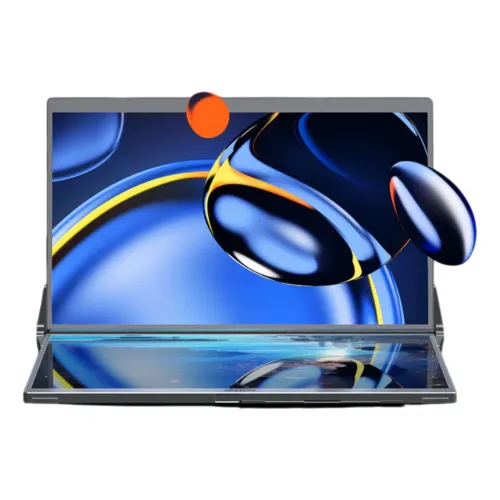
Overview: Compact 14-Inch × 2 Foldable Dual-Screen Productivity on the Go
The Arzopa E1S 14" FHD IPS Dual Screen Portable Monitor is the compact, travel-focused sibling in Arzopa’s foldable dual-display lineup, combining two 14-inch Full HD (1920 × 1080) IPS screens inside a precision-machined CNC aluminum alloy chassis. While a standard single-panel portable monitor adds only one auxiliary screen beside a notebook, the Arzopa E1S unfolds vertically on a rotatable central hinge to stack two 14-inch 16:9 displays one above the other—instantly transforming a 13-inch or 14-inch ultrabook, MacBook, or mini PC into a three-screen mobile workstation.
Designed for software engineers, financial analysts, digital marketers, academic researchers, and remote consultants who work across multiple windows while travelling, the E1S pairs 350 cd/m² brightness, an 1800:1 static contrast ratio, and 100% sRGB colour gamut coverage with two full-function USB 3.1 Type-C ports, one Mini-HDMI 2.0 input, and dual 1W stereo speakers—all within a 9.3 mm single-panel profile weighing 1.36 kg.
Arzopa E1S (14" × 2) vs. Arzopa E1 (15.6" × 2): Choosing the Right Size
Buyers comparing Arzopa’s foldable dual-screen monitors in Bangladesh will encounter both the 14-inch Arzopa E1S and the 15.6-inch Arzopa E1. Understanding how their specifications compare makes it easy to select the right footprint for your bag:
- Footprint & Portability: With dual 14-inch panels and a net weight of 1.36 kg (1,360 g), the E1S is 218 grams lighter and noticeably more compact than the 15.6-inch E1 (1.578 kg), sliding into 14-inch laptop sleeves and compact commuter backpacks that cannot fit a 15.6-inch housing.
- Pixel Density (PPI): Running 1920 × 1080 across a 14-inch diagonal yields approximately 157.3 pixels per inch (PPI) per screen—sharper than the ~141.2 PPI of a 15.6-inch 1080p screen—so fine code fonts and dense spreadsheet cells appear crisper at close laptop viewing distances.
- Luminance & Contrast Specifications: Bangladesh distributor sheets for the E1S specify 350 cd/m² typical brightness and an 1800:1 static contrast ratio (compared with 300 cd/m² and 1200:1 on the 15.6-inch E1), while retaining the same 100% sRGB colour gamut, 8-bit (16.7 million colours) depth, and 60Hz refresh rate.
Four Multi-Screen Operating Modes: Extended, Mirror, Splice & Tent Flip
Backed by its integrated 315°–360° rotatable hinge and built-in rear kickstand, the Arzopa E1S adapts to four distinct multi-screen workflows:
- Extended Mode (Independent Dual Workspaces): With the Arzopa multi-screen driver installed on Windows, macOS, or compatible Android devices, the upper and lower 14-inch screens operate as independent displays. Keep your IDE on the laptop screen, API documentation on the lower E1S panel, and terminal logs or live previews on the upper panel.
- Splice Mode (Vertical Panorama Canvas): Merges the upper and lower 1920 × 1080 displays into one tall vertical canvas (1920 × 2160 combined pixel grid), ideal for scrolling through long source-code files, legal contracts, financial order books, or multi-track audio/video timelines.
- Mirror Mode (Synchronized Duplication): Duplicates your primary display across the E1S panels for training sessions, classroom demonstrations, or collaborative design reviews.
- Flip / Tent Presentation Mode: By folding the upper 14-inch panel backward over the top hinge into an A-frame tent posture, a client or colleague sitting across a meeting table can view your slides or live dashboard face-to-face while you work on the lower screen.
Dual 14-Inch IPS Panels: 350 Nits, 1800:1 Contrast & 100% sRGB Colour
Each of the two 14-inch screens uses an LED-backlit In-Plane Switching (IPS) panel with full 178° horizontal and 178° vertical viewing angles. Because stacked vertical monitors are viewed at slightly different vertical angles from eye level, wide IPS viewing angles are essential to prevent the upper screen from shifting in gamma or colour saturation.
With 350 cd/m² typical brightness and an 1800:1 contrast ratio, the E1S stays legible in bright coworking spaces, airport lounges, and sunlit offices. Full 100% sRGB colour gamut coverage and 8-bit (16.7 million colours) depth ensure accurate web graphics, UI mockups, brand assets, and video previews, while HDR10 signal support and Low Blue Light eye-care tuning help maintain visual comfort across full workdays.
Connectivity: Dual Full-Function USB-C Ports & Mini-HDMI 2.0
The side connector bay of the Arzopa E1S is built for clean, low-clutter cabling across modern laptops and desktop PCs (note that some local retailer tables contain an OCR typo reading "Power Supply ISDN", which refers to USB-PD power supply and DisplayPort Alt Mode video data):
- 2 × Full-Function USB 3.1 Type-C Ports: Both Type-C ports support DisplayPort Alt Mode video data and USB Power Delivery (PD) power input/pass-through. When connected to a laptop with a full-function Thunderbolt 3/4, USB4, or USB-C DP Alt Mode port, a single USB-C cable can transmit video and power; connecting an external USB-PD power adapter to the second USB-C port powers both 14-inch screens at full 350-nit brightness and can reverse-charge the host laptop.
- 1 × Mini-HDMI 2.0 Port: Allows connection to laptops, desktops, mini PCs, or gaming consoles that output video over standard HDMI (using an HDMI-to-Mini-HDMI cable while supplying power via one of the USB-C ports).
- Built-In Dual 1W Stereo Speakers (1W × 2): Integrated stereo speakers provide convenient audio for Zoom/Teams calls, webinars, and reference video playback without carrying external desktop speakers.
CNC Aluminum Alloy Construction, Built-In Kickstand & Travel Ergonomics
Visual inspection of the product gallery images highlights the E1S’s sleek matte-grey CNC-machined aluminum alloy body with ultra-narrow three-side bezels around both 14-inch panels. When folded shut for transit, the two screens close face-to-face like a clamshell laptop to protect the IPS glass from keys or accessories inside a bag. At the rear of the lower housing sits an integrated fold-out metal kickstand that props the dual-screen tower securely on any flat desk, hotel table, or tray without requiring an external stand or VESA arm.
Real-World Multitasking Workflows for Developers, Analysts & Creators
Adding two vertical 14-inch 1920 × 1080 displays beside a laptop changes how complex multi-window projects are organized:
- Software Engineering & DevOps: Dedicate the lower 14-inch screen to your code editor or pull-request diff while keeping live server logs, Docker container metrics, or browser developer tools pinned on the upper 14-inch screen—or switch to Splice Mode to view over 100 lines of vertical code at once without scrolling.
- Financial Trading, Accounting & Data Analysis: Place live market charts or pivot tables on the upper panel, order books or general ledger sheets on the lower panel, and communication or research tools on your primary notebook display.
- Client Consultations & Field Audits: Fold the top screen backward over the 315°–360° hinge into Flip / Tent Mode during in-person meetings in Dhaka cafés, boardrooms, or client offices so stakeholders sitting opposite you can follow slides, architectural plans, or spreadsheets without crowding behind your laptop.
- Content Creation & Video Editing: Use the 100% sRGB upper panel as a dedicated full-screen 1080p program monitor while keeping your timeline, media bins, and audio mixers spread across the lower panel and laptop display.
Pre-Purchase Checklist for Bangladesh Buyers
Before ordering the Arzopa E1S in Bangladesh, review these practical setup tips:
- Driver Installation for Multi-Screen Mode: Just like the 15.6-inch Arzopa E1, independent multi-screen extension on Windows, macOS, and Android requires installing the official Arzopa display driver; ensure your work laptop permits driver installation if managed by corporate IT.
- Host Port Compatibility: For single-cable video and power connection, verify that your laptop’s USB-C port supports DisplayPort Alt Mode (Thunderbolt 3/4, USB4, or full-function USB 3.1/3.2 Type-C). If your laptop only has a data-only USB-C port, connect video via the Mini-HDMI 2.0 port and supply power via one of the USB-C ports.
- Power Budget Planning: Driving two 14-inch 350-nit IPS screens draws more power than a single portable monitor. For stable full-brightness operation, plug an external USB-PD power adapter into the secondary USB-C port.
- Warranty Verification: The catalog and authorized Bangladesh retailers provide a 2-year warranty. Verify the official warranty card, serial number, and included USB-C / Mini-HDMI cables on your purchase invoice.