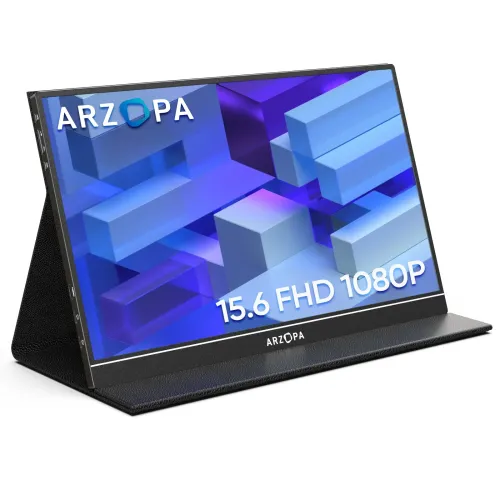
A portable second screen for compatible devices
The Arzopa S1 Table is a 15.6-inch portable monitor intended to add a separate display to a laptop, phone, tablet or console. Arzopa lists a Full HD 1920 × 1080 IPS panel and a 60Hz refresh rate. The supplied gallery shows the monitor standing in its magnetic smart cover, a slim landscape screen, side ports and a dual-speaker feature image. Its connection choices include Mini HDMI and two full-function USB-C ports. Unlike a self-powered tablet, the S1 Table has no internal battery, so it needs power from the host or an external source.
Screen size, aspect ratio and resolution
The 15.6-inch display uses a 16:9 aspect ratio and Full HD resolution. This makes it suitable as a laptop companion for documents, web pages, chat, reference material, timelines and presentations. A second screen can reduce the need to switch between windows, though available space depends on the connected computer’s display settings and desk arrangement. Full HD provides a familiar 1920 × 1080 workspace; it is not a high-resolution 2K or 4K panel. Arzopa identifies the S1 Table resolution as 1920 × 1080 and its refresh-rate table lists 60Hz.
IPS panel and the published display measurements
Arzopa’s current Brazil product page lists an IPS LCD panel, 250 cd/m² brightness, 65.75% sRGB color gamut, 262K colors at 6-bit, 1100:1 contrast and a 178-degree viewing angle. Older S1 Table guide and Bangladesh retail material report different values: 300 cd/m², 72% color gamut, 16.7 million colors and 1000:1 contrast. The supplied marketing image also advertises 300 nits, 1000:1 and 16.7M. These may reflect different revisions or regional specifications. This listing records the current official figures while clearly exposing the legacy conflict; buyers who require a particular measured brightness or gamut should ask for the specification sheet matching the delivered unit.
Refresh rate and motion expectations
S1 Table is a 60Hz portable monitor. It can display standard desktop, video and casual gaming content, but it does not offer the high refresh rates of gaming monitors designed for 120Hz, 144Hz or above. Smoothness also depends on the source device and signal. Select 1920 × 1080 in the computer’s display settings and allow the host to choose the supported 60Hz mode. For competitive gaming or especially fast motion, compare a faster display. Arzopa’s official model table identifies S1 Table as 60Hz rather than the higher refresh rate of its separate gaming models.
Ports and single-cable USB-C setup
The current Arzopa product page lists one Mini HDMI 2.0 input and two USB-C 3.1 full-function ports supporting DisplayPort video output and PD power. A laptop or phone can connect by USB-C only if its USB-C port supports video output; USB-C connectors that provide charging/data only will not carry a display signal. Check the host’s manual for DisplayPort Alt Mode or another supported video function. Mini HDMI carries audio and video, but not power. For that connection, attach a USB-C power cable and suitable adapter or power source as explained in the user guide.
Power requirements and no internal battery
The S1 Table does not include an internal battery. It must be powered by a compatible source. The Arzopa guide notes a 5V/2.4A or higher power source for basic operation and recommends external power for high brightness or volume settings. The official Brazil page lists 6W operating consumption and up to 1W standby; adapters and region bundles can differ. Use a suitable supplied or approved power source. A phone or laptop may be able to power the monitor through a full-function USB-C connection, but this can draw power from the host and may limit brightness or battery life.
Sound and image settings
Arzopa’s current S1 Table listing specifies built-in 1W × 2 speakers. It also has a 3.5mm audio output for compatible headphones or external speakers. The OSD controls include brightness, contrast, volume, input selection and image settings; the guide describes a rotary control and power button for navigating menus. HDR10 is listed on the current regional page, but this does not establish a brightness class or guarantee how every device will map HDR content. Confirm the desired input and audio route on the connected device if sound is absent.
Magnetic smart cover and portability
The supplied smart cover protects the screen and folds into a support for landscape viewing. The cover can be set at different positions according to the guide, but it is not a height-adjustable monitor arm. Arzopa’s current Brazil listing gives bare monitor dimensions of 355 × 220 × 9.3 mm and weight of 742 g. The catalog gallery image instead shows 1.7 lb and 0.3-inch thickness, while older sellers also report 1.7 lb. Those values conflict, and it is unclear whether one figure includes packaging or cover. Confirm whether a seller’s weight is for the panel only or the complete kit if travel weight matters.
Compatible laptops, phones and consoles
The monitor can extend or mirror a device with a suitable video output. USB-C connections require a full-function host port with video capability. For a computer with HDMI, connect Mini HDMI to HDMI for the signal and USB-C separately for power. Phones or tablets can use full-function USB-C when their model supports video output; some iPhone models require an adapter. Consoles can connect through Mini HDMI with separate monitor power. Arzopa’s compatibility documentation warns that not all devices with USB-C support video, so verify the exact laptop or phone before relying on a single-cable setup.
Accessories and box contents
The S1 Table user guide lists the monitor, magnetic smart cover, USB-C-to-USB-A cable, USB-C-to-USB-C cable, Mini-HDMI-to-HDMI cable and charger. Regional shipments and sellers can bundle differently, so compare the actual Bangladesh seller’s carton list and inspect the box at delivery. The supplied marketing image shows a cover and screen but cannot prove which charger wattage or cable revision is present in a particular unit. Keep the included cables labelled and use the right cable for the job: USB-C full-featured for supported video and power, Mini HDMI for video/audio, and a separate USB-C connection for power when using HDMI.
Warranty, revision and Bangladesh purchase checks
The catalog record and a Bangladesh retailer listing state two years of warranty. Arzopa’s Brazil site displays its own regional warranty messaging, which does not establish Bangladesh coverage. Ask which local distributor or seller handles a claim, what panel defects are covered and whether the box, serial number and invoice are required. The Arzopa page and older guide differ on brightness, gamut, contrast, color depth, weight and dimensions. Confirm the exact S1 Table revision printed on the unit or manual before comparing the figures. Retail price and stock can change; third-party price context is not the BiponiBD offer.
Who should choose the S1 Table
This portable display can suit a student, hybrid worker, presenter or traveler who wants an additional Full HD workspace and can provide compatible USB-C or Mini HDMI connectivity. Its smart cover, speakers and compact dimensions support temporary setups away from a desk. It is less suited to users who require a built-in battery, high-refresh gaming, a guaranteed specific color gamut or a VESA-mounted desktop display. Before ordering, check the laptop’s USB-C video support, the display’s power needs, exact regional display specifications and warranty provider.
Connection checklist
For USB-C, confirm that the host port supports video output and connect a full-featured cable; add external power if needed. For HDMI, connect Mini HDMI for video/audio and a separate USB-C power source because HDMI does not power the display. Select the S1 Table as an extend or mirror display in the computer settings, choose 1920 × 1080 at 60Hz, and route audio to its speakers or 3.5mm output. Place the magnetic cover on a stable surface and check that the monitor is supported securely before use.
Technical specifications and revision notes
Key features
- 15.6-inch IPS portable display with Full HD 1920 × 1080 resolution and 16:9 aspect ratio.
- Arzopa lists the S1 Table maximum refresh rate as 60Hz.
- Current Arzopa Brazil specifications list 250 cd/m² brightness, 65.75% sRGB and 262K (6-bit).
- Current official listing gives 1100:1 contrast, 178° viewing angle, HDR10 support and 6W operating power.
- One Mini HDMI 2.0 input and two full-function USB-C 3.1 ports supporting DP video and PD power.
- Built-in dual 1W speakers and a 3.5mm audio output for external listening equipment.
- Smart magnetic cover works as a protective cover and adjustable viewing support.
- Current official product page lists 355 × 220 × 9.3 mm and 742 g; older gallery differs.
- No internal battery; USB-C power can be used, and mini-HDMI video requires separate power.
- Published exact-model specifications differ by region/revision; confirm the delivered hardware generation.
Advantages
- 15.6-inch portable form and included smart cover make it easy to add a second screen away from a desk.
- Full HD, IPS and 60Hz suit common productivity, study, presentations and casual video use.
- Dual USB-C full-function ports and Mini HDMI support several connection approaches.
- Built-in 1W ×2 speakers and a headphone output provide basic audio options.
- Arzopa documentation explains power requirements, cabling and compatibility checks for USB-C video.
Points to consider
- At 60Hz it is not a high-refresh gaming display.
- A USB-C socket on the host must support video output; charging-only ports will not carry display data.
- Mini HDMI carries video/audio but not monitor power; a separate power connection is needed.
- Arzopa regional/current specifications differ from the older user guide and supplied marketing image.
- Local warranty provider, package charger/cables and exact panel revision should be confirmed with the seller.
Frequently asked questions
What is the exact monitor model?
The model is Arzopa S1 Table, a 15.6-inch portable monitor. Arzopa’s current Brazil product page names the same model and publishes a 60Hz Full HD specification.
What resolution and refresh rate does it support?
Arzopa lists 1920 × 1080 Full HD and 60Hz for S1 Table. The refresh rate should be set on the connected computer or device, which must also support the mode.
What are the latest official brightness and color figures?
The current Arzopa Brazil product page lists 250 cd/m² brightness, 65.75% sRGB gamut and 262K (6-bit) color. Older user-guide/local retailer material lists 300 cd/m², 72% and 16.7 million colors; the exact revision in the Bangladesh retail box should be checked.
How many speakers does it have?
Arzopa’s current product page lists built-in 1W × 2 speakers. The guide also provides a 3.5mm audio output for headphones or external audio devices.
What are the video and USB ports?
The current Arzopa page lists one Mini HDMI 2.0 input and two USB-C 3.1 ports supporting DP output and PD power. The USB-C host port needs to support video output for a full-function single-cable connection.
Does Mini HDMI power the display?
No. The user guide says Mini HDMI carries audio/video but does not supply monitor power. Connect a suitable USB-C power source as well when using Mini HDMI.
Can a laptop connect with one USB-C cable?
Yes, if the laptop’s USB-C port supports video output and provides suitable power. Arzopa cautions that not every USB-C port supports display signal. If it does not, use the Mini HDMI connection plus separate USB-C power.
Does the monitor have an internal battery?
No. The S1 Table guide says it has no built-in battery. It must receive power through a compatible USB-C source or adapter.
What is the size and weight?
The current official Brazil listing states 355 × 220 × 9.3 mm and 742 g. Older supplied marketing images say 1.7 lb and the user guide does not give the same dimensions. Confirm the revision and whether the stated weight includes the cover.
Does it support HDR?
The current Arzopa Brazil page says HDR10 support. HDR behavior depends on the input device and signal; this is not a claim of a particular HDR brightness or certification level.
What is included in the package?
The Arzopa guide lists the monitor, smart cover, USB-C-to-USB-A cable, USB-C-to-USB-C cable, Mini-HDMI-to-HDMI cable and charger. Regional bundles can differ, so check the Bangladesh seller’s actual carton list.
What warranty applies in Bangladesh?
The catalog and Canvas IT listing state two years. Arzopa Brazil describes local Brazilian terms separately, so those do not establish Bangladesh coverage. Confirm the local distributor or seller, covered defects and claim documents before purchase.
Current display values are from Arzopa’s S1 Table regional product page. Older S1 Table material supplied with this catalog lists different panel measurements; verify revision and local warranty for the delivered item.