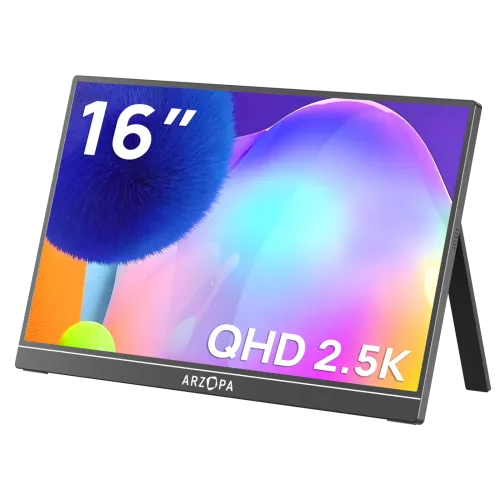
Arzopa Z1RC 16-inch 2.5K WQXGA Portable Monitor
Meet the Arzopa Z1RC, a 16.0-inch portable monitor designed for people who want more working room beside a laptop. Its IPS panel has a native resolution of 2560 × 1600 pixels and a 16:10 aspect ratio. That WQXGA resolution is often marketed as 2.5K or QHD+, but it is not the familiar 2560 × 1440 16:9 format. At this size, the extra vertical pixels make documents, code, spreadsheets and editing timelines easier to view with less scrolling.
The display refreshes at up to 60Hz. This is suitable for office work, study, web browsing, presentations and video playback, while the fixed 60Hz rate is a limitation for high-refresh competitive gaming. The connected computer or console also needs to support the selected resolution and refresh mode. Arzopa’s model comparison identifies the Z1RC as a 60Hz productivity monitor; do not confuse it with the Z1FC, which is a different 16.1-inch Full HD 144Hz model, or the Z1C, a separate Full HD 60Hz product.
Arzopa specifies an IPS panel with a 1200:1 contrast ratio and 350-nit brightness. Its current product material advertises 123% sRGB color gamut, but does not explain whether this is measured coverage or gamut volume, so the number should be treated as a manufacturer marketing specification rather than a calibration result. The product page describes 10-bit color as 8-bit plus FRC. Local catalog graphics and retailer templates also circulate 500-nit, 100%-sRGB and “1.07 billion” claims; keep any such figures qualified and never turn them into independent test results.
HDR10 signal or OSD mode is listed by Arzopa. There is no VESA DisplayHDR certification listed for this portable monitor, so HDR support should not be presented as a certified high-dynamic-range performance rating. IPS technology provides wide viewing usability, while the matte anti-glare surface helps reduce reflections from nearby lighting. Brightness remains a specification value; users should avoid expecting laptop-class outdoor visibility in direct sunlight.
The Z1RC offers two full-function USB Type-C ports and one Mini-HDMI input. Arzopa describes the USB-C connections as supporting DisplayPort output and power delivery; its setup guide also describes full-featured USB-C video connections. A compatible laptop with USB-C DisplayPort Alt Mode can often send video and power over one USB-C cable. USB-C connector shape alone does not guarantee video output: check the computer, tablet or phone specifications for DP Alt Mode or Thunderbolt support before buying.
When connecting over Mini-HDMI, HDMI carries the picture and sound signal but does not power the monitor. Connect the included USB-A-to-USB-C power cable to a suitable USB power source as well. The manual says the monitor has no internal battery and calls for at least 5V/2.4A from the connected device or power adapter; Arzopa’s product guidance recommends adding power for a more stable setup. A 5V/3A supply is a sensible target where available, especially for HDMI, phones or high brightness. A wall charger is not listed in the standard box contents.
The manufacturer lists HDMI 2.0 for the Mini-HDMI port and a 60Hz panel ceiling. The reviewed product materials do not provide a verified per-port timing table, so the catalog should not promise a particular host-specific mode beyond the display’s native 2560 × 1600 resolution and 60Hz maximum. The included Mini-HDMI-to-HDMI cable is one metre according to the product page. An adapter, dock or console setup may be needed depending on the source device; Nintendo Switch and other consoles may require their dock or a compatible video output arrangement.
Two built-in 1W speakers provide basic audio from a compatible USB-C or HDMI source. The Arzopa product page does not list a separate 3.5mm headphone output, and the manual’s port diagram shows Mini-HDMI and two USB-C ports without a headphone jack. If private listening is important, connect headphones to the computer, phone or console. The monitor itself is not a Bluetooth speaker and does not contain a battery, so it needs power from the host, a power bank or an external USB power adapter while in use.
A built-in adjustable stand is integrated into the aluminum-alloy body. Arzopa’s product material shows an angle-adjustable kickstand and supports both landscape and portrait workflows; its product imagery indicates adjustment up to about 80 degrees. This built-in stand is different from a detachable magnetic folio cover. Some Bangladesh descriptions use generic “smart cover that doubles as a stand” copy, but the standard manufacturer box list does not identify a magnetic cover. Check the seller’s exact bundle if an accessory sleeve or cover is advertised.
The monitor measures 356 × 238 × 9.3mm according to Arzopa. The product page lists a net weight of 1.79lb, approximately 812g, while some retailer and supplier records list roughly 780g or 660g. Because the figures differ and shipment weight is not verified, this listing retains no assumed variant shipping weight. The rear is an aluminum-alloy housing with a slim profile. Arzopa’s product specifications do not list VESA mounting holes; use the built-in kickstand or a separately verified support solution rather than assuming it fits a standard VESA arm.
The standard box list on the manufacturer page includes the Z1RC monitor, a one-metre full-featured USB-C-to-USB-C cable, a one-metre Mini-HDMI-to-HDMI cable, a USB-A-to-USB-C power cable and a quick-start guide. It does not list a wall power brick. Retail bundles can vary by seller, so confirm the contents on the invoice or product page before purchase. The included cables make common laptop and HDMI connections easier, but a laptop still needs a video-capable USB-C port for one-cable display operation.
Arzopa advertises a two-year standard warranty on its official store. Bangladesh retailer pages commonly state two years, while a Ryans listing has shown a one-year warranty, so local coverage is retailer-specific rather than a single verified Bangladesh-wide distributor policy. Ask which company handles service, whether the warranty is local or brand-backed, and what proof of purchase is required. The existing BiponiBD variant price remains unchanged; online competitor prices are snapshots that can change with stock, promotion and seller terms.
For work, connect USB-C to a compatible laptop and choose Extend or Duplicate in the computer’s display settings. Set the external display to 2560 × 1600 at 60Hz if the source supports it. For a desktop or console using Mini-HDMI, connect the HDMI cable for video and connect USB-C power separately. If the screen does not start or flickers, check source-device video capability, cable seating and available power before assuming the panel is faulty. Use the side controls to adjust brightness, volume and the on-screen display.
Before ordering, verify the exact product label says Z1RC. The Z1RC is the 16.0-inch 2560 × 1600 16:10 60Hz model. The Z1FC is 16.1-inch 1920 × 1080 16:9 at 144Hz, while the Z1C is a different 16.1-inch Full HD 60Hz monitor. Their refresh, brightness and gamut figures are not interchangeable. Search terms such as “2K QHD” appear on some older product pages, but include 2560 × 1600 and 16:10 prominently so buyers do not mistake this panel for 2560 × 1440.
This Arzopa Z1RC portable monitor is best suited to a compact mobile workstation, a second screen for coding and spreadsheets, presentations, travel and media viewing. Its strongest practical advantages are the sharp 16:10 resolution, slim aluminum construction, integrated stand, dual USB-C inputs, Mini-HDMI and built-in speakers. Its trade-offs are the 60Hz ceiling, dependence on an external power source, lack of a listed headphone jack and lack of a verified VESA mount. These specifics help buyers compare it accurately with a laptop, tablet or high-refresh portable gaming display.
For color-critical work, treat the stated 123% sRGB as a manufacturer claim and calibrate the display if color matching matters. No independent measurement or color-accuracy delta-E result is included in the verified product documentation. For bright outdoor use, the official 350-nit rating should guide expectations rather than older 500-nit graphics. These qualifications keep the Arzopa Z1RC listing useful for search while setting realistic expectations about brightness, gamut, connectivity and power.