Arzopa Z3FC 16.1-inch 2K QHD 180Hz IPS Portable Gaming Monitor: Complete Guide
Model identity and portable use
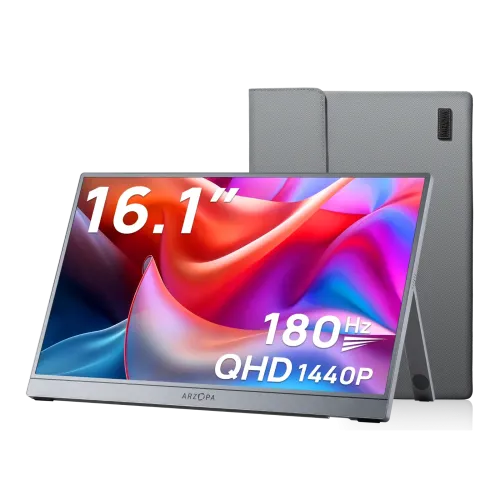
The Arzopa Z3FC is a 16.1-inch portable gaming monitor with a 2560 × 1440 QHD IPS panel and up to 180Hz refresh. Arzopa markets the display as 2.5K QHD, while many buyers search for 2K QHD; the resolution value is the same 2560 × 1440. The model code is Z3FC. The existing product title and slug remain stable, while the brand, model name and manufacturer part number are corrected to Arzopa and Z3FC. The screen has an integrated kickstand and aluminum body rather than a traditional desktop stand. It does not contain a battery, so it needs a compatible USB-C power source or a USB-C power connection alongside HDMI. Product images show a carry sleeve; confirm if it is included in the actual regional package.
QHD resolution and pixel density
The native resolution is 2560 × 1440 pixels at 16:9, which gives approximately 182.4 pixels per inch across the 16.1-inch diagonal. That density provides detailed text and graphics in a compact display area and is useful for a second laptop screen, handheld gaming, travel work or a console setup. The monitor can be positioned in landscape or portrait using its integrated kickstand. The source device controls the output resolution and scaling, so a phone or handheld may not expose every desktop resolution. For the clearest image, select 2560 × 1440 in the operating system and adjust text scaling for comfortable reading. Use the product-specific Z3FC details rather than specifications for Arzopa Z1FC or other portable monitor models.
180Hz over USB-C and Mini-HDMI limits
Arzopa lists up to 180Hz at QHD through USB-C DisplayPort Alt Mode. A full-function USB-C cable and a host device that can output 2560 × 1440 at 180Hz are required. The Mini-HDMI 2.0 input supports up to 144Hz at QHD in the reviewed specification. HDMI video does not power the monitor, so connect USB-C power when using Mini-HDMI. Refresh rate is the number of display updates per second; it is not the same as pixel response time or the frame rate a game can render. A console or handheld may be limited by its own output capabilities. Confirm the graphics source, cable and selected timing together when troubleshooting a lower-than-expected refresh rate.
IPS picture, brightness and color
The display uses an IPS panel with 400 cd/m² typical brightness, 1000:1 typical contrast and 107% sRGB gamut as specified by Arzopa. It supports 8-bit color and 16.7 million colors. A wide-gamut percentage describes color range, not factory calibration accuracy or uniformity. For color-sensitive editing, use a calibrated workflow and check the color-management behavior of the computer and software. The anti-glare surface and 400-nit rating support indoor work and travel use, though the screen can still reflect bright light. Set brightness for the room rather than leaving it at maximum. HDR10 support is listed, but Arzopa does not list a VESA DisplayHDR certification or local dimming. This should be described as HDR signal support rather than high-end HDR contrast performance.
Response time, FreeSync and gaming
Arzopa lists typical 9ms GtG response time in its detailed specifications. That is distinct from the 180Hz refresh rate. A display can refresh rapidly while liquid-crystal transitions take longer, so the listing should not claim 1ms response without model-specific evidence. The monitor supports AMD FreeSync/Adaptive-Sync, which can reduce tearing with compatible devices and frame rates. Actual support depends on the source GPU, connection, software driver and game. The portable format is useful for gaming away from a desk, but a small speaker system and thin panel are practical compromises. Position the screen securely and use a stable kickstand surface. For 180Hz, use USB-C video with a source that supports the required QHD mode; Mini-HDMI is listed up to 144Hz at QHD.
USB-C, Mini-HDMI and power
The Z3FC has two full-function USB 3.1 Type-C ports and one Mini-HDMI 2.0 input. The USB-C ports support DisplayPort Alt Mode video and USB-PD power. One cable can carry display and power when the computer supports the necessary standards and power output. Some laptops may need their own charger if the monitor draws more power than the host can provide. With Mini-HDMI, supply power separately over USB-C. Use the included or a suitable Mini-HDMI-to-HDMI cable for a console or camera, and check which cable is supplied with the regional carton. The product listing gives 12.9W typical power consumption. Do not connect incompatible adapters; match the port, voltage and power-delivery requirements in the manufacturer documentation.
Stand, dimensions and carrying
The integrated kickstand adjusts up to approximately 80 degrees and supports landscape or portrait placement. It folds into the rear of the display for transport. The monitor body measures 366 × 228 × 9.3mm and weighs about 780g net. These are product dimensions and net weight, not retail carton measurements. Arzopa does not publish gross package weight or outer-box dimensions in the reviewed model specification, so the shipping logistics fields remain blank until a local carton is measured. The slim aluminum body is easier to pack than a typical desktop monitor, but protect the panel from pressure and impact inside a bag. A protective sleeve is shown in the catalog images; confirm the seller’s box contents before relying on it as an included accessory.
Audio, HDR and controls
The Z3FC includes two 1W speakers for basic system sounds, video and casual play. Their small size limits volume and bass compared with headphones or external speakers. The official port description reviewed does not list a separate headphone output. The Mini-HDMI connection can carry audio from a compatible source; USB-C audio behavior depends on the host. OSD buttons on the monitor control input, brightness and picture settings. Low Blue Light and HDR10 are listed by Arzopa. HDR10 mode may change brightness, contrast or color presentation, but the available documentation does not claim a DisplayHDR tier. For long work sessions, tune brightness and color settings to the environment and avoid using HDR mode for color work unless the source and app are configured for it.
Bangladesh price, warranty and buying checklist
The catalog price is ৳33,500. Research across local retailers showed offers around ৳33,500–৳35,000 depending on seller and stock. Retail listings advertise two years of warranty; check the current invoice and serial-specific terms before buying. Confirm the exact Z3FC model, screen condition, included cables and whether the carry sleeve is in the sealed box. Test both USB-C ports and Mini-HDMI, check the display for dead pixels, and verify that your laptop or handheld supports USB-C DisplayPort Alt Mode if you expect one-cable video. Barcode, GTIN and country of origin were not confirmed from the physical package evidence, so those fields remain blank. Do not fill these values from another Arzopa model or a different regional carton.
Who should choose the Z3FC
Choose the Z3FC if you need a light second display for a compatible laptop, handheld console, camera, desktop or gaming console and value QHD resolution with high refresh. It is convenient for travel, temporary workstations, coding, media and gaming. Check the exact port limits: USB-C supports the 180Hz QHD path, while Mini-HDMI is listed to 144Hz at QHD and needs separate USB-C power. A laptop’s USB-C connector must support video, not only charging or data. If you want a built-in battery, higher-powered speakers or a documented HDR certification, compare another portable or desktop model. For shipping, the measured product size and 780g net weight do not replace gross carton data; obtain the local package measurements if the carrier needs them.