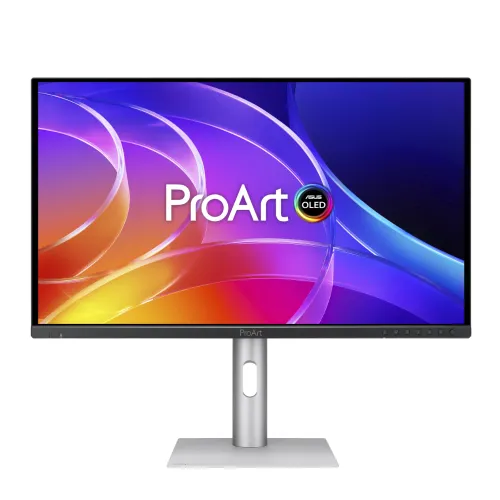
A 4K QD-OLED display for detailed creative work
The ASUS ProArt Display OLED PA279CDV is a professional monitor built around a 26.5-inch viewable QD-OLED panel in the 27-inch class. Its native 3840 × 2160 resolution places more than eight million pixels into a 16:9 workspace, giving editors room to view high-resolution material, arrange tool panels and inspect fine edges without leaving the 4K canvas. At 166 pixels per inch and a 0.153mm pixel pitch, interface text and image detail appear dense at a normal desktop distance. The active viewing area is approximately 589.97 × 332.93mm. The surface is anti-reflection, and the flat panel uses a standard widescreen layout. For the sharpest output, the source computer, selected input and cable need to support the target 4K resolution and refresh rate together.
QD-OLED contrast, brightness and HDR
QD-OLED is a self-emissive display technology: each pixel produces its own light instead of relying on a conventional LCD backlight. This lets the panel render very dark pixels beside bright content with high contrast. ASUS lists a typical contrast ratio of 1,500,000:1, a 250 cd/m² typical brightness and a peak HDR brightness of up to 1,000 cd/m² at a 3% picture area. The small-area condition matters: the peak figure should not be presented as continuous full-screen output. The monitor accepts HDR10 and carries VESA DisplayHDR True Black 400 certification. These features can help creators preview HDR media and evaluate contrast, while final mastering still depends on calibrated settings, application color management and the target delivery specification. Use the screen’s HDR presets and review the intended output on a suitable reference workflow when a client deliverable requires it.
Color accuracy and working color spaces
Color work benefits from known color coverage and a measured calibration target. ASUS specifies true 10-bit color capable of displaying approximately 1.0737 billion colors, with 100% sRGB, 100% Rec.709 and 99% DCI-P3 coverage. The PA279CDV is Calman Verified and factory calibrated to Delta E below 1.5. These claims give photographers, designers and video editors a useful starting point for common web, HD video and wide-gamut work. ProArt Preset includes color modes such as sRGB, BT.709, Adobe RGB, P3, BT.2020, DICOM, HDR PQ, Native and user modes; the technical sheet also lists RGB gain/offset adjustment and multiple gamma selections. Adobe RGB has a selectable preset, but ASUS does not publish a coverage percentage in the specification sheet reviewed. If print proofing is central to your work, verify the measured Adobe RGB coverage for your unit rather than assuming a percentage.
120Hz response for motion review
The monitor supports a maximum refresh rate of 120Hz and a 0.1ms gray-to-gray response time. For editing, those figures can make timeline scrubbing, animated interface elements and fast motion previews feel smoother than a typical 60Hz creator monitor. ASUS also lists Adaptive-Sync variable refresh rate, which can synchronize compatible output rates to reduce tearing during supported use. The refresh actually available depends on graphics hardware, connection type, selected resolution, operating system and cable capability. ASUS’s published signal ranges include 48–120Hz vertical for HDMI, USB-C and DisplayPort. This is a productivity and creator display rather than a product whose only purpose is competitive gaming: color presets, calibration, connectivity and ergonomics remain central to its design. Check the computer’s supported output modes before planning a 4K 120Hz setup, especially when using a dock or adapter.
USB-C, video inputs and desk connectivity
A full-function USB-C port supports DisplayPort Alt Mode, USB 3.2 data and up to 96W Power Delivery. With a compatible laptop and cable, one connection can carry the display signal, activate the monitor’s USB hub and charge the computer, reducing cable changes at a shared desk. The video connections also include two DisplayPort 1.4 DSC ports with daisy-chain support and one HDMI 2.1 FRL input. The built-in hub provides three USB 3.2 Gen 1 Type-A downstream ports and one USB 3.2 Gen 1 Type-C downstream port. ASUS additionally lists one USB-C signal/data connection for KVM, plus an earphone jack. KVM can switch a keyboard and mouse between two connected computers, but both hosts need the appropriate video and USB data links. Check port labels and the manual when wiring a two-computer setup; a video cable alone may not carry the USB data needed for peripheral switching.
ProArt controls and Mac-oriented modes
The display includes ProArt Palette adjustments, ProArt Preset picture modes, ProArt Chroma Tune and ASUS DisplayWidget Center. DisplayWidget Center lets users adjust monitor settings from the computer interface instead of navigating every menu with the on-screen controls. ASUS lists M Model color temperature as a Mac-oriented selection and identifies the product as Mac compatible. The manufacturer also lists automatic rotation support through DisplayWidget Center, Picture-in-Picture and Picture-by-Picture, HDCP 2.2, multiple HDR modes and ASUS Power Sync. These capabilities are useful for mixed-source desks, color-space changes and screen layout checks, but software and operating-system requirements can vary. Before relying on a feature in a managed workflow, install the current ASUS utility for the operating system and verify that the connected computer exposes the needed color profile and port behavior.
Comfort, OLED care and environmental sensors
The stand adjusts through 0–130mm of height travel, +23 to −5 degrees of tilt, 30 degrees of swivel in each direction and 90-degree pivot in either direction. A 100 × 100mm VESA pattern and Kensington lock slot give additional mounting and desk-security options. ASUS lists an ambient-light sensor and a proximity sensor, along with flicker-free and low-blue-light functions. OLED Care includes screen-saver and panel-protection tools that can reduce avoidable static-image exposure. OLED remains an emissive panel technology with a potential image-retention or burn-in risk under unsuitable long-term use; protective features reduce risk but do not make the technology immune. Follow ASUS guidance for screen care, keep ventilation clear and use the warranty terms applicable to the actual sales region. ASUS publishes a three-year warranty including panel burn-in for the model globally, but Bangladesh coverage and claim conditions should be confirmed in writing with the local seller.
Size, weight, power and box contents
ASUS estimates the monitor at 61.21 × 52.58 × 20.21cm with the stand and 61.21 × 36.09 × 3.98cm without it. Net weight is listed as 5.6kg with the stand, 3.6kg without, and 8.4kg gross in the carton; ASUS notes that dimensions and weight may vary by region. The power specification lists a 100–240V, 50/60Hz input, less than 26.54W consumption, below 0.5W in power-saving mode and 0W when switched off with the hard switch. The published regional accessory list includes a warranty card, USB-C cable, quick-start guide, quick-release stand, power cord, DisplayPort cable and color pre-calibration report. Bundled accessories can vary by region, so inspect the sealed local package and invoice. If using a monitor arm, confirm its load rating and VESA fit; when measuring a desk, allow room for the stand base, cable bend and ventilation.
Bangladesh buying notes and suitable workflows
The catalog price of ৳133,000 is retained as the store’s configured price. On 6 November 2026, public Bangladesh seller pages displayed ৳130,000 at Ultra Technology BD, ৳132,799 at Star Tech and around ৳133,000 at Ryans, Tech Land BD and Skyland. These are dated seller snapshots, not a guarantee of today’s stock or a BiponiBD price promise. Retailer pages also list a three-year warranty; Ryans states that the original box is mandatory for claims. Buyers should confirm the regional part number, distributor-backed warranty, burn-in coverage, box-retention rule and accessories before ordering. The PA279CDV is a strong fit for creators who need 4K detail, wide-gamut color, fast refresh, high OLED contrast and USB-C laptop docking. It can also suit a mixed Mac and Windows desk with Auto KVM. Compare its 26.5-inch viewable size and 250 cd/m² typical brightness with the room and workflow. It is less suitable when the priority is a published Adobe RGB coverage guarantee, a sustained 1,000-nit full-screen level, or avoiding OLED maintenance considerations.
Key features
- 26.5-inch viewable 4K UHD (3840 × 2160) QD-OLED panel with 166 PPI, 16:9 format and anti-reflection surface.
- Up to 120Hz refresh and 0.1ms GTG response time, with Adaptive-Sync variable refresh rate for compatible systems.
- True 10-bit output supports 1.0737 billion colors; ASUS lists 100% sRGB, 100% Rec.709 and 99% DCI-P3 coverage.
- Factory calibrated and Calman Verified with Delta E below 1.5; multiple color-space, gamma and color-temperature modes are available.
- HDR10 support, VESA DisplayHDR True Black 400 certification, 250 cd/m² typical brightness and up to 1,000 cd/m² peak at 3% screen area.
- Full-function USB-C carries DisplayPort Alt Mode and USB 3.2 data while delivering up to 96W Power Delivery to compatible laptops.
- Auto KVM switches a connected keyboard and mouse between two computer hosts; daisy-chain capable DisplayPort 1.4 DSC and HDMI 2.1 add setup flexibility.
- Adjustable stand, 100 × 100mm VESA mounting, ambient-light/proximity sensors, ASUS OLED Care and DisplayWidget Center support a flexible creator workspace.
Advantages
- QD-OLED combines per-pixel black control with 4K detail and high contrast for reviewing dark scenes and rich imagery.
- Factory Delta E < 1.5 calibration, Calman Verified status, 100% sRGB/Rec.709 and 99% DCI-P3 cover common creative delivery spaces.
- 120Hz and 0.1ms GTG are unusually responsive for a color-focused ProArt display and support smooth motion review.
- One USB-C connection can provide video, hub data and up to 96W laptop charging; Auto KVM can reduce desk switching between two computers.
- The stand has height, tilt, swivel and pivot adjustments; ASUS publishes a three-year warranty including panel burn-in, but local coverage must be confirmed.
Things to consider
- The 1,000-nit figure is a 3% area peak; typical brightness is 250 cd/m², not a sustained full-screen SDR rating.
- OLED static-image retention or burn-in remains a technology consideration; OLED Care mitigates risk but cannot promise that burn-in is impossible.
- ASUS lists no Adobe RGB coverage percentage in the specifications reviewed; verify a measured gamut report if print soft-proofing is central.
- The 26.5-inch viewable area is slightly smaller than the 27-inch class name suggests; measure desk space and viewing distance.
- USB-C video, charging and KVM depend on host, cable and port support; verify laptop compatibility and connection topology.
Frequently asked questions
Is the PA279CDV an OLED monitor?
Yes. ASUS identifies its panel as QD-OLED. It is not an IPS LCD model; do not confuse it with ProArt PA279CV or PA279CRV.
What are the screen size and native resolution?
It is 26.5 inches viewable, marketed as a 27-inch class display, with 3840 × 2160 (4K UHD), a 16:9 ratio and 166 PPI.
What are its refresh rate and response time?
ASUS specifies up to 120Hz and 0.1ms gray-to-gray response. Adaptive-Sync VRR is listed; actual output depends on host, connection and settings.
How bright is the monitor?
Typical brightness is 250 cd/m². ASUS lists up to 1,000 cd/m² peak HDR brightness at a 3% picture area; that is not a sustained full-screen rating.
Which color gamuts and calibration does it support?
ASUS lists 100% sRGB, 100% Rec.709, 99% DCI-P3 and true 10-bit color. It is Calman Verified and factory calibrated to Delta E below 1.5.
Does it support HDR?
It accepts HDR10 and has VESA DisplayHDR True Black 400 certification. The manufacturer lists 1,000 cd/m² peak at 3% area and 1,500,000:1 typical contrast.
Can it charge a laptop through USB-C?
Yes. The full-function USB-C input supports DisplayPort Alt Mode, USB data and up to 96W Power Delivery. The computer and cable must support the needed modes and wattage.
What video and USB ports are included?
One HDMI 2.1 FRL, two DisplayPort 1.4 DSC, full-function USB-C, USB-C and three USB-A hub ports, a separate USB-C KVM data connection, and an earphone jack.
How does Auto KVM help?
With two computers connected using supported video and USB data links, KVM can switch a monitor-connected keyboard and mouse between hosts. The second computer needs an upstream data connection.
Does it have speakers?
Yes. ASUS lists two built-in 2W speakers for basic system audio. For detailed monitoring, use dedicated speakers or headphones.
Can the monitor be wall mounted?
Yes. It supports a 100 × 100mm VESA mount and includes a height-adjustable stand with tilt, swivel and pivot. Check the mount load rating and installation instructions.
What warranty and price apply in Bangladesh?
ASUS publishes three years including panel burn-in; local retailers list three years. Confirm written Bangladesh warranty terms, box requirements, stock and final price with the seller.