Pros
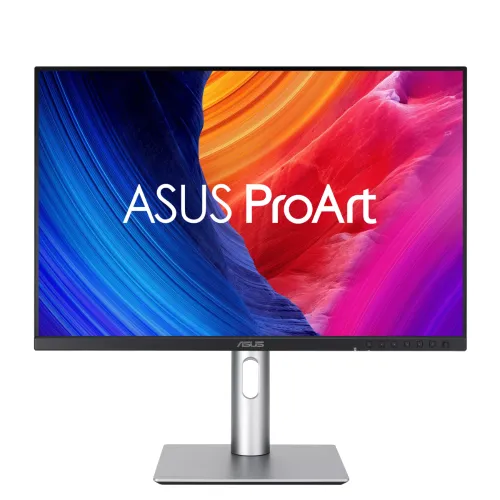
- 24.1-inch 16:10 WUXGA IPS workspace with 100Hz refresh and a fully adjustable stand.
- Factory-calibrated Delta E < 2 and 100% sRGB/Rec.709 coverage for color-focused work.

All categories
 New condition
Monitors
ASUS · ProArt Display PA248QV Gen2 (PA248QFV)
A 24.1-inch 16:10 WUXGA IPS display for color-focused work, with 100Hz Adaptive-Sync, 100% sRGB/Rec.709 and a fully adjustable stand.
Approximate Market Price
BDT 35,000
Informational market estimate only; this is not a current Store offer. Last checked Oct 18, 2026. Source
Compare store prices
No live offers for this variant
BDT 35,000
Approximate Market Price
Informational market estimate only; this is not a current Store offer. Last checked Oct 18, 2026. Source
Loading history…
Product story
This 24.1-inch IPS monitor uses a 16:10 WUXGA (1920 × 1200) panel. ASUS lists 100Hz Adaptive-Sync, 100% sRGB and Rec.709 coverage, factory calibration to Delta E < 2, and Calman Verified status.
Inputs include HDMI 2.1 (TMDS) and DisplayPort 1.2. The monitor has a four-port USB 3.2 Gen 1 Type-A hub and an earphone jack; connect the upstream USB cable to the computer to use the hub. The stand supports tilt, swivel, portrait pivot and 0–130 mm height adjustment, with a 100 × 100 mm VESA mount.
The resolution is WUXGA (1920 × 1200), not QHD. ASUS lists HDMI, DisplayPort and USB hub connectivity; it does not list USB-C video input or USB-C power delivery. Check your computer ports, included cables, current stock and warranty terms with the selected seller before ordering.
Helpful answers
Product-specific answers maintained with the catalog information.
No. It is a WUXGA display with 1920 × 1200 resolution and a 16:10 aspect ratio.
The manufacturer lists a USB Type-A hub and a USB upstream connection. A USB-C input or USB-C power delivery is not listed; connect the upstream cable as specified in the product documentation.
Yes. The manufacturer lists pivot adjustment for the stand, alongside height, tilt and swivel adjustment.
Warranty terms can vary by seller and listing. Confirm the current warranty period and service coverage with the seller before purchase.
Customer community
Become a merchant
Join BiponiBD, publish accurate offers and start free.