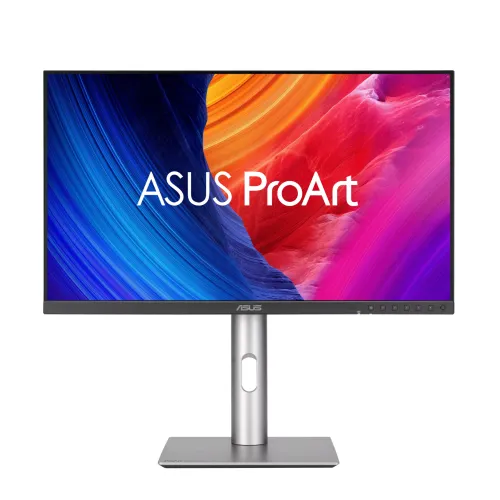
The ASUS ProArt Display PA278CGRV is a 27-inch QHD IPS professional monitor with 144Hz refresh, 100% sRGB, 97% DCI-P3, Calman Verified Delta E < 2 accuracy and HDR10 / VESA DisplayHDR 400. ASUS lists USB-C DisplayPort Alt Mode with up to 96W Power Delivery, two DisplayPort 1.4 DSC inputs, HDMI 2.1, KVM, PIP/PBP, a USB hub and a fully adjustable stand. Compare the PA278CGRV price in Bangladesh and confirm current stock, compatibility and warranty terms.
Overview
The ASUS ProArt Display PA278CGRV is a 27-inch professional QHD IPS monitor for creative work, office productivity and general media. Its native resolution is 2560 × 1440, and ASUS specifies a maximum 144Hz refresh rate. The ProArt line adds creator-focused color modes, calibration controls and a broad set of desk connections. This model is particularly notable for USB-C DisplayPort Alt Mode with up to 96W Power Delivery, two DisplayPort inputs, a USB hub, KVM, PIP/PBP and a height-adjustable stand. ASUS lists 100% sRGB, 97% DCI-P3, Calman Verified factory calibration and Delta E below 2. Those figures describe manufacturer specifications rather than a guarantee that every unit measures identically after shipping or over time. Verify current Bangladesh price, stock, warranty provider and exact regional package with the seller before ordering.
QHD IPS image and motion
The 27-inch IPS screen has 2560 × 1440 resolution and a 16:9 aspect ratio. QHD offers more detail and desktop space than Full HD at the same physical size, which can help with documents, image previews, timelines and multiple windows. It remains below 4K in pixel count, so it may require less graphics bandwidth and less interface scaling than UHD. ASUS lists a maximum 144Hz refresh rate, 5ms GTG response time and 178-degree horizontal and vertical viewing angles. Adaptive-Sync supports variable-refresh operation with compatible systems. The available refresh rate depends on the computer, selected resolution, input, cable and monitor settings. After connection, select 2560 × 1440 and enable the highest supported refresh rate in the operating system or graphics utility.
Color range and calibration
ASUS lists 100% sRGB and 97% DCI-P3 color coverage, 10-bit color with up to 1.0737 billion colors, Calman Verified status and Delta E below 2. ProArt Preset modes include sRGB, Adobe RGB, DCI-P3, BT.709, BT.2020, DICOM, HDR PQ and Native. Color-temperature selection, RGB gain and offset adjustment, gamma settings and ProArt Palette controls provide options for different creative tasks. Gamut percentages describe a color range under the manufacturer's measurement convention; they do not alone confirm uniformity, calibration stability or exact reproduction on a particular unit. For commercial photography, print or video delivery, use a color-managed application and verify the individual display with a suitable calibration instrument.
HDR, brightness and contrast
The official sheet lists 350 cd/m² typical brightness, 400 cd/m² HDR peak, 1500:1 typical contrast and 3000:1 maximum contrast. HDR10 and VESA DisplayHDR 400 are specified. These features allow compatible HDR signals and meet the named certification tier, but do not promise local dimming or the deep blacks and bright highlights of higher-end HDR displays. Actual playback also depends on the source, operating system, content, input and selected monitor mode. For everyday mixed use, the QHD panel, broad stated gamut, calibration features and high refresh may matter more than the HDR label alone.
Connectivity and USB-C
USB-C supports DisplayPort Alt Mode and up to 96W Power Delivery, allowing compatible laptops to send video and receive power over one cable. ASUS lists one HDMI 2.1 TMDS input and two DisplayPort 1.4 DSC inputs with daisy-chain support. The USB hub has one USB 3.2 Gen 1 Type-C downstream port and three USB 3.2 Gen 1 Type-A ports, with an earphone jack for audio. USB hub and KVM functions require the intended host/upstream wiring described in the manual. Video modes depend on the graphics device, cable and port. A laptop that requires more than 96W under load may still need its original power adapter.
KVM, PIP/PBP and workflow tools
ASUS lists KVM and PIP/PBP support. KVM can share a connected keyboard and mouse between compatible computers when the right USB upstream connections are made. Picture-in-Picture and Picture-by-Picture can display multiple sources simultaneously, subject to supported input combinations and display modes. ProArt Palette, ProArt Preset, QuickFit Plus, DisplayWidget Center, ProArt Chroma Tune and auto-rotation support add controls for calibration and layout. ASUS Power Sync is also listed. Before planning a two-computer or multi-input workflow, consult the current manual for supported input pairs and USB wiring instead of assuming every port combination works at full refresh.
Stand, audio and physical setup
The included ergonomic stand supports -5° to +23° tilt, -30° to +30° swivel, -90° to +90° pivot and 0–130mm height adjustment. ASUS lists a 100 × 100mm VESA pattern for compatible arms or wall mounts. An anti-glare coating helps reduce reflections in typical desk lighting, and the official spec lists an ambient light sensor and Kensington lock. Built-in speakers are rated at 2W × 2, with a headphone output. They are convenient for basic system audio, while headphones or external speakers are preferable for detailed editing and fuller sound. Check desk depth, viewing distance and cable clearance when positioning the monitor.
Power, compatibility and package
ASUS lists 100–240V, 50/60Hz input, below 20W consumption, below 0.5W in power-saving mode and zero watts in power-off mode with the hard switch. The page lists Mac Compliance, Calman Verified, AMD FreeSync, DisplayHDR 400, TÜV Low Blue Light, TÜV Flicker-free, TCO Certified, EPEAT Gold and Energy Star. Listed accessories include USB-C, HDMI and DisplayPort cables, power cord, quick-release stand, quick-start guide, warranty card and a color pre-calibration report; ASUS notes accessories can vary by region. Confirm the local box contents, the computer's port capabilities and warranty documents with the seller.
Bangladesh price and warranty snapshot
As checked on 6 November 2026, the visible listing range was ৳61,699–৳64,000, though not every price was confirmed on a functioning live product page. Star Tech's directly inspected page showed ৳61,800 and In Stock, with ৳67,600 regular price. Skyland's ৳61,699 appeared in Google results, but the direct URL returned Page Not Found. Eastern IT displayed ৳63,000 and In Stock but also said actual prices would be updated soon. Global Brand showed ৳64,000 and Out of stock. Prices and stock are snapshots; confirm at checkout. ASUS lists a three-year LCD Zero Bright Dot warranty. Ask the local seller about provider, dead-pixel conditions, invoice requirements and service location.
Who may benefit
This model can suit designers, photographers, editors and office users who value QHD detail, a broad manufacturer-stated color gamut, factory calibration, 144Hz motion and a flexible desk connection. The USB-C charging, KVM, hub, PIP/PBP and adjustable stand are useful for a multi-device workstation. Consider a 4K display if maximum pixel density is essential, a premium HDR model for demanding HDR mastering, a higher-wattage dock for a power-hungry laptop, or dedicated speakers for audio work. It is also sensible to compare the final seller price and warranty rather than relying on cached search snippets.
Setup checklist
Before payment, verify model PA278CGRV, final price, stock, delivery and local three-year warranty coverage. Connect through USB-C when the notebook supports DP Alt Mode and up to 96W charging, or select HDMI/DisplayPort according to the required mode. Connect USB upstream for hub and KVM operation as described in the manual. In system settings, select 2560 × 1440 and enable up to 144Hz when supported by the source and cable. Choose the color preset for the intended task and calibrate for critical delivery. Enable HDR only with a compatible source and content. Adjust the stand for eye level or use a 100 × 100mm mount, and keep the invoice and warranty documents.
Key features
- 27-inch IPS panel, 2560 × 1440 QHD resolution and up to 144Hz refresh.
- ASUS lists 100% sRGB and 97% DCI-P3 color coverage.
- Calman Verified factory calibration and Delta E below 2 per ASUS specifications.
- 10-bit support for 1.0737 billion colors.
- 350 cd/m² typical and 400 cd/m² HDR peak brightness.
- HDR10 support and VESA DisplayHDR 400 certification.
- USB-C DisplayPort Alt Mode with up to 96W Power Delivery.
- One HDMI 2.1 TMDS and two DisplayPort 1.4 DSC inputs with daisy chain.
- USB hub with one USB-C downstream and three USB-A ports.
- KVM switch, PIP/PBP and Adaptive-Sync support.
- Built-in 2W × 2 speakers and headphone output.
- Ergonomic stand with tilt, swivel, pivot, 0–130mm lift and 100 × 100mm VESA.
Pros
- QHD resolution and 144Hz combine useful workspace with smoother motion.
- Broad stated sRGB/DCI-P3 coverage and factory Calman verification.
- USB-C video and 96W charging simplify compatible laptop setups.
- Two DisplayPort inputs, HDMI, USB hub and KVM support multiple devices.
- PIP/PBP and a fully adjustable stand help flexible creator workflows.
- Several Bangladesh listings provide a current price comparison, with availability caveats.
Considerations
- QHD is not 4K; buyers needing maximum pixel density should compare UHD alternatives.
- 144Hz depends on source, port, cable and selected display mode.
- DisplayHDR 400 is an entry-level HDR tier and does not promise local dimming or premium contrast.
- 96W USB-C may not replace the adapter for every high-power laptop.
- 2W × 2 speakers suit basic playback better than detailed studio listening.
- Seller prices and stock differ; some prices were visible only in search snippets.
Frequently asked questions
What is the ASUS ProArt PA278CGRV price in Bangladesh?
On 6 November 2026, Star Tech's direct page showed ৳61,800 and In Stock, with ৳67,600 regular price. Skyland appeared at ৳61,699 in Google results but its direct URL was not verified. Eastern IT showed ৳63,000 and In Stock while warning actual prices will be updated soon. Global Brand showed ৳64,000 and out of stock. Confirm the final checkout price and availability.
What are the resolution and refresh rate?
ASUS specifies 27-inch IPS, 2560 × 1440 QHD and maximum 144Hz. Actual refresh depends on host device, port, cable and display settings.
Is it suitable for photo or video work?
ASUS lists 100% sRGB, 97% DCI-P3, Calman Verified factory calibration and Delta E below 2. For critical work, use a color-managed workflow and calibrate or measure the individual unit.
Does USB-C charge a laptop?
Yes. ASUS lists DisplayPort Alt Mode and up to 96W Power Delivery. The laptop and cable must support the required video and charging profiles; some high-power laptops may still need their adapter.
How many video inputs are there?
The official specification lists one HDMI 2.1 TMDS, two DisplayPort 1.4 DSC with daisy chain, and USB-C DisplayPort Alt Mode. Supported modes vary by input and source.
Does it have a USB hub and KVM?
Yes. ASUS lists one USB 3.2 Gen 1 Type-C downstream port, three USB 3.2 Gen 1 Type-A ports and KVM. Follow the manual's host/upstream connection instructions.
Can it show two inputs at once?
ASUS lists PIP/PBP. Supported combinations and resolution limits depend on the input pair; consult the current user guide.
What does HDR400 mean?
ASUS lists HDR10, VESA DisplayHDR 400 certification and 400 cd/m² HDR peak. This is an entry HDR tier; it does not indicate local dimming or high-end HDR contrast.
Is the stand adjustable?
Yes. ASUS lists -5° to +23° tilt, ±30° swivel, ±90° pivot and 0–130mm height adjustment. VESA mounting is 100 × 100mm.
What warranty is listed?
ASUS lists a three-year LCD Zero Bright Dot warranty. Confirm the Bangladesh seller's local provider, coverage, dead-pixel policy and claim steps.
Does it include speakers?
Yes. The built-in stereo speakers are 2W × 2, and ASUS lists an earphone jack. External audio may suit editing or detailed listening better.
Will it work with a Mac?
ASUS lists Mac Compliance and USB-C DP Alt Mode. Video resolution, 144Hz, hub behavior and charging depend on the specific Mac, cable/adapter and system configuration.