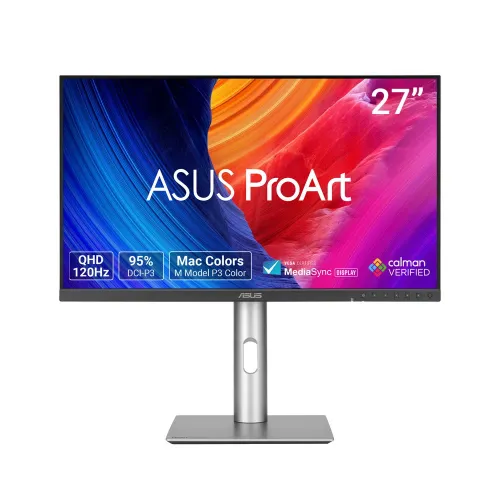
ASUS ProArt PA278QGV overview
The ASUS ProArt Display PA278QGV is a 27-inch QHD professional monitor designed for a desktop workspace that benefits from detailed images, adjustable color modes and smooth on-screen motion. ASUS identifies this model as ProArt Display PA278QGV, also presented in its regional product family as PA278QV Gen2 (PA278QGV). The panel has a native 2560 × 1440 resolution, 16:9 aspect ratio, IPS technology and anti-glare surface. Its maximum refresh rate is 120Hz over DisplayPort; the manufacturer lists HDMI vertical frequency up to 100Hz. ASUS specifies 5ms grey-to-grey response, HDR10, Adaptive-Sync and a 350 cd/m² brightness rating. ProArt features include 100% sRGB and 95% DCI-P3 coverage, a color accuracy rating of ΔE < 2, Calman Verified status, multiple picture presets and color adjustment controls. The monitor also includes built-in speakers, a four-port USB-A hub, a full-adjustment stand and an ambient-light sensor. This review keeps the existing product title, slug, category, Active status, variant SKU, catalog MSRP and three-year warranty field. It corrects the model identifiers and replaces thin generic copy with exact-model information.
QHD panel and workspace detail
At 2560 × 1440 pixels, the PA278QGV provides more workspace than a Full HD display of similar size and presents text, timelines, spreadsheets, design canvases and web pages with finer detail. Its 27-inch, 16:9 IPS panel has a listed pixel pitch of 0.233mm and active viewing area of 596.74 × 335.67mm. ASUS specifies 178-degree horizontal and vertical viewing angles at a contrast ratio threshold of 10:1. The anti-glare finish is intended to reduce distracting reflections from nearby lights and windows; room placement and brightness still affect perceived comfort. The panel uses LED backlighting. Rated brightness is 350 cd/m², while contrast is given as 1500:1 typical and 3000:1 maximum. Those are separate manufacturer figures and should not be read as one simultaneous standard measurement. The monitor supports 1073.7 million colors at 10-bit according to ASUS. Resolution and pixel density depend on the connected computer, cable, operating system, scaling setting and application. QHD is a practical middle ground for users who want more canvas than Full HD without the higher graphics and scaling demands of a 4K display.
Color presets and creator workflow
ProArt is the product line’s central feature set. ASUS lists preset modes for sRGB, Adobe RGB, DCI-P3, Rec.709, DICOM, HDR, Native and user-defined configurations, alongside RGB gain and offset tuning and gamma choices from 1.8 through 2.6. ASUS reports 100% sRGB and 95% DCI-P3 color-space coverage and a color accuracy rating of ΔE < 2; the product is also listed as Calman Verified. These specifications can help photographers, illustrators, video editors and design teams begin with a color mode suited to their work. They do not replace a calibrated viewing environment or a measurement workflow when a delivery contract requires specific color targets. ProArt Palette provides on-screen adjustment controls, and the bundled pre-calibration report is listed among the regional accessories. Color modes can change brightness, white point and the range of displayed colors. Before judging a project, choose the correct display mode, disable incompatible operating-system filters and confirm the application’s color management. For print work, a monitor preview remains an approximation of ink, paper and lighting conditions.
120Hz refresh and motion
The PA278QGV supports a maximum 120Hz refresh rate through its DisplayPort 1.4 connection. ASUS lists the vertical frequency range as 48–120Hz over DisplayPort and 48–100Hz over HDMI. Thus, the catalog’s 120Hz model title is accurate for a compatible DisplayPort connection, while HDMI is limited to 100Hz according to the manufacturer’s technical page. The actual mode also depends on the computer graphics output, cable, driver and resolution settings. A 120Hz panel can show more frequent updates than a 60Hz screen when the source supplies those frames, which may make desktop scrolling, cursor movement, editing timelines and compatible games appear smoother. ASUS lists 5ms GTG response time and Adaptive-Sync variable refresh technology. These manufacturer values do not guarantee identical motion performance for every pixel transition or source frame rate. The model is a creator-focused general-purpose monitor with adaptive sync, rather than a monitor marketed around the fastest competitive gaming response modes. HDR10 is supported, but the stated 350 cd/m² brightness and contrast figures should be considered when deciding whether HDR output meets a particular editing or viewing requirement.
Connections and USB hub
The manufacturer specification lists one DisplayPort 1.4 input, one HDMI 2.1 TMDS input, four downstream USB 3.2 Gen 1 Type-A ports and an earphone jack. The USB ports form a hub for peripherals when the monitor is linked to a host computer using the appropriate upstream USB connection; they are not four independent video inputs. ASUS lists a USB Type-B to Type-A cable among accessories, with regional package variation noted. There is no USB-C video input or USB Power Delivery in the official specification, so a laptop that relies on one-cable docking will need a separate compatible video cable and its own charging arrangement. DisplayPort is the connection to choose when using the full 120Hz mode. The HDMI input’s published vertical frequency limit is 100Hz. A headphone jack and integrated 2W × 2 speakers are available for basic audio. Check the graphics device’s output capabilities and the supplied cables before setup, especially if the computer is connected through a dock, adapter or KVM switch. Protected video may also depend on HDCP support across the entire connection chain.
Stand, orientation and setup
The included stand provides tilt from −5° to +23°, swivel ±30°, pivot ±90° and 0–130mm height adjustment. This range can help align the screen with seated eye level, angle the panel toward a second viewer or rotate it for portrait-oriented code, documents and page layouts. An operating-system setting may be needed to rotate the displayed image. The monitor supports a 100 × 100mm VESA mount and includes a Kensington lock point. Its approximate dimensions with the stand are 61.22 × 53.61 × 19.04cm, and ASUS lists 61.22 × 36.29 × 4.69cm without the stand. Net weight is approximately 6.4kg with the stand or 4.7kg without it; gross package weight is listed as 9.3kg. The package should include power, HDMI and DisplayPort cables, a USB Type-B to Type-A cable, a warranty card, quick-start guide and a color pre-calibration report, though ASUS notes that accessories vary by region. Confirm desk depth, arm capacity, VESA screw requirements and the exact local box contents before installation.
Eye comfort and useful utilities
ASUS lists Flicker-free and Low Blue Light features, an ambient-light sensor and automatic rotation support through DisplayWidget Center. QuickFit Plus can show layout guides, while Picture-in-Picture and Picture-by-Picture modes allow supported sources to appear in different screen regions. ProArt Preset and ProArt Palette provide selectable display modes and manual color adjustments. ASUS Power Sync is also listed. These functions can make multi-device or color-managed work easier to configure, but they depend on source compatibility and software support. Flicker reduction and blue-light settings do not prevent visual fatigue by themselves; users should set a comfortable brightness, avoid strong reflections, choose a suitable viewing distance and take breaks during extended sessions. The built-in speakers are rated 2W × 2 and are suitable for ordinary system audio and video calls, while headphones or external speakers may be preferable for detailed listening. Adaptive-Sync can coordinate supported refresh behavior with compatible graphics hardware. Keep the monitor firmware, graphics driver and ASUS display utility aligned with the computer environment, and check supported operating systems on ASUS support before installing management software.
Bangladesh price, stock and warranty
During this review, Bangladesh retailer pages showed a broad asking-price spread: Ryans displayed ৳48,900 special price and ৳52,300 regular price; Skyland showed ৳48,900; Ez Gadgets showed ৳49,899; Moharaz listed ৳54,500. The comparison site Dordam showed a Star Tech offer at ৳45,800 and other listings from ৳46,000 to ৳50,000, though its merchant status and update date should be checked directly before purchase. These are dated seller listings, not a guaranteed live quote or a BiponiBD offer. The catalog variant MSRP of ৳48,900 is retained. The product record and Ryans page both show a three-year warranty, but warranty coverage depends on the local distributor, serial number, invoice, packaging and claim terms. Before ordering, ask the retailer to confirm current stock, the price payable, whether the unit has the local warranty, which accessories are in the box, delivery charges, return window and the service location. Keep the invoice and warranty card. Market price and availability can change without notice, so use the linked seller page for a fresh offer rather than treating this snapshot as current inventory.
Who should consider the PA278QGV
This monitor can suit content creators, photographers, designers, office users and developers who want QHD resolution, a 27-inch IPS panel, a broad set of preset color modes and a stand that adjusts in four directions. A 100% sRGB and 95% DCI-P3 specification, ΔE < 2 rating and Calman Verified listing are useful selection points for color-aware work, while a 120Hz DisplayPort mode can make motion and interface interaction smoother. The USB hub can keep a keyboard, mouse or other peripherals close to the display once its upstream connection is installed. Its limits should guide the purchase: the maximum is 120Hz over DisplayPort and 100Hz over HDMI; it has no USB-C video or laptop charging; and the listed HDR10 support is not a named VESA DisplayHDR certification. Buyers who require a higher refresh rate, built-in USB-C docking or a specific HDR luminance standard should compare alternatives. For color-critical deliverables, verify the desired preset and calibrate for the actual room, workflow and output requirement.
Summary and buying checklist
ASUS ProArt Display PA278QGV combines a 27-inch anti-glare IPS panel, 2560 × 1440 resolution, 120Hz maximum refresh over DisplayPort, 100Hz maximum vertical frequency over HDMI, 5ms GTG response, 350 cd/m² brightness, HDR10 and Adaptive-Sync. Color specifications include 100% sRGB, 95% DCI-P3, 10-bit display colors and an ASUS ΔE < 2 accuracy rating with Calman Verified certification. Connectivity consists of one DisplayPort 1.4, one HDMI 2.1 TMDS, a four-port USB 3.2 Gen 1 Type-A hub and an earphone jack; integrated speakers are rated 2W × 2. The stand supports tilt, swivel, pivot and 130mm height adjustment, with 100 × 100mm VESA mounting. Before choosing it, check that the graphics output and cable support the intended resolution and refresh rate, confirm USB hub cabling and local warranty terms, and compare current retailer pricing. The exact model code is PA278QGV and ASUS eShop identifies the part number 90LM05L1-B01K71. The saved catalog name, slug, Active status, Monitors category, variant SKU, ৳48,900 MSRP and three-year catalog warranty remain unchanged.