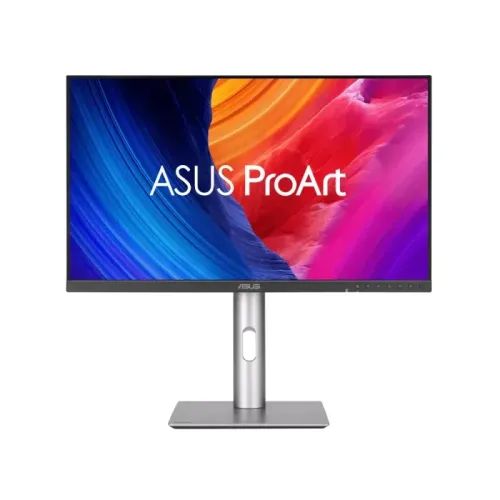
The ASUS ProArt Display PA27JCV is a 27-inch professional monitor with 5120 × 2880 native resolution. At 218 pixels per inch and 0.116mm pixel pitch, small interface elements, fine lines and high-resolution photographs can be shown with substantially more detail than on a conventional 27-inch 4K screen. The 16:9 panel contains about 14.7 million pixels, around 77 percent more than 3840 × 2160. On a compatible computer, the extra pixels can support detailed previews and a broad editing timeline. The host still needs a graphics output and cable capable of driving 5K at 60Hz. Check operating-system scaling preferences, GPU support and the chosen port before planning a workstation around the maximum resolution.
IPS panel and LuxPixel surface
The flat IPS LCD uses LED backlighting and has a 27-inch diagonal, 16:9 ratio and 178-degree horizontal and vertical viewing angles under the manufacturer test condition. ASUS markets its anti-glare, low-reflection surface as LuxPixel. Surface treatment can reduce distracting reflections from windows and studio lights, although room placement and ambient brightness still affect perceived contrast. The panel is designed for a creator desk where more than one person may review an image or layout. Its pixel density makes it useful for detailed UI and text, but a proper viewing distance and scaling setting remain important for comfortable long sessions.
Color gamut and factory calibration
ASUS lists 10-bit color (1.0737 billion colors), 99 percent DCI-P3, 100 percent sRGB/Rec.709 and 95 percent Adobe RGB coverage. The model is Calman Verified and factory pre-calibrated to Delta E below 2 according to the manufacturer. ProArt Preset modes cover multiple common color workflows, and ASUS also lists ProArt Palette and Chroma Tune software. These are manufacturer specifications rather than a guarantee that every unit stays calibrated indefinitely or that every application uses the correct profile. For print, video delivery or client approval, select the matching color space, use a managed application and recalibrate when the workflow requires it. Retailer shorthand such as “100% color” should not replace the individual gamut figures.
Brightness, contrast and HDR
The official specification gives 400 cd/m² typical brightness and 500 cd/m² HDR peak, with 1500:1 typical and 3000:1 maximum static contrast. It accepts HDR10 and carries VESA DisplayHDR 500 certification. Typical brightness, HDR peak and contrast ratio describe different test conditions; the 500 cd/m² figure should not be read as sustained full-screen output. ASUS Light Sync includes an ambient-light sensor and a backlight sensor intended to adapt to room conditions and compensate for warm-up variation. The PA27JCV is an edge-lit LCD rather than a multi-zone Mini-LED reference display. Users assessing HDR mastering should consider that distinction and review their target deliverable on an appropriate reference monitor.
USB-C, ports and Auto KVM
The ASUS specification summary names USB-C with DisplayPort Alt Mode, DisplayPort 1.4 and HDMI 2.1, plus a three-port Type-A and one-port Type-C downstream hub. The official manual rear-panel diagram adds important topology detail: one full-function USB-C upstream port carries video, USB data and up to 96W Power Delivery; a second USB-C upstream port carries data for a second KVM computer; and the hub provides three USB-A downstream ports plus one USB-C downstream port with up to 15W output. The rear panel also has a 3.5mm earphone jack and HDCP 2.2 support. Auto KVM can switch peripherals connected to the monitor between two computers, but a second host on HDMI or DisplayPort requires its own USB data cable to the data-only upstream port.
Motion, eye care and creative tools
The PA27JCV is specified for 60Hz refresh and 5ms gray-to-gray response. ASUS lists VESA MediaSync/Adaptive-Sync in the 48–60Hz range, aimed at smooth video playback and timeline work rather than high-frame-rate gaming. The feature set also includes QuickFit Plus for on-screen guides and ASUS ProArt controls. TÜV Rheinland flicker-free and low-blue-light certifications are listed in the product materials. These features do not replace sensible brightness, breaks or color-managed settings. For gaming, check the intended frame rate and compare a display with a higher refresh rate if motion response is the main priority.
Ergonomics, dimensions and power
The stand provides 0–130mm height adjustment, +23° to −5° tilt, ±30° swivel and ±90° pivot. The monitor supports a 100 × 100mm VESA mount and has a Kensington lock slot. Manufacturer dimensions with stand are about 612.2 × 538.1 × 215.0mm at maximum height; without the stand, about 612.2 × 362.9 × 44.1mm. Net weight is listed as 5.91kg with the stand and 4.14kg without; packaged gross weight is 8.73kg. ASUS specifies an internal 100–240V, 50/60Hz supply, 31.04W typical draw, below 0.5W in power-saving mode and 0W switched off at the hard power switch. Leave room for the stand, cable bend and airflow when measuring a desk.
Bangladesh price, warranty and box contents
The BiponiBD variant remains at ৳118,500. A dated seller check on 6 November 2026 found Star Tech and Ryans at ৳118,000, TechLand BD at ৳118,500 offer (৳127,000 regular) and Skyland at ৳120,000. These figures are market references, not current BiponiBD offers, and stock or promotions can change. Bangladesh listings state a three-year warranty; Ryans says the original box is required for claims. Confirm the seller/distributor, warranty coverage, invoice wording, regional model suffix and exact box contents before buying. ASUS says cable bundles can vary by region. The Skyland listing reports a regional ordering part code 90LM0AL0-B01KB0, but the exact suffix and GTIN on the BiponiBD shipment are not verified.
Who should consider this display
The PA27JCV can suit photographers, designers, video editors and developers who want a dense 5K desktop, factory-calibrated color and USB-C laptop docking. Its 96W charging and Auto KVM can simplify a desk shared by two compatible computers. The 60Hz panel and built-in 2W speakers make it less suited to users prioritizing high-refresh gaming or critical audio monitoring. Native 5K needs compatible host hardware, and the second-host KVM workflow needs an extra data connection. Compare panel brightness, HDR method, gamut, cable support and local warranty terms against the actual work rather than relying on the “5K” label alone.
Key features
- 27-inch 16:9 IPS LED display with native 5K UHD (5120 × 2880), 218 PPI and 0.116mm pixel pitch for a dense studio workspace.
- ASUS LuxPixel anti-glare, low-reflection surface and 178° horizontal/vertical viewing angles support comfortable shared viewing in a bright workspace.
- 10-bit, 1.0737-billion-color panel with 99% DCI-P3, 100% sRGB/Rec.709 and 95% Adobe RGB; factory Calman Verified calibration with Delta E < 2.
- 400 cd/m² typical and 500 cd/m² HDR peak brightness, HDR10 and VESA DisplayHDR 500; contrast is 1500:1 typical and 3000:1 maximum.
- Full-function USB-C supports DisplayPort Alt Mode, USB data and up to 96W Power Delivery for a compatible laptop over one cable.
- Auto KVM supports two computers; the manual shows a second data-only USB-C upstream port and hub with three USB-A plus one USB-C downstream port.
- ASUS Light Sync combines ambient-light and backlight sensors; ProArt Preset, ProArt Palette, Chroma Tune and QuickFit Plus assist creative workflows.
- 60Hz, 5ms GTG, VESA MediaSync/Adaptive-Sync, HDMI 2.1, DisplayPort 1.4, 2W × 2 speakers, 3.5mm audio, 4-way stand, 100×100mm VESA and internal PSU.
Pros
- 5K at 218 PPI gives fine text and detail; 5120×2880 contains about 77% more pixels than 3840×2160.
- Factory calibration, Calman Verified status and broad DCI-P3, sRGB and Adobe RGB coverage help color-managed photo and video work.
- A single USB-C cable can carry video and hub data while delivering up to 96W to a compatible notebook.
- Auto KVM, multiple hub ports and a four-way ergonomic stand support desk sharing and flexible studio setups.
- Internal power supply, useful sensors, headphone output and VESA mounting are built into the monitor.
Considerations
- The maximum refresh rate is 60Hz, so it is aimed at design and editing rather than high-refresh competitive gaming.
- DisplayHDR 500 is not a Mini-LED multi-zone dimming system; HDR mastering performance should be judged against the intended workflow.
- A second HDMI/DisplayPort computer needs a separate USB-C data connection to use Auto KVM.
- The built-in 2W × 2 speakers are basic desktop audio, not reference monitoring speakers.
- Native 5K at 60Hz needs a compatible host GPU and cable; verify the computer output and DSC/HDMI/USB-C support.
Frequently asked questions
What is the native resolution and pixel density?
It is 5120 × 2880 (5K UHD) on a 27-inch 16:9 IPS display, with 218 PPI and 0.116mm pixel pitch.
What is ASUS LuxPixel?
ASUS describes LuxPixel as its anti-glare, low-reflection surface treatment for reducing reflections while retaining clear fine detail.
How many USB-C ports does the PA27JCV have?
The manual diagrams three USB-C receptacles: full-function video/data/96W PD upstream, a second data-only KVM upstream, and a downstream hub port rated up to 15W.
Can it charge a laptop over USB-C?
The primary full-function USB-C input supports DisplayPort Alt Mode and up to 96W Power Delivery. Actual charging depends on the laptop and cable.
How does Auto KVM work?
Connect one host through the full-function USB-C port. For a second host using HDMI or DisplayPort, also connect its USB data to the second USB-C upstream port; peripherals on the monitor hub can then switch hosts.
Which color spaces and calibration are specified?
ASUS lists 99% DCI-P3, 100% sRGB/Rec.709, 95% Adobe RGB, 10-bit color and factory Calman Verified calibration with Delta E below 2.
What are brightness, contrast and HDR ratings?
The manufacturer lists 400 cd/m² typical, 500 cd/m² HDR peak, 1500:1 typical and 3000:1 maximum contrast, HDR10 and VESA DisplayHDR 500.
What is the refresh rate and response time?
The PA27JCV is 60Hz with 5ms GTG and supports VESA MediaSync/Adaptive-Sync from 48–60Hz.
Does it have speakers and a headphone jack?
Yes. ASUS specifies two 2W speakers and a 3.5mm earphone jack.
What are the stand adjustments and VESA size?
Height adjusts 0–130mm; tilt is +23° to −5°, swivel ±30° and pivot ±90°. The VESA pattern is 100×100mm.
What is its power draw and power supply?
ASUS specifies an internal 100–240V, 50/60Hz supply, 31.04W typical, below 0.5W power-saving and 0W off with the hard switch.
What is its price and warranty in Bangladesh?
The catalog price remains ৳118,500. Retailer prices checked 6 Nov 2026 ranged ৳118,000–৳120,000; sellers state three years, but confirm written local terms and box-retention rules.