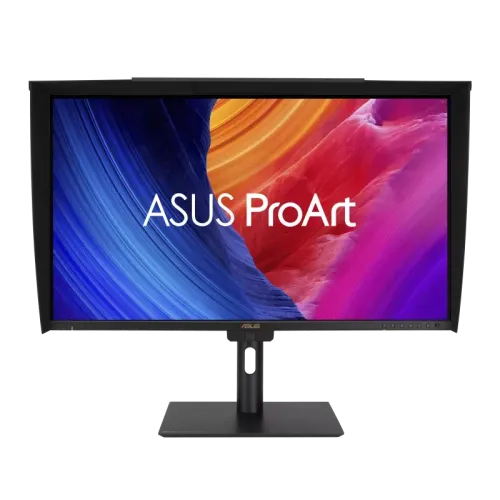
4K resolution for a creator workstation
The ASUS ProArt Display PA27UCGE is a 27-inch professional IPS monitor with a native 3840 × 2160 4K UHD resolution. That pixel count offers four times as many pixels as Full HD and gives photo editors, video creators, illustrators and designers a detailed canvas for reviewing fine edges, typography and high-resolution footage. ASUS lists 163 pixels per inch, a 16:9 aspect ratio and an active viewing area of 596.74 × 335.66mm. The display uses an anti-glare, low-reflection LuxPixel AGLR surface. At this size and resolution, users can arrange a timeline, editing tools and a preview together while retaining detailed image inspection. The 4K signal and high refresh modes require a compatible graphics source and connection; when using a laptop dock or adapter, verify that the complete chain supports the target resolution, refresh and color depth. The panel is flat and the manufacturer specifies 178-degree horizontal and vertical viewing angles.
Color accuracy and wide-gamut editing
Color-focused work depends on the screen’s measured behavior, source profiles and the way each application manages color. ASUS lists 100% sRGB and 98% DCI-P3 coverage, 10-bit display output with approximately 1.0737 billion colors and factory color accuracy of Delta E below 1. The manufacturer notes that gamut percentages and Delta E can be affected by calibration, measurement environment and equipment. ProArt Preset includes Native, sRGB, Adobe RGB, DCI-P3, BT.2020, DICOM, Rec.709, HDR PQ and HDR HLG selections, alongside three user modes. RGB gain and offset, five color-temperature modes and gamma choices from 1.8 through 2.6 provide additional control. For print or broadcast delivery, select the intended output space in the application, use a calibrated display profile and verify a proof using the same standards required by the client. A listed preset alone does not guarantee that a full workflow is color managed.
Built-in colorimeter and calibration tools
The PA27UCGE includes a motorized colorimeter that flips into position for supported self-calibration. ASUS also lists hardware calibration, ProArt Palette, Calman Ready and ColourSpace CMS integration. This combination is intended to help keep the monitor’s behavior consistent as it is used and to support calibration workflows that can store settings in the display. The Light Sync system includes an ambient-light sensor and a backlight sensor. These tools can help a studio measure and adjust the screen, but they do not automatically make every connected application color accurate. Calibration targets, room lighting, display mode and software all matter. Follow ASUS’s manual and current software support for setup, avoid obstructing the sensor, and retain calibration reports with project records. If a client needs a specific reference level or certification, measure the unit and validate the target deliverable rather than relying only on the advertised Delta E figure.
160Hz refresh with Adaptive-Sync
ASUS specifies a maximum refresh rate of 160Hz and a 1ms gray-to-gray response time. Its published activated vertical range is 48–160Hz across HDMI, USB-C and DisplayPort, with VESA Adaptive-Sync listed. For editing, animation and game-development review, the higher refresh can make scrolling, moving previews and fast camera motion feel smoother than a standard 60Hz display. It can also help developers inspect a project at higher frame rates. A 160Hz screen does not create frames that the computer cannot render: the GPU, application, source mode and cable must all support the selected 4K refresh. The specification identifies Adaptive-Sync but does not list separate NVIDIA G-SYNC or AMD FreeSync certification. Buyers should therefore match the feature to their graphics card and confirm the actual variable-refresh mode in their operating system and application.
HDR brightness and viewing modes
The monitor lists HDR10 and HLG support, VESA DisplayHDR 600 certification, 600 cd/m² typical brightness and 600 cd/m² peak brightness. These are manufacturer specifications; HDR impact depends on the source’s mastering, scene brightness, selected picture mode and the application’s HDR handling. Multiple HDR modes include PQ and HLG options for different signal types and color spaces. The IPS panel’s typical contrast ratio is 1,000:1, which is distinct from the HDR certification and brightness rating; dark-room black depth will be more limited than on an OLED monitor. For HDR preview, set the software and operating system to the intended format, inspect highlight and shadow detail, and compare the final content on its target viewing devices. Do not interpret “600 nits” as a guarantee that every HDR frame remains at that brightness or that all content will look identical across displays.
USB-C, HDMI, DisplayPort and KVM
The connectivity set includes one USB-C input with DisplayPort Alt Mode and up to 96W Power Delivery, one DisplayPort 1.4 DSC input and two HDMI 2.1 FRL inputs. The USB hub includes one downstream USB 3.2 Gen 1 Type-C and two downstream USB 3.2 Gen 1 Type-A ports, plus an earphone jack. A USB-C connection can carry video and charge a compatible laptop, reducing the number of cables on a desk. ASUS’s Auto KVM can switch a connected keyboard and mouse between two computers when their video and USB data links are connected as required. The monitor also supports picture-in-picture and picture-by-picture. A single video lead may not provide the USB upstream data needed for the hub and KVM, so follow the port diagram in the manual. Check the host’s USB-C power requirements, display capabilities and cable ratings before buying for a specific laptop.
Ergonomics, sensors and physical details
The stand provides height adjustment from 0 to 120mm, tilt from −5° to +23°, swivel up to 30° in either direction and pivot up to 90° in either direction. The rear supports a 100 × 100mm VESA mount and includes a Kensington lock slot. ASUS lists an ambient-light sensor, backlight sensor and proximity sensor as part of its Light Sync features. Published dimensions with the stand are 61.24 × 57.47 × 20.18cm; without the stand they are 61.24 × 38.08 × 4.76cm. The listed net weight is 6.4kg with stand and 4.5kg without, with 10.6kg gross packaging weight. ASUS notes regional variation for dimensions, weight and accessories. Measure desk depth, arm capacity and cable clearance, and leave the monitor’s sensors unobstructed if using automatic Light Sync functions.
Audio, certifications and power
The monitor has two built-in 2W speakers and a headphone output for basic desk audio. It supports HDCP 2.3, TÜV Flicker-free, TÜV Low Blue Light and lists Mac Compliance, FSC MIX, Calman Ready, VESA DisplayHDR 600, EPEAT Gold and Energy Star certifications on ASUS’s technical page. Power input is 100–240V at 50/60Hz. ASUS lists under 27W consumption, under 0.5W in power-saving mode and 0W when switched off using the hard power switch. Certification marks and energy figures describe specific test conditions; actual consumption varies with brightness, connected USB devices and use. Keep the power connection accessible and use the supplied regional cable. The listed accessory set can include a monitor hood, color pre-calibration report, USB-C and DisplayPort cables, HDMI Ultra High Speed cable, power cord, quick-start and warranty cards, and a USB-C-to-A cable; ASUS states that contents vary by region.
Bangladesh price and warranty checks
The configured BiponiBD variant price of ৳140,500 is retained. Bangladesh product pages checked on 6 November 2026 listed ৳142,000 at Skyland and Ryans, and ৳141,500 at Tech Land BD. These prices are dated retailer snapshots, not a guaranteed live BiponiBD offer; check current seller stock and final checkout amount. Those retailer pages state three years of warranty. ASUS’s UK specification page lists a three-year LCD zero-bright-dot warranty, but that does not establish the Bangladesh distributor’s dead-pixel threshold, service route or exact exclusions. Confirm the local warranty card and the selling unit’s region-specific model code, hood and cable bundle before purchase. The PA27UCGE suits creators who want 4K detail, wide-gamut IPS, calibration tools, a built-in colorimeter, a high refresh rate and USB-C laptop charging. It may be less appropriate for buyers who prioritize OLED-level black depth or whose computer cannot drive the chosen 4K refresh mode.
Key features
- 27-inch 4K UHD (3840 × 2160) IPS panel with 163 PPI, a 16:9 aspect ratio and ASUS LuxPixel AGLR surface.
- Up to 160Hz refresh with Adaptive-Sync VRR and 1ms GTG response supports smooth motion review and fast-rendering work.
- ASUS lists 100% sRGB, 98% DCI-P3, true 10-bit color and factory color accuracy of Delta E below 1.
- A built-in motorized colorimeter supports self-calibration; hardware calibration, Calman Ready and ColourSpace CMS integration are also listed.
- 600 cd/m² typical and peak brightness, HDR10 and HLG support, and VESA DisplayHDR 600 certification.
- USB-C DisplayPort Alt Mode with up to 96W Power Delivery can carry a compatible laptop display signal and charge it.
- Auto KVM, two HDMI 2.1 FRL ports, DisplayPort 1.4 DSC, USB hub and PIP/PBP support multi-device workflows.
- The stand provides height, tilt, swivel and pivot adjustment; Light Sync sensors, integrated colorimeter and 100 × 100mm VESA mounting add flexibility.
Advantages
- 27-inch 4K resolution provides detailed workspace for photo, design, video editing and other UHD content.
- Factory Delta E < 1 target, 98% DCI-P3 and 100% sRGB coverage support color-conscious creative work.
- The built-in colorimeter and hardware calibration support repeatable calibration without a separate external puck.
- 160Hz and Adaptive-Sync combine smooth motion with a professional color workflow, useful for game developers and high-frame-rate previews.
- 96W USB-C, Auto KVM and an ergonomic stand simplify a mixed laptop/desktop workstation.
Things to consider
- IPS contrast is specified at 1,000:1, so dark-room black levels will not match OLED displays.
- 600 cd/m² is the manufacturer’s listed typical and peak rating; HDR results still depend on content, settings and the selected picture mode.
- 4K at 160Hz needs a capable computer, graphics output and cable; a dock or adapter may reduce the available mode.
- Professional calibration features require a suitable workflow and software; the built-in colorimeter does not replace checking the final deliverable on its target devices.
- Bangladesh seller pages show different prices and warranty wording; confirm distributor coverage, included hood/cables and dead-pixel terms before purchase.
Frequently asked questions
What is the native resolution and panel type?
The PA27UCGE has a 27-inch IPS panel with native 3840 × 2160 4K UHD resolution, 16:9 aspect ratio and 163 PPI.
What refresh rate and response time does it support?
ASUS specifies up to 160Hz and 1ms GTG. The actual mode depends on the source device, selected input, cable and display settings.
What color coverage and accuracy are listed?
ASUS lists 100% sRGB and 98% DCI-P3 coverage, 10-bit 1.0737-billion-color output and Delta E below 1. Color-space results can vary with calibration, instruments and measurement conditions.
Does it have a built-in calibrator?
Yes. ASUS lists an embedded motorized colorimeter supporting self-calibration, plus hardware calibration. Calman Ready and ColourSpace CMS integration are also listed.
What are the brightness and HDR specifications?
ASUS lists 600 cd/m² typical and peak brightness, HDR10 and HLG input support, and VESA DisplayHDR 600 certification. HDR rendering depends on the source, content and display mode.
Which ports and USB-C charging are included?
The monitor lists one USB-C input with DisplayPort Alt Mode and up to 96W PD, one DisplayPort 1.4 DSC, two HDMI 2.1 FRL, one USB-C 3.2 Gen 1 downstream, two USB-A 3.2 Gen 1 downstream and an earphone jack.
Can USB-C charge my laptop?
It can provide up to 96W Power Delivery while carrying DisplayPort Alt Mode video to a compatible host. Check laptop charging needs and use a cable rated for the required video/data/power functions.
Does it support Adaptive-Sync or G-SYNC?
ASUS specifies VESA Adaptive-Sync and a 48–160Hz vertical range on HDMI, USB-C and DisplayPort. The reviewed specification does not claim a separate NVIDIA G-SYNC or AMD FreeSync certification.
Does the monitor have speakers?
Yes. ASUS lists two built-in 2W speakers and an earphone output.
What stand adjustments and mounting does it offer?
The stand supports −5° to +23° tilt, ±30° swivel, ±90° pivot and 0–120mm height adjustment. VESA mounting is 100 × 100mm.
What warranty is listed in Bangladesh?
ASUS’s UK specification page lists a three-year LCD zero-bright-dot warranty, while Bangladesh retailer listings state three years. Confirm the local distributor, dead-pixel policy, warranty card and claim conditions in writing.
What is the current Bangladesh price?
On pages checked 6 November 2026, Skyland and Ryans listed ৳142,000 and Tech Land BD listed ৳141,500. Prices, stock and promotions change; BiponiBD’s configured ৳140,500 price is a separate catalog value, not a seller offer.