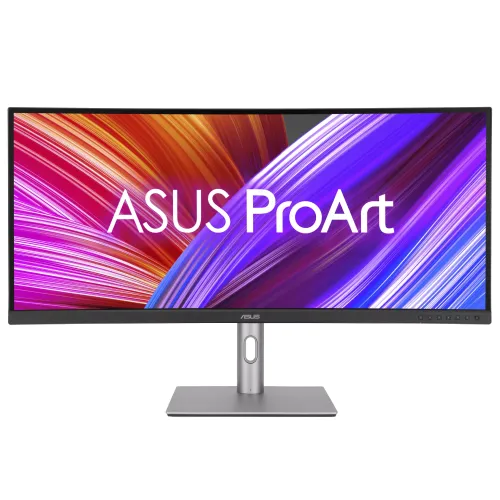
ASUS ProArt Display PA34VCNV overview
The ASUS ProArt Display PA34VCNV is a 34.1-inch curved professional monitor built for editing, design, photography, office work and multi-window workflows. It combines a 21:9 UWQHD resolution of 3440 × 1440 with an IPS panel and a gentle 3800R curve. The display is factory pre-calibrated and Calman Verified, with ASUS specifying average Delta E below 2 and 100% sRGB and Rec. 709 coverage. Ten-bit color support represents more than 1.07 billion colors. For laptop desks, the monitor has a USB-C upstream port that carries DisplayPort Alt Mode video and data, with up to 96W Power Delivery. It also includes RJ45 Ethernet, three downstream USB 3.2 Gen 1 ports, dual HDMI 2.0 and two DisplayPort 1.4 connectors with MST daisy-chain support. The screen runs at a maximum 60Hz with a 5ms gray-to-gray response time and Adaptive-Sync. ASUS lists HDR10 signal support, two 2W speakers, PIP/PBP and QuickFit Plus overlays. These specifications target precise everyday creative work and one-cable connectivity rather than high-refresh competitive gaming.
34.1-inch 21:9 UWQHD workspace
The PA34VCNV renders 3440 × 1440 pixels across a 34.1-inch diagonal screen. The 21:9 format places more horizontal workspace beside a standard 16:9 image, making it practical to keep an editing timeline, preview window, tools and reference material open together. ASUS lists a viewable area of 799.8 × 334.8mm, a 0.2325mm pixel pitch and approximately 110 PPI. The non-glare surface helps reduce reflections in a normal office or studio, while the 178° horizontal and vertical viewing-angle specification describes the IPS panel’s rated viewing geometry. A curved panel can bring the edges into a more consistent viewing distance when seated centrally. The 3800R radius is relatively gentle, which suits long timelines, spreadsheets and drafting canvases where straight horizontal lines should remain natural. The screen is 817.2mm wide, so desk depth and seating distance matter. Applications control how windows use the extra horizontal area; operating-system snapping or workspace layouts can make the screen easier to use. The curved design is meant to keep a wide image within comfortable reach without the steep contour used by some gaming displays.
Factory color calibration and ProArt controls
Color accuracy is a core part of the ProArt positioning. ASUS lists 100% sRGB and 100% Rec. 709 coverage, 10-bit display color and factory pre-calibration verified by Calman to average Delta E below 2. A calibration report is included in the standard package listing, though the included accessories can vary by region. These specifications support work in web, interface and standard dynamic range video color spaces when the computer, application and color-management settings are configured correctly. ProArt Preset offers Native, sRGB, Rec. 709, DCI-P3, DICOM, HDR and two user modes. ProArt Palette provides six-axis color controls; gamma choices are 1.8, 2.0, 2.2, 2.4 and 2.6, and ASUS lists five color-temperature presets. Calman Verified factory calibration should not be confused with internal hardware LUT writing. This model uses its OSD adjustments and computer color profiles; it is not established as supporting ASUS ProArt Hardware Calibration. For color-critical delivery, use a suitable calibration workflow and the intended output color space. The factory report documents the original calibration state, while recalibration and room conditions can affect results over time.
USB-C 96W docking and complete connections
The upstream USB-C port is the central connection for a compatible laptop. ASUS lists DisplayPort Alt Mode video, USB data and up to 96W Power Delivery, so one cable can provide display, peripheral data and laptop charging. Confirm that the laptop supports video over USB-C and that its power demand is within the monitor’s delivery capability. The PA34VCNV also has two DisplayPort 1.4 connectors, with one input and one output for MST daisy chaining, plus two HDMI 2.0 inputs. The downstream hub includes one USB 3.2 Gen 1 Type-C port and two USB 3.2 Gen 1 Type-A ports. RJ45 Ethernet is provided for a wired network connection through the USB-C upstream path. The hub and LAN connection require a data connection to the host; plugging in HDMI alone will not carry USB data. There is an earphone output and two 2W built-in speakers. This is useful connectivity for a compact studio desk, though there is no separate USB-B upstream port or automatic hardware KVM switch. PIP/PBP can display sources together, but does not itself switch USB peripherals between computers.
60Hz motion, Adaptive-Sync and HDR10
The panel’s maximum refresh rate is 60Hz, with a 5ms GTG response rating and Adaptive-Sync variable refresh support. ASUS identifies the VRR range as 48–60Hz. Some merchant tables label the display G-SYNC or FreeSync, but the safe model-specific statement is VESA Adaptive-Sync; the model is not an officially badged hardware G-SYNC display. It supports HDR10 input and includes HDR among its picture modes. ASUS lists typical brightness at 300 cd/m² and static contrast at 1000:1. No VESA DisplayHDR certification tier or local dimming system is listed, so HDR10 should be described as signal support rather than a promise of certified HDR mastering performance. This combination fits general creative, productivity and media use at 60Hz. Users who require a higher refresh rate for gaming should compare a different display, such as the flat PA348CGV, after checking its separate specifications. The PA34VCNV’s curved format and color tools are the main reasons to choose this model.
PIP/PBP, QuickFit Plus and eye care
Picture-in-Picture and Picture-by-Picture allow the monitor to show two connected video sources simultaneously in supported layouts. This can help compare a work computer and a second device or keep one source visible beside another. Available source combinations and image layouts depend on the monitor settings and input modes. QuickFit Plus adds on-screen guides such as safe-area boundaries, a center marker, custom frame and ruler overlays. These guides help with layout checks without changing the source image. ASUS also lists TÜV Rheinland Flicker-Free certification and a hardware Low Blue Light solution. Users can adjust brightness and position for the room and their working habits; individual comfort varies. Two 2W speakers provide basic audio for calls and system sound, while the 3.5mm earphone output supports external headphones or speakers. These features complement the wide workspace, but the monitor does not include a webcam or automatic multi-computer KVM switch. Connect USB-C upstream to the computer when using the USB hub and Ethernet pass-through.
Ergonomics, mounting and physical planning
The included stand supports height adjustment from 0 to 130mm, tilt from +23° to −5° and swivel from +15° to −15°. The VESA pattern is 100 × 100mm, and a Kensington lock slot is listed. ASUS specifies physical dimensions with stand as 817.2 × 569.2 × 240mm at its maximum height; the no-stand size is 817.2 × 369.7 × 91.7mm. Packaging dimensions are listed as 108 × 19 × 52cm, while regional packing may vary. Net weight is 10.8kg with stand and 7.8kg without it; gross package weight is 16.3kg. The large width and weight call for a sturdy desk or properly rated arm. When using a third-party mount, check that it supports 100 × 100mm, the load, required fasteners and the curved display’s center of gravity. Parcel dimensions and courier weight may differ from the manufacturer’s box specification, so the seller should confirm final shipping measurements.
Power use, box contents and Bangladesh buying notes
The monitor accepts 100–240V AC at 50/60Hz. ASUS lists typical power consumption of 26.9W, less than 0.5W in power-saving mode and 0W in hard-switch off mode. Actual consumption changes with brightness, connected USB devices and USB-C charging load. Standard regional accessories list the display and stand, power cord, HDMI cable, DisplayPort cable, USB-C cable, calibration report, quick-start guide and warranty card; accessory contents can vary by regional batch, so confirm the delivered box. Reviewed Bangladesh sellers listed the PA34VCNV around ৳105,000–৳106,000 cash, with three-year warranty terms on their product pages. BiponiBD’s existing ৳106,000 variant price remains unchanged. Confirm stock, current payable price, included cables and written warranty coverage before purchase. The catalog name is corrected to reflect the actual 34.1-inch 21:9 model and USB-C dock. Its product ID, product number, slug, active status, Monitors category, variant ID, SKU, price and four existing media identities remain attached to this listing.
Choosing the right ProArt monitor for a workflow
The PA34VCNV is a fit for people who value a gentle curved ultrawide shape, accurate sRGB and Rec. 709 presentation, and a built-in USB-C dock with Ethernet. A video editor can arrange a timeline and preview area across the 21:9 canvas, a photographer can work with image and tool panels, and an office user can keep multiple documents visible. These are workflow examples rather than guarantees of faster work; the benefit depends on the applications and working style. Compare the PA34VCNV carefully with the related PA348CGV before choosing. The PA34VCNV is curved, operates at up to 60Hz and supplies 96W USB-C power, RJ45 LAN and DP 1.4 daisy chaining. The PA348CGV is flat and offers up to 120Hz and a different color/HDR specification. Their model codes are similar but their hardware is not interchangeable. Likewise, some listings for this monitor contain specifications copied from smaller 27-inch screens. Check the exact PA34VCNV model and the corrected values in this listing when comparing online offers. Ask the seller to confirm regional power cord, cables, calibration paper, warranty service and return terms. That makes the product page useful both as a specification reference and as a checklist before ordering.