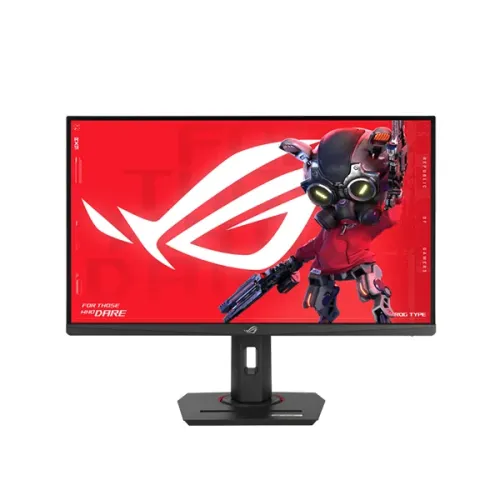
The ASUS ROG Strix XG279CNS is a 27-inch Full HD Fast IPS monitor with a 380Hz maximum refresh rate, Adaptive-Sync features, DisplayHDR 400 and an adjustable stand.
Model identity and intended use
The ROG Strix XG279CNS is ASUS’s 27-inch Full HD Fast IPS gaming monitor with a maximum refresh rate of 380Hz. ASUS’s official ROG specification page is the primary source for the exact model’s display, signal timing, connections, certifications, ergonomics, power and accessories. Star Tech’s Bangladesh page identifies the same model, but some of its copied text conflicts with ASUS. This description follows ASUS where the sources disagree and calls out the local listing discrepancy so buyers can check the actual regional unit.
The XG279CNS combines a conventional 1920 × 1080 Full HD resolution with a very high refresh target. Full HD can reduce the graphics workload compared with QHD or 4K, which may help a capable PC reach higher frame rates in esports titles. At 27 inches, however, it has lower pixel density than a 27-inch QHD display. Text and fine image detail may look less crisp at close viewing distances. Choose based on the balance between fast motion, detail, graphics hardware and how far you sit from the screen.
The panel uses Fast IPS technology with an anti-glare surface and a 16:9 shape. ASUS lists 110% sRGB color space, 16.7 million display colors, 1000:1 typical contrast and a 178-degree horizontal and vertical viewing angle. These figures describe the manufacturer’s stated capabilities; they do not establish calibration accuracy or unit-to-unit uniformity. People who need a display for color-critical production should check color-gamut coverage, calibration reports and their own workflow requirements rather than treating a broad sRGB figure as a calibration guarantee.
Refresh rate, motion and synchronization
ASUS specifies a maximum refresh rate of 380Hz. Its signal-frequency section lists vertical frequency up to 380Hz over DisplayPort and up to 360Hz over HDMI. The PC graphics card, its output, cable bandwidth, resolution, color settings and operating-system mode all affect which refresh options are available. A monitor cannot create frames that the graphics system does not render. Confirm the model’s intended port and the PC’s supported mode before purchase, then select the refresh rate in the operating system and game settings.
The manufacturer lists 1ms GTG and 0.3ms minimum response-time figures. GTG is a gray-to-gray pixel transition measure; the minimum is not a guarantee that all transitions complete at that time. Pixel response varies with transition, overdrive setting, temperature and test method. It also differs from input lag, which includes the delay between an input and the displayed result. Competitive players should compare measured independent reviews when they need detailed motion performance rather than relying on one headline response number.
ASUS lists Adaptive-Sync, Extreme Low Motion Blur, ELMB Sync, AMD FreeSync Premium, G-SYNC Compatible and VESA AdaptiveSync Display 380Hz. Variable refresh can coordinate display updates with compatible graphics output to reduce tearing in supported conditions. ELMB Sync combines motion-blur reduction and variable refresh, but a particular mode can change brightness or visual behavior. Check the monitor menu, graphics driver and game configuration to see which features can run together on the desired input.
Brightness, HDR and visual settings
The official specification lists both typical brightness and HDR peak brightness at 400 cd/m². These are separately named values in ASUS’s table. The display is certified for VESA DisplayHDR 400. HDR playback also requires compatible content, an operating system and source device configured for HDR, and a supported signal path. The certification alone does not prove local dimming, scene-by-scene brightness behavior or a particular subjective HDR result. Compare HDR and SDR on content you know, and select the setting that looks best to you.
ASUS lists TÜV Flicker-free and TÜV Low Blue Light certifications. The monitor also includes GameVisual and other on-screen gaming features. These tools provide display modes and user controls; they do not guarantee that extended sessions will avoid discomfort. Adjust brightness for the room, reduce reflections, use a comfortable viewing distance and take regular breaks. The anti-glare finish can help reduce reflections from some light sources but cannot remove every glare condition.
Full HD on a 27-inch screen can be useful when a gaming PC is tuned for very high frame rates, but image sharpness depends on scaling and distance. If the monitor is also used for documents or detailed creative work, compare it with a QHD model in person where possible. The 16:9 format is common for games and video, while the flat surface can fit a single-screen or multi-monitor desk arrangement.
Ports, audio and compatibility
ASUS’s official connection table lists one DisplayPort 1.4 HBR3, one HDMI 2.1 FRL, one USB-C input supporting DisplayPort Alt Mode, and an earphone jack. ASUS also specifies USB-C power delivery at 7.5W. The USB-C connection can carry a compatible DisplayPort video signal, but its low power output is not suitable as the primary charger for most laptops. Check the source device’s USB-C video support and use a separate power adapter when required.
Star Tech’s current specification table says HDMI 2.0, while ASUS’s exact-model page specifies HDMI 2.1 FRL. The mismatch may reflect a retailer content error or a regional configuration difference. ASUS also notes that specifications and availability can vary by market. Buyers who require a particular HDMI mode should ask the seller to confirm the port printed on the local unit and its supported input timings before ordering. The product data here uses HDMI 2.1 from ASUS and clearly records that the retailer page differs.
There are no built-in speakers. Audio can be connected to the earphone output or routed from the PC or console to headphones or external speakers. If a console or PC setup relies on HDMI audio, configure the source audio output and check whether audio is sent to the monitor’s headphone jack. A headphone jack does not mean the display includes speakers.
Stand, mounting and physical fit
The included stand supports 0–120mm height adjustment, tilt from -5° to +20°, swivel 45 degrees in either direction and pivot 90 degrees in either direction. A 100 × 100mm VESA mounting interface is also listed, as are a Kensington lock and a one-quarter-inch tripod socket. The stand can help position the screen for a seated desk setup; an arm or wall mount should be rated for the display’s weight and use the correct VESA hardware.
ASUS gives estimated dimensions that vary by region. The listed dimensions with stand are approximately 61.41 × 21.88 × 51.03cm (width × height × depth); without the stand they are 61.42 × 6.58 × 36.67cm. The estimated net weight is 6.5kg with stand and 3.9kg without it; gross shipping weight is listed as 9.0kg. Leave additional room for cables, stand movement, ventilation and access to the monitor controls. Measure the desk before purchasing if depth is limited.
The VESA interface and tripod socket can support different mounting plans, but accessories and regional product details can vary. Check the exact local unit’s package, mounting screws and manual. Keep the monitor on a stable surface and follow the installation guidance when attaching an arm. The listed Kensington lock can be used with a compatible security cable, which may be useful in shared work or gaming spaces.
Power, warranty and Bangladesh availability
ASUS lists power consumption at 20W, power-saving mode at 0.5W and power-off mode below 0.3W. It specifies 100–240V at 50/60Hz. Actual consumption depends on brightness, selected mode, connected equipment and usage. The listed accessories include a DisplayPort cable, power cord, quick-start guide, ROG pouch, sticker and warranty card; ASUS notes that accessories vary by region. Confirm the local box contents before relying on a particular cable or accessory.
Star Tech lists a three-year warranty on its exact-model product page. Warranty coverage, service provider, required invoice and exclusions are determined by the local seller and authorized service terms. Ask for the written coverage and keep the purchase invoice and serial number. ASUS’s official global specification page cautions that availability and specifications can differ between markets, so the Bangladesh unit should be checked at purchase.
Star Tech currently marks the exact model “Up Coming” and “To be announced.” Its page body and Google search snippet also contain a ৳47,000 price sentence, but that sentence conflicts with the direct availability status. Tech Land’s result says Out of Stock; other retailer results show discontinued or unavailable stock. Those stale or conflicting labels do not prove a live offer, so this product record leaves the market price empty rather than publishing an unsupported estimate. Recheck stock and final billed price with the seller before ordering.
The monitor’s strengths are its high DisplayPort refresh ceiling, Fast IPS panel, variable-refresh certifications, HDR400 support, HDMI 2.1 and flexible stand. Its trade-offs include Full HD density at 27 inches, no integrated speakers, limited USB-C charging power and a regional retailer specification that conflicts with ASUS on HDMI version. The official specifications make the intended product clear, while the stock and price evidence remains uncertain. This distinction supports a more useful comparison without turning an old listing sentence into a promise of current availability.
Key features
- 27-inch Fast IPS panel with Full HD 1920 × 1080 resolution, 16:9 format and anti-glare surface, as specified by ASUS.
- Up to 380Hz maximum refresh rate is supported over DisplayPort; ASUS lists vertical signal frequency up to 360Hz over HDMI.
- ASUS specifies 1ms GTG and 0.3ms minimum response figures; the minimum figure is not a universal result in every mode.
- 400 cd/m² typical brightness and 400 cd/m² HDR peak brightness are both listed by ASUS.
- 110% sRGB color-space figure, 16.7 million colors and 1000:1 typical contrast are listed by ASUS.
- VESA DisplayHDR 400, VESA AdaptiveSync Display 380Hz, AMD FreeSync Premium and G-SYNC Compatible are listed certifications.
- Adaptive-Sync, Extreme Low Motion Blur Sync, GamePlus, GameVisual, Shadow Boost, Aspect Control and DisplayWidget Center.
- One DisplayPort 1.4 HBR3, one HDMI 2.1 FRL input, one USB-C DisplayPort Alt Mode input with 7.5W power delivery, and an earphone jack.
- No built-in speakers; use headphones or connect speakers to the source device.
- TÜV Flicker-free and TÜV Low Blue Light certifications are listed by ASUS.
- Ergonomic stand provides 0–120mm height adjustment, tilt -5° to +20°, swivel ±45° and pivot ±90°.
- 100 × 100mm VESA mount, Kensington lock and 1/4-inch tripod socket are listed by ASUS.
- Estimated net weight is 6.5kg with stand and 3.9kg without stand; regional dimensions may vary.
- ASUS lists 20W power consumption, 0.5W power-saving mode and below 0.3W power-off mode.
- Regional accessories listed by ASUS include DisplayPort cable, power cord, quick-start guide, ROG pouch, sticker and warranty card.
Advantages
- A 380Hz maximum refresh target and Fast IPS panel suit competitive PC gaming when the system can deliver the required frame rate.
- ASUS lists Adaptive-Sync, FreeSync Premium, G-SYNC Compatible and VESA AdaptiveSync Display 380Hz support.
- HDMI 2.1 and DisplayPort 1.4 provide high-refresh video inputs; USB-C also carries DisplayPort Alt Mode video.
- The supplied stand supports height, tilt, swivel and pivot adjustments, with VESA mounting as an alternative.
- Official ASUS specifications distinguish the panel, timing, ports, HDR, ergonomic movement, weight and power details.
Limitations to consider
- Full HD resolution at 27 inches gives less pixel density than QHD alternatives of the same size.
- The maximum 380Hz mode is listed over DisplayPort; HDMI signal frequency is listed only up to 360Hz vertically.
- There are no built-in speakers, and USB-C power delivery is limited to 7.5W.
- The 0.3ms minimum response figure is a best-case specification; real pixel response depends on mode and measurement conditions.
- Star Tech labels the item Upcoming / To be announced despite stale ৳47,000 page copy; no active Bangladesh offer was verified.
Frequently asked questions
What is the ASUS ROG Strix XG279CNS?
It is a 27-inch Full HD Fast IPS gaming monitor with a maximum 380Hz refresh rate, DisplayHDR 400, Adaptive-Sync features and an adjustable stand.
What resolution and aspect ratio does it use?
ASUS specifies 1920 × 1080 Full HD resolution and a 16:9 aspect ratio. At 27 inches, Full HD prioritizes high frame rates over the finer pixel density of QHD.
Can the monitor reach 380Hz?
ASUS lists a maximum 380Hz refresh rate and DisplayPort vertical frequency up to 380Hz. The graphics output, cable and selected mode must also support the signal. ASUS lists HDMI vertical frequency up to 360Hz.
What does the response-time rating mean?
ASUS specifies 1ms GTG and 0.3ms minimum. These describe pixel-response measurements, not input lag; results vary by display mode and test conditions.
What are the brightness and contrast specifications?
ASUS lists 400 cd/m² typical brightness, 400 cd/m² HDR peak brightness and 1000:1 typical contrast. The two brightness figures are separately labelled by ASUS.
Does it support HDR and variable refresh rate?
ASUS lists VESA DisplayHDR 400, Adaptive-Sync, VESA AdaptiveSync Display 380Hz, AMD FreeSync Premium and G-SYNC Compatible. Actual operation depends on the source device, connection and settings.
What video connections are available?
The official specification lists one DisplayPort 1.4 HBR3, one HDMI 2.1 FRL and one USB-C input with DisplayPort Alt Mode, plus an earphone jack. Star Tech’s page currently says HDMI 2.0, which conflicts with ASUS’s exact-model specification; verify the regional unit if this detail is critical.
Does the USB-C port charge a laptop?
ASUS lists USB-C DisplayPort Alt Mode and 7.5W power delivery. That is a low-power connection and should not be treated as a replacement for a laptop charger.
Does it include speakers?
No. ASUS specifies no built-in speakers. Connect headphones to the monitor’s earphone jack or use audio output from the computer or console.
How can the stand be adjusted?
ASUS lists 0–120mm height adjustment, tilt from -5° to +20°, swivel ±45° and pivot ±90°. The monitor also supports a 100 × 100mm VESA mount.
What is the current Bangladesh price and availability?
Star Tech’s direct product page shows “Up Coming” and “To be announced.” Its page body and search snippets contain ৳47,000, but that amount is not treated as a current offer while the page status says Upcoming. No market-price estimate is published.
What warranty and accessories are listed?
The reviewed Star Tech page lists three years. ASUS lists a DisplayPort cable, power cord, quick-start guide, ROG pouch, sticker and warranty card, with accessories varying by region. Confirm local warranty terms and package contents with the seller.
Confirm Bangladesh stock, final price, exact regional HDMI specification, warranty and package contents with the seller.