Product overview
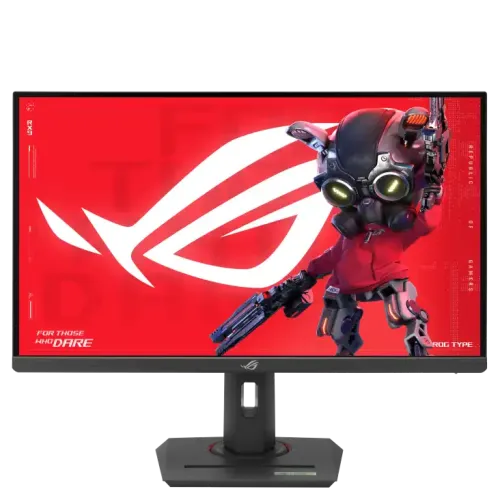
The ASUS ROG Strix XG27ACG is a 27-inch gaming monitor built around a Fast IPS panel with a native 2560 × 1440 resolution. ASUS lists a maximum refresh rate of 180Hz and a 1ms grey-to-grey response time. The combination is intended for users who want a detailed QHD picture and a high-refresh display in one screen. It can also serve for everyday desktop work, study, browsing and video, where its stand adjustments and matte anti-glare surface can make placement and viewing more comfortable. The product name, brand, category, active status, slug, existing price and warranty record remain as catalog identity and commercial data; this review enriches the descriptive and technical content using the manufacturer specification page and Bangladesh seller listings. The exact model is XG27ACG, part of the ROG Strix monitor family. Before purchase, verify stock, final price, warranty coverage and included regional accessories with the Bangladesh seller.
QHD picture and Fast IPS panel
The 2560 × 1440 resolution displays 3.69 million pixels across a 16:9 screen. At 27 inches, QHD provides more desktop detail than 1920 × 1080 Full HD and can show more content in supported games, editing tools and work applications. ASUS specifies Fast IPS technology, 178° horizontal and vertical viewing angles, a 0.233mm pixel pitch and an anti-glare surface. The panel is flat rather than curved. Typical brightness is listed at 400 cd/m², with 400 cd/m² also listed as HDR peak brightness. The typical contrast ratio is 1000:1 and the display supports 16.7 million colors. ASUS publishes 125% sRGB and 95% DCI-P3 color-space figures. These gamut coverage numbers describe the range of colors the panel can display; they do not by themselves prove factory calibration accuracy. For print or color-critical work, use a calibrated display workflow and verify the color mode and target gamut required by the project.
180Hz gaming and response behavior
A 180Hz maximum refresh rate can show up to 180 display updates per second when the selected input, cable, graphics output and operating mode support it. ASUS lists 1ms GTG response time and Trace Free technology. A published response-time figure depends on the measurement method and selected overdrive mode; it does not promise that every pixel transition takes exactly one millisecond. ASUS also lists Extreme Low Motion Blur and ELMB Sync, Adaptive-Sync, GameFast Input technology and Shadow Boost. These options are designed to support motion clarity, variable refresh and game visibility. Their effect depends on the game, graphics card, driver, refresh mode and monitor settings. If motion trails, flicker or overshoot appear, test a different overdrive or sync setting. A capable graphics card is required to render many games at high frame rates at native QHD resolution; the monitor accepts lower refresh rates for less demanding tasks.
Choose the right connection for 180Hz
The connection changes the maximum refresh mode. ASUS lists DisplayPort 1.4 HBR3 and USB-C with DisplayPort Alt Mode as inputs that support vertical frequencies up to 180Hz. HDMI 2.0 is listed with a maximum vertical frequency of 144Hz. Buyers targeting 2560 × 1440 at 180Hz should therefore connect through DisplayPort or a compatible USB-C DisplayPort Alt Mode output, and check that the computer, cable and graphics driver support the desired signal. HDMI remains useful for compatible devices, but should not be presented as the 180Hz route for this model. The monitor has one DisplayPort input, one HDMI input, one USB-C input and an earphone jack. ASUS specifies USB-C Power Delivery at 7.5W. That low power level may provide limited power to small accessories, but it is not a substitute for a laptop charger and does not make this a high-power docking monitor. The USB-C input is principally relevant for compatible video output; confirm the host's DP Alt Mode support and cable specification.
HDR, adaptive sync and image controls
The XG27ACG supports HDR10 and ASUS lists VESA DisplayHDR 400 certification. The manufacturer specification gives 400 cd/m² typical and HDR peak brightness. HDR playback still depends on the source, operating-system HDR configuration and content, and perceived results vary by scene and room lighting. ASUS lists Adaptive-Sync, AMD FreeSync and G-SYNC Compatible support among its certificates or features; the available operation depends on the graphics card, driver and selected input. The monitor also includes GameVisual modes, eight color-temperature choices, six-axis color adjustment and gamma adjustment from 1.8 through 2.6. GamePlus provides gaming overlays and aids, while HDCP 2.2 support enables protected video playback when the full signal path supports it. DisplayWidget Center can provide software controls on compatible systems. Aura Sync lighting is included. These tools give users settings to tune, but do not automatically calibrate a display for professional color workflows.
Comfort, ergonomics and mounting
The supplied stand provides tilt from −5° to +20°, swivel from −45° to +45°, pivot from −90° to +90° and height adjustment from 0 to 120mm. The ability to raise, rotate or angle the screen helps adapt it to a desk and viewing posture. Pivot rotation can be useful for portrait documents, although the display remains a 16:9 panel and some applications may need manual orientation settings. A 100 × 100mm VESA mounting pattern is available for a compatible wall bracket or monitor arm. ASUS also lists a Kensington lock slot and a 1/4-inch tripod socket. Check the load rating and fasteners of any third-party mount before installation. Approximate dimensions with the stand are 61.37 × 50.96 × 21.88cm; without the stand they are 61.37 × 36.72 × 8.87cm. Listed weight is 6.6kg with the stand and 3.8kg without it. ASUS notes that dimensions and accessories can vary by region, so compare the unit and packaging details with the local seller before planning a tight desk fit.
Daily use, power and audio
The anti-glare surface, adjustable stand and 27-inch QHD canvas make the monitor practical for mixed use, including gaming, documents and browser-based work. ASUS specifies power consumption below 28W, power-saving consumption below 0.5W, power-off consumption below 0.3W, and input voltage of 100–240V at 50/60Hz. It has no integrated speakers. Audio can be routed to headphones or external speakers through the 3.5mm earphone jack, depending on the connected device and audio settings. This distinction is useful when planning a desk setup: users who expect sound directly from the display should budget for a separate audio solution. Flicker-free technology and a hardware low blue light feature are specified. They can help users adjust the image for comfort, but do not remove the need for breaks, suitable room lighting and an individually comfortable brightness level.
Bangladesh price and warranty checks
Bangladesh listings reviewed for this exact model show seller prices that differ by promotion and date. Ryans displayed a special price of ৳47,000 and a regular price of ৳51,000 at the time reviewed. Tech Heaven and Nexus also listed the XG27ACG, though availability and exact promotional pricing can change. The catalog variant MSRP remains ৳48,000 and has not been changed to match a temporary offer. Confirm the final payable amount, stock, delivery terms, dead-pixel or return policy, and warranty provider before ordering. The catalog currently records a three-year warranty; that record is retained, but the buyer should check the warranty card and seller invoice for local coverage, exclusions and claim requirements. Regional accessories can vary. Confirm the power cable, stand components and any bundled cables with the seller rather than assuming every regional package is identical.
Who this monitor suits
This model may suit PC gamers who want QHD detail and a refresh rate above 144Hz, provided their computer and chosen connection can drive the desired mode. It also offers useful stand movement for people who reposition a display for portrait reading, collaboration or a changing desk setup. The 125% sRGB and 95% DCI-P3 figures may interest users who need a broad color range, while professional work still calls for independent calibration. A single HDMI input and single DisplayPort input are sufficient for a modest setup but may require switching cables or adding a separate switch when several devices are used. There is no built-in speaker, and USB-C supplies only 7.5W, so users seeking a one-cable laptop docking and charging monitor should account for these limits. The best fit depends on GPU capability, desk dimensions, port availability, audio preferences and the games or applications used.
Summary
ASUS ROG Strix XG27ACG combines a 27-inch Fast IPS panel, 2560 × 1440 resolution, 180Hz maximum refresh rate, 1ms GTG response-time specification, 400 cd/m² brightness and HDR10 support. ASUS lists adaptive sync, ELMB Sync, GameVisual and several gaming and color adjustment features. Its stand supports tilt, swivel, pivot and up to 120mm height adjustment, with VESA 100 × 100mm mounting. The key connection detail is that DisplayPort and USB-C DP Alt Mode can reach 180Hz, while HDMI is specified up to 144Hz; USB-C Power Delivery is 7.5W. It has no built-in speakers. The catalog's existing ৳48,000 MSRP, three-year warranty record, status, category, slug and variant identity are preserved. Manufacturer specifications and Bangladesh offers have been recorded to make the product page clearer and more useful for purchase decisions.