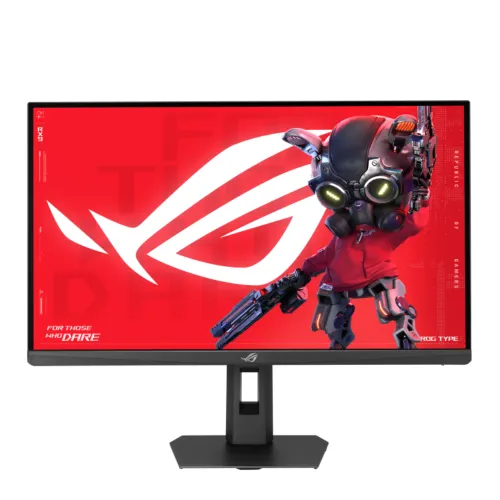
ASUS ROG Strix XG27ACMEG overview
ASUS ROG Strix XG27ACMEG is a 27-inch Fast IPS gaming monitor with a native WQHD resolution of 2560 × 1440. ASUS lists a maximum refresh rate of 260Hz with overclocking enabled and a minimum response-time figure of 0.3ms. It is a standard black XG27ACMEG, not the separately named XG27ACMEG-G Hatsune Miku Edition. The exact suffix matters when searching for the right firmware, accessory or warranty information.
The monitor pairs high refresh with a 1440p image, a common balance for competitive PC gaming and everyday desktop work. It can show fast motion when the source supplies high frame rates, but the computer still has to render those frames. Game complexity, graphics settings and GPU performance affect the actual frame rate. Choose the 260Hz overclocked mode only with compatible equipment and verify the resulting mode in the operating system and graphics driver.
WQHD resolution on a 27-inch screen
The 27-inch panel uses a 16:9 aspect ratio and 2560 × 1440 pixels. WQHD, QHD and 1440p are common names for this resolution. It provides more desktop room than Full HD at the same screen size while demanding less rendering throughput than 4K at comparable frame rates. The 0.233mm pixel pitch and 178-degree horizontal and vertical viewing angles are listed in the product specifications.
Fast IPS technology is intended to combine wide viewing angles with quick pixel transitions. The display uses an anti-glare surface and has a flat panel. Viewing-angle figures are measured at a stated contrast threshold; they do not mean that brightness and colour stay perfectly unchanged at every angle. Position the screen at a comfortable distance and use operating-system scaling or application zoom to suit your eyesight.
260Hz overclocked refresh and compatible signal
ASUS lists 260Hz as the maximum refresh rate and identifies it as an overclocked mode. The manufacturer’s signal-frequency table gives a 48–260Hz vertical range for HDMI, USB-C and DisplayPort. The monitor’s overclock setting, graphics output, cable, selected resolution and system configuration all affect which rate can be selected. Enable the display’s OC setting and confirm the active refresh rate after connecting the source.
A high refresh display can make cursor movement and compatible games look smoother when the system delivers frames fast enough. It does not increase game frame production by itself. Some titles will run below 260 frames per second at WQHD, especially with demanding graphics options. Adaptive-Sync can coordinate refresh updates with supported variable frame delivery, while ELMB Sync combines ASUS motion-blur reduction with variable refresh rate under compatible conditions.
Response time and motion controls
ASUS lists 1ms grey-to-grey response time and 0.3ms minimum response time. These figures use different measurement conditions and are not interchangeable. A minimum result does not describe every pixel transition or every overdrive setting. Pixel response, refresh rate, motion processing and content all contribute to perceived clarity. ASUS Variable Overdrive 2.0 adjusts overdrive as frame rate changes, which can help avoid using one fixed setting across every game.
The display also includes Extreme Low Motion Blur and ELMB Sync. Motion strobing can alter perceived brightness and may not be suitable for every user or refresh mode. Try the monitor’s settings with the games and frame rates you actually use. A response-time label cannot promise that all ghosting, overshoot or blur disappears, and it should not be read as a universal real-world result.
Adaptive-Sync, G-SYNC and FreeSync
ASUS lists Variable Refresh Rate with Adaptive-Sync, G-SYNC Compatible certification and AMD FreeSync Premium certification. A compatible GPU and driver can adjust refresh timing to match frame output within the supported range, helping reduce tearing and uneven presentation. Enable VRR on both the display and source where required, and check that the selected resolution, refresh rate and cable work with your computer or console.
The manufacturer also lists GameFast Input technology, GamePlus and GameVisual. GamePlus includes gaming overlays and tools; GameVisual provides picture presets. These controls change the way an image is displayed and offer choices for different content. They do not guarantee higher skill or performance, and some image processing modes may affect brightness, latency or colour appearance.
HDR10, DisplayHDR 400 and brightness
ASUS lists HDR10 support and VESA DisplayHDR 400 certification. The technical specification gives 400 cd/m² typical brightness and 400 cd/m² HDR peak brightness. DisplayHDR 400 is an entry-level certification; the product page does not list a local-dimming backlight. Buyers seeking high-impact HDR should compare black level, peak brightness, local dimming and tone mapping against a higher-tier display.
The typical contrast ratio is 1,000:1. An IPS screen can provide consistent colour from different viewing positions, but its native black level is not equivalent to an OLED panel. For everyday games, work and video, HDR can still be enabled for compatible content, but the on-screen result depends on the game, operating system, HDR calibration and room lighting.
Colour gamut and factory report
ASUS lists 95% DCI-P3 and 130% sRGB gamut values. The product also supports 10-bit display colour, shown as approximately 1.073 billion colours. These figures describe the colour range and signal representation; they do not mean that every colour in a wider space is covered by the same percentage. ASUS provides a color calibration E-report through DisplayWidget Center, which can help users inspect the report associated with their display.
For colour-sensitive work, choose the intended colour mode and use colour-managed applications and profiles. Gamut size, coverage and calibration are distinct ideas. A wide gamut may display more saturated colours, but final accuracy depends on settings, software, content and ambient lighting. If a project specifies a particular print or cinema colour space, compare that exact coverage requirement with the monitor before relying on it for delivery work.
USB-C, DisplayPort and HDMI connections
The rear connection bay contains one DisplayPort 1.4 HBR3 input, one HDMI 2.1 FRL input and one USB-C port with DisplayPort Alt Mode. The USB-C port supports up to 15W Power Delivery. A host device must support DP Alt Mode for USB-C video, and 15W is below the charging requirement of most laptops. Use a regular laptop power adapter where needed. ASUS also lists an earphone jack and no built-in speakers.
DisplayPort is suitable for a gaming PC and HDMI 2.1 for a compatible console or other source. The manufacturer’s signal-frequency table includes all three video inputs. Use a cable and source that support the required WQHD refresh mode. A connector’s physical shape alone does not guarantee bandwidth or features; adapters, docks and cables can limit the available setting.
Ergonomic stand and mounting
The stand supports 0–110mm height adjustment, swivel from −45 to +45 degrees, tilt from −5 to +20 degrees and pivot from −90 to +90 degrees. Pivot can help with portrait-oriented code, documents and web pages. A 100 × 100mm VESA mounting pattern is also listed. Check the monitor-arm load rating, screw length and mounting instructions before detaching the supplied stand.
The cabinet includes a Kensington lock slot, a 1/4-inch tripod socket and Aura Sync lighting. These details allow different desk, security and streaming arrangements. Keep the cable path clear while adjusting the display, and leave room behind the monitor for its stand and connectors. ASUS estimates dimensions of 614 × 503 × 188mm with the stand and 614 × 367 × 86mm without it; dimensions can vary by region.
Eye care, AI and display software
ASUS lists TÜV Flicker-free and TÜV Low Blue Light certifications. These features provide display settings that some users may find more comfortable, but comfort still depends on brightness, room light, viewing distance and session length. Adjust the screen to reduce reflections and take breaks during long sessions. No display certification removes the need for a suitable desk setup and personal comfort checks.
ROG Gaming AI features include AI Visual, Dynamic Crosshair and Dynamic Shadow Boost. DisplayWidget Center lets users change display settings with a mouse, while GamePlus and GameVisual provide gaming tools and presets. These options can be turned on or off depending on the game and personal preference. Compare the picture before and after enabling a feature to decide whether it improves visibility without changing the intended image too much.
Power, package and accessories
The ASUS specification lists power-on consumption below 29W, standby below 0.5W and power-off below 0.3W. The power input is 100–240V at 50/60Hz. Use the supplied adapter and power cable, and keep the ventilation openings clear. Power consumption varies with brightness, mode, connected source and the features enabled.
ASUS lists a DisplayPort cable, power adapter, power cord, quick start guide, ROG pouch, ROG sticker and warranty card among the accessories. ASUS notes that the listed accessories can vary by region. Confirm the actual contents when purchasing in Bangladesh, and keep the invoice, serial details, carton and warranty card until the return and warranty process is understood.
Bangladesh price and warranty
Three Bangladesh retailer listings checked on 6 November 2026 showed a price of ৳56,000 each at Star Tech, Ryans Computers and Sell Tech BD. These third-party asking prices are a snapshot and can change with availability, discount, payment method and store policy. They are provided as market context only and are not a current BiponiBD offer. The catalog MSRP of ৳56,000 remains unchanged.
The catalog retains a three-year warranty value, consistent with local listings. Warranty coverage, service location, box requirement and dead-pixel terms can depend on the seller and import channel. Ask for the written coverage and keep the original box if the seller requires it for a claim. ASUS regional warranty policies may differ, so verify the exact local service route for the unit being purchased.
Who may prefer this monitor?
The XG27ACMEG can suit competitive PC players who want a high refresh rate at WQHD, users who prefer an adjustable stand and people who want USB-C display input for a compatible device. The 15W USB-C power delivery is convenient for accessories or lower-power devices, but it should not be mistaken for full laptop charging. The tripod socket and lighting can also suit a streaming or ROG-themed desk.
It may be less suitable for users who need 4K resolution, built-in audio, higher USB-C charging power or advanced local-dimming HDR. Its maximum 260Hz mode requires overclocking and a compatible system. Compare the base and OC refresh modes, the graphics hardware, cable setup, colour needs and intended games before choosing a monitor.
Summary
ASUS ROG Strix XG27ACMEG is a black 27-inch WQHD 2560 × 1440 Fast IPS monitor with a 260Hz overclocked maximum, 1ms GTG and 0.3ms minimum response figures, Adaptive-Sync, G-SYNC Compatible and AMD FreeSync Premium. It also lists HDR10 and DisplayHDR 400, 95% DCI-P3, 130% sRGB, USB-C DP Alt Mode with 15W power delivery, DisplayPort 1.4, HDMI 2.1 and an ergonomic stand.
The product and variant model/MPN are normalized to XG27ACMEG. The existing slug, active status, Monitors category, SKU, ৳56,000 MSRP, three-year catalog warranty, variant, logistics and all image URLs remain intact. The market-price snapshot is identified as informational and separate from BiponiBD store offers. Verify the source timing, 260Hz overclock setting and written Bangladesh warranty before purchase.