Overview
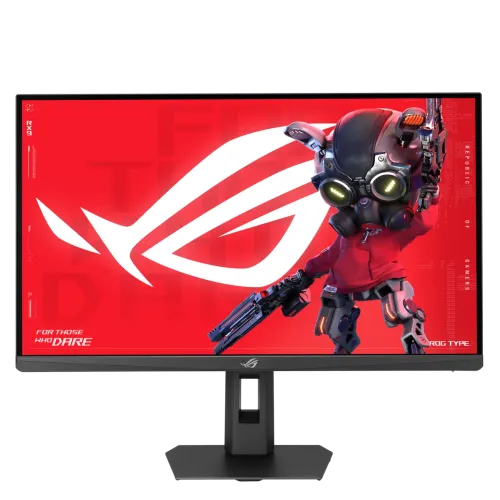
The ASUS ROG Strix XG27ACMES is a 27-inch gaming monitor built around a Fast IPS panel and native 2560 × 1440 resolution. That combination gives this model a useful middle ground: more desktop detail than Full HD, while asking the graphics card to render fewer pixels than a 4K screen. The display has a flat 16:9 format, anti-glare surface and 178-degree horizontal and vertical viewing angles at the stated contrast criterion. ASUS identifies the maximum refresh rate as 255Hz. It is a maximum operating mode, so the computer, graphics output, cable, selected input and monitor settings must all support the desired resolution and refresh together. The product name and model code used here are XG27ACMES, in black. It is distinct from white XG27ACMES-W listings found in some regional shops; the suffix and finish should be checked on the actual box and unit before purchase.
Fast QHD motion for play
The 255Hz maximum refresh capability is intended for games where quick updates and responsive motion matter. At 255 refreshes per second, compatible source output can update the image more frequently than a conventional 60Hz office monitor. The practical result depends on the game frame rate, graphics hardware, connection and settings; a monitor cannot make a game render at 255 frames per second by itself. ASUS lists 1ms GTG and a separate 0.3ms minimum response-time figure. These are manufacturer measurements with different conditions and should not be interpreted as a promise that every pixel transition is identical. For competitive titles, users can choose a refresh mode that balances frame rate, visual quality and GPU load. The native QHD resolution also keeps text, maps and interface elements detailed for general desktop use. Users with a less powerful PC can still select lower refresh or graphics settings; the display does not require every game to run at its maximum mode.
Fast IPS colour and viewing
The Fast IPS panel is specified with 178°/178° viewing angles, 133% sRGB and 97% DCI-P3 colour-space coverage. Those gamut figures indicate a wide colour range in ASUS’s specification, but they do not by themselves guarantee a particular calibration accuracy or make this a reference display. For photo, video or design work where colour matching is important, check the selected picture mode and use calibration appropriate to the task. ASUS lists a typical brightness of 350 cd/m² and a 1300:1 typical contrast ratio. The anti-glare surface helps reduce reflections from ambient lighting, although placement and room lights still affect perceived contrast. The flat panel shape suits a standard desk setup and can be easier to align beside another flat monitor. The listing describes 1.0737 billion colours / 10-bit support; actual output format and colour depth depend on the connected graphics system and settings.
HDR and adaptive refresh
The model supports HDR formats and is listed with VESA DisplayHDR 400 certification. ASUS describes a 400 cd/m² HDR peak, alongside 350 cd/m² typical brightness. HDR quality depends on the source content, operating-system configuration, game or application, and the display’s brightness and contrast capability; an HDR label should not be treated as equivalent to a high-end HDR television. For motion synchronization, the official specification lists Adaptive-Sync and AMD FreeSync Premium, while ASUS describes G-SYNC compatibility. These technologies coordinate refresh behavior with supported graphics hardware to reduce tearing in compatible games. Compatibility can vary by GPU, driver, connection and refresh mode. ASUS also includes ELMB Sync, which combines motion-blur reduction with variable refresh use cases. The exact best combination is game-dependent, and users may need to compare clarity, brightness and motion artifacts in the on-screen display rather than assuming one setting is optimal for every title.
Gaming controls and software
ROG gaming functions include GameVisual picture presets, GamePlus on-screen aids, Shadow Boost, Trace Free response tuning, Extreme Low Motion Blur and ELMB Sync. ASUS also promotes Gaming AI tools such as Dynamic Crosshair and Dynamic Shadow Boost, plus Variable Overdrive 2.0. These are optional display features for tuning the image or presenting game overlays; they do not guarantee improved skill, visibility in every game, or compatibility with all software. DisplayWidget Center is ASUS software for adjusting supported monitor settings from a computer. Users who prefer not to install desktop software can use the physical on-screen controls where the function is available. Features and menu names may depend on firmware or regional implementation. For everyday work, a neutral colour preset may be preferable to a vivid gaming mode. For gaming, users can select a preset and then adjust brightness and response controls to suit the room and game.
Connections and USB-C limits
The ASUS Global exact-model specification lists one DisplayPort 1.4 input with HBR3, one HDMI 2.1 FRL input, one USB-C connector with DisplayPort Alternate Mode, and an earphone jack. ASUS specifies 15W USB-C Power Delivery. This can provide a modest charge to compatible devices, but it should not be mistaken for a full-power laptop charger. Connection capabilities can differ by port and source; use the supplied or a standards-compliant cable and consult the device’s output specifications. The HDMI and DisplayPort signal ranges are listed to 255Hz vertically. The single HDMI input may require swapping cables when several HDMI sources are connected. The USB-C video path is useful for compatible laptops, but the product specification does not describe a multi-port USB hub or an integrated KVM switch, so buyers should not assume either is included. ASUS specifies no built-in speakers; use headphones or external audio if sound is needed.
Ergonomics, mounting and desk fit
The included stand supports tilt from +20° to −5°, swivel from +45° to −45°, pivot from +90° to −90°, and 0–110mm height adjustment. ASUS also lists a 100 × 100mm VESA wall-mount pattern, Kensington lock and 1/4-inch tripod socket. Before mounting, check that the arm or bracket supports the display’s weight and the VESA pattern, and follow the mounting hardware’s instructions. ASUS gives estimated dimensions that may vary by region: 61.48 × 50.34 × 18.87cm with stand and 61.48 × 36.71 × 6.30cm without stand. Listed net weight is 5.96kg with stand and 3.87kg without. Allow space for the stand footprint, cables and ventilation. A monitor arm can free desk space, but mounting screws and load limits should be verified with the arm manufacturer.
Power, certification and what is in the box
ASUS lists power consumption below 21W, below 0.5W in power-saving mode and below 0.3W when off. The specification includes TÜV Flicker-free and TÜV Low Blue Light certificates, VESA AdaptiveSync Display 255Hz, VESA DisplayHDR 400, AMD FreeSync Premium and G-SYNC Compatible. Certifications describe tested standards and compatibility scope; they are not a substitute for choosing comfortable brightness and taking breaks during extended sessions. The manufacturer lists a DisplayPort cable, power cord, quick-start guide, ROG pouch, ROG sticker and warranty card as accessories, with a note that accessories vary by region. Bangladesh package contents may differ, so confirm the sealed box contents with the seller. ASUS specifications can change and may differ between markets. The manufacturer explicitly advises checking with the supplier for the exact offer and local availability.
Price, warranty and buying checks in Bangladesh
Bangladesh retailer listings checked for this review showed prices that varied by seller, promotion and stock status. Star Tech and Ryans list the black XG27ACMES around ৳45,000 and ৳39,300 respectively on the pages reviewed; other sellers show different promotions. These are market observations, not a BiponiBD offer or guaranteed current checkout price. The existing catalog variant MSRP of ৳45,000 has therefore been preserved. Confirm live stock, final price, delivery charge, invoice, model suffix, colour and written warranty before ordering. The catalog warranty remains two years as previously recorded; check the seller’s warranty card and provider, as warranty service may depend on local distribution and serial number. The manufacturer source does not establish the warranty of a particular Bangladesh unit. Inspect the screen for damage at delivery and keep packaging and purchase documents according to the seller’s return policy.
Who this monitor may suit
This display can suit PC players who want QHD detail and a high refresh ceiling, especially when their graphics hardware can produce high frame rates in the games they play. It also offers a broad-gamut panel and USB-C video input for compatible laptops, so it can serve a mixed gaming and desktop role. A buyer who mainly watches video, uses office apps, or has a modest graphics card may not need the full 255Hz capability. Users seeking built-in speakers, a multi-port docking station, more than one HDMI input, a height-adjustable stand, or stronger HDR performance should compare those requirements before choosing. Colour professionals should evaluate calibration and application workflow rather than rely solely on gamut percentages. The best choice depends on the actual PC, desk, games, work and connection needs; the specification is a reference for capability, not a promise about a particular setup.
Summary
ASUS ROG Strix XG27ACMES combines a 27-inch QHD 2560 × 1440 Fast IPS panel, up to 255Hz refresh, ASUS-listed 1ms GTG and 0.3ms minimum response figures, 350 cd/m² typical brightness, 1300:1 typical contrast, 133% sRGB and 97% DCI-P3. It supports HDR with VESA DisplayHDR 400 certification, Adaptive-Sync, AMD FreeSync Premium, G-SYNC compatibility, ELMB Sync and several ROG gaming controls. Connections include DisplayPort 1.4 HBR3, HDMI 2.1, USB-C with DP Alt Mode and 15W Power Delivery, plus an earphone jack. The black model is the XG27ACMES; white XG27ACMES-W offers should not be conflated. The catalog’s saved name, URL slug, category, active status, variant price and stock identifiers remain unchanged while the technical copy and specifications are being aligned with the exact-model manufacturer page.