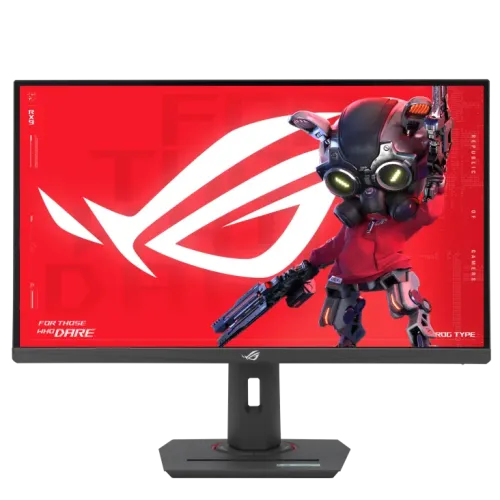
ASUS ROG Strix XG27ACMS overview
The ASUS ROG Strix XG27ACMS is a 27-inch QHD gaming monitor built around a Fast IPS panel. ASUS specifies a native 2560 × 1440 resolution, 16:9 aspect ratio and maximum refresh rate of 320Hz. It combines a high refresh ceiling with a one-millisecond grey-to-grey response-time rating for fast-paced PC gaming, while the QHD pixel count provides more desktop detail than Full HD. The model also includes Adaptive-Sync, AMD FreeSync Premium and G-SYNC Compatible support, subject to the graphics device and connection. Its inputs are one DisplayPort 1.4, one HDMI 2.1 and one USB-C port with DisplayPort Alt Mode. ASUS lists 15W USB-C power delivery, so USB-C video is supported but laptop charging is limited. Confirm the exact model on the unit and the current local offer before ordering.
QHD resolution and 27-inch workspace
The 2560 × 1440 panel provides a 16:9 QHD workspace on a 27-inch display. Compared with Full HD at the same size, QHD offers more pixels for fine interface details, game scenery and text. Pixel density and scaling preference depend on viewing distance, eyesight and operating-system settings; users can choose a comfortable scaling level instead of assuming one setting suits every desk. ASUS lists a 0.233mm pixel pitch, 595.96 × 335.32mm viewing area and 178-degree horizontal and vertical viewing angles. The anti-glare surface can help reduce reflections from some lights, but it cannot eliminate glare from a bright window. QHD is also a practical target for high-frame-rate gaming, although demanding games may still need graphics-setting adjustments to approach the monitor’s maximum refresh rate.
320Hz refresh rate and motion response
ASUS lists a maximum refresh rate of 320Hz for the XG27ACMS. A high refresh rate can display more frequent frame updates when the computer renders them, which is useful for fast camera movement and competitive games. The figure is a maximum capability, not a promise that every game will run at 320 frames per second. The graphics card, game engine, resolution, display mode, cable and driver settings all affect the result. ASUS specifies 1ms GTG and a separate 0.3ms minimum response-time figure. Response-time ratings use manufacturer test conditions and do not describe every pixel transition in every mode. Players should check the monitor’s on-screen settings and the device output menu after setup. If the refresh option is missing, verify the selected resolution, cable, port and system configuration before assuming the monitor is defective.
Adaptive sync and ROG gaming tools
The official specification lists Adaptive-Sync technology, AMD FreeSync Premium and G-SYNC Compatible certification. With a compatible graphics system, variable refresh can synchronize display updates with rendered frames over supported operating ranges and help reduce tearing. The result depends on the GPU, driver, game, connection and selected settings. ASUS also lists ELMB Sync, Extreme Low Motion Blur, GamePlus, GameVisual, Shadow Boost and Aspect Control. These tools offer optional overlays, picture modes and motion settings; they do not guarantee a particular competitive advantage. Motion-blur reduction can change brightness or visual appearance, so compare modes in the games you actually play. Configure one feature at a time and retain the setting that looks clearest to you. The monitor’s 320Hz maximum, QHD resolution and compatible sync modes work together only when the connected source supports the chosen combination.
Brightness, color and HDR certification
ASUS lists 350 nits typical brightness and 500 nits peak brightness for HDR, with a typical 1000:1 contrast ratio. The manufacturer lists color-space figures of 94% DCI-P3 and 130% sRGB, plus a 1.07-billion-color specification. These gamut figures describe color-space size or coverage as the manufacturer presents it; they do not guarantee that every unit arrives calibrated to a professional accuracy target. ASUS lists VESA DisplayHDR 400 certification. That certification is a useful capability marker but should not be read as a promise of OLED-level black levels or local dimming. Actual HDR appearance depends on the source, content, system settings and room lighting. The official spec page does not identify an HDR signal format in its display table, so confirm format support if a specific console or application requirement matters.
Ports and USB-C behavior
The XG27ACMS has one DisplayPort 1.4 input, one HDMI 2.1 input, one USB-C input and an earphone jack according to ASUS. The USB-C port supports DisplayPort Alt Mode for video and up to 15W power delivery. A compatible computer can therefore send display output over USB-C, but 15W is not enough to replace the normal charger for many laptops. The monitor lists HDMI signal frequency up to 320Hz vertically, but the achievable resolution and refresh combination should be confirmed for the source and cable. With one HDMI and one DisplayPort connection, users with several wired devices may need to switch cables or use a suitable external switch. Check which cables are included in the local box; ASUS notes that accessories can vary by region.
Stand, height adjustment and mounting
ASUS confirms a stand with 0–120mm height adjustment and tilt from −5° to +20°. The monitor also supports a 100 × 100mm VESA wall or arm mount and includes a Kensington lock point. ASUS’s official mechanical-design section does not list swivel or pivot, so those movements should be confirmed with the seller rather than assumed from a listing or another ROG model. The estimated dimensions are 614.8 × 512.9 × 218.8mm with the stand and 614.8 × 367.1 × 60.1mm without it; estimated weight is 6.52kg with stand and 3.81kg without. ASUS notes that regional dimensions and weights may vary. Before using an arm, check its load rating, VESA screws and available desk clearance. Leave space for the power and video cables when setting height or tilt.
Eye comfort and everyday use
The manufacturer lists flicker-free operation and TÜV Low Blue Light certification. These features can be useful for long sessions, though they do not replace suitable room lighting, readable scaling, a comfortable viewing distance or regular breaks. The anti-glare panel and adjustable height can help users position the display for a particular desk. ASUS lists 27W typical power consumption, below 0.5W in power-saving mode and below 0.3W powered off, with a 100–240V, 50/60Hz input range. Actual consumption varies with brightness, selected mode and use. ASUS identifies an earphone jack, while Ryans lists no built-in speakers; plan to use headphones or separate speakers if audio is needed. Check the on-screen menu and operating-system controls to set brightness, refresh rate, color mode and audio output after connecting the monitor.
Image and model verification note
The current catalog gallery contains several ASUS ROG product renders. One promotional image visibly carries “180Hz” and “Type-C” text, which conflicts with the official XG27ACMS 320Hz maximum specification. The monitor render itself resembles the product, but the graphic may have been reused from a related model or an older asset. The rest of the catalog’s visible art should not override the ASUS technical page. Before purchase, confirm that the box and rear product label say XG27ACMS and ask the seller to confirm the delivered unit’s refresh rate. This listing preserves the existing media URLs because no replacement asset was verified in this review. The image-specific alt text calls out the mismatch so the marketing graphic is not misrepresented as the product’s official refresh specification.
Bangladesh price, stock and warranty
Four public Bangladesh listings for the exact XG27ACMS were checked on 5 November 2026. The observed prices ranged from ৳53,800 to ৳54,500: Techland and Nexus showed ৳53,800, Moharaz showed ৳54,000, and Ryans showed ৳54,500. Retailer prices, discount conditions and stock can change, so these values are market context rather than a BiponiBD store offer. The catalog’s existing MSRP of ৳54,500 and three-year warranty text have been preserved. A seller’s page may describe its own warranty process, while ASUS eligibility depends on region, serial number and local distributor terms. Ask for the warranty issuer and written claim conditions, check the box is available if required, and confirm delivery, return and dead-pixel policies before payment.
Who should consider this monitor
The XG27ACMS may suit PC players who value high refresh rates, QHD detail and a 27-inch Fast IPS panel. It is most compelling when the computer can produce high frame rates in the games being played. People with midrange systems can still use QHD, but they should not expect to reach the maximum refresh in every title without adjusting graphics settings. The USB-C input can serve a compatible laptop as a display connection, though its 15W power delivery is not a full laptop charging solution. Console users should check the console’s supported resolution and refresh modes; the presence of HDMI 2.1 alone does not guarantee every high-refresh mode from every device. For work requiring color-critical output, check calibration requirements and color-management workflow rather than relying on gamut figures alone.
Setup and buying checklist
Before ordering, verify the exact ROG Strix XG27ACMS model, current stock, price, warranty issuer and return conditions. Check that the computer supports 2560 × 1440 at the intended refresh rate through the selected DisplayPort or HDMI connection, and use a suitable cable. In the operating system, select QHD and then choose the refresh rate; install current graphics drivers if the desired mode is unavailable. Enable variable refresh only with a compatible device and test motion features against your own content. USB-C video requires DisplayPort Alt Mode, while the port provides only 15W power delivery. For an arm, confirm 100 × 100mm VESA fit and adequate load rating. The catalog includes one image marked 180Hz, so request confirmation that the supplied product is the 320Hz XG27ACMS rather than a related model. Confirm included cables and audio equipment separately.