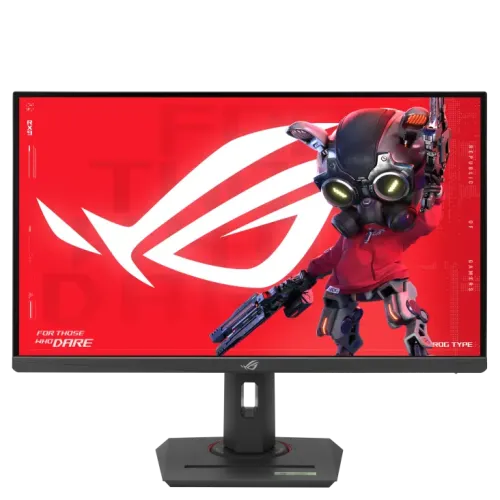
ASUS ROG Strix XG27UCG is a 27-inch Fast IPS 4K gaming monitor with dual mode: 3840 × 2160 at up to 160Hz or Full HD at up to 320Hz. It adds 1ms GTG, Adaptive-Sync, HDMI 2.1, DisplayPort 1.4, USB-C 15W, DisplayHDR 400 and a fully adjustable stand. Compare ASUS XG27UCG price in Bangladesh and confirm live stock and warranty.
Product overview
The ASUS ROG Strix XG27UCG is a 27-inch Fast IPS gaming monitor with a native 3840 × 2160 4K UHD resolution. Its defining capability is a dual-mode display: ASUS lists 4K at up to 160Hz and Full HD at up to 320Hz. This gives players a choice between a sharper image and a higher refresh ceiling, provided the selected game, computer or console, cable and input support the desired mode. The display also lists Adaptive-Sync, AMD FreeSync Premium, G-SYNC Compatible, ELMB Sync and a 1ms GTG response time. For mixed use, its stand adjusts in height, tilt, swivel and pivot, while HDMI 2.1, DisplayPort 1.4 and USB-C expand device connectivity. Buyers should understand that its USB-C charging output is 15W, not laptop-class power delivery.
4K resolution and 27-inch workspace
The panel’s 3840 × 2160 native resolution places roughly four times as many pixels as Full HD across the display. At 27 inches, that density can make fine text and detailed game environments appear crisp, although many users choose operating-system scaling so menus and text remain comfortable to read. App behavior and scaling quality vary, so confirm that the software used for work supports the preferred scale. When gaming at 4K, the graphics hardware must render a much larger pixel count than in Full HD; frame rates depend on the game, graphics settings and GPU. The XG27UCG provides a way to switch to 1920 × 1080 when prioritizing the 320Hz ceiling, but that lower-resolution mode changes image detail and should be chosen for the intended game rather than treated as a free performance increase.
Dual-mode refresh choices
ASUS Tech Specs lists the UHD mode at 48–160Hz vertical frequency and the FHD mode at 48–320Hz. In practice, the available refresh rate depends on the selected resolution, port, graphics output, cable, game and monitor configuration. The 4K 160Hz setting is aimed at players who want high detail with fluid motion, while Full HD 320Hz can suit supported esports titles where rapid motion and response are priorities. Moving from 4K to Full HD lowers pixel detail; scaling a lower resolution on a 4K panel may look softer than native output. Verify supported timings in the ASUS manual and source device settings. Do not assume every console, game or connection automatically enables the maximum mode.
Fast IPS response and variable refresh
ASUS describes a Fast IPS panel with 1ms GTG response time. It lists Adaptive-Sync, AMD FreeSync Premium, G-SYNC Compatible, ELMB Sync and Variable Overdrive. Variable refresh can coordinate the monitor refresh with compatible frame output to reduce tearing, while ELMB Sync is designed to combine backlight strobing and VRR under supported combinations. Response-time figures are measured under specified conditions and should not be read as a guarantee that every transition is free of blur or overshoot. Users may need to tune overdrive and motion settings for the selected refresh rate and game. Compatibility also varies with GPU, driver, port and mode. If screen tearing or flicker occurs, update the graphics driver and test supported adaptive-sync settings.
HDR, brightness and image characteristics
The official technical page lists 350 cd/m² typical brightness, 400 cd/m² HDR peak, 1000:1 typical contrast, HDR10 input support and VESA DisplayHDR 400 certification. These specifications describe an HDR-compatible display, but do not establish the local dimming or peak brightness capabilities associated with higher HDR tiers. Room lighting and picture settings affect the result. The panel is specified at 95% DCI-P3 and 130% sRGB; color calibration e-report is available through DisplayWidget Center. For color-managed tasks, select the correct working color space and application profile, and consider calibration when repeatability matters. Wide gamut can make compatible content vivid, but unmanaged content may appear oversaturated depending on the application and system settings.
Connections for PC and console
The rear connections include one DisplayPort 1.4 HBR3, one HDMI 2.1 FRL and one USB-C input with DisplayPort Alt Mode. The monitor also has an earphone jack. ASUS identifies HDMI 2.1 features such as console 4K at 120Hz and VRR in its product information; confirm the console, cable and current mode support the combination. DisplayPort or USB-C may be preferable for a PC depending on the GPU output and required refresh setting. USB-C power delivery is only 15W, so it is not intended to power a standard notebook. Check the host device’s USB-C video support before connecting. No built-in speaker is listed, so plan for headphones or separate speakers.
Stand, placement and mounting
The included stand supports 0–120mm height adjustment, -5° to +20° tilt, ±45° swivel and ±90° pivot. This allows users to align the screen with their seated position or rotate it vertically for certain tasks. The display also supports 100 × 100mm VESA mounting. ASUS lists a 1/4-inch tripod socket, which can attach compatible equipment, and a phone holder built into the stand. Check the available desk space before installation; with stand the product is approximately 61.4 × 51.0 × 21.9cm and weighs 6.6kg. Without the stand, ASUS lists 61.4 × 36.7 × 9.0cm and 3.8kg. For a third-party arm, confirm load rating and fastener fit.
Gaming features and software
GamePlus, GameVisual, GameFast Input, Shadow Boost, Dynamic Crosshair and DisplayWidget Center are among the listed tools. DisplayWidget Center provides mouse-based access to settings on supported systems, while GamePlus options add overlays and counters. Dynamic Shadow Boost adjusts dark-scene visibility, and Dynamic Crosshair provides a configurable on-screen aiming reticle. These functions are preferences and do not guarantee better results in every game. Aura Sync lighting provides an appearance option for compatible setups. Disable overlays or lighting if they distract or interfere with a game. The monitor also lists TÜV Flicker-free, TÜV Low Blue Light, VESA AdaptiveSync and DisplayHDR certifications. Eye-comfort features do not remove the benefit of comfortable brightness, viewing distance and regular breaks.
Desk, power and box contents
ASUS lists power consumption below 30W in power-on mode, below 0.5W standby and below 0.3W off, with 100–240V at 50/60Hz. These are stated figures and actual draw varies with brightness, HDR content and settings. Listed regional accessories include a DisplayPort cable, power adapter, power cord, quick-start guide, ROG pouch, ROG sticker and warranty card; accessories may vary by country. Confirm the exact Bangladesh package contents and adapter with the retailer. The monitor’s dimensions with stand and weight should be considered when planning desk layout, especially when the stand is rotated or a camera/tripod accessory is attached. Keep adequate cable slack for swivel and pivot movement.
Bangladesh price and warranty snapshot
On 6 November 2026, the Star Tech and Tech Land direct pages both showed ASUS ROG Strix XG27UCG at ৳71,800 and In Stock. Their regular prices differed: Star Tech listed ৳76,490 and Tech Land listed ৳75,000. The BiponiBD variant MSRP is ৳72,000 and remains unchanged. Both local sellers list a three-year warranty; the existing catalog warranty is retained, but the buyer should confirm whether coverage is ASUS-authorized or seller-provided and ask about service location, exclusions and dead-pixel conditions. Prices and availability can change, and final checkout amount may depend on payment method, delivery area or promotion. Verify model suffix XG27UCG carefully; white or later-generation variants have different product identifiers and may differ in specifications.
Who should consider it
This monitor may suit PC gamers who want a single 27-inch screen for 4K detail and an optional high-refresh Full HD mode. It can also support console play where the chosen console, HDMI input and game offer compatible 4K/120Hz or VRR output. The ergonomic stand and VESA support make it adaptable to desks and multi-display setups. It may be a poor fit if a buyer needs laptop charging through USB-C, built-in speakers, a larger 4K desktop, OLED contrast or a high refresh rate at 4K beyond the supported specification. Before purchase, compare the GPU’s expected game performance at both resolutions, available outputs, desk depth and warranty terms. The best mode depends on whether image detail or motion ceiling matters more for the games being played.
Key features
- 27-inch Fast IPS display with native 3840 × 2160 4K UHD resolution and 16:9 aspect ratio.
- Dual-mode operation switches between 4K at up to 160Hz and Full HD at up to 320Hz.
- ASUS lists 1ms GTG response time and Fast IPS pixel response.
- Adaptive-Sync, AMD FreeSync Premium and G-SYNC Compatible support variable refresh workflows.
- ELMB Sync combines motion blur reduction and variable refresh rate under supported settings.
- VESA DisplayHDR 400 certification, HDR10 signal support and 400-nit HDR peak brightness are listed.
- Color specifications include 95% DCI-P3 and 130% sRGB coverage.
- One DisplayPort 1.4 HBR3, one HDMI 2.1 FRL and USB-C DP Alt Mode input.
- USB-C provides up to 15W power delivery, suitable for low-power accessories or compatible handhelds.
- Stand supports tilt, ±45° swivel, ±90° pivot and up to 120mm height adjustment.
- 100 × 100mm VESA mount, 1/4-inch tripod socket, phone holder and Kensington lock.
- Aura Sync, DisplayWidget Center, GamePlus, Shadow Boost and Dynamic Crosshair tools are listed.
Pros
- Dual mode lets users choose 4K image detail at 160Hz or Full HD motion up to 320Hz.
- Fast IPS, 1ms GTG and VRR features target responsive gaming when the source can sustain the selected mode.
- 4K resolution on a 27-inch panel offers fine detail for games, video and desktop content.
- Ergonomic height, tilt, swivel and pivot adjustments plus VESA mounting support flexible placement.
- HDMI 2.1, DisplayPort 1.4 and USB-C provide connections for a PC, console and compatible device.
- Two directly checked Bangladesh retailers showed ৳71,800 and In Stock in the same dated snapshot.
Considerations
- USB-C Power Delivery is limited to 15W and will not replace a typical laptop charger.
- Full HD 320Hz mode reduces resolution substantially from the native 4K mode.
- DisplayHDR 400 is an entry-level HDR certification and should not imply premium local-dimming performance.
- At 27 inches, 4K may require operating-system scaling; app support and preferred viewing distance vary.
- USB-C has DP Alt Mode but the 15W power limit is not a full-featured laptop docking solution.
- Price, stock, warranty conditions and included accessories can vary by seller and region.
Frequently asked questions
What is the ASUS ROG Strix XG27UCG price in Bangladesh?
On 6 November 2026, Star Tech and Tech Land direct product pages both showed ৳71,800 and In Stock. Their regular prices differed: Star Tech ৳76,490 and Tech Land ৳75,000. Confirm checkout price and stock before ordering.
What does dual mode mean on this monitor?
ASUS specifies a 4K mode up to 160Hz and a Full HD mode up to 320Hz. Choose the 4K mode for pixel detail or Full HD mode when supported games and hardware benefit more from a higher refresh ceiling.
What is the native resolution?
The native resolution is 3840 × 2160 (4K UHD), with a 16:9 aspect ratio. The 320Hz dual-mode option uses Full HD, 1920 × 1080.
What panel and response time does it use?
ASUS lists a 27-inch Fast IPS panel and a 1ms GTG response time. Real motion clarity depends on selected refresh mode, overdrive, frame rate and viewing conditions.
Does it support G-SYNC and FreeSync?
ASUS lists Adaptive-Sync, AMD FreeSync Premium and G-SYNC Compatible. Compatibility depends on the source graphics hardware, connection, driver and configuration.
What ports are available?
The official specification lists one DisplayPort 1.4 HBR3, one HDMI 2.1 FRL and one USB-C with DisplayPort Alt Mode. It also has an earphone output and no built-in speakers.
Can USB-C charge a laptop?
USB-C Power Delivery is listed at 15W. That is far below what most laptops need for charging during use; keep the laptop’s own power adapter connected. The USB-C port may still suit a compatible handheld or low-power device.
What is the brightness and HDR rating?
ASUS lists 350 cd/m² typical brightness, 400 cd/m² HDR peak, HDR10 support and VESA DisplayHDR 400 certification. This is not a claim of OLED-like blacks or advanced local dimming.
What color range does ASUS specify?
The official page lists 95% DCI-P3 and 130% sRGB color-space coverage, with a color calibration e-report via DisplayWidget Center. Coverage alone does not guarantee color accuracy for every unit or unmanaged app.
What ergonomic adjustments are included?
The stand supports -5° to +20° tilt, ±45° swivel, ±90° pivot and 0–120mm height adjustment. ASUS also lists a 100 × 100mm VESA pattern and a 1/4-inch tripod socket.
Does it have speakers?
No. ASUS lists Speaker: No and an earphone jack. Use headphones or external speakers connected to the PC or another audio device.
What is the warranty in Bangladesh?
The existing BiponiBD record and both checked local retailers indicate a three-year warranty. Confirm the warranty provider, service process, dead-pixel terms, exclusions and invoice requirements with the seller.