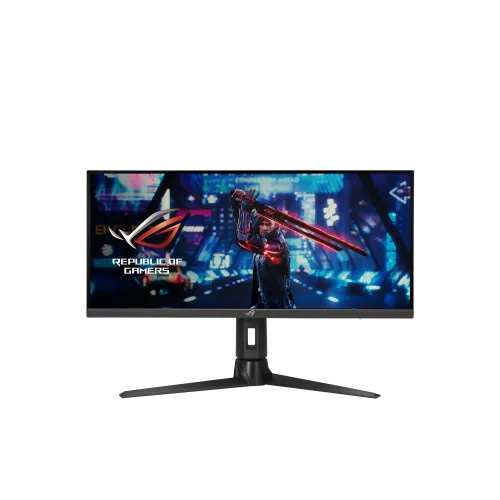
ASUS ROG Strix XG309CM is a 29.5-inch viewable 21:9 Fast IPS ultrawide gaming monitor with WFHD 2560 × 1080, 220Hz overclocked refresh, 1ms GTG, USB-C 15W, KVM, 2W × 2 speakers and an ergonomic stand. Compare ASUS XG309CM price in Bangladesh and confirm current stock and warranty.
Overview and correct model identity
ASUS ROG Strix XG309CM is a 29.5-inch viewable ultrawide gaming monitor with a 21:9 Fast IPS panel. It uses 2560 × 1080 WFHD resolution and offers a high-refresh mode up to 220Hz when overclocking is enabled through a suitable connection. The product is sometimes called a 30-inch monitor by local sellers, which is a rounded size label; the ASUS spec lists 29.5 inches. It combines 1ms GTG, Adaptive-Sync, AMD FreeSync Premium, NVIDIA G-SYNC Compatible, ELMB Sync and a USB-C hub. An adjustable stand, built-in 2W × 2 speakers, KVM switch and 1/4-inch tripod socket add practical desk features. Buyers should compare the exact XG309CM model and port refresh limits rather than infer capabilities from a similar ROG monitor.
WFHD ultrawide workspace
The 2560 × 1080 resolution spreads a Full HD-height image across a 21:9 panel. Its extra horizontal width can keep a game map, chat, browser or reference window visible beside the main task, and can give video timelines more room. Not every title or video uses 21:9; unsupported games may show side bars, stretch the image or crop it. The 1080-pixel vertical resolution is below 2560 × 1440 and 4K monitors, so users needing dense text or detailed creative work may prefer a higher-resolution panel. ASUS lists 0.270mm pixel pitch and anti-glare surface. Viewing distance, scaling and content source quality all influence perceived sharpness. Check the games and applications that matter before choosing an ultrawide aspect ratio.
Fast IPS and refresh behavior
ASUS describes a Fast IPS panel with 1ms GTG response time. The default refresh rate is 144Hz, and 220Hz is an overclocked mode. The official signal-frequency table lists DisplayPort and USB-C from 48Hz to 220Hz with overclock enabled, while HDMI reaches 200Hz. Maximum refresh depends on resolution, host output, port, cable, graphics driver and monitor settings. A 220Hz setting is useful only when the computer can deliver a sufficiently high frame rate and the game benefits from it. Response-time figures represent a specific measurement condition; overdrive settings can affect overshoot or blur. If the image flickers or the display loses signal, return to the default rate and check the cable and source mode before troubleshooting further.
Adaptive sync and motion tools
The monitor lists Adaptive-Sync, AMD FreeSync Premium and NVIDIA G-SYNC Compatible support. Variable refresh can align display timing with compatible GPU frame output to reduce tearing. ASUS Extreme Low Motion Blur Sync is designed to operate blur reduction with variable refresh under supported modes. GameFast Input, GamePlus, GameVisual and Shadow Boost provide input and picture options. Their usefulness depends on game, GPU, frame rate and personal preference; no setting improves every title. Enable adaptive sync in the monitor and source device when appropriate, then test the games used most often. If flickering occurs at variable frame rates, try another refresh setting or disable the relevant feature. The display is flat and supports a broad horizontal view, but its 21:9 format may need game-specific configuration.
Color, brightness and HDR
ASUS specifies 300 cd/m² typical brightness, 1000:1 typical contrast, 110% sRGB and 16.7 million colors. A factory color calibration report lists Delta E below 2. Those values can help buyers understand the panel’s stated range, but they are not a measurement of the purchased unit and do not guarantee color accuracy in every app. Use color-managed applications and the correct profile for editing work. The monitor accepts HDR10 content; this does not mean it has advanced local dimming or a high-end HDR backlight. Choose picture settings based on room brightness and use case. ASUS lists TÜV Flicker-free and TÜV Low Blue Light certifications. These comfort options can support user preference, but should not be interpreted as a medical promise or a substitute for comfortable setup.
USB-C, hub and KVM setup
USB-C supports DisplayPort Alt Mode and connects the host to the monitor’s USB hub. ASUS lists up to 15W Power Delivery and two USB 3.2 Gen 1 Type-A downstream ports. That power level may help with a small accessory or compatible handheld but is too low for most laptop charging needs. The KVM feature can let two connected computers share one keyboard and mouse through the monitor, provided both hosts are wired to the required video and USB connections. Follow the manual’s specific port map and input switching behavior. The USB-C port does not replace a full laptop dock or high-power charger. Verify that the laptop supports video over USB-C and that the cable is suitable for DisplayPort Alt Mode and the desired refresh rate.
Connectivity and audio
The official specification lists one DisplayPort 1.2, one HDMI 2.0 and one USB-C DP Alt Mode connection. HDMI can support a lower overclocked maximum than USB-C or DisplayPort according to the signal-frequency table. Choose the connection based on the PC or console’s available output and the target refresh setting. Built-in stereo speakers are listed at 2W per channel, with an earphone output. They can provide convenient system sound without external speakers, though buyers seeking stronger bass or higher volume should use a separate audio system. The display’s KVM and USB hub are separate from its video inputs: connecting video alone will not necessarily enable peripherals across both hosts.
Stand, mount and desk planning
The supplied stand allows tilt from -5° to +20°, swivel up to 25° in either direction and height adjustment up to 110mm. ASUS does not list pivot. A 100 × 100mm VESA pattern supports compatible arms or wall mounts, and a 1/4-inch tripod socket can hold compatible equipment. The monitor weighs 7.5kg with stand and measures about 70.73cm wide with the stand, so check desk width and arm capacity. The 21:9 layout may occupy more horizontal space than a conventional 27-inch 16:9 panel. Leave cable slack so swiveling does not pull the connectors. The stand also offers Aura Sync lighting and a Kensington lock. Confirm any regional accessory variation before assuming a specific cable or mounting component is included.
Bangladesh price and warranty
On 6 November 2026, Star Tech and Tech Land direct pages both showed ৳69,700 and In Stock, with regular prices of ৳72,000. The BiponiBD variant MSRP remains ৳70,000. Both sellers list three-year warranty coverage, matching the saved catalog’s three-year warranty wording. The ASUS UK store is an official ASUS storefront operated by an authorized reseller, and it verifies product identity and manufacturer specifications; it does not define Bangladesh warranty terms. Ask the local seller who provides service, whether coverage is official or seller warranty, what the dead-pixel policy states and what documents a claim requires. Prices can change with promotions and payment method, so use the checkout total as the final amount.
Who should consider it
The XG309CM may suit gamers who want a wider 21:9 field of view, fast motion and convenient peripheral sharing in a single display. It can also support multitasking, streaming control panels and side-by-side apps. The 220Hz overclocked mode is most relevant for compatible PC games and hardware; HDMI’s listed ceiling is 200Hz. Users seeking more vertical pixels should consider a 1440p ultrawide, while laptop owners needing one-cable charging should note the 15W limit. Built-in speakers are convenient but modest. Before buying, verify desk width, 21:9 game support, GPU frame rates, the intended input port and local warranty details. The right setup balances resolution, refresh, connectivity, audio and viewing distance rather than relying on one specification in isolation.
Key features
- 29.5-inch viewable Fast IPS panel with 2560 × 1080 WFHD resolution and 21:9 ultrawide ratio.
- 220Hz overclocked refresh rate; native/default refresh listed as 144Hz, with input maximum depending on port.
- ASUS Fast IPS with 1ms GTG response time and 178° horizontal/vertical viewing angles.
- 110% sRGB gamut and factory color calibration report with Delta E <2 are listed.
- Adaptive-Sync, NVIDIA G-SYNC Compatible, AMD FreeSync Premium and ELMB Sync support.
- USB-C input supports DisplayPort Alt Mode, USB hub and up to 15W Power Delivery.
- USB hub includes two USB 3.2 Gen 1 Type-A ports; KVM switch supports two connected devices.
- DisplayPort 1.2 and HDMI 2.0 inputs; HDMI refresh ceiling is lower than DP/USB-C at overclock.
- Built-in stereo speakers rated 2W × 2 and an earphone output provide basic audio options.
- Ergonomic stand offers tilt, ±25° swivel and 0–110mm height adjustment; VESA 100 × 100mm.
- 1/4-inch tripod socket, Kensington lock and Aura Sync lighting are included features.
- HDR10 input support, anti-glare surface, TÜV Flicker-free and TÜV Low Blue Light certificates.
Pros
- 21:9 WFHD ultrawide format provides extra horizontal room for games, timelines and side-by-side windows.
- 220Hz overclocked refresh option and 1ms GTG target responsive play in compatible configurations.
- Fast IPS, Adaptive-Sync, FreeSync Premium, G-SYNC Compatible and ELMB Sync provide several motion tools.
- USB-C video, 15W power, two-port USB hub and KVM offer convenient low-power device switching.
- Built-in 2W × 2 speakers and an adjustable height/swivel stand reduce some setup needs.
- Star Tech and Tech Land direct listings both showed ৳69,700 and In Stock in the dated check.
Considerations
- 2560 × 1080 WFHD is less vertically detailed than 2560 × 1440 or 4K displays.
- The 220Hz rate is an overclocked mode; HDMI is listed up to 200Hz, while DP/USB-C supports 220Hz overclock.
- USB-C Power Delivery is limited to 15W and cannot replace a typical laptop charger.
- Built-in 2W speakers are suitable for basic sound but are not a substitute for dedicated audio equipment.
- The stand lists tilt, swivel and height movement but no pivot adjustment.
- The 30-inch-class ultrawide needs sufficient desk width and compatible game/app support for 21:9.
Frequently asked questions
What is the ASUS ROG Strix XG309CM price in Bangladesh?
Star Tech and Tech Land direct pages both showed ৳69,700 and In Stock on 6 November 2026. Each listed ৳72,000 as the regular price. Check the final checkout amount, stock and delivery before ordering.
What is the exact screen size and resolution?
ASUS lists a 29.5-inch viewable 21:9 Fast IPS panel with 2560 × 1080 WFHD resolution. Some local listings round its size to 30 inches.
Does it support 220Hz?
Yes, ASUS lists 220Hz as an overclocked refresh rate. Its specification describes the default as 144Hz. ASUS lists DisplayPort and USB-C vertical frequency up to 220Hz overclocked, while HDMI is listed up to 200Hz overclocked.
What ports are available?
ASUS lists one DisplayPort 1.2, one HDMI 2.0 and one USB-C with DisplayPort Alt Mode. The USB-C connection provides a USB hub and up to 15W Power Delivery; two USB-A downstream ports are included.
Can USB-C charge a laptop?
USB-C Power Delivery is only 15W. It can provide modest power for some accessories or compatible devices, but it is not designed to charge most laptops during normal use.
Does the monitor have built-in speakers?
Yes. ASUS lists two built-in 2W speakers and an earphone jack. They can handle basic audio, while headphones or external speakers may suit fuller sound.
Is the XG309CM an HDR monitor?
It accepts HDR10 signals. ASUS lists 300 cd/m² typical brightness and 1000:1 typical contrast; HDR10 support should not be taken to mean premium local dimming or high-end HDR impact.
What is its color coverage?
ASUS lists 110% sRGB and a factory calibration report with Delta E below 2. Gamut coverage indicates range, not a guarantee of every unit’s accuracy or color-managed software behavior.
Does it support FreeSync and G-SYNC?
ASUS lists Adaptive-Sync and the model supports AMD FreeSync Premium and NVIDIA G-SYNC Compatible operation. Actual behavior depends on GPU, connection, drivers and settings.
What does KVM do on this monitor?
The built-in KVM feature can switch a connected keyboard and mouse between two connected computers when both hosts are wired to the monitor using supported USB connections. Consult ASUS instructions for the required port setup.
What stand adjustments and mounting does it offer?
The stand supports -5° to +20° tilt, ±25° swivel and up to 110mm height adjustment. A 100 × 100mm VESA mount and 1/4-inch tripod socket are listed. Pivot adjustment is not listed in the official specifications.
What warranty applies in Bangladesh?
The catalog record and both checked local sellers indicate a three-year warranty. Confirm local coverage provider, service address, exclusions and claim terms with the seller; regional package and warranty conditions can differ.