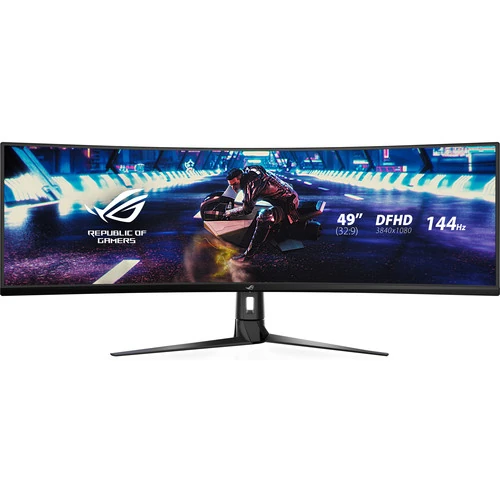
ASUS ROG Strix XG49VQ 49-inch DFHD Curved Gaming Monitor
The ASUS ROG Strix XG49VQ is a 49-inch super-ultra-wide gaming monitor built around a VA LCD panel with a 32:9 aspect ratio and 1800R curvature. Its native resolution is 3840 × 1080. ASUS classifies the model as super ultra-wide; the resolution is commonly called DFHD. It is not 4K UHD: 4K UHD is 3840 × 2160, so this monitor has 1080 vertical pixels rather than 2160. The distinction matters when comparing sharpness, graphics workload and the kinds of input signals a computer must provide.
The 32:9 format places a broad continuous desktop across one panel. It can be useful for applications that benefit from a long timeline, several side-by-side windows, or a supported panoramic game view. A single screen can replace a multi-display arrangement for some desk workflows, while avoiding a central bezel. The exact benefit depends on application layout and user preference. Some games and video sources do not render in 32:9; they may display black bars, use a narrower field of view, or crop content according to their own settings.
DFHD resolution and refresh
At 3840 × 1080, the display combines two 1920 × 1080 Full HD widths while retaining 1080 vertical pixels. On a large 49-inch diagonal, users should consider viewing distance and text scaling, especially for dense text or detailed design work. It offers extra horizontal room, but it does not provide the same vertical detail as a 3840 × 2160 4K UHD monitor. Product titles that call this model “4K” are inaccurate even if they also state 3840 × 1080; use the exact model and resolution to compare it fairly.
ASUS specifies a maximum refresh rate of 144Hz and a 4ms grey-to-grey response time. A 144Hz panel can refresh up to 144 times per second when the selected input timing and connected source support that mode. The monitor cannot create frames that the computer or game has not rendered. Performance depends on the graphics hardware, application, rendering settings, cable, connection and display mode. ASUS’s manual lists up to 3840 × 1080 at 144Hz through DisplayPort and up to 3840 × 1080 at 120Hz through HDMI. Therefore, a buyer seeking the maximum listed refresh should check the computer’s output and use a compatible DisplayPort connection.
The VA panel has a typical 3000:1 contrast ratio and ASUS lists 178-degree horizontal and vertical viewing angles. ASUS also lists a 450 cd/m² typical brightness, 450 cd/m² HDR peak brightness, a 0.311mm pixel pitch and support for 1.0737 billion colors (10-bit). These are manufacturer specifications, not a promise that every screen area or content frame reaches the maximum brightness. Perceived contrast, colour and visibility depend on picture mode, ambient light, source signal and viewing position.
Curved 32:9 viewing and HDR
The 1800R curve follows a tighter arc than a flat screen of the same width. From a suitable viewing position, the curve can make the far edges feel less distant and keep the wide image within a more consistent viewing angle. Desk depth and seating position are important: the user should sit near the centre and leave enough room for the panel and its stand. The display surface is anti-glare, which can reduce reflections from room lighting, though placement and direct light still affect the image.
ASUS lists HDR10 support and VESA DisplayHDR 400 certification. HDR can show compatible content with a wider brightness range when the source device, operating system, application and monitor mode are configured appropriately. HDR does not mean that every scene is equally bright, nor does a certification guarantee a particular experience in every room. The monitor also lists 90% DCI-P3 and 125% sRGB colour-space coverage. These coverage figures describe the gamut specification; they should not be mistaken for a factory calibration report or a guarantee of color accuracy for a particular unit.
For gaming, ASUS lists Adaptive-Sync, AMD FreeSync Premium Pro, GamePlus, GameVisual, DisplayWidget, GameFast Input technology and Shadow Boost. Adaptive-Sync is intended to coordinate compatible source frame output with the display refresh cycle to reduce tearing and stutter within supported conditions. Its active range depends on the source, port and configured mode. GamePlus and GameVisual provide on-screen tools and picture presets. Shadow Boost changes visibility in darker areas. Their effects vary by game and user preference; they do not improve a computer’s rendering performance.
Inputs, audio and USB hub
The XG49VQ provides one DisplayPort 1.2 input and two HDMI 2.0 inputs. The HDMI ports are useful for connecting more than one source, but the maximum refresh and resolution combinations depend on the exact source timing. For the monitor’s native 3840 × 1080 resolution, the manual lists a maximum 120Hz signal through HDMI and 144Hz through DisplayPort. Check the manual’s supported timing table when configuring a PC, dock or other device. The USB hub consists of one USB Type-B upstream connection to the computer and two USB 3.0 / USB 3.2 Gen 1 Type-A downstream ports for peripherals. The monitor also has an earphone jack. No USB-C video input is listed.
ASUS also lists Picture-by-Picture (PBP), which can display multiple connected sources, and Picture-in-Picture (PIP). The available split layouts and refresh behavior depend on the selected PBP mode. The manual notes that Adaptive-Sync/FreeSync and HDR are disabled while PBP is active. Check the manual before planning a multi-source workflow because some layouts use reduced per-window refresh rates.
Two built-in 5W speakers can provide basic audio without separate desktop speakers. Their presence can be convenient for system sounds, meetings or casual listening, while users who need more detailed sound can connect headphones or external audio equipment through the earphone output. The available sound depends on the source device and the monitor’s audio settings. The product has an AC power input rated for 100–240V, 50/60Hz. ASUS specifies power consumption below 47W and power-saving consumption below 0.5W.
Stand, dimensions and installation
The supplied stand supports tilt from -5 to +20 degrees, swivel from -16 to +16 degrees and height adjustment from 0 to 120mm. A pivot adjustment is not listed in the exact-model specification. ASUS specifies a 100 × 100mm VESA mounting pattern for compatible arms or wall mounts. Before mounting, confirm the bracket’s load rating, screw fit, panel clearance and the desk or wall structure. Because the monitor is nearly 1.2 metres wide, measure the installation space and check cable access before ordering.
ASUS gives estimated dimensions with the stand of approximately 1193.33 × 529.10 × 344.74mm (width × height × depth), and without the stand approximately 1193.33 × 369.7 × 178.4mm. Net weight is listed as 13.3kg with the stand and 9.7kg without it; packaged gross weight is listed as 20.9kg. Measurements may vary by region. The included accessory list can also vary by region; ASUS lists a DisplayPort cable, HDMI cable, power adapter, power cord, quick-start guide, VESA mount kit and warranty card. Check the contents of the actual seller package, especially if a particular cable is needed for the intended refresh mode.
Who should consider it?
This model is best suited to a buyer who specifically wants a very wide 32:9 screen, has enough desk space and uses software or games that can take advantage of the panoramic layout. It may also suit a productivity desk where wide timelines and side-by-side windows are valuable. Buyers who prioritise fine vertical detail should compare the 1080-pixel vertical resolution with a 1440p or 4K UHD alternative. Before purchase, confirm the graphics output, required cables, game aspect-ratio support and desk dimensions. The “4K” wording found on some retail titles should not be used as the specification: the resolution is 3840 × 1080 DFHD.
Bangladesh price and warranty note
At the time of this review, Bangladesh retailer listings showed prices from ৳142,800 to ৳151,999, with some listings showing a ৳155,000 regular price. Star Tech’s listing was marked out of stock; other listings have their own stock and warranty conditions. The observed listing range is dated market context, not a BiponiBD live offer or a guarantee of current seller price. Retailers describe a three-year warranty, but replacement, service, panel and claim terms can differ. Before buying, ask the seller to confirm the exact model, written warranty provider, replacement conditions, service process and coverage. Check the live BiponiBD product page for its current price and availability.
For clarity, this catalog entry retains its existing product URL slug so that existing links remain stable, while correcting the visible name and technical copy. ASUS identifies the model as ROG Strix XG49VQ and supplies the technical values listed here. The barcode/GTIN, physical-unit country of origin and parcel shipping dimensions were not confirmed in the available product record and are not guessed.
Key features
- 49-inch 32:9 super-ultra-wide VA display with 1800R curvature and anti-glare surface.
- Native DFHD resolution is 3840 × 1080. It is not 4K UHD, which is 3840 × 2160.
- Maximum 144Hz refresh rate and 4ms GTG response time, subject to the selected input mode and source.
- HDR10 input support and VESA DisplayHDR 400 certification; HDR appearance depends on compatible content and settings.
- 90% DCI-P3 and 125% sRGB color-space coverage listed by ASUS.
- One DisplayPort 1.2, two HDMI 2.0 inputs, a USB hub (one Type-B upstream and two Type-A downstream ports) and an earphone jack.
- Built-in stereo speakers rated 2 × 5W.
- Stand offers tilt, swivel and 0–120mm height adjustment; 100 × 100mm VESA mounting is supported.
Advantages
- The 32:9 canvas provides substantial horizontal workspace for supported games and side-by-side desktop windows.
- The 1800R curve brings the edges of the wide panel closer to the viewer’s field of view.
- 144Hz refresh and Adaptive-Sync support are useful with a compatible PC and supported signal mode.
- Multiple video inputs, USB-A hub, earphone output and built-in speakers are integrated.
- Height, tilt and swivel adjustments plus VESA mounting offer several desk setup options.
Things to consider
- 3840 × 1080 is DFHD, not 4K UHD; its vertical pixel count is 1080.
- The very wide 32:9 format needs compatible game or application support; some content may show side bars or crop.
- A 144Hz mode requires a compatible source, cable and connection; HDMI modes do not support the same maximum as DisplayPort.
- The large stand footprint and 49-inch panel require substantial desk width and depth.
- The three-year replacement warranty is a local retailer listing and must be checked against the written unit-specific terms.
Frequently asked questions
Is the ASUS ROG Strix XG49VQ a 4K monitor?
No. Its native resolution is 3840 × 1080, commonly described as DFHD for its 32:9 format. 4K UHD is 3840 × 2160, with twice the vertical pixel count.
What is the screen size and aspect ratio?
ASUS specifies a 49-inch panel with a 32:9 aspect ratio and 1800R curvature.
What resolution does it display?
The native resolution is 3840 × 1080 (DFHD). The supported input timing depends on the port and connected device.
What is the maximum refresh rate?
ASUS lists a maximum of 144Hz. Its manual distinguishes input limits: DisplayPort can support 3840 × 1080 at 144Hz, while HDMI timing tops out at 120Hz for that resolution.
Which panel technology does it use?
ASUS lists a VA panel. The panel is anti-glare and has a typical 3000:1 contrast ratio.
Does it support HDR?
ASUS lists HDR10 and VESA DisplayHDR 400 certification. HDR requires compatible content and source output; picture results vary by mode and conditions.
Which ports are included?
The specification lists one DisplayPort 1.2, two HDMI 2.0 ports, one USB Type-B upstream connection, two USB 3.0 / USB 3.2 Gen 1 Type-A downstream hub ports and an earphone jack.
Does it have built-in speakers?
Yes. ASUS specifies two 5W speakers.
Can I adjust the stand?
The stand supports -5° to +20° tilt, -16° to +16° swivel and up to 120mm of height adjustment. Pivot rotation is not listed.
Can I mount it on a monitor arm?
ASUS lists a 100 × 100mm VESA mounting pattern. Confirm the arm supports the monitor’s size, weight, clearance and mounting hardware.
What warranty is available in Bangladesh?
Techland BD lists a three-year replacement warranty for this model. The seller’s listing is subject to change; check the written warranty card or invoice for coverage and claim conditions.
What is the current BiponiBD price and stock?
The available source is a third-party retailer listing, not a live BiponiBD offer. Check the product page or seller for current BiponiBD price and availability.
Sources: ASUS ROG XG49VQ technical specifications: https://rog.asus.com/uk/monitors/above-34-inches/rog-strix-xg49vq-model/spec/?config=90LM04H0-B01170 ; ASUS XG49VQ user manual: https://dlcdnets.asus.com/pub/ASUS/LCD%20Monitors/XG49VQ/ASUS_XG49VQ_English.pdf?model=xg49vq ; Bangladesh retailer listings checked on 6 November 2026 include https://www.techlandbd.com/asus-rog-strix-xg49vq-49-inch-monitor, Star Tech, Skyland Computer BD, Vibe Gaming and Monarch IT. Retailer prices and warranty wording are observations and can change.