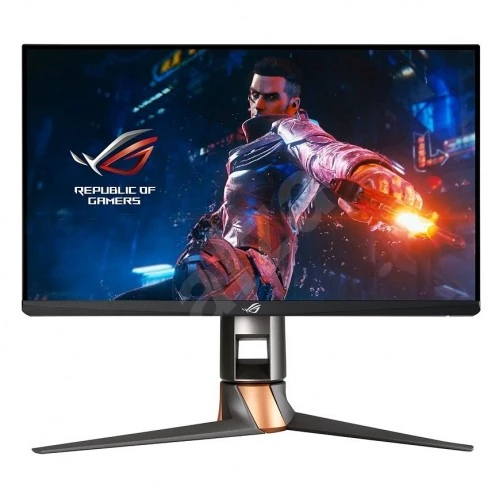
ASUS ROG Swift 360Hz PG259QN esports display
The ASUS ROG Swift PG259QN is a 24.5-inch FHD monitor designed for high-refresh competitive play. Its Fast IPS panel displays 1920 × 1080 pixels at up to 360Hz over DisplayPort 1.4. HDMI 2.0 supports up to 240Hz at the same FHD resolution. The port difference matters: a 360Hz capable computer connected through HDMI will be limited by the monitor’s HDMI input ceiling. Use DisplayPort and a suitable cable to access the maximum refresh rate.
The model uses a dedicated NVIDIA G-SYNC processor with Variable Overdrive and a listed 1–360Hz variable refresh range. G-SYNC coordinates compatible graphics output with the screen to reduce tearing and stutter within supported conditions. The 1ms gray-to-gray response rating is a manufacturer specification; actual pixel transition behavior varies by mode, overdrive and content. A high refresh ceiling is most useful when the graphics system can produce high frame rates.
The 24.5-inch screen has a 16:9 aspect ratio, non-glare surface, approximately 0.2830mm pixel pitch and viewing angles rated at 178 degrees horizontally and vertically. Full HD on this size prioritizes frame rate and competitive visibility rather than detailed desktop workspace. The active display area measures approximately 543.168 × 302.616mm.
G-SYNC, ULMB and gaming controls
The hardware G-SYNC module supports Variable Overdrive, which can adjust overdrive behavior as refresh rate changes. ASUS also lists NVIDIA Ultra Low Motion Blur (ULMB) up to 240Hz. ULMB and the 360Hz maximum are separate operating choices; ULMB does not run at 360Hz. Check the monitor menu and supported graphics configuration when comparing motion settings, since options can depend on refresh rate and source.
ASUS GamePlus features include a crosshair overlay, timer, FPS counter, display alignment and stopwatch. Seven GameVisual presets include Scenery, Racing, Cinema, RTS/RPG, FPS, sRGB and G-SYNC Esports Mode. Dark Boost can adjust shadow detail across three levels. Select the preset that fits the content and check that changes do not compromise the intended color or game image.
Aura Sync lighting illuminates the rear ROG logo and can synchronize with compatible ASUS components and software. The monitor uses an internal passive heatsink and fanless cooling design. This avoids a cooling fan in the monitor, though the external power adapter and connected computer can still produce their own operating noise.
Brightness, color and HDR10
ASUS lists 400cd/m² typical brightness and HDR10 support. The monitor processes 10-bit color using 8-bit plus frame-rate control and includes a factory sRGB GameVisual preset with approximately 99% sRGB coverage. HDR10 compatibility allows the display to accept supported HDR signals, but the model does not specify a local-dimming backlight or a high-tier HDR certification. Image appearance depends on source mastering, picture mode, room lighting and system configuration.
For standard desktop and web work, use an appropriate color preset and avoid changing multiple controls without checking the profile. The calibration report documents the factory state. Professional color work may require an external calibration device and a managed software workflow. The monitor’s gaming focus, FHD resolution and 400-nit rating should be compared against the requirements of HDR mastering or higher-resolution creative work.
TÜV Rheinland-certified Flicker-Free and Ultra-Low Blue Light modes are included, with four blue-light filter levels. These controls can change screen behavior for user preference but are not medical guarantees. Adjust brightness to room conditions, keep an appropriate viewing distance and take breaks during long sessions.
DisplayPort, HDMI and USB hub
DisplayPort 1.4 supports 1920 × 1080 at up to 360Hz, G-SYNC operation and 10-bit processing under supported configuration. HDMI 2.0 supports FHD up to 240Hz. HDCP 2.2 is listed. To troubleshoot a missing 360Hz option, confirm that the source is connected to DisplayPort, use a capable cable, select 1920 × 1080 and check the graphics driver and Windows advanced display settings.
Two USB 3.2 Gen 1 Type-A ports provide downstream connections for peripherals, and a USB 3.0 Type-B upstream connection links the hub to the computer. Connect the upstream cable to enable the monitor USB ports. Keyboard, mouse and compatible accessories can use the two Type-A connections; available speed and charging depend on the port and attached device.
The monitor has a 3.5mm audio jack but no built-in speakers. Use headphones or external audio equipment. Video cables and USB upstream cables may be included in the box; check the regional package contents and connect the appropriate cable for the desired display refresh and hub use.
Ergonomic stand and physical dimensions
The standard desktop stand supports 0–120mm height adjustment, tilt from −5 to +20 degrees, swivel 25 degrees left and right, and 90-degree clockwise pivot. The display can be positioned in portrait orientation when the desk and cable routing allow. A 100 × 100mm VESA pattern supports compatible monitor arms or wall mounts, and a Kensington lock slot is available.
With the stand at its highest position, dimensions are approximately 557 × 499 × 247mm (width × height × depth). At the lowest stand height, the screen measures approximately 557 × 379 × 247mm. Without the stand, dimensions are around 557 × 330 × 88mm. The carton is about 664 × 475 × 258mm. Leave enough space to pivot and swivel the display and route cables safely.
Net weight is approximately 7.1kg with the stand and 3.5kg without it; gross boxed weight is 9.9kg. The black/dark-gray chassis uses ROG Cybertext styling. Confirm the desk or mount can support the assembled monitor and follow the installation guide when attaching a VESA mount.
Power, accessories and support
The monitor uses an external 90W power adapter and accepts 100–240V AC at 50/60Hz. ASUS lists operating consumption below 27W and power-saving/off states below 0.5W. Place the adapter where it has airflow and cannot be knocked loose. Use the included power cord and keep cable slack for the stand’s height, swivel and pivot range.
ASUS lists DisplayPort and HDMI cables, USB 3.0 upstream cable, 90W adapter and power cord, ROG welcome card, calibration report, ROG sticker, I/O port cover, quick-start guide and warranty card. Regional contents may differ. Check the actual sealed package and invoice, and retain the serial number and calibration document for future support.
Bangladesh price and warranty
Bangladesh retailer pages reviewed showed approximately ৳93,000–৳93,200 at Star Tech, around ৳93,000 at Ryans, and a TechLand cash price near ৳93,000 against a regular price of ৳95,000. Sellers commonly state three years of warranty. The existing variant MSRP of ৳93,200 is retained, and the market range reflects approximately ৳93,000–৳95,000 from checked listings. Stock and promotional prices can change, and at least one listing was marked out of stock when reviewed.
Verify the PG259QN model code on the product label and invoice, the seller’s current availability, the warranty provider, service location and coverage terms. This model is distinct from the PG259QNR, which adds the NVIDIA Reflex Latency Analyzer and desk-clamp mount kit. The PG259QN reviewed here includes a standard desktop stand and does not include those QNR-specific accessories.
Who should consider the PG259QN
This monitor can suit esports players who prioritize high refresh and motion handling at FHD, use a DisplayPort source capable of high frame rates and value hardware G-SYNC with Variable Overdrive. The stand’s full ergonomic adjustments, USB hub, ULMB option and gaming overlays add flexibility. Its 24.5-inch size matches common competitive setups, while the 360Hz maximum is available only through DisplayPort.
Before choosing it, consider that HDMI is limited to 240Hz, ULMB is limited to 240Hz, the display is FHD, and built-in speakers are absent. HDR10 and 400-nit brightness do not provide local dimming. Confirm the seller warranty and accessories in writing, and compare the PG259QN with the PG259QNR only after checking whether the Reflex analyzer and clamp are actually needed.
Setup checklist and compatibility notes
Connect a compatible gaming computer to the DisplayPort input when the goal is 360Hz. After connecting, select the monitor’s native 1920 × 1080 resolution in the operating system and graphics control panel, then choose the available 360Hz refresh option. If only lower refresh values appear, check the cable and port in use, graphics driver, display mode and monitor input selection. A cable connection alone does not guarantee that the source device can generate enough frames for a 360Hz experience.
For HDMI use, plan around the specified 240Hz FHD maximum. Notebook docks, adapters, KVM switches and capture equipment may impose their own resolution or refresh limits; check their specifications before placing them between the computer and display. The USB hub also needs its upstream Type-B cable connected to the host. Video and USB functions use separate connections, so a successful picture does not by itself mean that the USB hub is linked.
The stand can be adjusted after placing the display on a stable surface. Hold the panel while raising or lowering it, keep hands clear of the pivot points and leave slack in the power, video and USB cables. For VESA installation, check screw compatibility and the mount’s load rating against the monitor’s weight without its stand. Follow ASUS installation instructions and avoid forcing connectors or stand movement.
The package contents and local after-sales terms can vary by distribution region. Confirm that the invoice states PG259QN, check that the serial number on the carton and product match, and ask the retailer to identify the warranty provider and service process. Preserve the original packaging and calibration report when practical. These checks help distinguish this PG259QN configuration from the visually similar PG259QNR and clarify the local seller’s coverage before purchase.