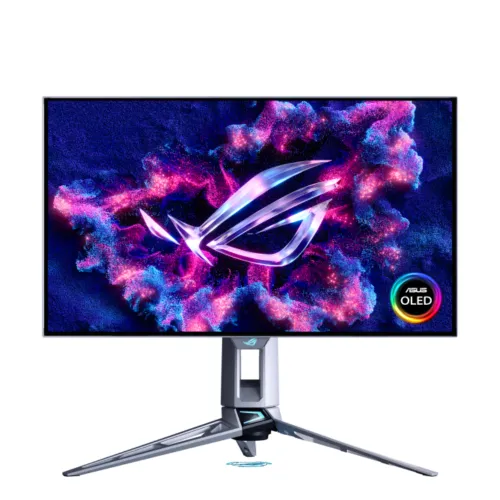
ASUS ROG Swift OLED PG27AQWP-W 27-inch Dual-Mode QHD Tandem WOLED Gaming Monitor pairs QHD at up to 540Hz with an HD mode up to 720Hz, a TrueBlack Glossy panel, DisplayPort 2.1 and OLED care features. Specifications below distinguish manufacturer ratings from dated Bangladesh retailer observations.
Product overview
The ASUS ROG Swift OLED PG27AQWP-W is a white, flat gaming monitor built around a 26.5-inch viewable Tandem WOLED panel. ASUS and sellers commonly describe it as a 27-inch-class display. The native 2560 x 1440 resolution gives a 16:9 QHD workspace, while dual-mode operation switches between QHD at up to 540Hz and HD at up to 720Hz. These are alternative display modes, so the chosen resolution and refresh rate must be supported by the connected system. Its headline specifications target competitive PC gaming, but HDMI inputs also make the display usable with compatible consoles and other video sources. The model name ends in “-W” and the listed housing color is white.
Panel type, surface and image characteristics
ASUS identifies the panel as WOLED and specifies Tandem WOLED panel technology. The product is marketed with the TrueBlack Glossy surface treatment; it should not be described as anti-glare or matte. Glossy surfaces can deliver a clear image in controlled lighting, while reflections from windows and lamps may be more noticeable than with a matte coating. ASUS lists a typical contrast ratio of 1,500,000:1 and 178-degree horizontal and vertical viewing angles at the specified contrast threshold. The 0.229mm pixel pitch and 586.75 x 330.05mm viewable area are listed in the manufacturer specification. The 16:9 shape fits standard QHD gaming layouts and does not require an ultrawide desk footprint.
Resolution and dual-mode refresh
The native panel resolution is 2560 x 1440 pixels. In its high-resolution mode, ASUS advertises up to 540Hz at QHD; in its high-refresh alternative, ASUS advertises up to 720Hz at HD. ASUS product materials identify this as Dual-Mode and call the lower-resolution mode HD. As these modes trade spatial detail for a higher refresh ceiling, buyers should select the mode that best suits the title and the frame rates their PC can sustain. Check the official timing table and current firmware documentation for supported combinations on the selected DisplayPort or HDMI input. The monitor cannot create extra rendered frames when the game or graphics system cannot supply them.
Motion response and adaptive sync
ASUS specifies a 0.02ms gray-to-gray response time. Response-time numbers are manufacturer test specifications and are not the same as total system input latency. The display lists AMD FreeSync Premium Pro and NVIDIA G-SYNC Compatible technologies, along with VESA AdaptiveSync Display 540Hz certification. Variable refresh can reduce tearing and stutter when the graphics source, driver, game and selected mode support it. ASUS also lists Extreme Low Motion Blur and GameFast Input technology. These functions can have mode or compatibility constraints, so consult the on-screen display and manual when using ELMB, HDR or adaptive sync together. Competitive performance still depends on the PC, game settings, network and player.
HDR, brightness and color
The specification lists HDR10 and VESA DisplayHDR 500 True Black certification. ASUS gives a peak HDR brightness figure of 1,500 cd/m² and notes that peak brightness may vary with color pre-calibration. This peak value is not a claim that every scene or full-screen image remains at that level. ASUS lists 1,073.7 million display colors at 10-bit, 99.5% DCI-P3 and 135% sRGB gamut size. The manufacturer also states Delta E below 2 and provides a color pre-calibration report with the product. Gamut size and gamut coverage are different measurement types; the percentage figures should not be compared as if they meant the same thing. Color-critical workflows should use suitable software and verify calibration for their environment.
Video inputs and USB hub
ASUS lists one DisplayPort 2.1 input, two HDMI 2.1 FRL inputs and an earphone jack. The model page highlights DisplayPort 2.1a UHBR20, and the listed bundled cable is DP80; confirm connector and timing details against the regional product page and manual. Three USB 3.2 Gen 1 Type-A ports are provided as a USB hub. ASUS does not list USB-C video or USB-C Power Delivery for this model, so it should not be sold as a single-cable laptop dock. The computer-to-monitor USB connection and the correct cable may be needed to use hub functions. Actual signal capabilities depend on the source, cable, device settings, firmware and selected operating mode.
Gaming features and utilities
The ASUS feature list includes GamePlus, GameVisual, DisplayWidget Center, GameFast Input technology, Shadow Boost, Aspect Control, Extreme Low Motion Blur and AI Visual. ASUS also lists Dynamic Crosshair and Dynamic Shadow Boost under its AI assistant features. The monitor can show an on-screen targeting aid or alter selected image regions through these gaming tools; they are optional display functions and do not replace game settings or accessibility options. DisplayWidget Center offers a software route to some monitor controls on a compatible computer. Color calibration E-report access is also listed through this utility. Feature availability can change with the operating mode, input source, firmware, connected software and local product bundle.
OLED care and proximity sensor
ASUS lists OLED Care and promotes OLED Care Pro and a Neo Proximity Sensor for the PG27AQWP-W. These features are intended to help protect the panel and manage screen behavior when a viewer is away. OLED pixels can still be affected by prolonged display of static high-contrast images, so use the manufacturer care settings and follow ASUS guidance for cleaning, screen refresh and long periods of inactivity. Panel-care features reduce exposure but do not guarantee that image retention or burn-in cannot occur. ASUS global specifications list three years of warranty including panel burn-in, subject to region-specific service and claim terms. Buyers in Bangladesh should verify the local distributor’s actual coverage before payment.
Stand, ergonomics and desk fit
The included stand supports -5 to +20 degrees of tilt, up to 30 degrees of swivel in either direction, up to 90 degrees of pivot in either direction and 0–110mm height adjustment. ASUS also lists a 100 x 100mm VESA wall-mount pattern, a Kensington lock and a 1/4-inch tripod socket. The estimated dimensions with stand are 60.56 x 54.79 x 27.35cm (width x height x depth); without the stand they are 60.56 x 36.94 x 6.31cm. Allow extra space for cables and movement, especially when rotating into portrait orientation. ASUS notes that dimensions and weights are estimates and may vary by region.
Weight, power and certificates
ASUS estimates net weight at 7.04kg with the stand and 4.54kg without it; gross package weight is 11.6kg. The estimated box measures 89.60 x 49.00 x 18.80cm. Power consumption is specified as below 55W, below 0.5W in power-saving mode and below 0.3W when off, with 100–240V AC at 50/60Hz input. Listed certificates and features include TÜV Flicker-free, TÜV Low Blue Light (hardware solution), VESA AdaptiveSync Display 540Hz, VESA DisplayHDR 500 True Black, AMD FreeSync Premium Pro and G-SYNC Compatible. Certification describes the manufacturer-listed standard or compatibility and does not assure every use case or configuration.
Accessories and regional package
ASUS lists a color pre-calibration report, DisplayPort 2.1 DP80 cable, HDMI Ultra High Speed cable, microfiber cloth, power cord, quick-start guide, ROG pouch, ROG sticker, USB 3.2 cable, VESA mount kit and warranty card. The official page explicitly says accessories vary by region. Retail listings can copy a global bundle list even when the local box differs. Confirm the exact package with the Bangladesh seller before ordering, especially if the DP80 cable, VESA accessories or calibration report matter to your setup. The product record does not add unverified box dimensions beyond the manufacturer’s estimated figure or assume an adapter not listed by ASUS.
Bangladesh price and warranty checks
At the time of this review, Star Tech’s page showed a price of ৳180,000 in its description section while its product header labeled the price “To be announced” and status “Pre Order.” It also advertised a three-year warranty. Because those statements conflict within the same page and the page was crawled last month, this is a dated retailer observation rather than a verified current BiponiBD price or stock status. The catalog MSRP of ৳171,500 is preserved rather than changed from a single inconsistent retail listing. ASUS’s global specification states three years including panel burn-in, but the local claim path, distributor and warranty provider may differ. Ask the seller to confirm current price, availability, local warranty and burn-in coverage in writing.
Advantages and trade-offs
Key advantages include the unusually high refresh options for competitive play, Tandem WOLED image characteristics, HDR certification, a broad collection of modern video inputs and a fully adjustable stand. DisplayPort 2.1 and two HDMI 2.1 inputs support a flexible multi-device desk, and three USB-A ports provide a useful monitor hub. Trade-offs are the premium niche focus, QHD rather than UHD native resolution, reliance on a high-performance PC for peak modes, glossy reflections in bright rooms and the absence of speakers or USB-C laptop docking. OLED care is useful, but buyers should understand static-image exposure and check the region-specific warranty. These points help compare the display against lower-refresh QHD models, 4K monitors and matte-panel alternatives.
Who this monitor suits
This model suits competitive PC gamers who value very high refresh rates and want to select between QHD detail and an HD 720Hz mode. It can also suit multi-device users who need DisplayPort and two HDMI inputs, or people who want height adjustment, pivot and VESA mounting. It may not suit buyers who need native 4K resolution, built-in speakers, USB-C video and laptop charging, a matte surface, or a budget monitor for office-only use. Before buying, verify the graphics card output and cable, measure the desk, decide whether glossy viewing works in the room and confirm the local warranty terms. The package listing and price should be checked with the retailer on the day of purchase.
Model identity and record accuracy
The exact product identifier is ROG Swift OLED PG27AQWP-W. The product page model string and manufacturer part number should use that exact identifier instead of the generic “ROG Swift OLED” wording. The product title can retain the 27-inch-class size while the detailed specification clarifies the 26.5-inch panel size. The existing slug is already model-specific and is preserved to avoid breaking existing product links. The variant SKU and MSRP remain unchanged because they are catalog identifiers and no authoritative evidence justifies replacing them. GTIN, barcode, country of origin and carton/item package measurements beyond ASUS’s estimated dimensions remain blank when no exact-model proof is available.
Key features
- 26.5-inch viewable (27-inch class) flat Tandem WOLED panel with 2560 x 1440 native QHD resolution and a 16:9 aspect ratio.
- Dual mode offers QHD at up to 540Hz or HD at up to 720Hz; the selected resolution/refresh pair depends on mode and source compatibility.
- ASUS TrueBlack Glossy surface, 1,500,000:1 typical contrast and up to 1,500 cd/m² peak HDR brightness listed by ASUS.
- 0.02ms gray-to-gray response time, HDR10 and VESA DisplayHDR 500 True Black certification.
- 99.5% DCI-P3, 135% sRGB gamut-size figure, 10-bit display support and ASUS stated color accuracy of Delta E below 2.
- One DisplayPort 2.1 input and two HDMI 2.1 FRL inputs, plus an earphone jack and three USB 3.2 Gen 1 Type-A hub ports.
- AMD FreeSync Premium Pro and NVIDIA G-SYNC Compatible variable-refresh technologies are listed by ASUS.
- ASUS OLED Care, OLED Care Pro and Neo Proximity Sensor features are described for panel-care and presence-aware screen behavior.
- GamePlus, GameVisual, ELMB, GameFast Input, Shadow Boost, Aspect Control and DisplayWidget Center software support.
- Tilt, swivel, pivot and height-adjustable stand, 100 x 100mm VESA mounting, Kensington lock and 1/4-inch tripod socket.
Advantages
- The QHD 540Hz and HD 720Hz modes let buyers choose between sharper resolution and a higher refresh ceiling for supported competitive titles.
- Tandem WOLED, glossy TrueBlack coating, high listed peak HDR brightness and deep typical contrast make the panel a premium gaming-focused display.
- DisplayPort 2.1, two HDMI 2.1 inputs and three USB-A hub ports provide useful PC and console connectivity.
- The stand offers height, tilt, swivel and portrait pivot adjustments, with both VESA mounting and a tripod socket available.
- ASUS lists adaptive sync from AMD and NVIDIA, HDR certification, OLED care functions and a three-year global warranty including panel burn-in.
Trade-offs to consider
- This premium model is optimized for very high-refresh gaming; its 2560 x 1440 native resolution is below 4K for buyers prioritizing workspace detail.
- 540Hz QHD and 720Hz HD demand a suitably capable PC, GPU output and cable; those peak modes are not guaranteed on every console or computer.
- There are no built-in speakers, no USB-C video input and no laptop charging over USB-C listed in ASUS specifications.
- The TrueBlack Glossy surface can reflect bright room lights; placement and ambient lighting may affect viewing comfort.
- OLED care reduces panel risk but does not make static-content exposure risk-free; local warranty handling and regional accessory bundles need seller confirmation.
Frequently asked questions
1. What is the exact display size and panel technology?
ASUS lists a 26.5-inch panel size, commonly sold as a 27-inch class monitor. It uses Tandem WOLED technology with ASUS TrueBlack Glossy surface treatment. It is a flat 16:9 display with a native resolution of 2560 x 1440 pixels.
2. How does the dual-mode refresh feature work?
The monitor supports QHD at up to 540Hz and an HD mode at up to 720Hz. ASUS describes the second mode as HD; confirm the exact output resolution and available timings in the manual and on the connected graphics device before purchase. The two refresh/resolution combinations are alternative operating modes, not simultaneous outputs.
3. What response time and HDR formats are listed?
ASUS specifies 0.02ms gray-to-gray response time and HDR10 support. It also lists VESA DisplayHDR 500 True Black certification. The 1,500 cd/m² figure is peak HDR brightness and can vary with the calibration state; it is not a full-screen sustained brightness promise.
4. Which video inputs are included?
The ASUS specification lists one DisplayPort 2.1 input and two HDMI 2.1 FRL inputs. Signal timing, maximum refresh and HDR availability can depend on the source device, cable, firmware, color settings and selected monitor mode. Match the PC or console output to the required QHD 540Hz or HD 720Hz mode.
5. Does the USB hub charge my laptop?
The monitor has three USB 3.2 Gen 1 Type-A hub ports. ASUS does not list USB-C video or laptop Power Delivery in the exact-model I/O specification, so do not treat this hub as a laptop docking or charging connection.
6. Does it have built-in speakers?
No. ASUS lists no built-in speakers. Connect headphones to the monitor earphone jack or use speakers connected to the computer or another audio source.
7. What adaptive-sync systems are supported?
ASUS lists AMD FreeSync Premium Pro and NVIDIA G-SYNC Compatible support. Adaptive sync requires compatible graphics hardware, a supported connection and suitable driver/settings. Certification does not guarantee that every game, refresh mode or GPU configuration behaves identically.
8. What stand adjustments and mounting options are available?
The stand supports tilt from -5 to +20 degrees, swivel up to 30 degrees left or right, pivot up to 90 degrees in either direction and 0–110mm height adjustment. The monitor also supports a 100 x 100mm VESA wall mount and includes a 1/4-inch tripod socket. Check clearances before rotating it.
9. What are its dimensions and weight?
ASUS estimates dimensions with stand at 60.56 x 54.79 x 27.35cm (W x H x D), and without stand at 60.56 x 36.94 x 6.31cm. Estimated net weights are 7.04kg with stand and 4.54kg without; gross package weight is 11.6kg. ASUS notes that these estimates can vary by region.
10. What cables and accessories are listed?
ASUS lists a color pre-calibration report, DisplayPort 2.1 DP80 cable, HDMI Ultra High Speed cable, microfiber cloth, power cord, quick-start guide, ROG pouch, ROG sticker, USB 3.2 cable, VESA mount kit and warranty card. ASUS says accessories vary by region; ask the Bangladesh seller to confirm the actual sealed-box contents.
11. What warranty does ASUS specify?
The ASUS global exact-model specification lists three years including panel burn-in. Service availability and claim terms vary by region. A Bangladesh retailer also displays a three-year warranty, but local distributor, documentation, burn-in eligibility and claim procedure should be confirmed in writing with the seller.
12. What should I check before buying an OLED gaming monitor?
Check that the GPU and cable support the refresh/resolution mode you intend to use, that the stand fits your desk, and that the retailer confirms local warranty coverage. OLED pixels can be affected by long exposure to static content; ASUS includes OLED Care and a Neo Proximity Sensor as panel-care features, but no care system guarantees that image retention is impossible. Review ASUS care guidance and firmware notes for the exact model.
Source note: ASUS exact-model specification and product/support pages checked 6 November 2026. Bangladesh Star Tech listing checked the same day; its page showed conflicting price/status fields. Confirm live seller terms before purchase.