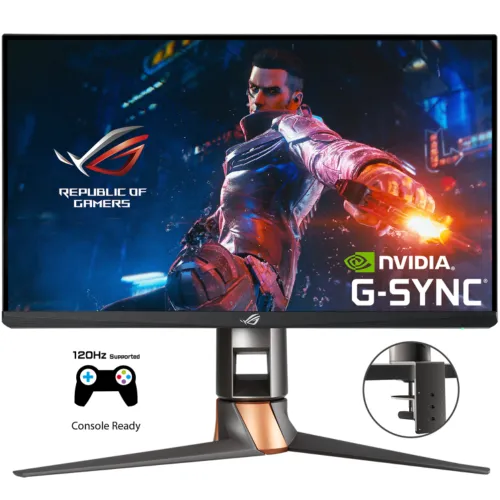
A 360Hz esports display built around a specific model
The ASUS ROG Swift 360Hz PG259QNR is a 24.5-inch Fast IPS gaming monitor built for high-frame-rate PC play. It displays Full HD at 1920 × 1080 in a 16:9 format and reaches up to 360Hz. ASUS specifies 1ms gray-to-gray response, 400 cd/m² typical brightness, a 1000:1 typical contrast ratio and 178-degree horizontal and vertical viewing angles. The 0.2830mm pixel pitch is consistent with its 24.5-inch FHD panel. A 360Hz screen can refresh more often than a conventional 60Hz panel, but the game, graphics card, connection and settings must produce and deliver the required frame rate. This is a performance-focused monitor: Full HD keeps the pixel workload lower so a capable gaming PC can target high frame rates, while a QHD or 4K display offers more desktop and image detail. The model code matters. PG259QNR is the Reflex Analyzer version with a ROG Desk Mount Kit, while PG259QN is the closely related standard mount version without those two QNR-specific items. Keep the full code in product titles, search terms and the MPN so shoppers can distinguish them.
Fast IPS motion and refresh-rate setup
ASUS describes the panel as Fast IPS and rates its response at 1ms GTG. The maximum refresh rate is 360Hz. The monitor supports NVIDIA G-SYNC and variable refresh technology, and the ASUS specification lists DisplayPort 1.4 with HBR3 alongside one HDMI 2.0 input. For the highest refresh mode, use DisplayPort and a PC graphics source that supports the required resolution and timing. A cable, GPU, driver, game and operating-system setting can all affect available refresh options; connect and select the high-refresh mode in the display settings rather than assuming any connection automatically runs at 360Hz. HDMI remains useful for a console or secondary device, but listing it does not imply that HDMI supports 360Hz at 1080p on this model. ASUS also includes NVIDIA ULMB controls in the monitor menu; the manual says Ultra Low Motion Blur is available at 144Hz or 240Hz, so users should understand it is an alternate motion mode rather than something to combine with the maximum 360Hz setting. GamePlus, GameVisual and Dark Boost provide additional on-screen gaming controls.
NVIDIA G-SYNC and Reflex Latency Analyzer
The PG259QNR contains an NVIDIA G-SYNC processor and a built-in Reflex Latency Analyzer. G-SYNC is intended to synchronize display refresh with supported graphics output to reduce tearing and stutter over supported modes. The Reflex analyzer detects a click from compatible equipment and measures the end-to-end response in the system. It helps users measure latency and compare configuration changes; it does not make every game or computer faster by itself. Setup depends on compatible mouse/peripherals, PC and on-screen configuration. The QNR version is distinct from PG259QN: ASUS lists Reflex Latency Analyzer for QNR and not for the PG259QN. This product also includes the ROG Desk Mount Kit, which is another QNR difference. Do not transfer these QNR features to PG259QN pages, and do not replace this product’s QNR code with the shorter family name in variant or support data. Competitive players may appreciate the latency-measurement capability when practicing with a consistent setup. For general browsing, office tasks or video playback, the analyzer is a specialized gaming tool and does not change the panel’s underlying 1920 × 1080 resolution.
HDR10, brightness and color data
ASUS lists 400 cd/m² typical brightness and 400 cd/m² peak brightness in HDR, plus HDR10 input support. The official specification does not give the monitor a VESA DisplayHDR certification tier. HDR10 support means it can accept HDR10 signal/content; it should not be described as a certified high-tier HDR display. The typical contrast is 1000:1. Color information needs particular care because one retailer table records 10-bit / 1.0737 billion colors, while the ASUS official PG259QNR specification lists 16.7 million display colors. This catalog description follows the first-party specification and avoids repeating the unsupported 10-bit claim. ASUS includes a color pre-calibration report among listed box contents, but the product spec does not provide a numeric Delta E rating or published gamut-coverage percentage. The display offers color-temperature, gamma and six-axis saturation adjustments in the on-screen menu. That provides user controls but is not a substitute for a calibrated color-work monitor. The PG259QNR should be presented primarily as a high-refresh esports display rather than a wide-gamut production monitor.
Connections, USB hub and audio
The input panel includes one DisplayPort 1.4 connection with HBR3 and one HDMI 2.0 connection. ASUS also lists two USB 3.2 Gen 1 Type-A ports as a hub and one earphone jack. Connect the monitor’s USB upstream cable to the computer when using the USB-A hub for peripherals. The headphone jack can pass audio from the connected source, but the monitor has no built-in speakers according to ASUS. The official specification also does not list a built-in microphone or camera. A headset or external speakers and separate camera/microphone may be needed for voice chat and calls. The product combines a standard adjustable monitor stand with a desk clamp mount in the QNR package, giving different ways to place the display near a keyboard and mouse. Cable pass-through in the stand helps route leads toward the back of the desk. Check the region-specific bundle, since ASUS says accessories can vary by market, and verify the required USB and DisplayPort cables are included before installation.
Desk mount, stand and VESA installation
The PG259QNR is supplied with the ROG Desk Mount Kit, a clamp that attaches the monitor’s mounting arm to the edge of a compatible flat desk. The mount can free desk space compared with the broad conventional base. ASUS also lists the standard stand and 100 × 100mm VESA wall-mount pattern. Stand adjustments include 0–120mm height travel, tilt from −5° to +20°, swivel ±25° and clockwise portrait rotation up to 90°. The desk edge, thickness, underside clearance and clamp placement should be checked before installation. The regular stand dimensions are an estimated 557mm wide, 499mm high at its tallest and 247mm deep; the panel without stand is approximately 557 × 330 × 88mm. ASUS says dimensions and weight can vary by region. Estimated net weight is 7.1kg with stand and 3.6kg without stand. The estimated box measures 688 × 256 × 538mm and gross weight is 13.3kg. These are manufacturer product/box estimates, not courier parcel measurements, so the exact shipping carton should be confirmed when arranging delivery.
Eye-care, lighting and menu tools
ASUS lists TÜV Flicker-Free and TÜV Low Blue Light certifications. These features are designed to reduce flicker and offer blue-light filtering options; they do not guarantee that every user will avoid eye fatigue. The monitor also includes Aura Sync lighting, GamePlus, GameVisual and Dark Boost. GamePlus offers on-screen tools for gaming, GameVisual provides selectable picture presets and Dark Boost adjusts visibility in darker scenes. The OSD gives controls for brightness, contrast, color temperature, six-axis saturation, gamma, inputs, audio output, lighting and system setup. Users can tailor those settings for their content and room, then save preferred setups through available shortcuts. ASUS lists a 100–240V AC, 50/60Hz input, less than 27W power consumption and less than 0.5W in power-saving/off modes. This is the monitor’s mains power requirement and should not be confused with the separate USB hub connection. RGB lighting can be synchronized with supported Aura components. Turn the lighting off if a low-distraction tournament or desk setup is preferred.
Bangladesh price, stock and warranty
Star Tech’s product listing showed a Bangladesh cash price of ৳101,000, a regular price of ৳109,590, in-stock status and three-year warranty when reviewed. Those are retailer details, not permanent manufacturer guarantees; promotions, stock and warranty service providers can change. Other local pages showed prices around ৳100,000–৳110,900. The existing BiponiBD price is ৳101,000 and has been preserved. Confirm the payable amount, stock, model code PG259QNR, included desk clamp and calibration report, condition, invoice and written warranty coverage with the seller. ASUS notes that the accessory bundle varies by region, while its estimated dimensions and weight may also vary by market. The warranty field should therefore reflect the seller’s current offer for this exact unit rather than imply every country has the same support terms. Country of origin is not stated in the reviewed product information and remains unknown. A known Bangladesh retailer price is useful for local search intent, but the actual catalog price should change only when authorized merchant information is verified.
Who should choose PG259QNR?
This model is designed for competitive PC players who value a 360Hz maximum refresh, 1ms GTG Fast IPS panel, G-SYNC and an integrated latency-measurement tool. The 24.5-inch Full HD format is familiar for esports and allows a GPU to target high frame rates more readily than a higher-resolution panel. The Reflex Latency Analyzer and desk clamp mount are the main reasons to select QNR over its sibling PG259QN. The trade-offs are the lower FHD pixel count, 400-nit brightness and color data that ASUS specifies as 16.7 million colors without numeric gamut coverage. HDR10 is supported, but no DisplayHDR certification tier is listed. Users seeking a large high-resolution workspace, built-in speakers, USB-C docking or wide-gamut creative calibration should check another category of display. For tournament or gaming desks, the clamp may be useful, but check desk compatibility and the complete regional box. Ensure the GPU, cable and selected mode support the high refresh rate desired, and use DisplayPort for the maximum 360Hz mode according to ASUS guidance.