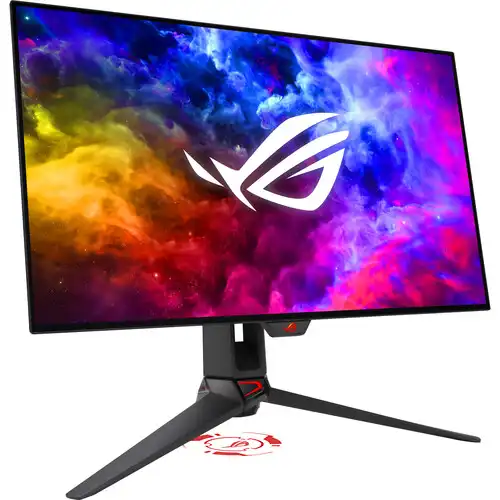
ASUS ROG Swift OLED PG27AQDM 26.5-Inch QHD (2560x1440) 240Hz 0.03ms WOLED Gaming Monitor
The ASUS ROG Swift OLED PG27AQDM is a 26.5-inch (27-inch class) flat QHD (2560 x 1440) gaming monitor built around a self-emissive WOLED panel featuring a 240Hz refresh rate (via DisplayPort 1.4 with DSC) and an ultra-fast 0.03ms Gray-to-Gray (GTG) response time. Engineered with a custom passive heatsink, internal top-vent airflow architecture, intelligent voltage optimization, and an anti-glare micro-texture coating, the PG27AQDM delivers 1,000 cd/m² (nits) HDR peak brightness (3% APL), a 1,500,000:1 typical contrast ratio, 99% DCI-P3 (135% sRGB) color gamut coverage with factory pre-calibration (Delta E < 2), and NVIDIA G-SYNC Compatible, AMD FreeSync Premium, and VESA AdaptiveSync 240Hz variable refresh rate support.
1. Panel Technology Clarification — Self-Emissive WOLED (Not IPS): Although some third-party catalog listings mistakenly label the panel type as "IPS," the ASUS ROG Swift OLED PG27AQDM uses a true self-emissive OLED (specifically WOLED) panel—not an IPS liquid-crystal display. Every organic pixel generates its own illumination independently, enabling true zero-nit black levels, a 1,500,000:1 static contrast ratio, and a 0.03ms (GTG) pixel response time without an LCD backlight.
2. Video Port Refresh Rate Clarification — DisplayPort 1.4 (Up to 240Hz) vs. HDMI 2.0 (Up to 120Hz at 2560x1440): Per the official ASUS technical specifications and user manual timing table, the full 240Hz refresh rate at native 2560 x 1440 resolution is supported exclusively over the DisplayPort 1.4 (with DSC) input (digital vertical frequency range: 40Hz to 240Hz; horizontal: 30 to 390 kHz). The two HDMI 2.0 ports operate at a maximum digital vertical frequency of 120Hz at 2560 x 1440 (vertical range: 40Hz to 120Hz; horizontal: 30 to 295 kHz). HDMI 2.0 does not support 240Hz on this monitor.
26.5-Inch QHD WOLED Panel with Custom Heatsink & Intelligent Voltage Optimization
With an active display area of 590.42 x 333.72 mm and a 2560 x 1440 (QHD / WQHD) native resolution in a 16:9 aspect ratio, the ROG Swift OLED PG27AQDM achieves a sharp pixel pitch of 0.229 x 0.229 mm (approximately 109 PPI). Unlike glossy OLED screens that can act like mirrors in brightly lit rooms, ASUS coats the PG27AQDM with an Anti-Glare Micro-Texture surface designed to scatter ambient light and reduce distracting reflections so colors remain accurate under studio or bedroom lighting.
To maximize OLED panel longevity and sustain high luminance without noisy mechanical cooling fans, ASUS re-engineered the internal thermal layout of the PG27AQDM:
- Custom Passive Heatsink: A large, custom-molded internal heatsink sits directly behind the OLED module to draw heat away from the organic light-emitting layers efficiently and silently.
- Expanded Top Exhaust Vents: Large upper chassis vents promote natural convection airflow, which ASUS describes as improving heat dissipation.
- Intelligent Voltage Optimization: Smart firmware algorithms monitor temperature variations across the panel and control the voltage applied to each pixel consistently, maintaining uniform brightness and mitigating the risk of long-term image retention (burn-in).
- ASUS Screen Protection Suite: Built-in OSD care routines include a Screen Saver (automatically dimming the screen after a period of inactivity), Pixel Cleaning (recalibrating pixels when the monitor has been active for several hours), Screen Move (periodically shifting pixel positions slightly), and Logo Brightness Adjustment (detecting and subtly dimming static on-screen logos).
240Hz Refresh Rate (via DisplayPort 1.4), 0.03ms (GTG) Response & Tri-Standard VRR
Built for competitive esports and fast-action gaming, the ROG Swift OLED PG27AQDM pairs its 240Hz maximum refresh rate (over DisplayPort 1.4 with Display Stream Compression) with a near-instantaneous 0.03ms Gray-to-Gray (GTG) pixel response time. Because self-emissive OLED pixels transition states orders of magnitude faster than liquid crystal molecules in IPS or VA panels, fast-moving objects across the 240Hz viewport exhibit crisp edges with virtually zero motion blur or inverse ghosting trails.
To ensure tear-free, low-latency frame pacing across varying frame rates, the monitor is validated across three major variable refresh rate (VRR) ecosystems:
- NVIDIA G-SYNC Compatible: Delivers smooth, stutter-free variable refresh rate performance on compatible GeForce graphics cards.
- AMD FreeSync Premium: Synchronizes frame output dynamically with compatible Radeon GPUs and supports Low Framerate Compensation (LFC).
- VESA AdaptiveSync Display 240Hz Certified: Independently verified to meet VESA's refresh-rate and variable timing requirements up to 240Hz over DisplayPort.
1,000-Nit Peak HDR10 Brightness, True 10-Bit 99% DCI-P3 Color & Uniform Brightness
Thanks to its WOLED panel structure and enhanced thermal headroom, the PG27AQDM reaches a peak luminance of 1,000 cd/m² (nits) in HDR mode (over a 3% APL window with HDR on) ; ASUS lists a maximum brightness of 450 cd/m² on its product launch page and a separate HDR peak of 1,000 cd/m² at 3% APL in the exact-model specification; measurement conditions differ. Combined with a 1,500,000:1 typical static contrast ratio and HDR10 signal compatibility, bright specular highlights—such as explosions, sunlight, and neon reflections—stand out vividly against pitch-black shadows without any local-dimming halo or blooming.
For creators and color-sensitive gamers, the panel supports true 10-bit color depth (1.0737 billion colors) and covers 99% of the cinema-grade DCI-P3 color space along with 135% of the sRGB color space. ASUS lists factory pre-calibration and color accuracy of Delta E (ΔE) < 2.
ROG-Exclusive Uniform Brightness Setting: Standard OLED panels often engage an Aggressive Automatic Brightness Limiter (ABL) that noticeably dims the screen whenever a large white browser or document window is maximized. When enabled in the OSD, ASUS's Uniform Brightness function keeps luminance consistent across changing window sizes, making everyday desktop work, coding, and web browsing far more comfortable for your eyes.
Aspect Ratio Control, GamePlus, GameVisual & ASUS DisplayWidget Center
ASUS equips the PG27AQDM with a comprehensive set of competitive gaming tools and software controls:
- Esports Aspect Ratio Control: Players who prefer smaller tournament screen sizes can switch the active display window to a simulated smaller aspect-ratio modes (available modes depend on firmware and signal settings), surrounded by true zero-light OLED black borders.
- ASUS Shadow Boost: Intelligently brightens dark areas of a scene without overexposing bright regions, helping players spot opponents hiding in dark corridors.
- ASUS GamePlus: Hardware-integrated overlays developed with pro gamers, including Crosshair (with Dynamic Crosshair support), Timer, FPS Counter, Display Alignment, and Sniper (magnifying the center target area).
- ASUS GameVisual (7 Modes): Provides seven preset display profiles—Scenery, Racing, Cinema, RTS/RPG, FPS, sRGB, and MOBA Mode—to match different game genres and workflows.
- ASUS DisplayWidget Center: Allows users to adjust monitor brightness, contrast, Uniform Brightness, GameVisual presets, and OLED Care settings directly inside Windows using a mouse instead of the physical OSD joystick.
- TÜV Rheinland Eye Care: Certified for both Flicker-Free operation and hardware-level Low Blue Light reduction, which shifts harmful blue light wavelengths at the panel level without introducing an unnatural yellow cast.
Connectivity, Ergonomic Stand, Top Tripod Socket & Aura Sync Lighting
The rear I/O bay and chassis of the ASUS ROG Swift OLED PG27AQDM combine futuristic ROG cyberpunk styling, customizable RGB lighting, and practical desk ergonomics:
- 1x DisplayPort 1.4 (with DSC): Primary high-bandwidth PC gaming input supporting the full native 2560 x 1440 resolution at up to 240Hz with compatible HDR and adaptive-sync signal modes; the source must support the selected timing.
- 2x HDMI 2.0 Ports: Secondary digital video inputs supporting 2560 x 1440 at up to 120Hz (40–120Hz vertical frequency) with HDCP 2.2 support for consoles, streaming devices, or secondary PCs.
- USB 3.2 Gen 1 Type-A Hub: Includes 1x USB Type-B upstream port and 2x USB 3.2 Gen 1 Type-A downstream ports (5 Gbps) for connecting gaming mice, keyboards, headsets, or thumb drives.
- 3.5mm Earphone Jack: Provides analog stereo headphone/speaker output (note: the monitor does not have built-in internal speakers).
- Full 4-Way Ergonomic Stand & VESA Mount: Supports 0 to 110 mm height adjustment, +20° to -5° tilt, +30° to -30° swivel, and +90° to -90° pivot (portrait rotation), plus a standard 100 x 100 mm VESA wall/arm mount (via included VESA adapter kit) and a Kensington security lock slot.
- Built-In 1/4-Inch Tripod Socket: Positioned at the top of the stand column to let streamers and content creators mount a webcam, microphone, or key light directly above the screen.
- ASUS Aura Sync Lighting & ROG Light Projection: Features a rear illuminated ROG logo compatible with ASUS Aura Sync RGB ecosystems and an under-stand LED projection lens.
Key Features
Feature details are maintained in the dedicated catalog feature list.
Pros and Cons
Pros
- Instantaneous 0.03ms (GTG) WOLED Motion Response at 240Hz: Eliminates LCD ghosting and overdrive artifacts while delivering true per-pixel blacks (1,500,000:1 contrast).
- Silent Custom Heatsink & Uniform Brightness Feature: Passive fanless cooling keeps the panel cool without fan noise, and Uniform Brightness prevents jarring ABL dimming on the desktop.
- High 1,000-Nit Peak HDR & Factory-Calibrated Color (ΔE < 2): Strong specular highlight impact alongside 99% DCI-P3 / 135% sRGB color coverage.
- Anti-Glare Micro-Texture Surface: Controls room reflections much better than glossy panels in well-lit gaming spaces.
- Complete Ergonomics & Streamer-Friendly Design: Full height, tilt, swivel, and ±90° pivot adjustments plus a built-in 1/4-inch top tripod socket and USB 3.2 hub.
Cons
- HDMI Ports Are HDMI 2.0 (Max 120Hz at 2560x1440): Achieving the full 240Hz refresh rate at 2560 x 1440 requires using the single DisplayPort 1.4 input; the two HDMI 2.0 inputs top out at 120Hz at QHD.
- No Built-In Internal Speakers: Audio output requires headphones or external speakers connected via the 3.5mm audio jack or PC.
- No USB Type-C or KVM Switch: The listed connections do not include USB-C DisplayPort Alt Mode or USB Power Delivery.
- External Power Adapter Brick: Uses an external 90W power adapter rather than an internal power board.
Specifications at a glance
ASUS lists a 26.5-inch WOLED panel, QHD 2560 × 1440, 16:9, 240Hz maximum over DisplayPort 1.4 with DSC, HDMI 2.0 up to 120Hz at QHD, 0.03ms GtG, HDR10 and a 1,000 cd/m² HDR peak at 3% APL. The ASUS launch page separately lists 450 cd/m² maximum brightness.
ASUS specifies 10-bit color, 99% DCI-P3, 135% sRGB, Delta E < 2, one 3.5mm jack, two USB Type-A downstream ports, height adjustment, tilt, swivel, pivot, VESA 100 × 100mm and a tripod socket. Exact signal and OSD behavior depend on settings and the source device.
Frequently Asked Questions (FAQ)
1. Does the ASUS ROG Swift PG27AQDM use an OLED or IPS panel?
It uses a true self-emissive OLED (specifically WOLED) panel, not an IPS panel. Any listing stating "IPS" is a catalog error; the PG27AQDM features per-pixel organic illumination with a 1,500,000:1 contrast ratio and a 0.03ms (GTG) response time.
2. Can the HDMI ports run 2560 x 1440 at 240Hz?
No. Because the two HDMI inputs are HDMI 2.0, their maximum vertical refresh rate at native 2560 x 1440 resolution is 120Hz (digital vertical frequency: 40–120Hz). To run 2560 x 1440 at the full 240Hz refresh rate, you must connect your PC via the DisplayPort 1.4 (with DSC) input.
3. How does the PG27AQDM protect against OLED burn-in?
It combines hardware and firmware safeguards: a custom passive heatsink, expanded top exhaust vents, intelligent per-pixel voltage optimization, and ASUS Screen Protection tools (Screen Saver, Pixel Cleaning, Screen Move, and Logo Brightness Adjustment).
4. What is the Uniform Brightness setting?
Uniform Brightness is an ROG-exclusive OSD option that prevents the Automatic Brightness Limiter (ABL) from dramatically changing screen brightness when you resize bright white windows, keeping desktop luminance steady and comfortable for productivity.
5. Does the monitor have a glossy or matte screen surface?
It features an Anti-Glare Micro-Texture matte coating that diffuses ambient room reflections and glare far more effectively than glossy OLED screens.
6. Does the ASUS ROG Swift PG27AQDM have built-in speakers?
No, it does not have built-in speakers. It includes a 3.5mm headphone jack to connect wired headphones or external desktop speakers.
7. Can the PG27AQDM rotate into portrait mode or mount on a VESA arm?
Yes. The factory stand supports +90° to -90° pivot (portrait rotation) in addition to 0–110mm height, +20° to -5° tilt, and ±30° swivel. It also includes a VESA mount adapter kit for standard 100 x 100 mm VESA arms (panel weight without stand is only 4.2 kg).
8. What is the 1/4-inch socket on top of the stand used for?
The integrated 1/4-inch tripod thread on top of the stand column allows streamers and remote workers to mount a webcam, streaming light, or microphone directly above the monitor without extra desk clamps.
9. Does this monitor support both NVIDIA G-SYNC and AMD FreeSync?
Yes. It is officially certified as NVIDIA G-SYNC Compatible, AMD FreeSync Premium, and VESA AdaptiveSync Display 240Hz.
10. How do I activate the two USB 3.2 Gen 1 Type-A ports on the monitor?
Connect the included USB 3.2 Type-B upstream cable from the monitor's upstream port to a USB port on your computer; this enables both USB 3.2 Gen 1 Type-A downstream ports and allows Windows OSD control via ASUS DisplayWidget Center.
11. Does ASUS release firmware updates for the PG27AQDM?
Yes, ASUS provides user-installable firmware updates on the official ROG support page that installation method varies by release; follow ASUS instructions to refine HDR tone mapping and system stability.
12. Why do some Bangladesh retailers list a 3-year warranty while ASUS's global specification states 2 years?
ASUS's referenced exact-model specification for the ROG Swift OLED PG27AQDM is a 2-year manufacturer warranty listed for the referenced specification configuration (which is listed as including panel burn-in), whereas several Bangladesh retailers (including Star Tech, TechLand BD, and Ryans) list a 3-year warranty on their product pages. Buyers should confirm the exact written warranty duration and burn-in coverage terms with the seller at purchase.
Bangladesh price and warranty note
On 6 November 2026, three Bangladesh seller pages showed ৳154,699 at Skyland Computer BD, and ৳155,000 at Star Tech and TechLand BD. The observed range is approximate third-party market information, not a BiponiBD offer, guaranteed checkout price or stock promise. The existing BiponiBD variant MSRP is a separate catalog value. Seller pages displayed three-year warranty terms; ASUS’s exact-model specification for the referenced configuration lists two years including panel burn-in. These terms differ. Ask the seller for written warranty duration, provider, exclusions and burn-in coverage for the specific Bangladesh unit before purchase.
ASUS lists the panel as 26.5-inch WOLED, 2560 × 1440 and 240Hz. DisplayPort 1.4 with DSC supports up to 240Hz, while the HDMI 2.0 vertical-frequency limit is 120Hz at native resolution. Input timing depends on the source and chosen mode. Country of origin, GTIN and barcode have not been verified.
Sources: ASUS product page https://rog.asus.com/us/monitors/27-to-31-5-inches/rog-swift-oled-pg27aqdm/; ASUS exact-model specifications https://rog.asus.com/uk/monitors/27-to-31-5-inches/rog-swift-oled-pg27aqdm/spec/?config=90LM08Q0-B01A70; ASUS user guide https://dlcdnets.asus.com/pub/ASUS/LCD%20Monitors/PG27AQDM/ASUS_PG27AQDM_UM_EN.pdf?model=PG27AQDM; ASUS support and firmware notes https://rog.asus.com/monitors/27-to-31-5-inches/rog-swift-oled-pg27aqdm/helpdesk_bios/; Star Tech https://www.startech.com.bd/asus-rog-swift-pg27aqdm-gaming-monitor; TechLand BD https://www.techlandbd.com/asus-rog-swift-pg27aqdm-265-inch-ips-240hz-monitor; Skyland Computer BD https://www.skyland.com.bd/asus-rog-swift-pg27aqdm-gaming-monitor.