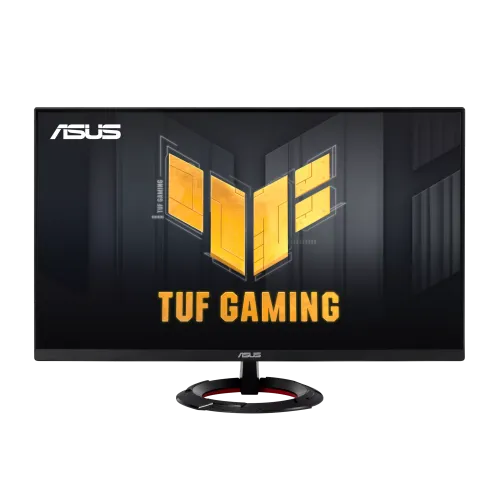
ASUS TUF Gaming VG249Q3R 23.8-inch 180Hz Fast IPS Gaming Monitor
The ASUS TUF Gaming VG249Q3R is a 23.8-inch Full HD gaming monitor with a Fast IPS panel and a maximum refresh rate of 180Hz. ASUS lists a 1920 × 1080 native resolution, 16:9 aspect ratio, 527.04 × 296.46mm active display area and 0.2745mm pixel pitch. The 23.8-inch diagonal is commonly rounded to 24 inches in retail titles; this is the smaller standard size, not a 24.5-inch panel.
The monitor supports native 1920 × 1080 at up to 180Hz over both HDMI 2.0 and DisplayPort 1.2. ASUS lists a vertical digital signal range of 48–180Hz on each connection and a horizontal range that accommodates the maximum mode. A compatible graphics card, cable, operating-system setting and game are required; select 180Hz in display settings after connecting. A 180Hz panel does not make every application render 200 frames per second.
ASUS specifies Fast IPS with LED backlighting, an anti-glare surface, 178° horizontal and vertical viewing angles, 250cd/m² typical brightness and 1000:1 typical contrast. The display has 16.7 million colors and ASUS lists 100% sRGB in the technical specification. ASUS lists 100% sRGB in the technical specification, without defining whether that figure represents area or coverage. Treat it as the manufacturer specification rather than an independent measurement.
ASUS rates the response at 1ms gray-to-gray (GtG). The specification does not list a 0.3ms minimum for the VG249Q3R; that figure belongs to newer VG249Q5R and VG249Q5A siblings. Some local pages also incorrectly add 1ms MPRT. Keep the Q3R response claim at 1ms GtG. ASUS Extreme Low Motion Blur, Variable Overdrive, Trace Free and GameFast Input are separate motion controls; results vary by setting.
ASUS does not list HDR support for the VG249Q3R, so catalog it as SDR-only. Do not add HDR10 or VESA DisplayHDR badges from the VG249Q5R or retailer templates. ASUS publishes no local dimming or HDR peak-luminance data for this model. Its typical brightness is 250cd/m² and contrast is 1000:1.
Variable refresh is supported. ASUS identifies Adaptive-Sync and AMD AMD FreeSync, and the specification lists VESA AdaptiveSync Display 180Hz certification. These features synchronize refresh with compatible graphics output to reduce tearing within supported modes; check current GPU compatibility and driver support. They do not mean the display contains a hardware G-SYNC module, and the catalog does not add a certification that ASUS does not list.
Video inputs are two HDMI 2.0 ports and one DisplayPort 1.2 input using . The monitor also has a 3.5mm earphone output and HDCP 2.2. ASUS does not list USB-C, a USB hub, VGA or DVI. The connection choice can affect console features and supported timing, so use the port and cable that match the source device. The HDMI inputs and DisplayPort timing table support native 180Hz.
The monitor includes stereo speakers rated 2W × 2 and an earphone jack. Use the source device’s audio routing and the monitor OSD to select the correct output; the headphone jack is audio out and is not a microphone input. Built-in speakers are convenient for system sounds and casual viewing, while headphones or external speakers provide a different listening setup. Confirm that audio is sent over HDMI or DisplayPort when using the monitor’s speakers.
The stand tilts from −5° to +22°. ASUS lists no height adjustment and provides a 75 × 75mm VESA mounting pattern. A compatible monitor arm or wall bracket can set a different screen height, but verify the mount’s load rating and fastener requirements. The security slot is a Kensington lock point. The catalog does not claim swivel or pivot adjustment because these functions are not listed in the official mechanical specification.
With the stand, ASUS estimates the physical dimensions at 540 × 407 × 213mm (W×H×D); without the stand they are 540 × 320 × 37mm. The carton is about 600 × 406 × 115mm. Net weight is about 3.7kg with the base and 2.7kg without it; gross packaged weight is about 4.6kg. ASUS notes that dimensions and weights can vary by region, so treat these as reference measurements and check the exact carton.
The display uses an external power adapter. ASUS lists AC input at 100–240V, 50/60Hz, consumption below 18W, power-saving below 0.5W and power-off below 0.3W. The regional accessory list includes a power adapter, power cord and DisplayPort cable, but included accessories can differ by market. Use the supplied adapter and verify its output label before replacing it; the 100–240V input is not the adapter’s DC output rating.
Gaming controls include GameVisual picture presets, GamePlus overlays, Extreme Low Motion Blur, Trace Free, GameFast Input, Shadow Boost, DisplayWidget Center and ASUS AI Visual. Eye-care functions include flicker-free operation and Low Blue Light. ASUS also lists TÜV Low Blue Light and TÜV Flicker-free certificates. These features let users adjust the image and motion settings; they do not guarantee a particular competitive result or prevent eye strain for every person.
The monitor has a 23.8-inch Full HD image with approximately 92.6 pixels per inch, which rounds to 93 PPI. At this size and resolution, text and game interfaces are denser than on a 27-inch Full HD monitor, while the screen remains larger than many laptop panels. Pixel density is calculated from the diagonal and resolution; it is not an extra ASUS certification. The published 0.2745mm pixel pitch also supports this density.
Bangladesh listings observed for this exact VG249Q3R show prices around ৳21,800–৳22,500 where a current price is listed. Star Tech and TechLand list about ৳21,800; Ultra Tech references approximately ৳21,800–৳22,500. Ryans is stock-check/TBA and Skyland is out of stock, not confirmed offers. Price and availability change; the BiponiBD variant price remains ৳22,000.
Star Tech, Ryans and TechLand list a three-year local warranty. Confirm the warranty provider, serial and invoice requirements, dead-pixel terms and service location with the seller before purchase. Keep the original carton and accessories until the local return and warranty process is clear. The ASUS specification says the included items can vary by region. The catalog retains its current active product, URL, variant and ৳22,000 internal price while refreshing public descriptions and metadata.
For initial setup, connect the DisplayPort or HDMI cable, the supplied AC adapter and power cord, choose 1920 × 1080, then set a supported 180Hz mode in the graphics control panel. Use the OSD for GameVisual, Adaptive-Sync and motion options. Test the speakers, earphone output, both HDMI ports and DisplayPort, and inspect the panel before the seller’s return window ends. This separates verified manufacturer capabilities from local listing titles and market-specific package details. Before ordering, match the model code on the carton and invoice, verify the local warranty provider, and confirm the included cables and adapter for your region. These checks help distinguish Q3R, Q3A and newer Q5 series models.