Product overview
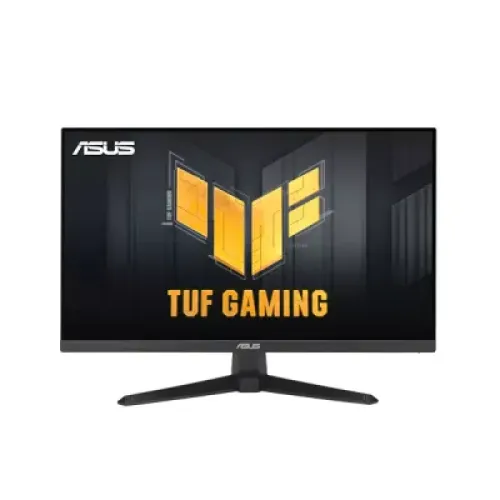
The ASUS TUF Gaming VG249QE5A is a 23.8-inch Full HD IPS gaming monitor with a published maximum refresh rate of 146Hz. ASUS pairs the display with HDMI 2.0 and DisplayPort 1.2, stereo speakers, a headphone output and several image and gaming controls. The exact manufacturer model is VG249QE5A; this guide keeps that code distinct from its TUF family name and the size/refresh details used for shopping searches. The product photographs show the black display, front TUF artwork and rear casing. Photos identify visible design only; they do not establish delivered condition, included regional accessories, warranty coverage or actual gaming performance on a particular PC.
Screen size and resolution
The panel measures 23.8 inches diagonally and uses a 16:9 shape with a native resolution of 1920 × 1080. This Full HD format is common for desktop gaming, video and general computer use. A 23.8-inch screen gives a compact fit for many desks, but the resolution is not QHD or 4K. Buyers who need more detail for large creative canvases or many simultaneous windows should compare higher-resolution models. ASUS lists an active display area of 527.04 × 296.46mm and a 0.2745mm pixel pitch. Those measurements describe the viewable panel and pixel spacing; they do not indicate that every application or source will render at its maximum frame rate.
Refresh rate and source compatibility
ASUS lists 146Hz as the monitor’s maximum refresh rate and its manual includes 1920 × 1080 timing up to 146Hz. To use that mode, the graphics output, cable, selected HDMI or DisplayPort input, driver and operating-system display setting must all support it. The panel’s maximum does not force a computer to produce 146 frames per second; frame rate depends on the game, graphics hardware, settings and workload. A lower source frame rate can still be displayed, while the refresh setting can be adjusted in system controls. If the mode is unavailable, check the cable, input, graphics output and display configuration before assuming a fault.
Response time explained
ASUS technical material lists 1ms MPRT, while the exact-model user guide specifies 4ms gray-to-gray. These numbers describe different response measurements and should be shown together with their labels. MPRT concerns motion-picture response, while GTG describes a pixel transition measure; neither number alone is input lag or a guarantee of identical results across all overdrive settings. A good comparison checks the measurement method, refresh mode and image artifacts rather than comparing unlabeled “1ms” claims. Use the monitor’s available response and ELMB controls according to ASUS instructions and personal preference, since different settings can affect brightness or visual appearance.
Brightness, contrast and color
The manufacturer specifies 300 cd/m² typical brightness and a 1500:1 typical contrast ratio. ASUS lists 16.7 million colors and publishes color-space values of 125% sRGB and 90% DCI-P3. These are reproduced using the manufacturer’s terminology; a gamut percentage is not a factory calibration report and does not establish color accuracy for every unit. The displayed picture also changes with brightness, color temperature, selected GameVisual mode and the room. Four color-temperature modes are listed. Users doing print, photo or video work should assess calibration needs and color-management support separately rather than inferring professional accuracy from a gamut number.
Motion and gaming technologies
Adaptive-Sync variable refresh and ELMB Sync are listed by ASUS. The manufacturer also names GameVisual picture modes, GamePlus overlays, Shadow Boost, Dynamic Crosshair and AI Visual features. These provide optional display or game-oriented controls; they do not increase the 146Hz panel ceiling or guarantee improved game performance. Their behavior depends on the selected input, resolution, refresh setting and graphics source. The exact source documentation should be checked when combining variable refresh and motion blur reduction. Use these as configurable tools and confirm whether a preferred mode is available with the computer and game in use. Retailer phrases about compatibility should not be expanded into certification claims absent in the ASUS technical specification.
Ports and audio
The rear connection set includes one HDMI 2.0 input and one DisplayPort 1.2 input. ASUS lists sound from HDMI and DisplayPort, two integrated stereo speakers rated at 2W each, and a separate earphone output. This supports basic audio without an external speaker set and gives a connection for headphones or compatible audio equipment. No USB hub, USB-C video input, Ethernet or laptop charging is listed for this model. Check that the computer has an available compatible port and that the chosen cable supports the desired resolution and refresh timing. The product image does not show every connector; rely on the model specification for port identity.
Eye-care and image controls
Flicker-free and Low Blue Light settings are listed by ASUS. The display also provides four color-temperature selections and DisplayWidget Center support. Such options can adjust the image to a user’s preferences, but they are not medical advice and do not guarantee reduced fatigue for every viewer. Ambient light, brightness, viewing distance, breaks and personal sensitivity also affect comfort. Keep the display settings matched to the source and task, and consult the manual for the specific OSD controls. The monitor’s technical page also lists GameVisual modes, which can change picture behavior by preset. Descriptive product copy should distinguish these software and settings features from panel hardware measurements.
Stand, mounting and desk fit
The supplied stand supports tilt from −5° to +23°. ASUS does not list height, swivel or pivot adjustment for this stand, so users who need more movement can consider a compatible VESA arm. The manufacturer specifies a 100 × 100mm mounting pattern and a Kensington lock slot. With stand, the display measures 541 × 394 × 174mm; without the stand it measures 541 × 323 × 58mm. Check the desk footprint, wall clearance, arm compatibility and cable routing before installation. The photographs show a two-foot stand design and a rear casing. They do not confirm the weight rating of an independently purchased arm or the physical contents of the shipping carton.
Power and energy
ASUS specifies a 100–240V, 50/60Hz voltage rating. Maximum power-on consumption is listed as 15W under the manufacturer’s stated measurement condition, with power-saving consumption below 0.5W and power-off below 0.3W. Actual power draw varies with image settings, brightness, audio use and operating state. The manual states its maximum power-on value is measured at 200 nits without audio, USB or card-reader connections. The supplied regional cable and packaging should be confirmed for a local offer. Follow the manufacturer setup and electrical-safety guidance; do not assume a retailer has included accessories beyond the verified offer description.
Dimensions and packaging
ASUS lists physical dimensions of 541 × 394 × 174mm with stand and 541 × 323 × 58mm without stand. Approximate net weights are 3.3kg assembled and 2.7kg without stand. The carton is 600 × 405 × 168mm, with about 5.0kg gross weight. These values help estimate desk fit and handling. Manufacturer values are approximate and may differ slightly by region or packaging. They should not be used as a courier billing quote. If transporting the monitor, keep it protected and use packaging instructions from the manufacturer. The product photos are studio views and do not show the exact shipping box or prove accessory condition.
Who it may suit
The VG249QE5A may suit a gaming or general-use desk where 23.8-inch Full HD, IPS viewing, a high refresh ceiling and HDMI/DisplayPort options meet the computer’s needs. Built-in speakers can serve casual system audio, while the earphone output allows external listening. The tilt stand and VESA compatibility provide two mounting choices. Check the desired resolution, GPU output and game frame rate before buying, as the monitor cannot create frames that the computer does not render. Buyers who need height adjustment, USB-C docking, high-resolution creative space or color-critical calibration should compare those needs against the stated specifications and consider other models.
Using the monitor with a PC
Connect the computer through a compatible HDMI 2.0 or DisplayPort 1.2 cable, select that input on the display and choose the desired refresh rate in the operating system or graphics settings. A missing 146Hz option may be caused by the source output, cable, driver, input selection or mode configuration. Confirm the graphics card can drive Full HD at the selected rate. Route audio over HDMI or DisplayPort if using the built-in speakers; otherwise select compatible headphones through the earphone output. ASUS OSD controls can then be used to select picture, color temperature and gaming features. Refer to the exact user guide for supported timings and button/menu instructions.
Care and placement
Set the monitor on a stable surface and leave enough room for the stand, tilt movement and attached cables. Keep liquids away from the display and follow ASUS cleaning instructions rather than applying cleaning fluid directly to the panel. If using a VESA arm, verify its 100 × 100mm pattern, weight rating and correct fasteners. Cable routing should not strain the HDMI or DisplayPort connector. Use the Kensington slot only with compatible equipment and installation guidance. Adjust brightness to the room and review the low-blue-light or flicker-free options if preferred. Technical marketing content should not imply that any feature removes the need for normal breaks or guarantees a particular comfort outcome.
Warranty and local offer
ASUS specifications describe the product hardware but do not establish warranty coverage for a specific Bangladesh sale. A local listing may advertise three years, but the provider, duration, serial eligibility, coverage and claim process need confirmation for the exact BiponiBD offer. The stored variant MSRP is BDT 16,000 and should not be represented as a live checkout quote or confirmed stock. Confirm availability, price, shipping and warranty before ordering. This keeps manufacturer model data separate from local retailer commitments and prevents a seller-specific statement from being presented as a universal ASUS warranty.
Model and evidence notes
The exact model code is VG249QE5A. The ASUS model page states that specifications and features can vary by region and images are illustrative. This guide follows the official exact-model technical page and English manual for the panel, inputs, response metrics, speakers, power and dimensions. Local pages provide market context only. Search results and retail feeds sometimes omit the distinction between MPRT and GTG, or shorten the advertised refresh value. Retaining those measurement labels and the input names makes the listing clearer for shoppers and more consistent with primary documentation. Check the exact packaging and warranty for the local seller rather than inferring them from a manufacturer image.
Purchase checklist
Before ordering, verify VG249QE5A on the offer and confirm that the desired PC output connects through HDMI 2.0 or DisplayPort 1.2. Check whether the graphics system supports the intended Full HD refresh rate and whether the tilt-only stand fits the desk setup. Decide if 23.8-inch Full HD provides enough work area, whether built-in 2W × 2 speakers are sufficient and whether a VESA arm is needed. If a specific cable, warranty period or service center is important, ask the seller to confirm it for the actual item. Review the active offer for current stock, selling price, delivery cost and claim terms before checkout.
Specification summary
Key features
- 23.8-inch IPS panel with native 1920 × 1080 Full HD resolution and 16:9 aspect ratio.
- Maximum 146Hz refresh rate; ASUS lists HDMI digital vertical frequency up to 146Hz.
- 1ms MPRT and 4ms gray-to-gray are distinct response figures; ASUS manual lists both.
- Typical brightness of 300 cd/m² and typical contrast ratio of 1500:1.
- ASUS lists 125% sRGB and 90% DCI-P3 color-space values; color-space coverage should be quoted with ASUS wording.
- 16.7 million displayed colors with an 8-bit signal path.
- Anti-glare screen surface and 178° horizontal/vertical viewing angles at CR≥10.
- One HDMI 2.0 input and one DisplayPort 1.2 input; both support digital audio.
- Integrated 2W × 2 stereo speakers and a 3.5mm earphone output.
- Adaptive-Sync variable refresh rate and ELMB Sync are listed; supported combinations depend on source and mode.
- GameVisual, GamePlus, Shadow Boost, Dynamic Crosshair and AI Visual gaming tools are documented.
- Flicker-free and Low Blue Light options plus four color-temperature selections.
- DisplayWidget Center software support and ASUS Power Sync are listed by ASUS.
- Tilt-only stand adjusts from −5° to +23°; height, swivel and pivot adjustment are not specified.
- 100 × 100mm VESA mount supports compatible monitor arms or wall mounts.
- Kensington lock slot is included for compatible cable security.
- Power-on consumption is listed up to 15W; power-saving below 0.5W and off mode below 0.3W.
- With-stand dimensions 541 × 394 × 174mm; approximate net weight 3.3kg.
- Without-stand dimensions 541 × 323 × 58mm; approximate weight 2.7kg.
- Carton dimensions 600 × 405 × 168mm and approximate gross weight 5.0kg.
Advantages
- 146Hz Full HD refresh gives compatible PC systems a faster motion ceiling than standard 60Hz displays.
- IPS technology, wide viewing angles and anti-glare treatment suit shared viewing and common desktop use.
- HDMI 2.0 and DisplayPort 1.2 provide two mainstream digital video choices, each with audio support.
- Built-in 2W × 2 stereo speakers and a headphone output cover basic listening and external audio needs.
- GamePlus, GameVisual, Shadow Boost, ELMB Sync and Adaptive-Sync offer several adjustable gaming features.
Points to consider
- The 23.8-inch panel is Full HD; it does not provide QHD/4K detail or an expanded high-resolution workspace.
- The included stand is tilt-only; no height, swivel or pivot adjustment is listed.
- The advertised 1ms figure is MPRT; ASUS manual specifies 4ms GTG, so buyers should compare like-for-like metrics.
- The manufacturer describes gamut as 125% sRGB and 90% DCI-P3; these are not proof of factory color calibration or color accuracy.
- No USB hub, USB-C video or laptop charging is listed.
- Three-year warranty claims on Bangladesh retailer pages do not establish the terms for a BiponiBD order.
Frequently asked questions
What is the exact model code?
The exact model code is ASUS VG249QE5A. “TUF Gaming” is the product family; size and refresh rate are not part of the MPN.
What size and resolution is the screen?
ASUS specifies a 23.8-inch IPS panel with 1920 × 1080 Full HD native resolution and a 16:9 aspect ratio.
Does it really support 146Hz?
Yes. ASUS lists 146Hz maximum refresh and the manual’s timing table includes Full HD up to 146Hz. The connected graphics card, cable, input and settings must support the selected mode.
Is response time 1ms or 4ms?
Both figures refer to different measures: ASUS lists 1ms MPRT and 4ms gray-to-gray in its exact-model user guide. MPRT should not be presented as GTG or input lag.
What are brightness and contrast?
The ASUS specification lists 300 cd/m² typical brightness and a 1500:1 typical contrast ratio. Actual viewing depends on settings and lighting.
What color gamut is specified?
ASUS lists 125% sRGB and 90% DCI-P3. Those are manufacturer color-space figures, not a promise of color calibration accuracy for every unit.
Which video ports are available?
There is one HDMI 2.0 and one DisplayPort 1.2 input. ASUS lists digital audio through HDMI/DP and a separate earphone output.
Does the monitor have speakers?
Yes. The manual lists two stereo speakers rated 2W each. The 3.5mm earphone output supports compatible external listening devices.
What gaming features are included?
ASUS lists Adaptive-Sync, ELMB Sync, GameVisual, GamePlus, Shadow Boost, Dynamic Crosshair and AI Visual features. Availability and behavior depend on input, mode and source support.
Can I mount it on a monitor arm?
Yes. ASUS specifies a 100 × 100mm VESA mount. The included stand tilts from −5° to +23°; the spec does not list height, swivel or pivot adjustment.
What are the dimensions and weight?
With stand, ASUS lists 541 × 394 × 174mm and about 3.3kg. Without stand it is 541 × 323 × 58mm and about 2.7kg. The box is 600 × 405 × 168mm and about 5.0kg gross.
What price and warranty apply here?
The stored catalog MSRP is BDT 16,000. Local retailer warranty terms are separate; confirm current stock, selling price, warranty provider, serial eligibility and claim terms for the BiponiBD offer.
Specifications follow ASUS VG249QE5A technical data and user guide. Confirm current BiponiBD availability, price, package contents and warranty terms for this offer.