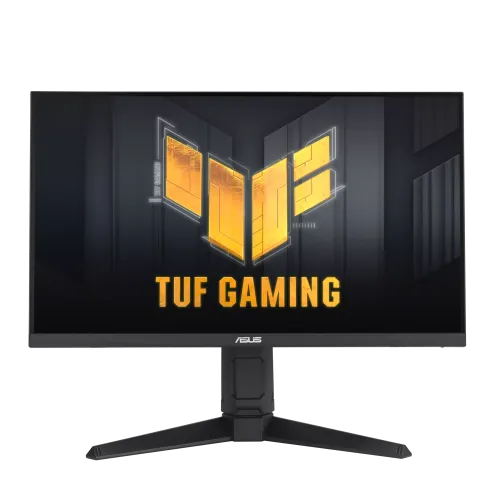
ASUS TUF Gaming VG259QL5A 24.5-inch Full HD 200Hz Fast IPS Monitor: Bangladesh Buyer Guide
The ASUS TUF Gaming VG259QL5A is a 24.5-inch Full HD gaming monitor built around a Fast IPS panel and a 200Hz maximum refresh rate. It pairs quick screen updates with adaptive sync, motion clarity options, a fully adjustable stand, stereo speakers and a broad set of game controls. The exact core model is VG259QL5A. ASUS lists the product as the TUF Gaming Series 5 VG259QL5A; “TUF Gaming” is the product family, while VG259QL5A is the model code. The exact local unit carton, manufacturing suffix, included cables and warranty provider should be checked with the Bangladesh seller because ASUS notes that specifications and accessories can vary by region. This guide uses the official model-level facts and flags retailer claims that conflict with them.
Fast IPS Full HD picture for gaming and daily use
The monitor has a 24.5-inch diagonal display area measuring 543.74 × 302.62mm, a 16:9 aspect ratio and 1920 × 1080 native resolution. ASUS specifies a Fast IPS panel, LED backlight, anti-glare surface and 178-degree horizontal and vertical viewing angles. Full HD is a practical resolution for this size: it keeps interface text familiar and lets many mid-range gaming PCs target higher frame rates than they might at QHD, while the 24.5-inch footprint fits a typical desk. The pixel pitch is 0.2832 × 0.2802mm. ASUS lists typical brightness of 300cd/m² and a typical 1000:1 contrast ratio. These are manufacturer ratings; perceived brightness and contrast vary with room light, viewing angle, selected picture mode and individual unit. The matte surface helps reduce reflections, but it cannot remove glare from a bright window or lamp directly behind the viewer.
200Hz refresh rate and response-time wording
The maximum refresh rate is 200Hz. A 200Hz screen can show up to 200 refreshes per second when the source, connection, graphics hardware and selected settings deliver the supported mode. A display’s refresh ceiling does not make a game render at 200 frames per second by itself. The ASUS specification lists 1ms gray-to-gray response time and a 0.3ms minimum response figure; the product page also promotes 0.3ms GTG as a minimum. Keep both numbers in context: they describe specified test or overdrive conditions, not a guarantee that every pixel transition always completes in that time. ELMB (Extreme Low Motion Blur) is a separate motion-clarity feature. It uses backlight strobing to reduce perceived blur, and users should compare it with Adaptive-Sync based on their preferred mode and supported combinations. ASUS also lists Trace Free and Variable Overdrive, which adjust pixel response behavior as frame rates change. These settings can affect overshoot and clarity, so the best option depends on the game and refresh rate.
Adaptive-Sync, FreeSync Premium and G-SYNC status
ASUS lists AMD FreeSync Premium and VESA Adaptive-Sync Display 200Hz. The UK specification page also lists G-SYNC Compatible in its certificate section, while the ASUS Global product description qualifies G-SYNC compatibility as under processing and tells buyers to check the current supported list. Because the official pages express G-SYNC status differently by region and time, this guide records the nuance instead of promising universal certification. Adaptive sync matches screen refresh to compatible GPU output over a supported variable refresh range and can reduce tearing when frame rates fluctuate. Actual behavior depends on graphics card, drivers, connection, operating system and monitor settings. Check ASUS’s live compatibility information for the exact GPU before purchase if G-SYNC certification is a deciding factor.
Color, HDR10 and eye-comfort options
ASUS rates the display at 99% sRGB and 16.7 million colors. The ASUS marketing page also mentions 130% sRGB, a color-volume style figure that is not the same as 99% sRGB coverage; use the technical specification’s 99% sRGB figure for straightforward coverage comparisons. HDR10 input is supported and ASUS advertises multiple HDR modes. The specification does not list a DisplayHDR certification or local-dimming zones, so HDR10 support should not be read as a promise of high-end HDR brightness or contrast. GameVisual offers seven presets for FPS, racing, RTS/RPG, MOBA, cinema, scenery and sRGB content. ASUS lists Flicker-Free and Low Blue Light technologies, with four Low Blue Light filter settings. These are display comfort options rather than medical features; adjust them to your room and personal preference. TÜV certification is listed for Flicker-Free and Low Blue Light on the ASUS UK spec page.
Ports, speakers and sound connections
The verified ASUS specification lists two HDMI 2.0 inputs, one DisplayPort 1.4 input (HBR2) and an earphone jack. This is the correct port configuration for VG259QL5A. Some Bangladesh retailer copy says HDMI 2.1, which conflicts with ASUS’s official technical specification and should be corrected. The two HDMI inputs are useful when a PC and console or streaming device stay connected at once; switch the active input through the monitor controls. ASUS specifies built-in stereo speakers rated at 2W × 2. They are convenient for system sounds, calls or casual video, but their small monitor enclosures are not a substitute for a dedicated speaker system or headset when richer sound is important. The earphone jack provides a connection for headphones or external audio equipment; confirm the source audio routing and volume settings in the monitor menu and computer.
Ergonomic stand, VESA and desk dimensions
The supplied stand supports tilt from -5° to +23°, swivel from -15° to +15°, portrait pivot up to 90° in either direction and 0–120mm height adjustment. This gives the VG259QL5A more setup flexibility than a fixed or tilt-only stand. It can be adjusted for eye level, turned toward another seat or rotated to portrait for reading long pages, chat or code. The back has a 100 × 100mm VESA mounting pattern and a Kensington lock; the official specification also lists a 1/4-inch tripod socket. ASUS UK gives estimated assembled dimensions of 55.9 × 52.8 × 20.8cm (W × H × D) and 55.9 × 32.9 × 6.2cm without the stand. The maximum-height dimension is region-dependent and the product page explicitly warns dimensions can vary, so measure the actual desk and verify the local carton documentation. UK-listed net weight is 4.9kg with stand and 2.9kg without stand, with 6.7kg gross package weight; treat these as that regional spec rather than a guarantee for every shipment.
Power, cables, warranty and local price
ASUS lists 100–240V, 50/60Hz input, power consumption below 15W, below 0.5W in power-saving mode and below 0.3W when off. Those values are official regional specification figures; actual consumption changes with brightness, audio use, refresh mode and connected devices. The UK accessory list includes a power cord, DisplayPort cable, warranty card and quick-start guide, while ASUS says accessories vary by region. Ask the seller which cables and power lead are in the exact sealed box. Star Tech lists a three-year warranty and ৳24,500; Skyland shows ৳24,450 and three years warranty in its listing. These are Bangladesh retailer offers, and the exact warranty provider, exclusions and service procedure must be confirmed on the invoice and package. The catalog’s existing ৳24,500 price is retained; live price and stock can change. ASUS model support should be contacted with the serial number for manufacturer service guidance.
Who should choose this monitor?
The VG259QL5A is a strong fit for players who value high refresh, 1080p performance, a Fast IPS panel and a stand that adjusts in several directions. It can also serve as a general-purpose home or study display thanks to its speakers, multiple video inputs, anti-glare finish and preset picture modes. Consider the pixel density and resolution before using it for detailed creative work: a QHD monitor of a similar size can show finer text and more workspace, while a properly calibrated display is preferable when color accuracy must be measured. If your main goal is competitive gaming, check that your PC can produce frame rates near the refresh target in your chosen titles and that the cable and GPU output support the selected 200Hz mode. The 200Hz panel remains useful below that ceiling, especially with adaptive sync, but hardware still determines the actual frame rate.
Setup checklist and model identity
Before setup, verify that the product label reads VG259QL5A, inspect the panel and stand, and keep the carton and purchase proof until the seller’s return window ends. Use the included DisplayPort cable or an appropriate HDMI 2.0 cable, connect the monitor directly to the graphics card, then select 1920 × 1080 and the highest supported refresh rate in the operating system or GPU control panel. Enable Adaptive-Sync as required and test ELMB separately because motion-strobing behavior can differ from variable refresh. Adjust height, tilt, swivel and pivot without forcing the stand. Use the OSD joystick or ASUS DisplayWidget Center for picture and gaming controls. For portrait use, enable operating-system screen rotation. Mounting arms must support the monitor’s weight and use the 100 × 100mm VESA pattern. Confirm exact regional warranty and included accessories with the seller before opening if those terms are essential. These checks help distinguish this VG259QL5A from similarly named TUF models whose panel, refresh rate or port layout may differ.