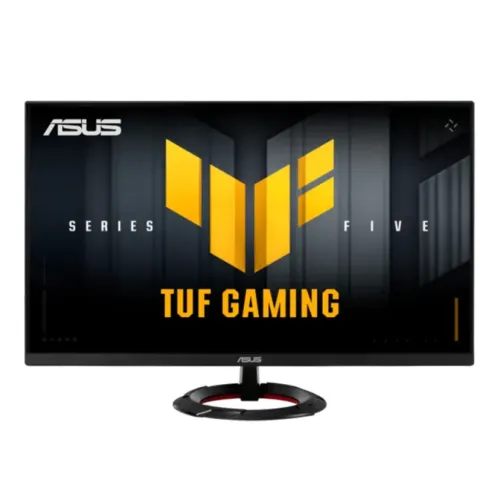
ASUS TUF Gaming VG279Q5R 27-inch FHD 200Hz Fast IPS monitor
The ASUS TUF Gaming VG279Q5R is a 27-inch Full HD gaming monitor built around a Fast IPS panel and a native maximum refresh rate of 200Hz. ASUS lists 1920 × 1080 resolution, 1ms gray-to-gray response time with 0.3ms minimum mode, 300 cd/m² typical brightness, 1000:1 typical contrast, 100% sRGB color space, HDR10 and 178-degree viewing angles. Its connectivity includes two HDMI 2.0 inputs and one DisplayPort 1.4 (HBR2) input; all three have a listed vertical signal range up to 200Hz. The monitor supports AMD FreeSync and VESA AdaptiveSync Display 200Hz. ASUS also includes Extreme Low Motion Blur, Trace Free, Variable Overdrive, GamePlus, GameVisual and TUF Gaming A.I. features. The current BiponiBD variant price is ৳26,000 and is preserved. Local seller prices and warranty offers are dated snapshots that can change.
27-inch Full HD panel and pixel density
The display measures 27 inches diagonally and uses a 16:9 aspect ratio with native 1920 × 1080 Full HD resolution. ASUS specifies a pixel pitch of 0.311mm and an active viewing area of 597.888 × 336.312mm. At about 82 pixels per inch, the panel presents large, readable game UI and desktop text at a normal viewing distance, while a same-size QHD monitor will show finer detail and more workspace. Full HD can be less demanding on a graphics card than QHD when aiming for high frame rates, but the best settings depend on the game and hardware. The surface is anti-glare, the display is flat, and the panel is Fast IPS with 178-degree horizontal and vertical viewing angles. ASUS lists 16.7 million colors and 100% sRGB color space; gamut coverage is not a factory calibration report or a guarantee of color accuracy for professional print work.
200Hz refresh and response specifications
ASUS rates the VG279Q5R for a maximum 200Hz refresh rate. A 200Hz display can show a new frame every five milliseconds when the computer is producing enough frames and the chosen mode is active. Fast motion may appear smoother than on a lower refresh display, though the graphics card, game, cable, resolution and settings all affect the actual result. ASUS lists 1ms gray-to-gray response time and a 0.3ms minimum response mode. These are manufacturer response ratings; they do not mean every pixel transition always completes in those times or remove all blur in every scene. The DisplayPort signal frequency is listed at 48–200Hz vertically; HDMI is also listed from 48–200Hz. Check the operating system’s advanced display settings after connecting, because a computer can initially choose a lower refresh rate. Enable monitor and GPU settings only as needed, then assess clarity and artifacts in the games you play.
Adaptive sync and motion tools
The official ASUS specifications list AMD FreeSync and VESA AdaptiveSync Display 200Hz for variable refresh rate. The ASUS page does not state NVIDIA G-SYNC Compatible certification. NVIDIA graphics cards may expose VESA Adaptive-Sync over DisplayPort depending on GPU, driver, cable and settings, but that should not be described as an ASUS G-SYNC certification. ASUS Extreme Low Motion Blur (ELMB), Trace Free and Variable Overdrive are included gaming features. ELMB uses motion-blur reduction behavior; users should compare it with their refresh and variable-refresh settings because some motion features may not operate together in every mode. Variable Overdrive and Trace Free adjust pixel response behavior; a stronger setting is not automatically better if it causes bright overshoot. GameFast Input Technology is also listed. Results depend on the source and on-screen settings; these tools complement rather than replace a fast PC or a stable connection.
Color, brightness and HDR10
The specification sheet lists 300 cd/m² typical brightness, 1000:1 typical contrast, 100% sRGB coverage and HDR10 support. HDR10 denotes supported HDR input; it does not mean the display has a high-brightness HDR backlight or local dimming. ASUS does not list local dimming for this model in the reviewed specifications. The monitor has 16.7 million display colors, four color-temperature modes and seven GameVisual modes. A 300-nit typical rating is suited to many indoor rooms, although glare and daylight can affect comfort. The anti-glare surface helps manage reflections but cannot eliminate them. Users can select picture presets for games, movies or sRGB work and adjust the image to suit their room. For color-critical work, use a calibrated display workflow and verify the specific panel rather than treating an sRGB coverage figure as a calibration certificate.
HDMI, DisplayPort and audio connections
The rear connection set comprises two HDMI 2.0 ports, one DisplayPort 1.4 input with HBR2 and one 3.5mm earphone jack. ASUS lists 48–200Hz vertical refresh range over both HDMI and DisplayPort, up to the monitor’s 200Hz maximum at supported modes. HDCP 2.3 is listed. The monitor has two built-in 2W stereo speakers for system audio, calls or casual media. They are convenient for basic listening; a headset or separate speakers may suit players who want stronger bass, isolation or higher audio detail. There is no USB hub or USB-C input listed in the ASUS specification. If connecting multiple devices, select the correct source input from the on-screen controls. Confirm the graphics card output, cable rating and selected resolution/refresh combination if 200Hz is not available after setup.
Stand, mounting and physical dimensions
The included circular stand supports tilt from -5° to +22°. ASUS does not list height adjustment, swivel or pivot for the included stand, so users who need a different eye level or portrait orientation should consider a compatible monitor arm. The rear supports a 75 × 75mm VESA mount and includes a Kensington lock slot. With the stand, ASUS lists physical dimensions of 61.5 × 42.8 × 21.3cm (width × height × depth) and net weight of 4.3kg. Without the stand, it measures 61.5 × 36.4 × 3.8cm and weighs 3.3kg. The listed carton dimensions are 69.2 × 43.5 × 14.4cm with an estimated gross weight of 5.4kg. These measurements help plan desk and arm compatibility; leave enough room for the stand footprint, cables and ventilation. Check the load limit and mounting hardware before attaching an arm or wall bracket.
Eye-care certifications, software and gaming features
ASUS lists TÜV Flicker-free and TÜV Low Blue Light certifications, plus four Low Blue Light filter settings and four color-temperature modes. DisplayWidget Center provides software access to monitor controls on supported Windows setups. GamePlus includes game overlays such as crosshair and timers, while GameVisual offers seven picture modes. Shadow Boost, GameFast Input, Trace Free and the TUF Gaming A.I. suite are listed in ASUS feature information. The named A.I. options include AI Visual, Dynamic Crosshair and Dynamic Shadow Boost. These are image and gaming aids; their effect depends on the selected mode and user preference. They do not guarantee competitive results or replace a properly tuned game and GPU setup. Flicker-free and low-blue-light features may support viewing comfort, but should not be presented as medical claims. Adjust brightness, room lighting, viewing distance and breaks to suit your use.
Bangladesh price, warranty and buyer fit
The checked Bangladesh retailer snapshots showed ৳25,900 at Skyland, ৳26,000 at Star Tech, TechLand and Ultra Technology, and a Ryans display range around ৳26,000–৳27,500. The broader observed range was ৳25,900–৳27,500, with ৳26,000 the common cash price in those snapshots. Local sellers advertise a three-year warranty. Treat price, stock, payment terms and warranty as seller-specific details, not a permanent market promise. BiponiBD’s existing variant price of ৳26,000 remains unchanged. Before purchase, confirm the exact VG279Q5R model and regional part number on the box, invoice price, warranty issuer, service conditions, dead-pixel terms and included power/video cables. Regional part numbers and accessories can vary; the evidence does not identify the exact box suffix or barcode for this catalog unit. This monitor suits buyers prioritizing 27-inch 1080p gaming, high refresh, Fast IPS, adaptive sync and speakers; those who prefer sharper desktop text or flexible included-stand adjustments may consider QHD or a height-adjustable alternative.
Setup checklist for 200Hz
Connect a compatible desktop or laptop directly through HDMI 2.0 or DisplayPort 1.4, then choose the monitor input and set 1920 × 1080 at up to 200Hz in the operating system or GPU control panel. Use a suitable cable and verify that the source device can output the desired refresh rate. For variable refresh, enable AMD FreeSync or the compatible Adaptive-Sync option in the graphics settings and check the monitor’s on-screen settings. NVIDIA users should treat VRR via DisplayPort as a compatibility mode requiring their GPU and driver configuration; ASUS lists FreeSync and VESA AdaptiveSync certification, not NVIDIA G-SYNC certification. Use ELMB or response tuning according to preference and inspect fast motion for artifacts. Adjust tilt and seating position; if more stand movement is needed, use a compatible 75 × 75mm VESA arm. If the monitor starts at 60Hz, check the selected mode and cable connection before assuming a fault.